
A real estate listing video should help a viewer understand the home and decide what to do next. Start with one question: are you showing the layout, introducing a useful feature, or inviting someone to view? That answer determines the source material, script and length.
To make the video, prepare the approved property facts, pair each scene with a clear point, and choose filming, editing or a photo-based workflow. Then review the finished file and publish the version that fits its destination.
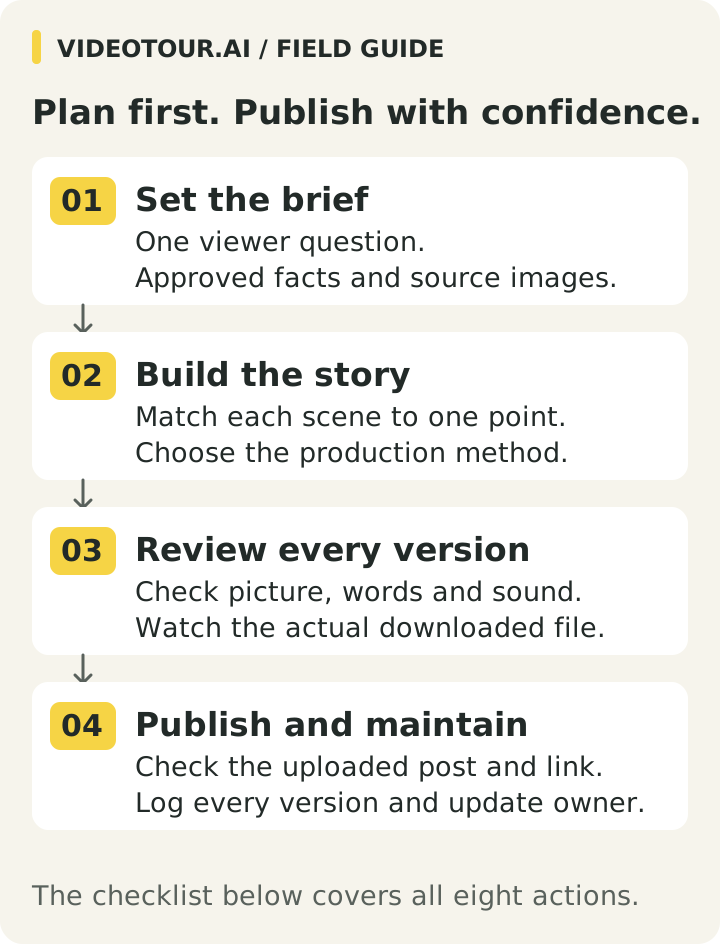
View the full-size production roadmap
Copy this checklist into your production notes, then use the brief fields, scene/script table and publishing log below to plan the work.
To make the video, prepare the approved property facts, pair each scene with a clear point, and choose filming, editing or a photo-based workflow. Then review the finished file and publish the version that fits its destination.
View the full-size production roadmap
Your eight-step production checklist
- Purpose: Write the one question the video should answer and the next action viewers can take.
- Approved facts: Confirm the location label, status and any price, room count or feature used. Keep the source and review date.
- Source material: Gather permitted photos or footage. Decide whether you need real movement, an agent explanation or selected still views.
- Sequence and script: Pair each scene with one factual point. Remove unsupported claims and redundant views. Read the words aloud against the images.
- Output plan: Choose the destination, shape, branding and required file or link. Set length from the job and available material.
- Picture and sound: Check property fidelity, readable text, pronunciation, music rights and audio balance in every version.
- Finished file: Watch the newly downloaded video outside the editor. Confirm it is the latest version and meets the destination’s requirements.
- Publish and maintain: Check the uploaded version and its link. Log each posting location so changed facts can be updated.
Copy this checklist into your production notes, then use the brief fields, scene/script table and publishing log below to plan the work.
Summary
Create an AI Video Tours from PhotosTry it For Free

1. Choose the type of listing video
| Type | Good use | What it does not establish |
|---|---|---|
| Filmed walkthrough | Show a real route through the rooms | Precise measurements or unseen condition |
| Photo-based video | Present approved views with labels and narration | A continuous physical route between photos |
| Agent-led introduction | Explain a specific feature in your own voice | Details the camera does not show |
| Short social teaser | Create interest in one feature or a viewing | The complete property description |
| Interactive 3D tour | Let viewers navigate a captured space | A substitute for every inspection or viewing |
A short promotional video can lead to a fuller tour or listing page. If you need self-directed navigation, review the distinction between video tours and interactive 3D tours.
2. Prepare the property facts and production brief
Before writing, gather the current address or permitted location label, listing status, room counts, price if used and confirmed features. Record where each fact came from, who approved it and when it was checked. If a detail is unresolved, leave it out until it is confirmed.
Use photographs or footage you have permission to publish. Remove old listing images, duplicates, private documents and frames that reveal access codes or security details. Compare staged or generated imagery with the actual property and label altered presentation appropriately.
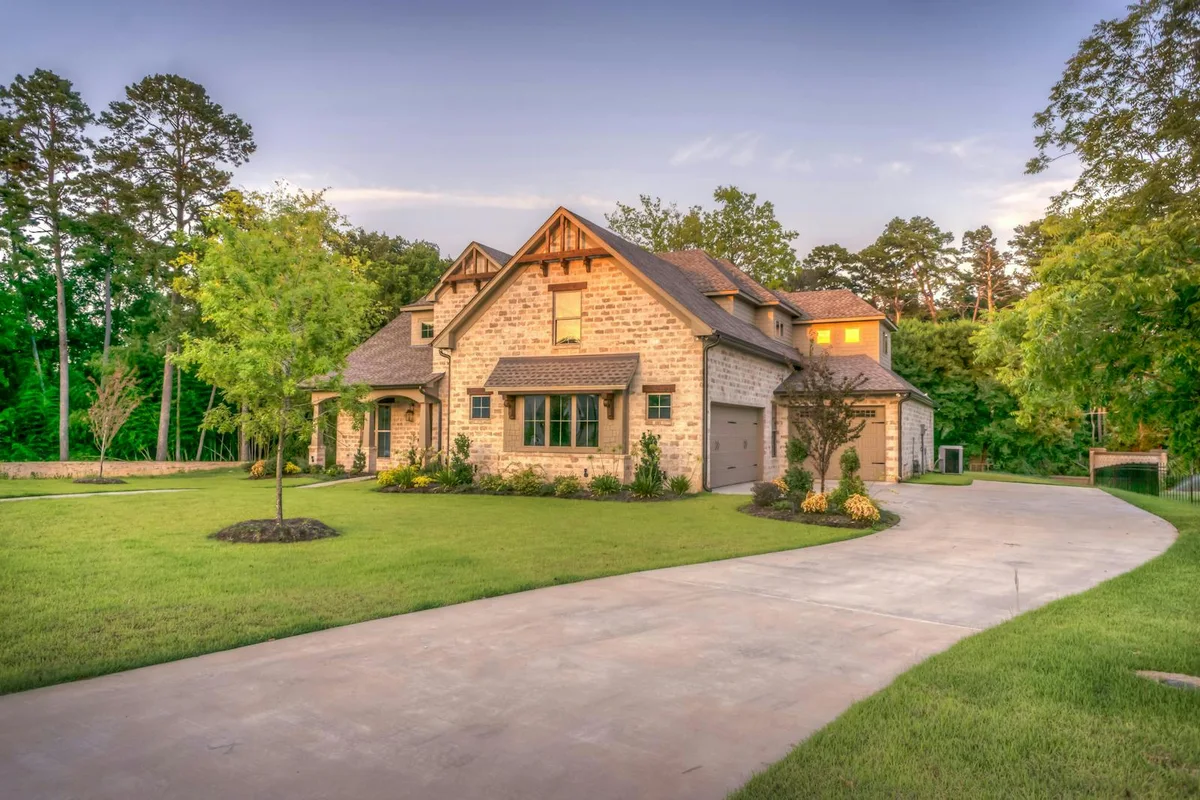
An establishing view gives the home context. Use your fact sheet for its location, status and other details that a photograph cannot confirm. This and the following photos are separate examples from existing VideoTour.ai assets.
Make a short brief with these fields:
Use photographs or footage you have permission to publish. Remove old listing images, duplicates, private documents and frames that reveal access codes or security details. Compare staged or generated imagery with the actual property and label altered presentation appropriately.
An establishing view gives the home context. Use your fact sheet for its location, status and other details that a photograph cannot confirm. This and the following photos are separate examples from existing VideoTour.ai assets.
Make a short brief with these fields:
- Viewer question: What should someone understand after watching? “What are the principal spaces?” needs different scenes from “How does the kitchen connect to the garden?”
- Evidence: List the approved fact sheet and media filenames. A garden photograph alone does not establish a route from the kitchen.
- Delivery: Name the intended destination, shape, branding version and whether it accepts a file or viewing link.
- Next action and owner: Record the live listing or contact route, the person who approves the video and who will update it.
3. Build a room-by-room shot list
This is a suggested sequence for a general listing introduction. Change it to match the home rather than making every property fit the same order.
For filmed footage, capture a steady transition between connected rooms when layout is the point. For photos, select complementary views and avoid implying that a slideshow proves room adjacency.
Write a source filename beside every planned scene. If two views communicate the same point, keep the clearer one; if an important room is missing, obtain suitable material or narrow the video’s promise.
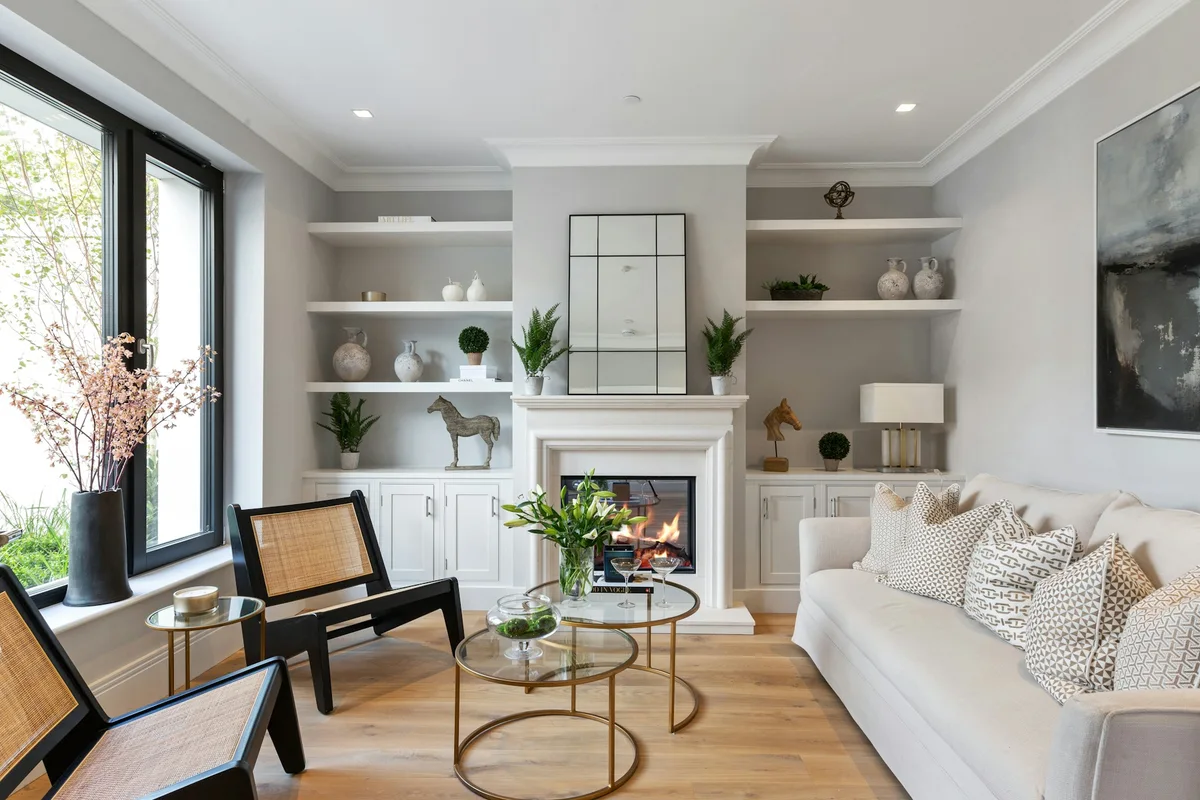
Keep a useful feature in its room context: here, the fireplace, windows and seating remain visible together. Photo by Tile Merchant Ireland, reused from VideoTour.ai’s existing photo example.
| Shot | What to show | Reason to include it |
|---|---|---|
| Exterior or entrance | A clear, current view | Orient the viewer |
| Main living area | Room width and useful connections | Explain the central space |
| Kitchen | A wide view plus one relevant detail | Show function and a distinctive feature |
| Primary bedroom | The room in context | Avoid a misleading close crop |
| Bathroom | A clear permitted view | Show the relevant fittings accurately |
| Outdoor or additional space | The feature that distinguishes this listing | Answer a likely buyer question |
| Closing view | A clean image with one next step | Make further exploration easy |
For filmed footage, capture a steady transition between connected rooms when layout is the point. For photos, select complementary views and avoid implying that a slideshow proves room adjacency.
Write a source filename beside every planned scene. If two views communicate the same point, keep the clearer one; if an important room is missing, obtain suitable material or narrow the video’s promise.
Keep a useful feature in its room context: here, the fireplace, windows and seating remain visible together. Photo by Tile Merchant Ireland, reused from VideoTour.ai’s existing photo example.
4. Write a short script from verified facts
Read the script aloud while looking at the intended images. Replace vague praise with details the viewer can see. Leave room for a pause when a useful layout or feature appears.
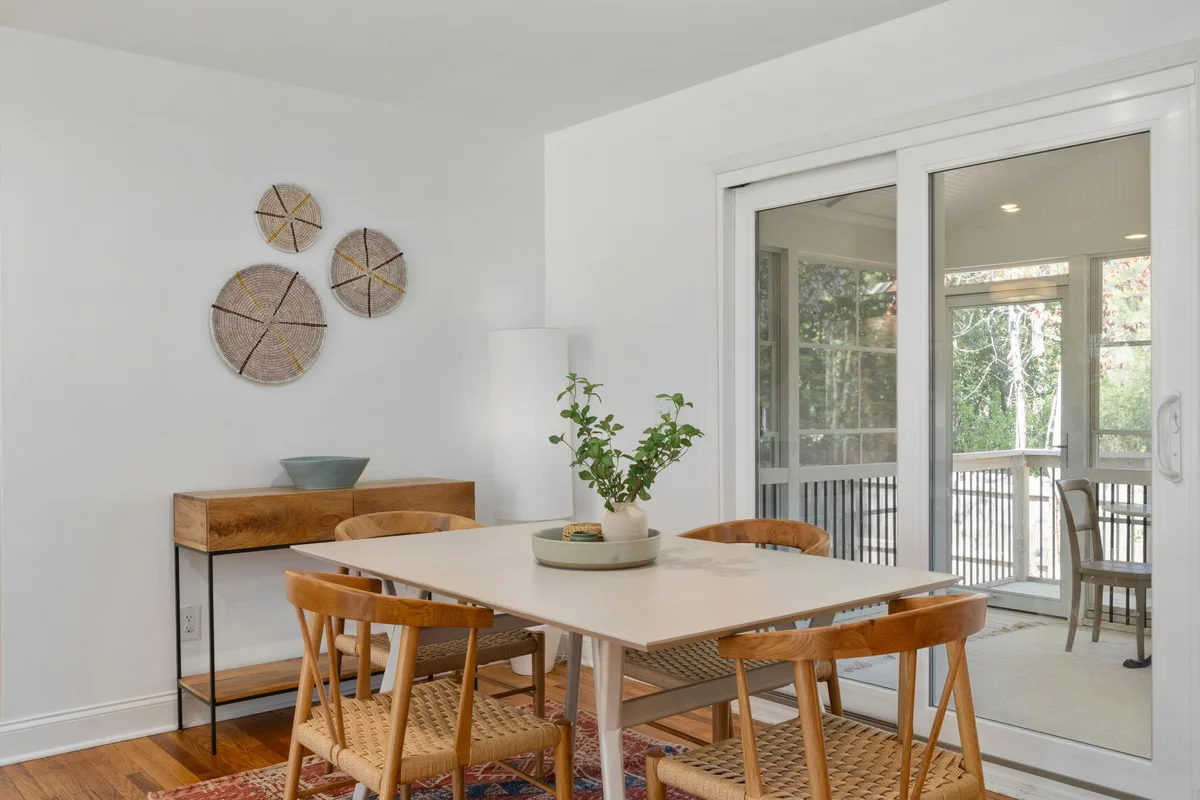
A photo-to-script example: “A dining area beside sliding glass doors.” The visible scene supports that description; the property’s size, location and price need separate confirmation.
Original listing script template
The fields in braces are instructions to the writer. Replace them with verified facts and remove unsupported lines before recording. This template is not an account of an actual listing or a tested conversion script.
Only mention a floor plan if one is available at that destination. If branding or contact details are restricted, prepare a suitable alternate ending. Read the final wording aloud to set the pace; the template does not require a fixed duration.
If a line names a pantry or balcony that the selected image does not show, change the view or remove the line. If the viewer must see a connection between rooms, use footage or a verified plan that supports it.
For a shorter follow-up post, use our 15 short property-video scripts.
A photo-to-script example: “A dining area beside sliding glass doors.” The visible scene supports that description; the property’s size, location and price need separate confirmation.
Original listing script template
The fields in braces are instructions to the writer. Replace them with verified facts and remove unsupported lines before recording. This template is not an account of an actual listing or a tested conversion script.
“Here is a first look at {property type} in {approved location label}. This {main room} shows {verified feature visible in the image}.
The kitchen includes {confirmed feature}. Here is {another room or feature worth showing}, with {specific detail supported by the source}.
For the complete property details and floor plan, visit {live listing destination}. To arrange a viewing, use {approved contact route}.”
Only mention a floor plan if one is available at that destination. If branding or contact details are restricted, prepare a suitable alternate ending. Read the final wording aloud to set the pace; the template does not require a fixed duration.
Match the script to the shot list
| Scene | Words to pair with it | Check before recording |
|---|---|---|
| Exterior or establishing view | “A first look at {property type} in {approved location label}.” | The photo and current fact sheet identify the same property. |
| Main living area | “This {main room} shows {visible, verified feature}.” | The named feature is visible; room connections are independently verified if mentioned. |
| Kitchen or another principal room | “The kitchen includes {confirmed feature}.” | The detail appears in this scene, rather than only in a different photograph. |
| Distinctive space or detail | “Here is {feature}, with {supported detail}.” | Use a wide view when a close-up alone would hide context. |
| Closing view | “View the complete details” or “Arrange a viewing.” | The destination works and the ending meets its branding requirements. |
If a line names a pantry or balcony that the selected image does not show, change the view or remove the line. If the viewer must see a connection between rooms, use footage or a verified plan that supports it.
For a shorter follow-up post, use our 15 short property-video scripts.
5. Choose filming, an editor or a photo-based workflow
Film when you need actual movement, an agent demonstration or a view the photos do not contain. Plan sound and access as carefully as the picture. An otherwise useful explanation can be difficult to follow if the speaker is inaudible.
Use a general editor when you want to control a recorded sequence, sound mix and graphics yourself. Use a photo-based workflow when the approved photography is the right starting material.
Compare the video apps for each production task and the cost worksheet before committing. Match the tool and budget to the brief; do not choose a production method solely because its first draft is quick.
If the approved photos answer your brief, follow the photo-to-video walkthrough. To evaluate that option in VideoTour.ai, see how to create a listing video from photos. A photo-based presentation shows selected views; generated movement is not evidence of a recorded route through the home.
Use a general editor when you want to control a recorded sequence, sound mix and graphics yourself. Use a photo-based workflow when the approved photography is the right starting material.
Compare the video apps for each production task and the cost worksheet before committing. Match the tool and budget to the brief; do not choose a production method solely because its first draft is quick.
If the approved photos answer your brief, follow the photo-to-video walkthrough. To evaluate that option in VideoTour.ai, see how to create a listing video from photos. A photo-based presentation shows selected views; generated movement is not evidence of a recorded route through the home.
6. Start a photo-based tour in VideoTour.ai
Start with the approved source pack and checked property facts. VideoTour.ai accepts up to 60 photos; use the views needed for the brief rather than filling the allowance. A supported individual listing URL is another starting point, but review its imported photos and facts before generating.
Check the room order, agent details, shape, captions, narration and soundtrack. Review optional effects and their displayed costs before selecting them. For a narrated presentation, check the chosen tour type: the separate Walkthrough Tour option does not support tour narration or an avatar presenter.
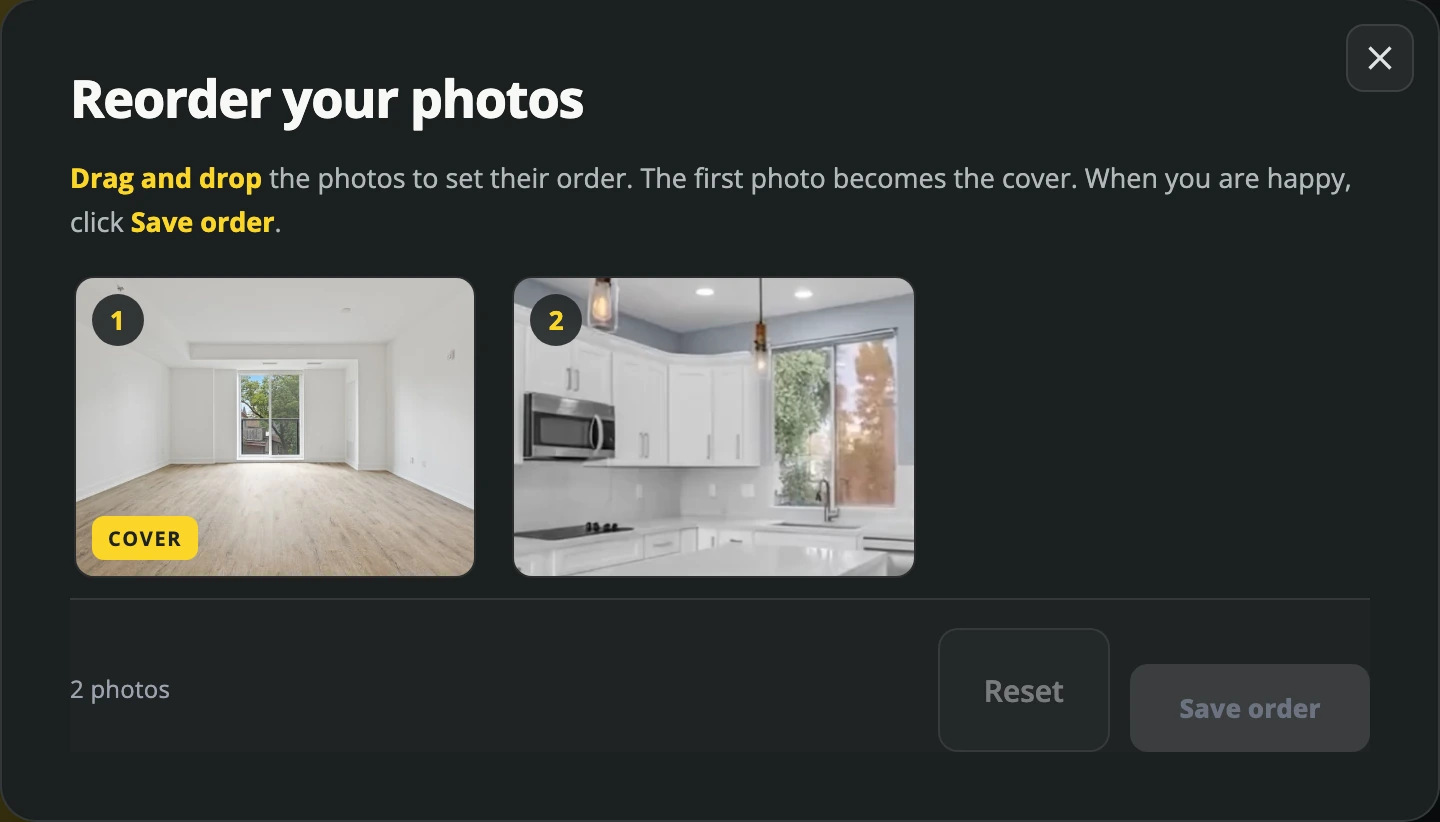
VideoTour.ai photo-order dialog: review and save the source sequence. Use the sequence to check your production plan.
Follow the current first-video instructions for exact setup controls. The screenshots in this guide illustrate the interface; they do not document one listing’s complete production.
Check the room order, agent details, shape, captions, narration and soundtrack. Review optional effects and their displayed costs before selecting them. For a narrated presentation, check the chosen tour type: the separate Walkthrough Tour option does not support tour narration or an avatar presenter.
VideoTour.ai photo-order dialog: review and save the source sequence. Use the sequence to check your production plan.
Follow the current first-video instructions for exact setup controls. The screenshots in this guide illustrate the interface; they do not document one listing’s complete production.
7. Review narration with the matching property views
Listen to the speech while watching the exact scenes it describes. A correct feature mentioned over the wrong room can still confuse a viewer. Check street names, prices, room counts and units particularly carefully.
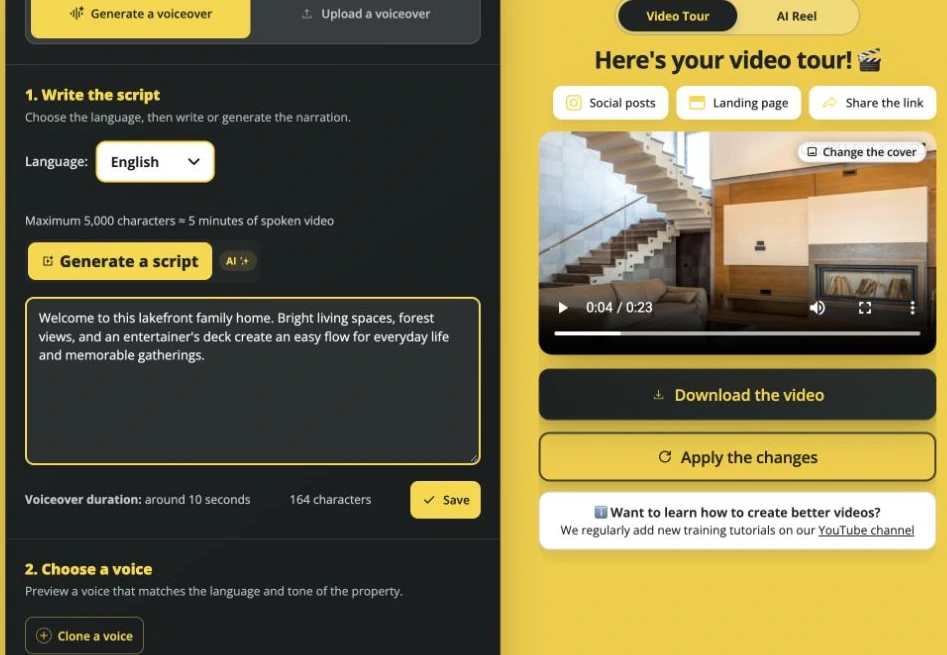
VideoTour.ai script controls beside a property preview. Review the words and views together.
Choose a voice that is easy to understand and lower competing music where necessary. Use your own recording or permitted voice options where appropriate. For current controls and supported update actions, follow the VideoTour.ai voiceover guide.
If you use a synthetic presenter, keep the introduction short and give the property enough unobstructed screen time. Review the presenter’s speech separately from the main tour narration.
Check the rights for the chosen music and intended destination, including any supplied attribution. A track being available in a picker is not a blanket permission for every use. See the music selection and volume guide.
VideoTour.ai script controls beside a property preview. Review the words and views together.
Choose a voice that is easy to understand and lower competing music where necessary. Use your own recording or permitted voice options where appropriate. For current controls and supported update actions, follow the VideoTour.ai voiceover guide.
If you use a synthetic presenter, keep the introduction short and give the property enough unobstructed screen time. Review the presenter’s speech separately from the main tour narration.
Check the rights for the chosen music and intended destination, including any supplied attribution. A track being available in a picker is not a blanket permission for every use. See the music selection and volume guide.
8. Prepare the required shapes and branding versions
The same property can need different edits. A listing presentation explains the selected spaces; a teaser gives one feature enough attention to earn a next step. A new frame shape alone does not make a new story.
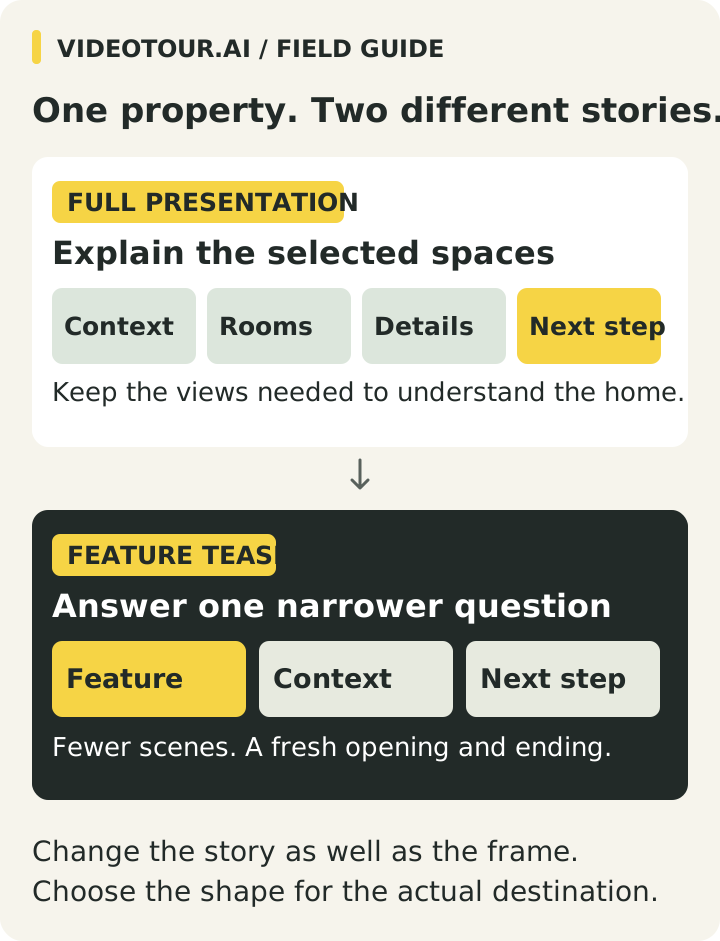
View the full-size presentation and teaser diagram
For example, a broader introduction may need an exterior and several principal rooms. A teaser about one verified feature can open on that feature, show its wider context and invite the viewer to the complete listing. Plan the teaser as its own edit, with its own opening and ending.
In VideoTour.ai, Format supports horizontal, vertical and square shapes. Keep a downloaded copy before switching the project to another shape if you need both versions, as explained in the format guide.
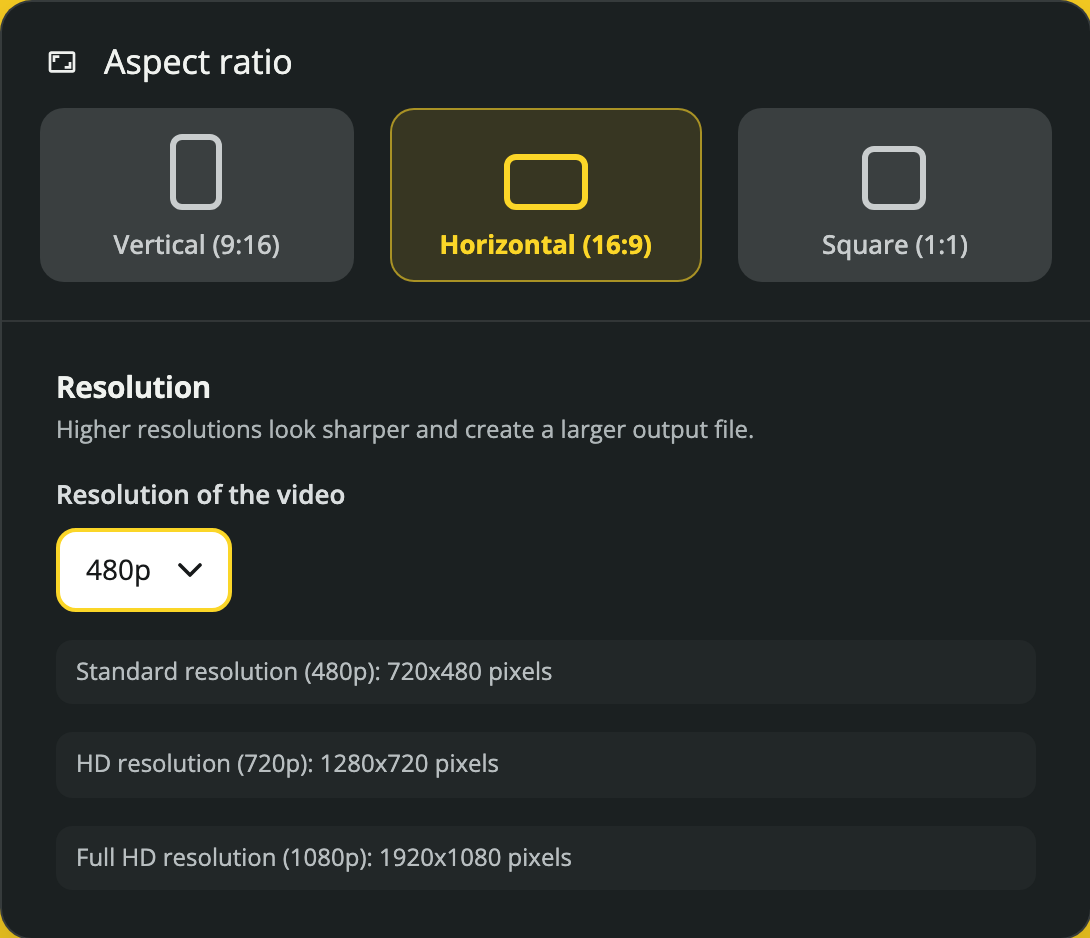
VideoTour.ai Format panel: choose the shape for the intended placement.
Inspect room edges, text and branding in every version. See the detailed property-video aspect-ratio workflow. Check your MLS’s own media rules before submitting; there is no universal branding, audio or file requirement assumed here.
View the full-size presentation and teaser diagram
| Version and purpose | Starting format | Content to prepare |
|---|---|---|
| Listing presentation: explain the selected rooms and features. | Wide (16:9), if suitable for the listing page or player. | Keep context, factual captions and an ending that leads to full details. |
| Short feature teaser: answer one narrower question. | Vertical (9:16), if suitable for the chosen phone placement. | Choose fewer scenes, a focused opening and a relevant next step; check framing and text again. |
| Listing-system version, if required: supply its accepted media. | Use the local system’s actual requirements. | Review branding, contact details, overlays, audio and whether a file or viewing link is required. |
For example, a broader introduction may need an exterior and several principal rooms. A teaser about one verified feature can open on that feature, show its wider context and invite the viewer to the complete listing. Plan the teaser as its own edit, with its own opening and ending.
In VideoTour.ai, Format supports horizontal, vertical and square shapes. Keep a downloaded copy before switching the project to another shape if you need both versions, as explained in the format guide.
VideoTour.ai Format panel: choose the shape for the intended placement.
Inspect room edges, text and branding in every version. See the detailed property-video aspect-ratio workflow. Check your MLS’s own media rules before submitting; there is no universal branding, audio or file requirement assumed here.
9. Run a before-publishing review
- Facts: current status, price, room counts and features match the approved source.
- Property appearance: no generation or edit changes an important physical detail.
- Sequence: the order is understandable and narration matches the view.
- Readability: captions and the next action work on a phone, including muted playback.
- Sound: names are pronounced correctly and music does not compete with speech.
- Destination: the right shape and branding version meet the intended placement’s requirements.
- File: you watched the newly finished download, not only the editor preview.
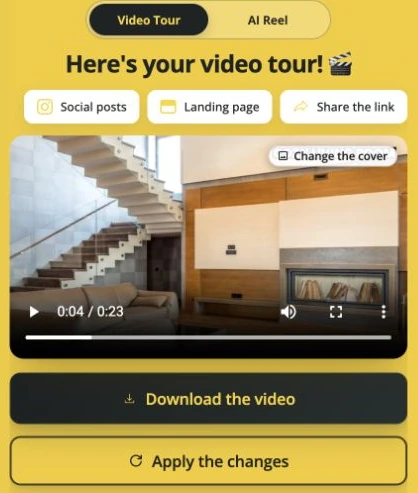
VideoTour.ai review and download interface. Watch the finished file before uploading it.
A finished MP4, a separate reel and a viewing link are different deliverables. Use the download action for the item you need; copying a viewing link does not upload a video file. Follow the finished-video download guide.
Give each saved file a clear property reference, format and revision date. Open that exact file on a phone as well as a computer. A later project edit does not replace a file already downloaded or posted elsewhere.
10. Publish and keep an update log
Use a title and description that identify the property and feature shown. Send viewers to a relevant live destination: the complete listing, floor plan, confirmed open-house details or an approved contact route. Open the link as a visitor to check it works without your own account access.
After uploading, check the actual post’s cover, crop, text, sound and link. Keep a publishing log with these fields: file/version, posting location and URL, next-step URL, date checked, approval contact and update owner.
When a price, status or viewing date changes, use that log to find every affected version. Correct the project, download the updated file and replace or remove older posts as the destination permits. Recheck the upload; changing the project alone leaves external copies untouched.
Prepare a separate property Reel when the social post needs a shorter story.
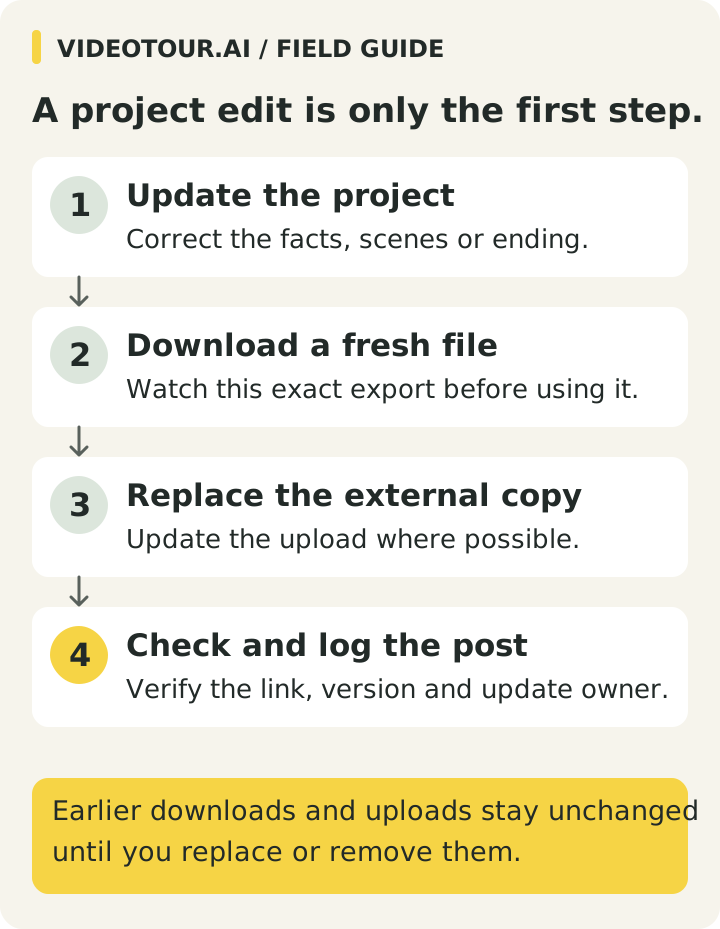
View the full-size publishing diagram
After uploading, check the actual post’s cover, crop, text, sound and link. Keep a publishing log with these fields: file/version, posting location and URL, next-step URL, date checked, approval contact and update owner.
When a price, status or viewing date changes, use that log to find every affected version. Correct the project, download the updated file and replace or remove older posts as the destination permits. Recheck the upload; changing the project alone leaves external copies untouched.
Prepare a separate property Reel when the social post needs a shorter story.
View the full-size publishing diagram
11. Measure whether the video answers the question
Record the property, format, production effort, publication date and destination. Views describe exposure; listing visits show a next step; relevant inquiries and viewing requests indicate a different level of interest. Keep those measures separate.
Use identifiable links and consistent notes where possible. Ask what information helped the viewer. If you revise the opening, avoid changing every other element at once so the comparison remains interpretable.
An inquiry arriving during a campaign is not automatically caused by the video. Price, market conditions and distribution may also change. Our real estate video statistics guide explains what available evidence does and does not show.
Use identifiable links and consistent notes where possible. Ask what information helped the viewer. If you revise the opening, avoid changing every other element at once so the comparison remains interpretable.
An inquiry arriving during a campaign is not automatically caused by the video. Price, market conditions and distribution may also change. Our real estate video statistics guide explains what available evidence does and does not show.
FAQ
How long should a real estate listing video be?
Use the time needed for its job. A teaser can focus on one feature; a fuller presentation needs enough time to make the selected rooms understandable. Read the script aloud, review the pacing and check the destination’s current limits.Should I film the property or use photos?
Film when viewers need actual movement, room connections or an on-camera explanation. Use approved photos when selected views answer the question. Describe the result as a photo-based presentation rather than a continuous recorded walkthrough.What should the script include?
A clear introduction, a few verified features shown in matching scenes, and one useful next action. Remove claims that the images and property information cannot support.Should I share a link or upload a video file?
Check what the destination accepts. A viewing link opens a hosted page; a video file is the export you upload. Watch the downloaded file and check the posted version rather than relying only on the editor preview.Does a video guarantee more inquiries or a faster sale?
No. Track relevant visits and inquiries alongside watch metrics, and consider changes in price, market conditions and distribution before attributing an outcome to video.Conclusion
Choose one listing, write the production brief and match each sentence to an approved view. Once the brief is ready, create your photo-based property video in VideoTour.ai or use the filming method the question requires.
For a long-term rental, adapt the facts, viewing invitation and follow-up using the rental property marketing plan.
For a long-term rental, adapt the facts, viewing invitation and follow-up using the rental property marketing plan.