
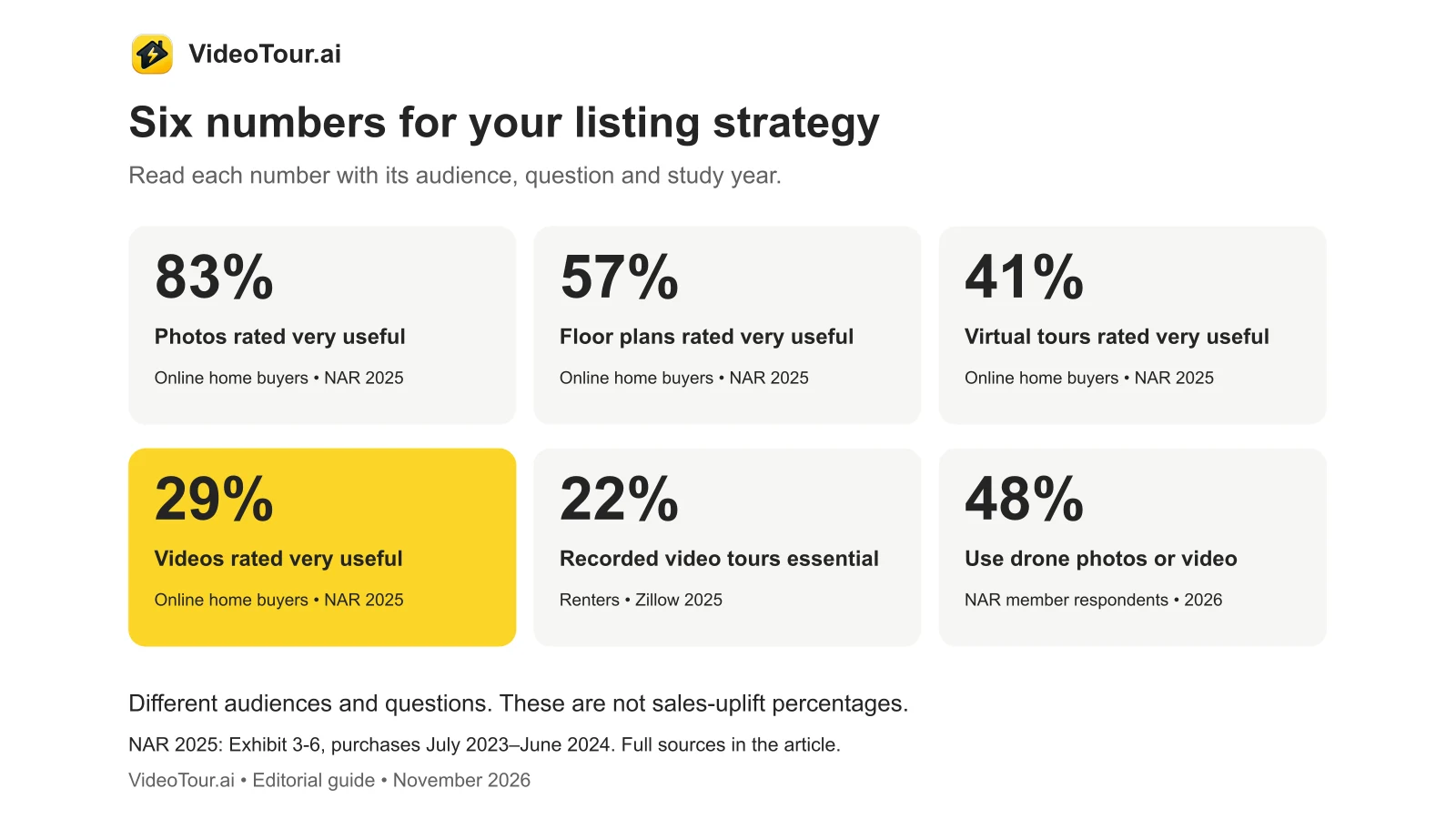
Do listing videos help homes sell faster? They can help a buyer understand the property and decide whether to book a viewing. The research does not establish a universal speed-of-sale uplift for recorded listing videos. Start with the six figures below, then use the detailed evidence and measurement plan to decide what to test.
Key figures and their original sources checked November 16, 2026. Each figure keeps its study year and audience.
The first four figures describe U.S. buyers who purchased between July 2023 and June 2024. The renter and agent figures answer different questions; they are not percentages of homes sold faster.
Download the six-statistics graphic to share it with a link back to this article and the original sources.
Key figures and their original sources checked November 16, 2026. Each figure keeps its study year and audience.
Six key numbers
| Figure | What was measured | Original source |
|---|---|---|
| 83% | Photos rated very useful by online home buyers | NAR 2025 · Exhibit 3-6 |
| 57% | Floor plans rated very useful by online home buyers | NAR 2025 · Exhibit 3-6 |
| 41% | Virtual tours rated very useful by online home buyers | NAR 2025 · Exhibit 3-6 |
| 29% | Videos rated very useful by online home buyers | NAR 2025 · Exhibit 3-6 |
| 22% | Renters who considered a recorded video tour essential | Zillow renters · 2025 |
| 48% | NAR member respondents using drone photography/video | NAR Technology Report · 2026 |
The first four figures describe U.S. buyers who purchased between July 2023 and June 2024. The renter and agent figures answer different questions; they are not percentages of homes sold faster.
Download the six-statistics graphic to share it with a link back to this article and the original sources.
Summary
Create an AI Video Tours from PhotosTry it For Free
Real estate video statistics at a glance
Start with what each number measures. Buyer preferences, agents’ use of technology and listing performance answer different questions.
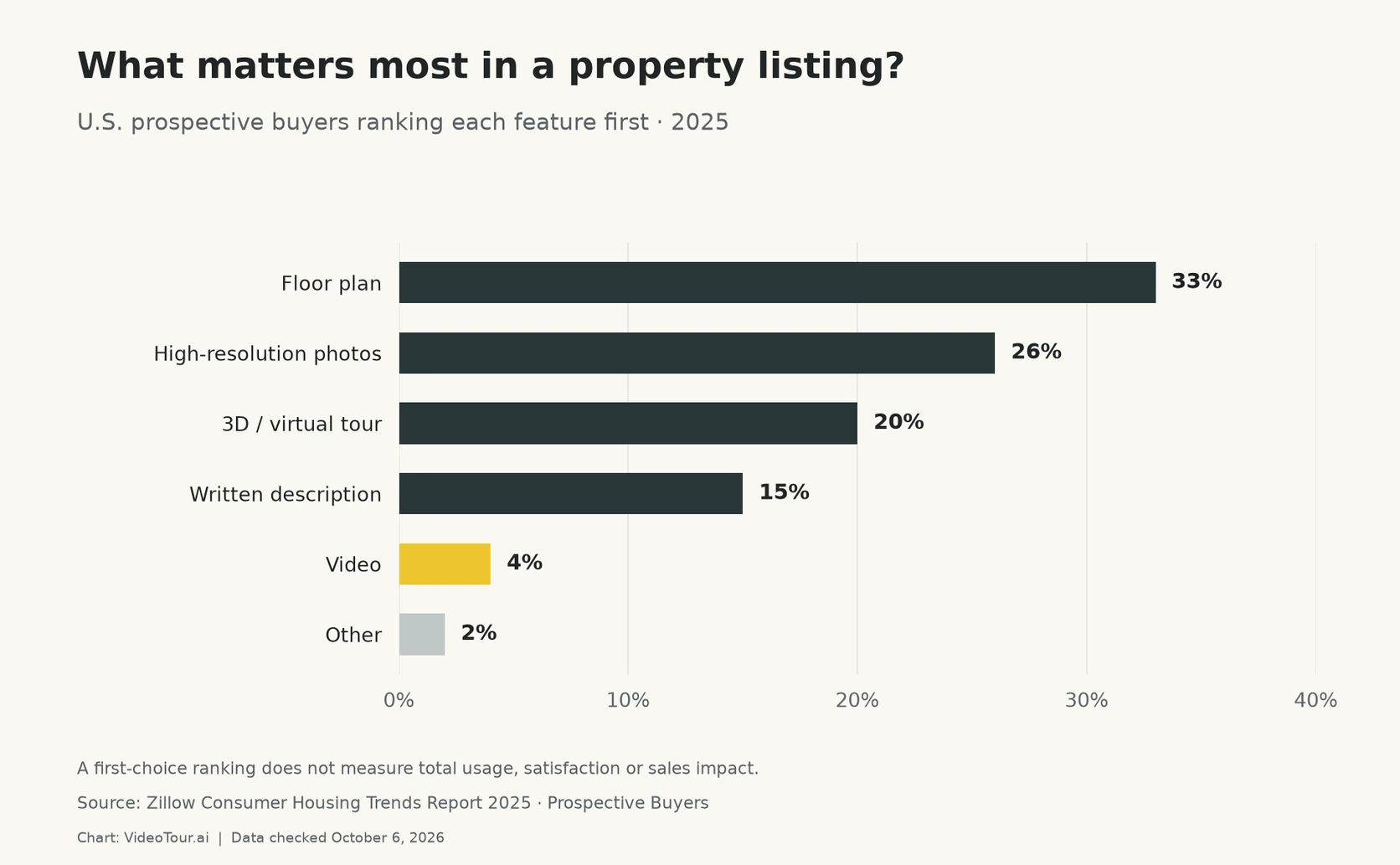 Share ranking each feature first, not overall usage or satisfaction. Chart by VideoTour.ai using Zillow’s 2025 prospective-buyer results.
The practical implication is to keep clear photos, a floor plan and accurate property information alongside the video. Use narration and sequencing to explain those materials. Replacing useful listing details with a cinematic montage would miss the buyer’s need for information.
| Statistic | Audience and date | What it tells you | Original source |
|---|---|---|---|
| 29% rated videos very useful | U.S. online home buyers; purchases July 2023–June 2024 | Usefulness, not sales uplift. | NAR 2025, Exhibit 3-6 |
| 22% considered a recorded video tour essential | U.S. renters, 2025 | Demand for recorded tours among renters; not a home-sale conversion rate. | Zillow renter survey |
| 20% ranked a 3D/virtual tour first | U.S. prospective buyers, 2025 | Their most important listing feature; this category is distinct from video. | Zillow prospective-buyer survey |
| 4% ranked video first | U.S. prospective buyers, 2025 | A first-choice ranking, not the percentage who watch or value video. | Zillow prospective-buyer survey |
| 48% used drone photography/video | NAR member respondents, 2026 | Adoption of a combined photo/video category, not all listing-video production. | NAR 2026 Technology Report release |
| 37% more views for listings with a Zillow 3D Home tour | Zillow listing data, January–July 2021 | A historical platform comparison involving interactive 3D tours. | Zillow’s published comparison |
| 14% faster sales reported for listings with a Zillow 3D Home tour | Zillow listing data, January–July 2021 | A historical association; it does not establish the effect of adding a recorded video today. | Zillow’s published comparison |
Video belongs in a complete listing package
Share ranking each feature first, not overall usage or satisfaction. Chart by VideoTour.ai using Zillow’s 2025 prospective-buyer results.The practical implication is to keep clear photos, a floor plan and accurate property information alongside the video. Use narration and sequencing to explain those materials. Replacing useful listing details with a cinematic montage would miss the buyer’s need for information.
Does video help sell real estate?
Video can support a sale by making a listing easier to understand and giving an interested buyer a clear next step. The evidence above does not establish that an ordinary listing video causes a fixed increase in enquiries, a higher sale price or a faster sale.
For example, Zillow’s historical comparison concerns its 3D Home product. A platform’s exposure rules, the property, its pricing and the agent’s wider marketing can also influence results. You cannot transfer its reported uplift to every video on Instagram, YouTube or a property website.
Give video a specific job in the sales process. For a relocation buyer, that might be explaining the route from the entrance to the living area before a visit. For a buyer comparing apartments, it might be showing the balcony access and where a desk could fit. The next useful signal is a relevant question or a viewing request.
Track that progression: viewer → listing visitor → relevant enquiry → attended viewing → offer. A video with fewer views but more suitable viewing requests may be more useful than a widely watched clip that reaches people outside the property’s market.
Practical takeaway: give the video a measurable job—answering a layout question, supporting a buyer shortlist or prompting a viewing request. Evaluate that job before making a broad claim about faster sales.
For example, Zillow’s historical comparison concerns its 3D Home product. A platform’s exposure rules, the property, its pricing and the agent’s wider marketing can also influence results. You cannot transfer its reported uplift to every video on Instagram, YouTube or a property website.
Give video a specific job in the sales process. For a relocation buyer, that might be explaining the route from the entrance to the living area before a visit. For a buyer comparing apartments, it might be showing the balcony access and where a desk could fit. The next useful signal is a relevant question or a viewing request.
Track that progression: viewer → listing visitor → relevant enquiry → attended viewing → offer. A video with fewer views but more suitable viewing requests may be more useful than a widely watched clip that reaches people outside the property’s market.
What independent research adds
A 2023 working paper by Mengxia Zhang and Isamar Troncoso studied 75,178 Greater Los Angeles home sales from March 2019 to March 2021. After accounting for photos, descriptions and other factors, the authors found no significant sale-price increase from 3D tours and a small increase in time on market. This historical, observational study is about interactive tours, not every kind of listing video. It adds a useful counterpoint to vendor comparisons.Practical takeaway: give the video a measurable job—answering a layout question, supporting a buyer shortlist or prompting a viewing request. Evaluate that job before making a broad claim about faster sales.
What are the benefits of real estate videos for listings?
The strongest benefits come from answering questions a buyer already has. These are practical uses to test, rather than universal performance claims.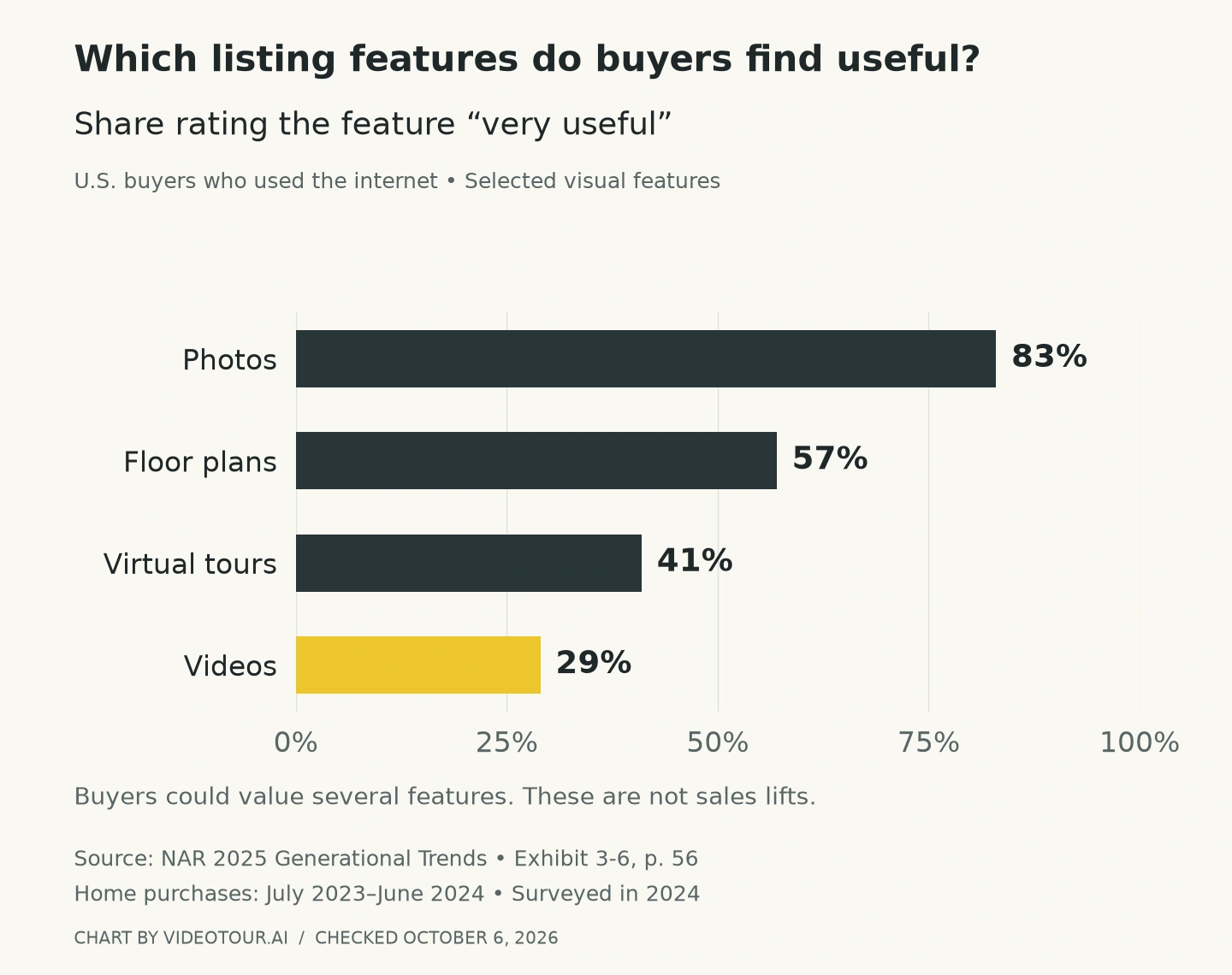 Selected features from NAR’s 2025 report, Exhibit 3-6. Purchases: July 2023–June 2024.
This measures usefulness, whereas Zillow’s earlier chart asks for a first choice. A buyer can value video while ranking a floor plan first. VideoTour.ai demonstration image. Use an exterior to establish the home and its visible approach; this is not a sales-results case study.
Useful narration: “The driveway leads to the garage, with a separate path to the front door.” That tells the viewer something the image supports. Follow it with the entrance or main living space from the same property.
Check before publishing: confirm the property identity, keep the approach visible and verify any claim about access or parking. A photo alone cannot establish exact dimensions, access rights or step-free entry.
Selected features from NAR’s 2025 report, Exhibit 3-6. Purchases: July 2023–June 2024.This measures usefulness, whereas Zillow’s earlier chart asks for a first choice. A buyer can value video while ranking a floor plan first.
Explain the layout and the property’s strongest features
Show rooms in a sensible order and describe the feature visible at that moment. A continuous filmed walkthrough can show how spaces connect. A video assembled from photos should make its sequence clear without inventing unseen connections, dimensions or views. Include the floor plan for precise orientation.Help buyers decide what to view in person
A tour gives remote or busy buyers something they can review before travelling. Show the features that determine fit: access, room arrangement, storage, outdoor space and any relevant limitation. A clear answer can help someone either request a viewing or rule out an unsuitable property.Give follow-up conversations a useful starting point
Send the video with a question tied to the buyer’s brief: “You mentioned needing a separate workspace. Does the second bedroom’s layout look suitable?” Save the response with the listing reference. This is more actionable than asking only whether they liked the video.Reuse approved material across your marketing
One reviewed property presentation can support a listing page, a shorter social edit and a personal follow-up. Keep the property facts and contact details consistent. Update all versions when the price, availability or description changes.Photo example: give the opening shot a job
VideoTour.ai demonstration image. Use an exterior to establish the home and its visible approach; this is not a sales-results case study.Useful narration: “The driveway leads to the garage, with a separate path to the front door.” That tells the viewer something the image supports. Follow it with the entrance or main living space from the same property.
Check before publishing: confirm the property identity, keep the approach visible and verify any claim about access or parking. A photo alone cannot establish exact dimensions, access rights or step-free entry.
Video walkthroughs, 3D tours and photo videos: know the difference
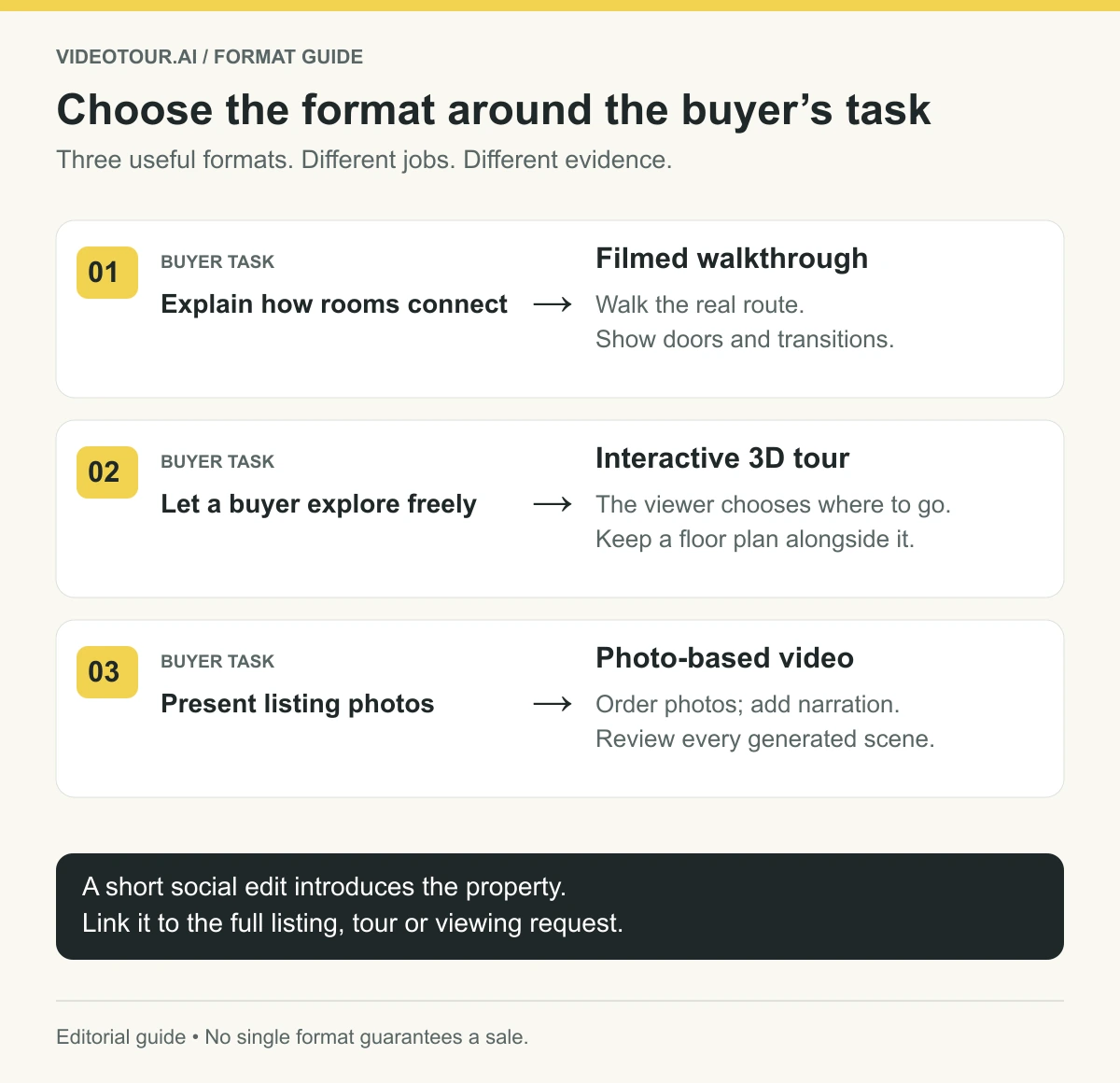 Choose the format around a buyer’s question. This is a production guide, not a comparison of proven sales returns.
Recorded walkthrough: the camera operator chooses the route. Interactive 3D tour: the viewer controls navigation. Photo-based video: supplied images are sequenced with motion, narration or captions. A short social edit can introduce any of these and direct the viewer to the full listing.
Walkthroughs can increase buyer interest when they remove uncertainty about a property. Production quality helps, but the useful information matters: show the doorway, the room and the feature you are describing. A beautiful shot alone does not answer a layout question.
Real estate video statistics that need more context
Before using a number in a seller presentation, find its original study, date, audience and format. Two widely repeated sales claims deserve particular care.
The same rule applies to older trend roundups: a “2023,” “2025” or “2026” label on a blog post does not make every underlying statistic current.
“403% more enquiries”
We could not verify a primary NAR study supporting this as a general result for listings with video. Use the traceable studies in this article when preparing a seller presentation.“Homes with video sell 31% faster”
Matterport’s February 2020 research summary reported properties closing up to 31% faster in one market in its first analysis. The analysis concerned 3D tours, covered 143,575 listings across four U.S. markets and used data from 2016–2019. It was not a test of ordinary recorded listing videos. Treat it as historical, format-specific evidence rather than a general video promise.Broad consumer and AI statistics
A survey about consumers watching brand videos does not measure home sales. Similarly, use of AI for descriptions or social posts does not establish use of AI video. NAR’s 2026 report says 81% of respondents adopted technology primarily to save time; that describes their motivation, not measured hours saved or sales generated. Read the original NAR findings.The same rule applies to older trend roundups: a “2023,” “2025” or “2026” label on a blog post does not make every underlying statistic current.
Create a useful listing video from photos with VideoTour.ai
VideoTour.ai helps turn property photos and listing information into a narrated video with captions, music and branding. Use it when you have approved images and need a repeatable way to prepare a property presentation.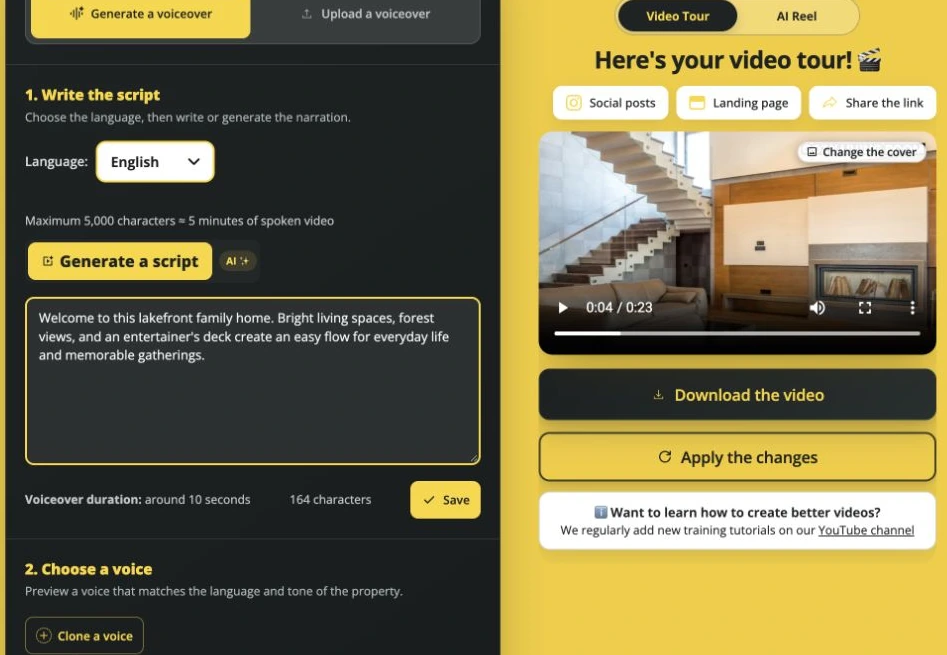 Actual VideoTour.ai demo interface: review the script beside the property preview. Voiceover guide.
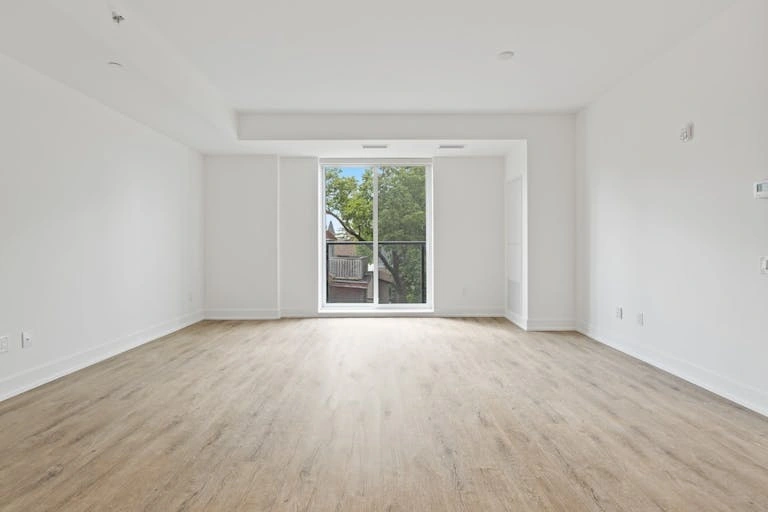 A separate VideoTour.ai demonstration image. The exterior and interior examples are not presented as the same property.
Useful narration: “This unfurnished room has a large window at the far end.” If the listing includes verified dimensions, add them and link the floor plan. Avoid promising that a particular bed, desk or sofa will fit unless you have checked the measurements.
In VideoTour.ai: place this photo at the right point in the sequence, match the voiceover to the room shown and review the animation for changes to windows, walls or proportions. The finished presentation should help a buyer understand the source photo.
Actual VideoTour.ai demo interface: review the script beside the property preview. Voiceover guide.Photo example: explain a room without inventing details
A separate VideoTour.ai demonstration image. The exterior and interior examples are not presented as the same property.Useful narration: “This unfurnished room has a large window at the far end.” If the listing includes verified dimensions, add them and link the floor plan. Avoid promising that a particular bed, desk or sofa will fit unless you have checked the measurements.
In VideoTour.ai: place this photo at the right point in the sequence, match the voiceover to the room shown and review the animation for changes to windows, walls or proportions. The finished presentation should help a buyer understand the source photo.
- Choose and order the photos. Build a sequence that helps someone understand the home: exterior, entrance, living area, kitchen, bedrooms and outdoor space, where available. Remove duplicates and misleading images.
- Prepare a factual script. Match each sentence to the room shown. Use verified details, keep measurements and units accurate, and finish with one next step.
- Choose the narration. Use an available AI voice, your own authorized cloned voice or a recording. Listen for names, numbers and pronunciation.
- Review and apply the edits. Check the visuals against the source photos, listen to the narration, and watch with sound off to assess captions. Apply the latest changes before downloading the final file.
- Connect the video to an enquiry. Put a relevant listing or booking link beside it and record where you shared it.
A practical video marketing plan for your next listing
Choose the format around the decision you want the viewer to make. These durations are starting points for an editorial test, not platform limits or proven optimums.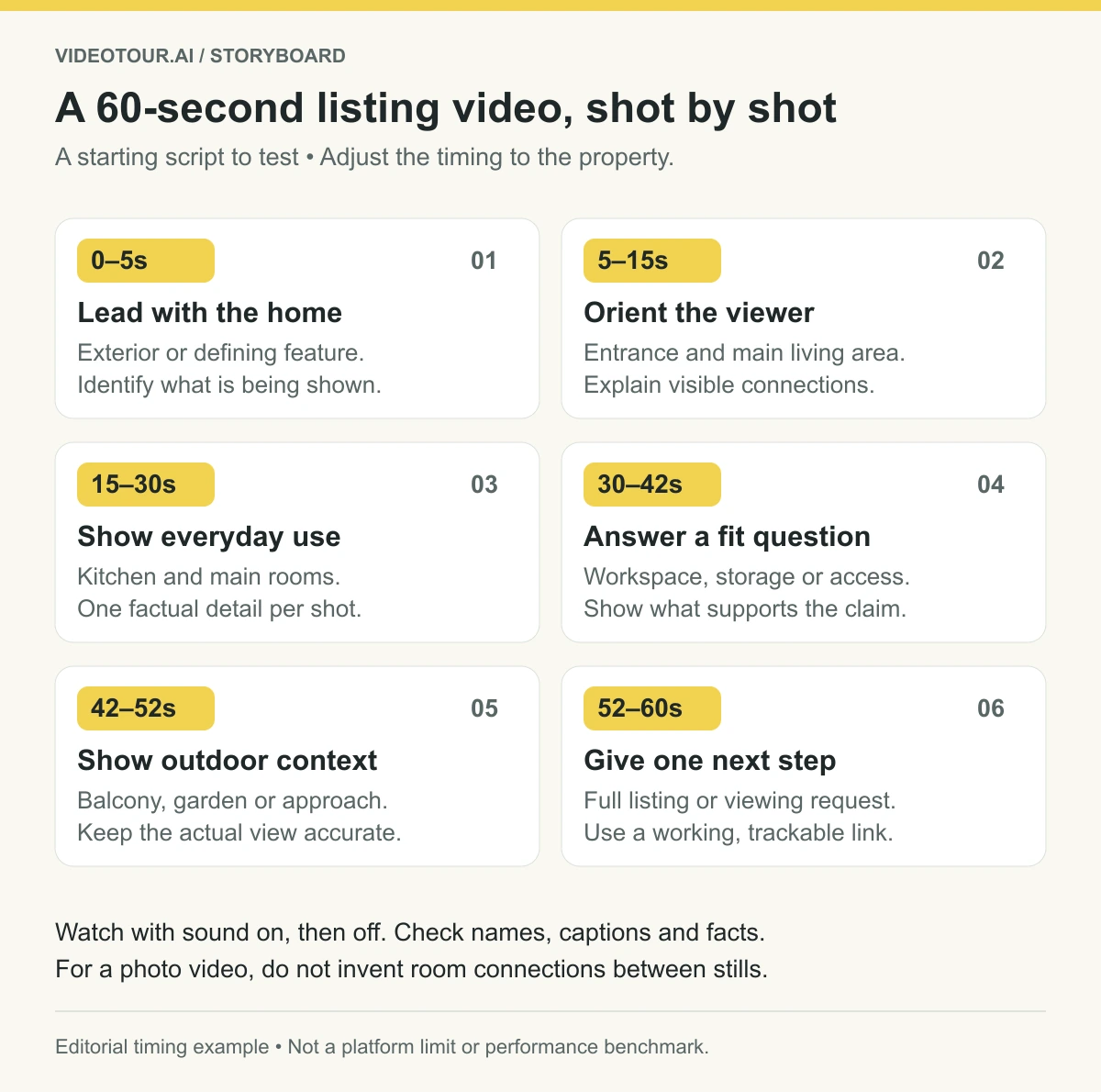 Use this as a shot list or photo-ordering plan. Adapt it to the rooms and verified features you actually have.
In NAR’s same report, Exhibit 3-2, 37% of buyers used an online video site during their search. This is channel use, not proof that video caused a purchase.
For each placement, write the buyer’s question, select the images that answer it and choose one next action. A listing overview can lead to a viewing request; a short social edit can lead to the full overview.
Use this as a shot list or photo-ordering plan. Adapt it to the rooms and verified features you actually have.In NAR’s same report, Exhibit 3-2, 37% of buyers used an online video site during their search. This is channel use, not proof that video caused a purchase.
For each placement, write the buyer’s question, select the images that answer it and choose one next action. A listing overview can lead to a viewing request; a short social edit can lead to the full overview.
| Placement | Suggested starting format | Next step |
|---|---|---|
| Listing page | A 60–90-second property overview beside the photos and floor plan. | Ask a property question or request a viewing. |
| Social feed | A 15–30-second edit opening with one relevant feature. | Open the full listing or send an enquiry. |
| Buyer follow-up | The full tour with a short message explaining why it fits the buyer’s brief. | Confirm interest or choose an available viewing time. |
| Neighborhood guide | An explanation of a specific local question, with checked sources. | Explore suitable listings or discuss search requirements. |
A simple property-video script
“This [property type] in [area] has [verified feature]. Starting in [room shown], notice [visible detail]. The [next room] includes [verified detail]. For [floor plan / full listing / a viewing], [one clear instruction].”Avoid opening with a long logo animation. Show the property early, keep text readable on a phone and choose a thumbnail that represents the actual home. Check each destination’s current format and branding requirements before uploading.
Measure enquiries, viewings and video marketing ROI
Views measure exposure. To assess whether video is helping your business, connect exposure to relevant enquiries and completed actions.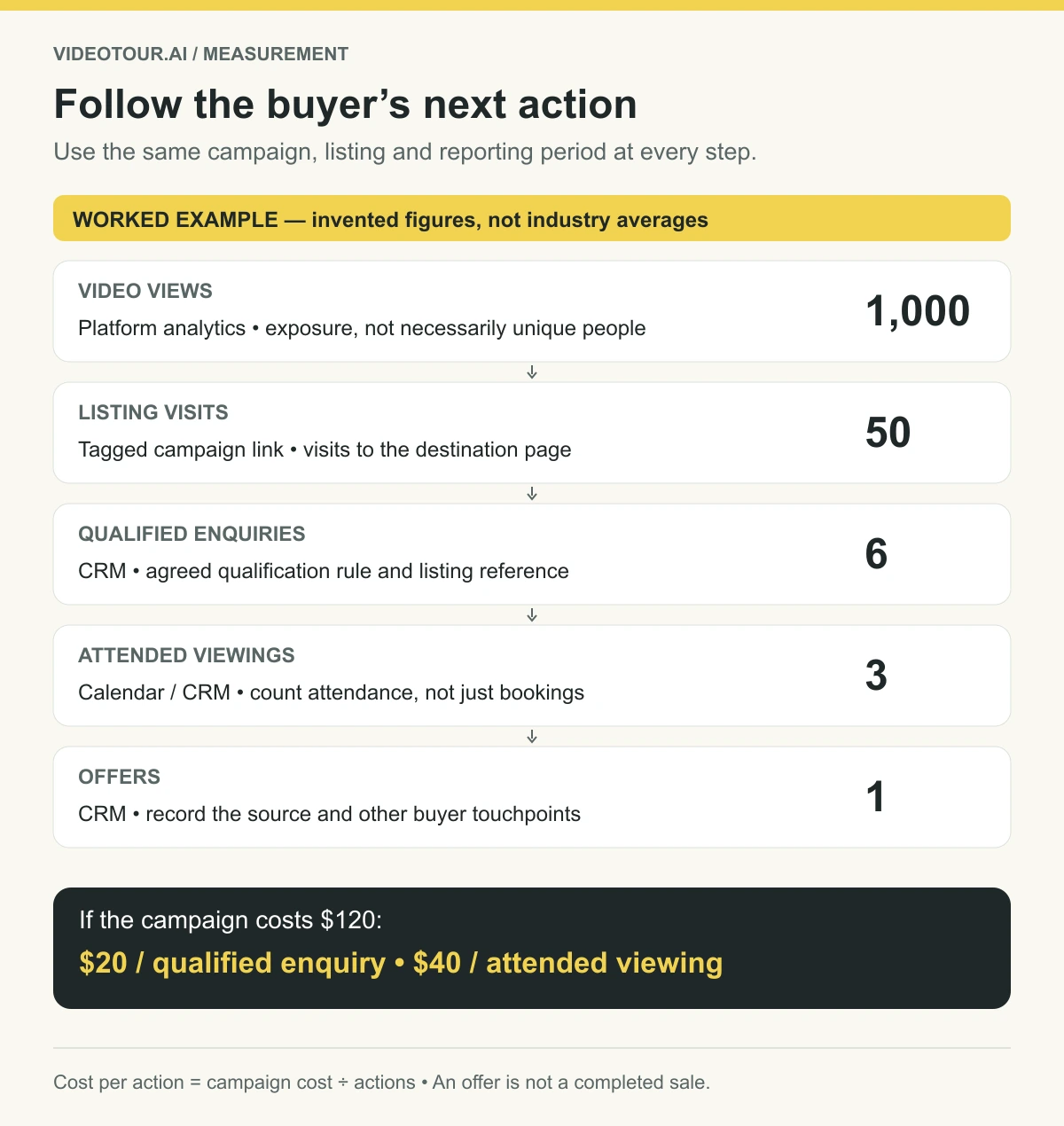 Worked example only. Track one listing over one reporting period, deduplicate enquiries and note other marketing touchpoints.
Set up a simple campaign log: record the listing reference, video version, posting date, channel, campaign link, production cost, promotion spend, qualified enquiries, booked viewings, attended viewings and offers. Keep the qualification rule consistent. For example: a genuine enquiry about the featured property from someone whose stated budget and timing match the listing.
Cost per qualified enquiry = total video campaign cost ÷ qualified enquiries attributed to that campaign. For example, a hypothetical campaign costing $120 that generates six qualified enquiries costs $20 per enquiry. That is a worked example, not an industry benchmark.
If the same hypothetical $120 campaign leads to three attended viewings, its cost per attended viewing is $40. Keep bookings and attendance separate, and do not count one person’s repeated messages as several enquiries.
For ROI, use the additional contribution you can reasonably attribute to the campaign, after the costs of completing the work: (attributable contribution − campaign cost) ÷ campaign cost × 100. If you cannot establish additional business, report enquiry and viewing costs instead of claiming a sales ROI.
Keep attribution modest. A buyer may encounter a portal listing, a referral and a video before enquiring. Ask how they found the property and record multiple touches where possible. Do not credit the video with the full sale price of a home.
Use a different campaign link for each placement, with the same listing reference in your analytics and enquiry log. For example, your own listing URL can carry utm_source=instagram, utm_medium=organic_social and utm_campaign=listing_042_feature. Use these as example labels and replace them with your own channel and listing reference.
Put the link in a clickable location supported by the channel, then test it from a phone. A UTM label identifies a visit; connect the subsequent enquiry through your form, CRM or a source question rather than assuming every later enquiry came from the video.
Worked example only. Track one listing over one reporting period, deduplicate enquiries and note other marketing touchpoints.Set up a simple campaign log: record the listing reference, video version, posting date, channel, campaign link, production cost, promotion spend, qualified enquiries, booked viewings, attended viewings and offers. Keep the qualification rule consistent. For example: a genuine enquiry about the featured property from someone whose stated budget and timing match the listing.
| Measure | How to track it | What to investigate |
|---|---|---|
| Watch time and retention | Use the video platform’s available analytics; compare videos of similar length. | If viewers leave early, review the opening and whether the video matches its title. |
| Visits from the video | Use a distinct campaign link for each placement. | If viewing is healthy but visits are weak, check the next-step message and link. |
| Qualified enquiries | Agree what “qualified” means before counting, then tag enquiries in your CRM. | Are people asking about the featured listing and matching its basic requirements? |
| Booked and attended viewings | Record both stages against the listing and source. | Are enquiries becoming appointments that people attend? |
| Production cost and time | Log editing hours, software allocation, filming and promotion. | Can you produce useful material consistently at a sensible cost? |
If the same hypothetical $120 campaign leads to three attended viewings, its cost per attended viewing is $40. Keep bookings and attendance separate, and do not count one person’s repeated messages as several enquiries.
For ROI, use the additional contribution you can reasonably attribute to the campaign, after the costs of completing the work: (attributable contribution − campaign cost) ÷ campaign cost × 100. If you cannot establish additional business, report enquiry and viewing costs instead of claiming a sales ROI.
Keep attribution modest. A buyer may encounter a portal listing, a referral and a video before enquiring. Ask how they found the property and record multiple touches where possible. Do not credit the video with the full sale price of a home.
Give each video a traceable route to the listing
Use a different campaign link for each placement, with the same listing reference in your analytics and enquiry log. For example, your own listing URL can carry utm_source=instagram, utm_medium=organic_social and utm_campaign=listing_042_feature. Use these as example labels and replace them with your own channel and listing reference.
Put the link in a clickable location supported by the channel, then test it from a phone. A UTM label identifies a visit; connect the subsequent enquiry through your form, CRM or a source question rather than assuming every later enquiry came from the video.
Run a 30-day test of your listing videos
Choose one listing and one buyer question. For example: “Can a short kitchen feature video bring interested viewers to the full listing?” Use a single next step and keep a record of the exact version posted.
These observations help choose what to investigate; they do not identify a cause on their own. For an opening test, keep the property sequence, destination and budget consistent and change only the opening. Record price changes and other marketing activity alongside the results.
Copy this review sentence: “From {start date} to {end date}, version {name} received {views} views and {tracked visits} listing visits. We recorded {qualified enquiries} relevant enquiries and {attended viewings} attended viewings. Total production and promotion cost was {cost}. Our next test is {one change}.”
For the creative, start with the 15-second feature script. If you need to compare production methods, use the AI-versus-videographer guide.
| When | Do this | Keep this record |
|---|---|---|
| Before launch | Choose the question, destination and primary measure. Set the budget and qualification rule. | Listing reference; approved script; video file; cost; baseline. |
| Launch day | Publish the reviewed video and test the campaign link on a phone. | Channel; post URL; launch date; video version; campaign link. |
| After 7 days | Check playback, early retention, link activity and relevant replies. | Views and listing visits for the same reporting window; any technical fixes. |
| After 30 days | Review enquiries, booked and attended viewings, production time and spend. | Deduplicated enquiries; attendance; cost per enquiry; other listing changes. |
What to change after the first review
| What you observe | Check first | Next test |
|---|---|---|
| Viewers leave before the property appears | A long introduction or a headline the clip does not answer | Open on the relevant room and shorten the setup. |
| People watch, but few reach the listing | The action is unclear or the link is hard to find | Use one specific closing action and a working clickable destination. |
| Listing visits arrive, but enquiries are scarce | Current price, availability, complete details and the enquiry form | Fix missing information before making another video. |
| Enquiries arrive, but appointments are missed | Response time, appointment confirmation and practical access details | Improve the follow-up and track attended viewings separately. |
These observations help choose what to investigate; they do not identify a cause on their own. For an opening test, keep the property sequence, destination and budget consistent and change only the opening. Record price changes and other marketing activity alongside the results.
Copy this review sentence: “From {start date} to {end date}, version {name} received {views} views and {tracked visits} listing visits. We recorded {qualified enquiries} relevant enquiries and {attended viewings} attended viewings. Total production and promotion cost was {cost}. Our next test is {one change}.”
For the creative, start with the 15-second feature script. If you need to compare production methods, use the AI-versus-videographer guide.
Sources and how to read these statistics
- NAR 2025 Home Buyers and Sellers Generational Trends: Exhibits 3-2 and 3-6; methodology p. 129. Primary-residence purchases, July 2023–June 2024; 5,390 overall responses, not each question’s sample.
- Zhang and Troncoso, Beyond the Hype, July 18, 2023, HBS Working Paper 24-003. Historical observational analysis of 3D tours; cited as a working paper, not a recorded-video experiment.
- Zillow Consumer Housing Trends Report: Renters, 2025. The overall research included more than 24,400 unique U.S. renters across surveys fielded March–July 2025. The 22% figure above is for total renters, not only recent movers.
- Zillow Consumer Housing Trends Report: Prospective Buyers, 2025. U.S. adults intending to buy within a year; surveys fielded March–September 2025. Overall sample sizes should not be treated as the respondent count for every question.
- NAR 2026 Technology Report announcement, September 22, 2026. Member survey findings describe adoption and attitudes; they do not isolate the sales effect of video.
- Zillow: How Virtual Tours Can Help Your Home Sell Faster, October 6, 2021. Its comparisons use January–July 2021 data and apply to Zillow 3D Home tours.
- Matterport research summary, February 25, 2020. Historical 3D-tour analyses; the “up to 31%” result is market-specific.
FAQ
Do listing videos help sell homes faster?
They can help buyers understand a property and move toward a viewing, but the sources reviewed here do not establish a universal speed improvement from adding a recorded video. Frequently quoted faster-sale figures concern particular interactive 3D-tour products and historical datasets.Why are videos important in real estate marketing?
They let an agent explain a property in a planned sequence and give buyers a presentation they can revisit or share. Their value depends on accurate information, useful visuals, the audience reached and a clear route to an enquiry.Can video marketing increase property sales?
It can contribute to the process by informing buyers and supporting follow-up. A higher view count alone does not establish more sales. Track qualified enquiries, attended viewings and offers, and account for price, location, promotion and market conditions.Are virtual-tour statistics the same as video statistics?
No. An interactive 3D tour lets the viewer navigate; a recorded video plays a prepared sequence. An AI video made from photos is another format. Check the format a study measured before applying its result to your marketing.Can I create a listing video without filming the property?
Yes. VideoTour.ai can turn supplied property photos and listing information into a narrated presentation. Use approved images, review the script and generated visuals, and make sure the finished video accurately represents the home.Conclusion
Use the statistics to explain why a useful video belongs beside clear photos, a floor plan and complete property details. Then measure what your own video helps buyers do: visit the listing, ask a relevant question or attend a viewing.
Have an approved photo set? Create a property video with VideoTour.ai, give it one clear next step and use the 30-day plan above to review the result.