
A folder of listing photos, a filmed walkthrough and a talking-head Reel need different tools. If your photos are ready, compare photo-to-video generation. If you are visiting the property, look for filming guidance. If you already have clips, choose an editor that helps you trim, caption and export them.
VideoTour.ai publishes this guide and is one of the tools covered. We reviewed official product documentation on October 15, 2026. These are choices by workflow, not a timed test or quality ranking. Existing screenshots and a VideoTour demonstration are labeled below.
VideoTour.ai publishes this guide and is one of the tools covered. We reviewed official product documentation on October 15, 2026. These are choices by workflow, not a timed test or quality ranking. Existing screenshots and a VideoTour demonstration are labeled below.
Summary
Create an AI Video Tours from PhotosTry it For Free

Which video app fits the material you have?
| Starting material | Workflow and tools | Device route | Work you still do |
|---|---|---|---|
| Listing photos + facts | Photo-to-video: VideoTour.ai | Web app; mobile export parity not tested | Check facts, motion, room sequence and final file |
| A phone + property access | Guided filming: Momenzo | iPhone and Android apps | Record usable shots and review the edit |
| Walkthrough or talking-head clips | Footage editing: CapCut, Clipchamp | CapCut: web, desktop, mobile; Clipchamp: desktop browser / Windows | Select takes, tighten pacing, correct captions and crop |
| Photos or clips + campaign graphics | Design-led assembly: Canva | Web and mobile apps | Build the sequence and review layouts and assets |
These routes can work together: a photo-generated tour may need a short social cut, while a filmed walkthrough may need a branded closing card. Choose for the step you actually need. Browser availability does not establish that every phone supports the same editing and export workflow.
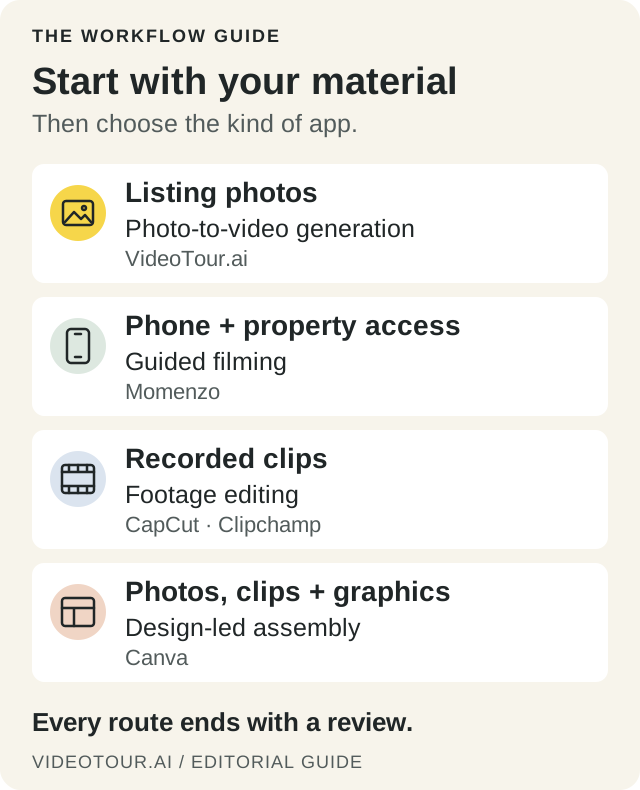
Choose the job first. Check device support and export conditions in the comparison table and profiles.
For CRM, scheduling and signatures, use the general agent workflow guide.
Apps that turn listing photos into videos
Start with photographs you own or have permission to use, plus approved listing details. Ready to use your listing photos? Follow the photo-to-video walkthrough for selection, sequencing and the final review.
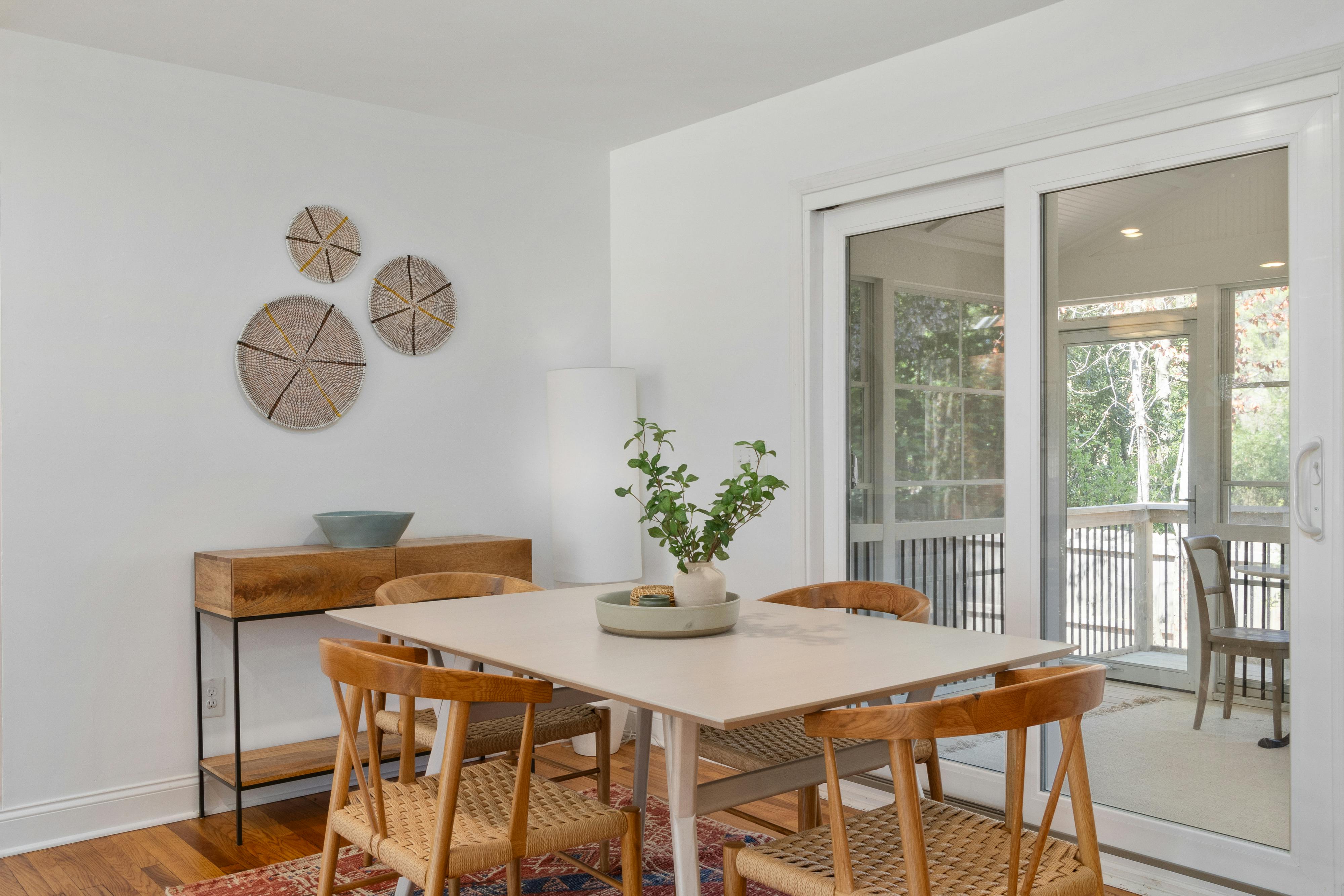
Existing photo from VideoTour’s public demonstration. Keep the original beside your output: chair edges, the table shape and window frames are useful reference points when reviewing generated motion.
Upload your photos and facts, choose the presentation options, then review the generated sequence, script, captions, music and branding in the editor. Put rooms in an understandable order; compare every scene with its original photo. Format controls help prepare each shape, but each crop still needs review.
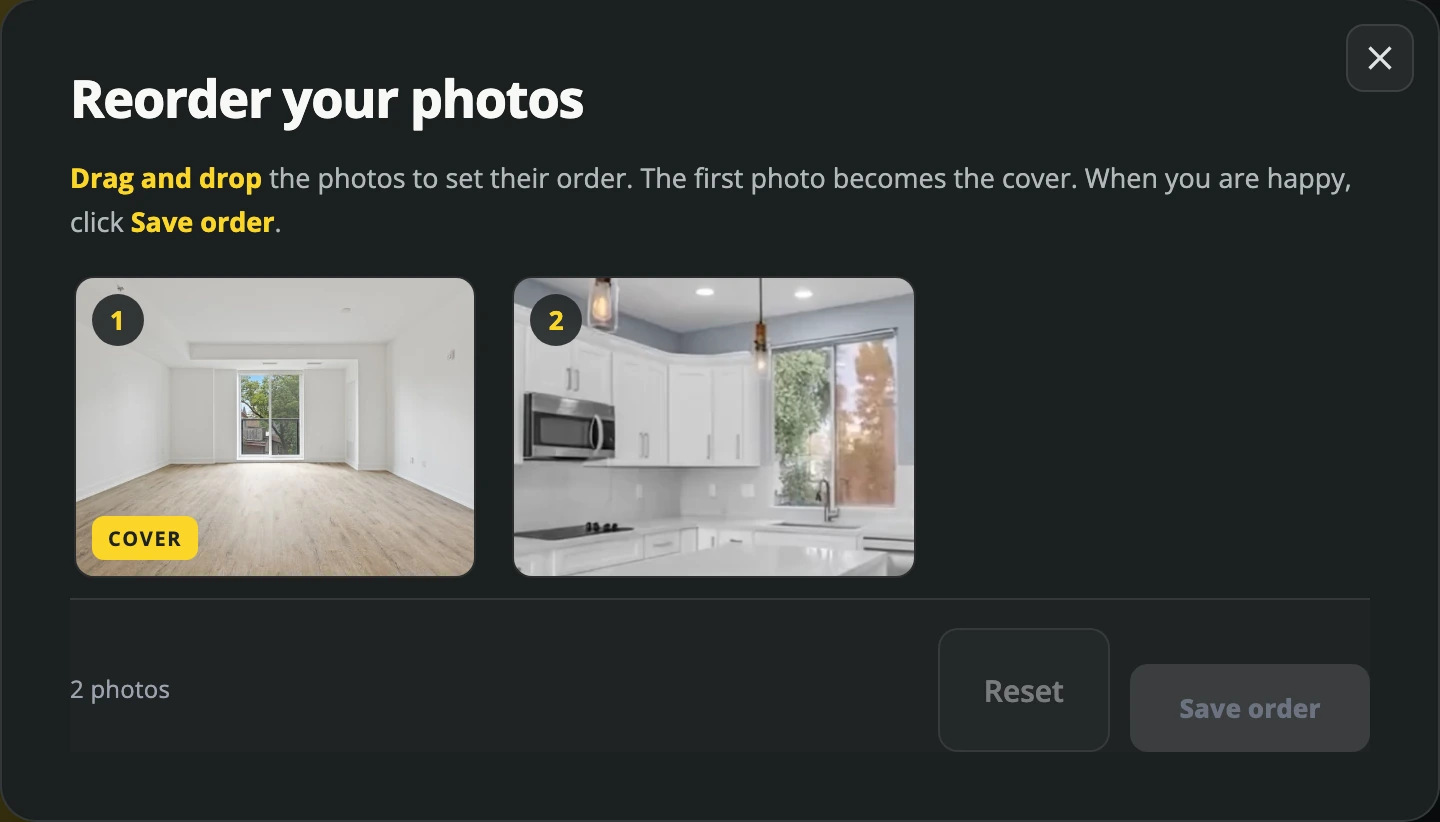
Existing VideoTour.ai editor screenshot showing property-photo order; not a timed comparison project.
Exports and cost: the first video is free, with no credit card required and no VideoTour.ai watermark. Adding new photos to an existing tour requires a paid plan. Independent costs US$39 on monthly billing; the annual option is US$348 per year, equivalent to US$29 per month. Optional AI work can consume credits: editing a sequence and generating another AI take are different operations. See current plans and free-account limits.
Limit: motion created from photographs does not prove the continuous route between rooms. Use filmed footage when that connection is the point of the video.
Existing photo from VideoTour’s public demonstration. Keep the original beside your output: chair edges, the table shape and window frames are useful reference points when reviewing generated motion.
VideoTour.ai: an editable tour from listing photos
Fits: an agent with completed photography who wants a narrated property presentation without a new filming visit. The browser workflow accepts up to 60 photos and supports horizontal, vertical and square versions.Upload your photos and facts, choose the presentation options, then review the generated sequence, script, captions, music and branding in the editor. Put rooms in an understandable order; compare every scene with its original photo. Format controls help prepare each shape, but each crop still needs review.
Existing VideoTour.ai editor screenshot showing property-photo order; not a timed comparison project.
Exports and cost: the first video is free, with no credit card required and no VideoTour.ai watermark. Adding new photos to an existing tour requires a paid plan. Independent costs US$39 on monthly billing; the annual option is US$348 per year, equivalent to US$29 per month. Optional AI work can consume credits: editing a sequence and generating another AI take are different operations. See current plans and free-account limits.
Limit: motion created from photographs does not prove the continuous route between rooms. Use filmed footage when that connection is the point of the video.
Apps for filming and editing real-estate videos
Before filming, plan the views a buyer needs to understand the space. An entrance can establish where a walkthrough begins; the next shot should explain the connection into the home.
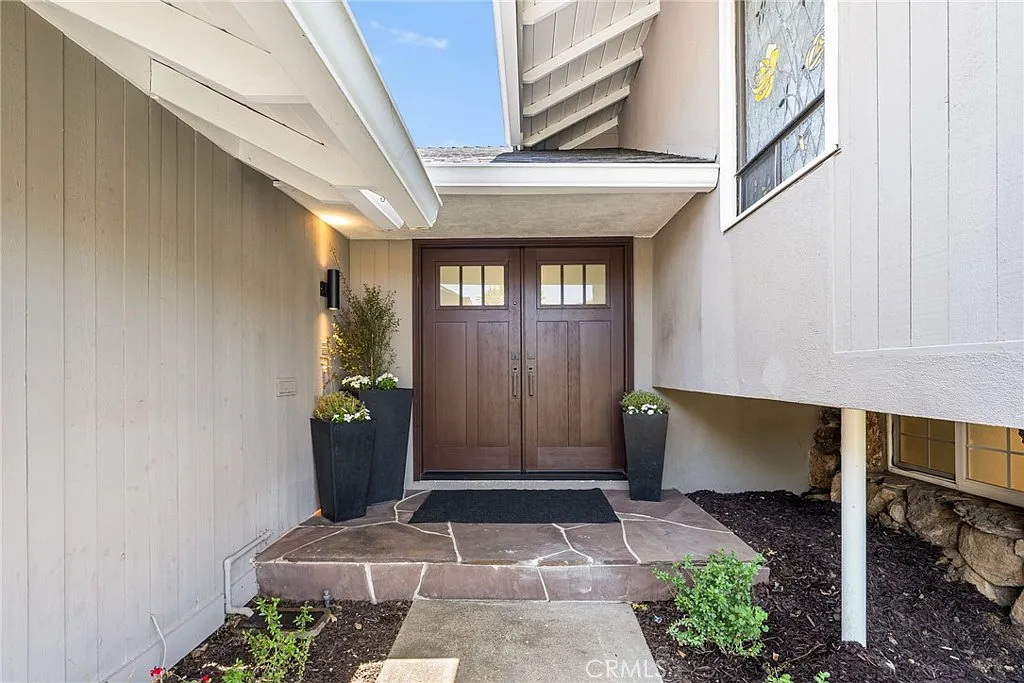
An establishing view from VideoTour’s existing photo demonstration. A filmed walkthrough would add the movement through the entrance that this still cannot show. Original image markings are retained.
For a walkthrough, record an establishing view, the connection into the living area and a steady kitchen shot. Keep vertical lines straight and avoid rushing past the feature you want a buyer to notice.
Exports and cost: the store descriptions reserve all features, profile customization and unlimited project exports for Pro. Downloading the app free does not establish a free publishable export. The US App Store lists several monthly, three-month and yearly offers, including different prices for the same duration; use the offer in your account to confirm renewal, branding and resolution terms.
Limit: a template cannot restore a missing shot or unclear spoken audio. Source: Momenzo.

Official Momenzo product visual, retained from this article. The displayed property and price are a vendor demonstration, not a tested listing. Image source.
Remove a slow opening, keep distinct views and correct automatic captions. You still decide which take is useful, where a cut belongs and whether the music competes with speech.
Exports and cost: CapCut advertises free online editing and watermark-free output, but that does not make every premium effect, asset or AI feature free. Check the selected project at export and the local subscription offer, including its billing period. Source: CapCut online editor.
Limit: using a dramatic template can obscure a room or give an ordinary cut an unnecessary effect. Start with the simplest edit that explains the property.
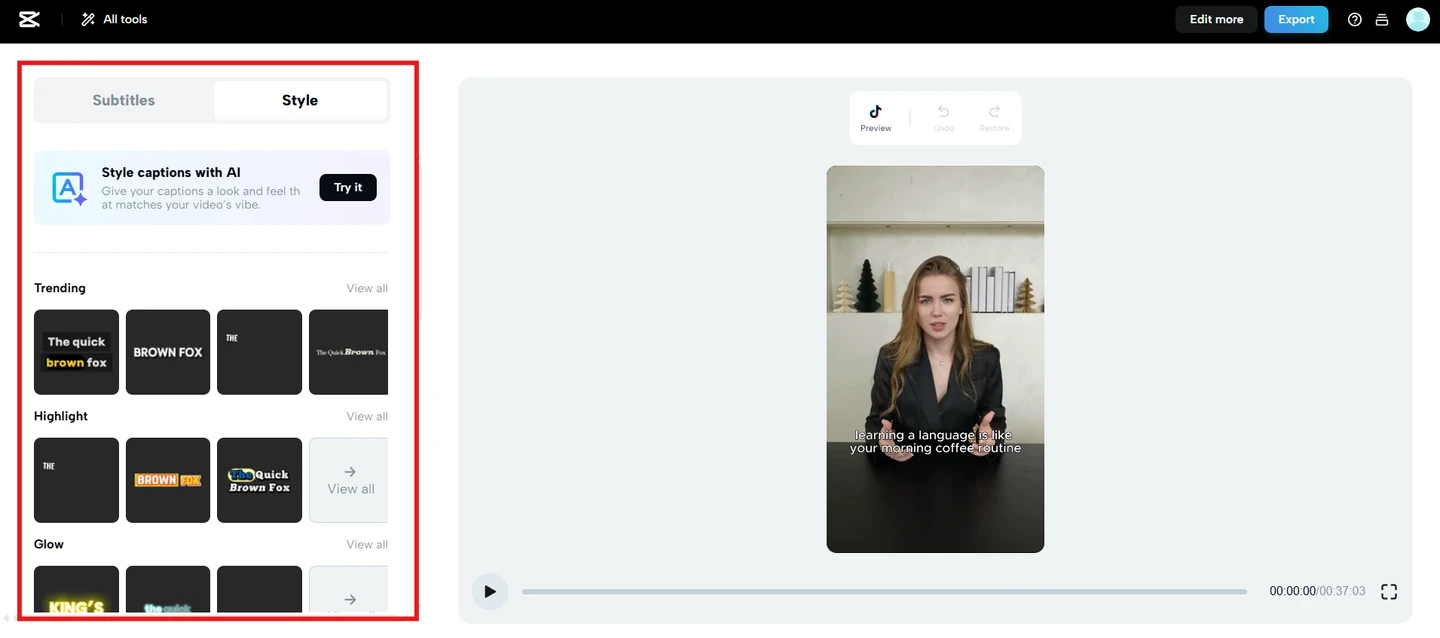
Existing screenshot from CapCut’s official caption tutorial, showing subtitle styling; not an export test.
Use a restrained opening card, property views and one closing action. You still choose the visual story, remove generic stock imagery and keep text from covering the home.
Exports and cost: free-account videos can export without a watermark when they use free assets. Pro or paid elements change that condition. Magic Resize is Pro; AI availability and allowances depend on the feature and plan. Compare the actual subscription and selected assets rather than assuming a template is wholly free. Source: Canva video editor.
Limit: a consistent graphic design does not establish accurate room order or realistic AI motion.
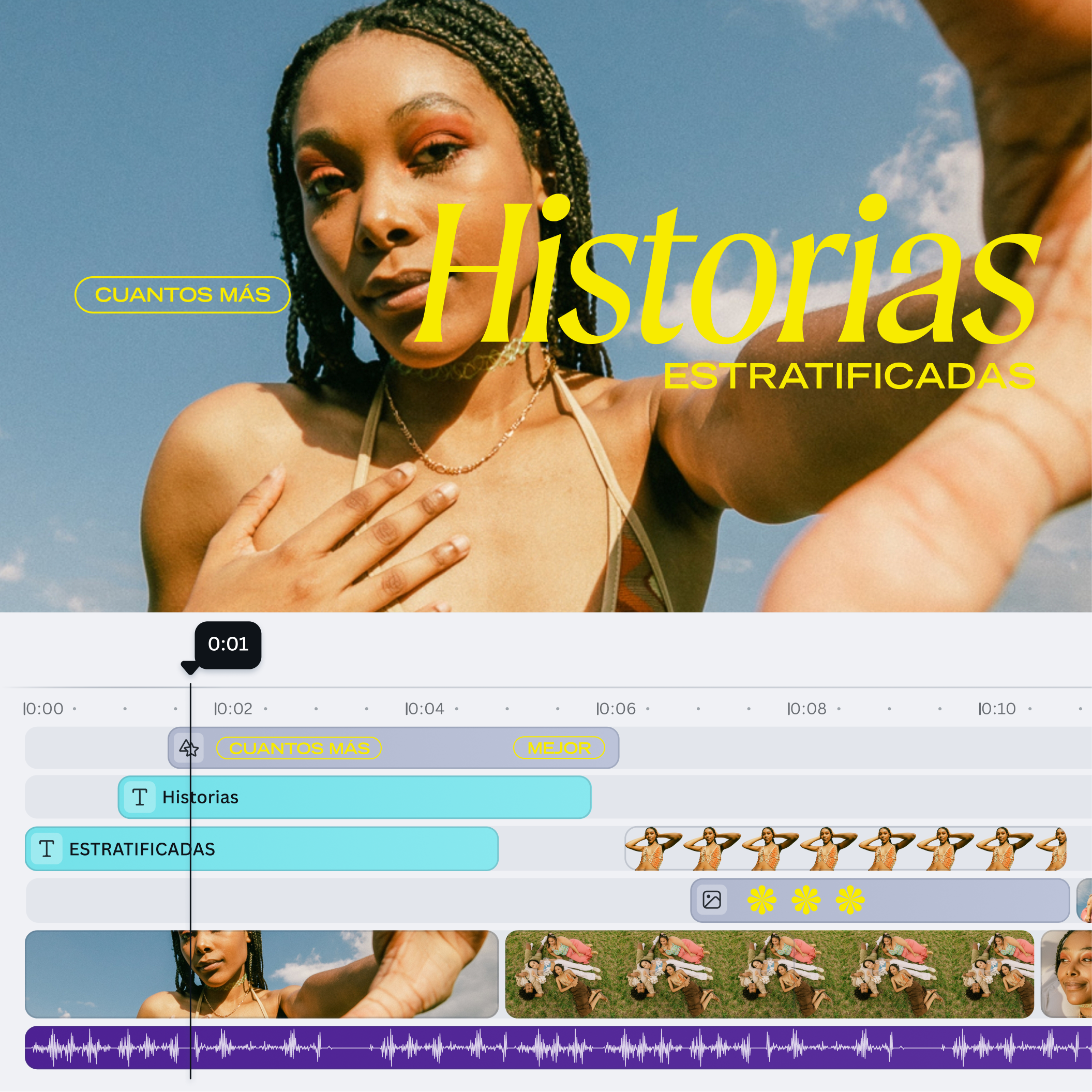
Canva’s official timeline example, in Spanish, illustrates separate text, visual and audio layers. Image source.
Import your media, assemble a sequence and check the target canvas. Automatic captions can help with transcription; you still check names and facts and choose the pacing.
Exports and cost: the personal free plan exports up to 1080p using your own media and free stock. Premium assets and features require the relevant entitlement; qualifying Microsoft 365 subscriptions add features. Work/school access depends on licensing and administrator settings. Source: Microsoft’s account and cost guide.
Limit: changing to a vertical canvas can cut off a wide room. Review Fit versus Fill using the Clipchamp aspect-ratio tutorial.

Microsoft’s official Clipchamp workspace visual, retained from this article. Image source.
An establishing view from VideoTour’s existing photo demonstration. A filmed walkthrough would add the movement through the entrance that this still cannot show. Original image markings are retained.
Momenzo: guidance while you film the property
Fits: an agent on site with a phone. Verified listings are available for iPhone and Android. Momenzo provides filming guidance, property templates, a teleprompter and automated assembly. You supply the footage and check the result.For a walkthrough, record an establishing view, the connection into the living area and a steady kitchen shot. Keep vertical lines straight and avoid rushing past the feature you want a buyer to notice.
Exports and cost: the store descriptions reserve all features, profile customization and unlimited project exports for Pro. Downloading the app free does not establish a free publishable export. The US App Store lists several monthly, three-month and yearly offers, including different prices for the same duration; use the offer in your account to confirm renewal, branding and resolution terms.
Limit: a template cannot restore a missing shot or unclear spoken audio. Source: Momenzo.
Official Momenzo product visual, retained from this article. The displayed property and price are a vendor demonstration, not a tested listing. Image source.
CapCut: control over recorded clips and social edits
Fits: footage that needs a tighter story, such as a phone walkthrough or an agent answering one buyer question. CapCut offers web, desktop and mobile routes. Its online editor supports trimming, splitting, text, captions and export settings; AI features and templates are additional options, not a requirement for this manual edit.Remove a slow opening, keep distinct views and correct automatic captions. You still decide which take is useful, where a cut belongs and whether the music competes with speech.
Exports and cost: CapCut advertises free online editing and watermark-free output, but that does not make every premium effect, asset or AI feature free. Check the selected project at export and the local subscription offer, including its billing period. Source: CapCut online editor.
Limit: using a dramatic template can obscure a room or give an ordinary cut an unnecessary effect. Start with the simplest edit that explains the property.
Existing screenshot from CapCut’s official caption tutorial, showing subtitle styling; not an export test.
Canva: video within a wider listing campaign
Fits: a campaign that needs a video, cover, flyer and consistent graphics. Canva’s web editor and mobile apps accept photos and clips. Timeline layers, templates and captions support assembly; its current tools also include image-to-video generation and AI-assisted clip selection. It is not limited to slideshows.Use a restrained opening card, property views and one closing action. You still choose the visual story, remove generic stock imagery and keep text from covering the home.
Exports and cost: free-account videos can export without a watermark when they use free assets. Pro or paid elements change that condition. Magic Resize is Pro; AI availability and allowances depend on the feature and plan. Compare the actual subscription and selected assets rather than assuming a template is wholly free. Source: Canva video editor.
Limit: a consistent graphic design does not establish accurate room order or realistic AI motion.
Canva’s official timeline example, in Spanish, illustrates separate text, visual and audio layers. Image source.
Clipchamp: a straightforward desktop editing route
Fits: clips or photos you want to arrange, trim, caption and resize. Microsoft supports the desktop editor in Edge or Chrome on computers, and through the Windows app. The desktop editor is not supported in mobile browsers on Android, iPhone or iPad. See supported devices.Import your media, assemble a sequence and check the target canvas. Automatic captions can help with transcription; you still check names and facts and choose the pacing.
Exports and cost: the personal free plan exports up to 1080p using your own media and free stock. Premium assets and features require the relevant entitlement; qualifying Microsoft 365 subscriptions add features. Work/school access depends on licensing and administrator settings. Source: Microsoft’s account and cost guide.
Limit: changing to a vertical canvas can cut off a wide room. Review Fit versus Fill using the Clipchamp aspect-ratio tutorial.
Microsoft’s official Clipchamp workspace visual, retained from this article. Image source.
When a specialist editor makes more sense
Keep Adobe Premiere on the shortlist when someone must combine multiple cameras, balance agent dialogue, match color and manage detailed revisions. Its desktop workflow offers timeline, sound, titles and color controls, but an editor still selects takes and finishes the production. It is paid software; compare the commitment as well as the monthly figure when choosing annual or monthly billing.
WeVideo is another browser-based option when media organization and a team review process matter. Verify collaboration and output features on the chosen plan. Its trial documentation describes a seven-day trial with watermarked exports. A trial project is useful for evaluating the workflow; it is not the same deliverable as an approved paid export.
For a closer look at the editing work, see Adobe’s timeline controls and WeVideo’s clip-editing guide. Neither route removes the need for usable source footage or a clear brief.
WeVideo is another browser-based option when media organization and a team review process matter. Verify collaboration and output features on the chosen plan. Its trial documentation describes a seven-day trial with watermarked exports. A trial project is useful for evaluating the workflow; it is not the same deliverable as an approved paid export.
For a closer look at the editing work, see Adobe’s timeline controls and WeVideo’s clip-editing guide. Neither route removes the need for usable source footage or a clear brief.
Compare the cost of a finished listing video
Compare a usable output, not the cheapest signup. Terms below were checked on October 15, 2026; confirm the offer in your country and account before buying.
A worked method, not a test result: suppose you pay US$39 for a monthly plan and finish five listing videos. The plan allocation is US$7.80 per finished video. Add any extra generation or licensed-media spending, then your measured active hours multiplied by your chosen hourly value. Divide an annual fee across the year only when that matches your actual commitment and output.
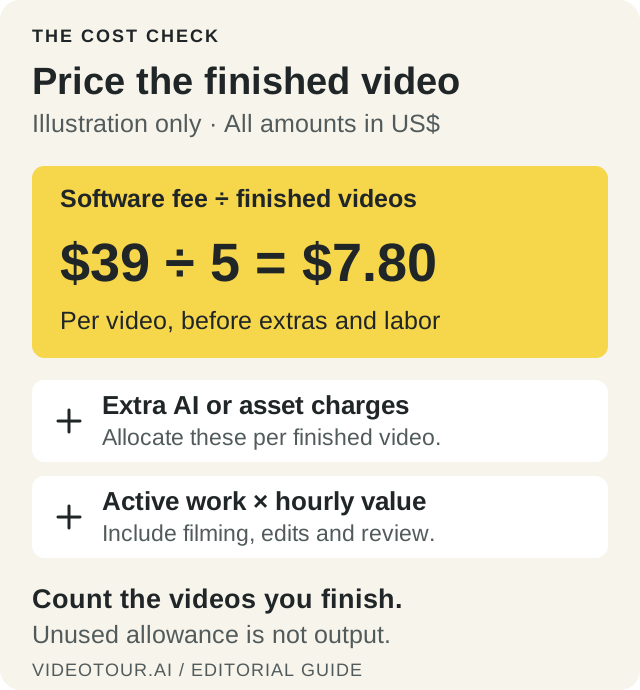
A calculation method, not a measured result or an all-inclusive production quote. Use the billing period, actual output and costs that apply to your work.
The real estate video cost guide has a fuller worksheet. An unused allowance does not lower the cost of the videos you actually publish.
| Cost layer | What to compare |
|---|---|
| Plan and included output | VideoTour Independent: US$39 monthly, or US$348/year (US$29/month equivalent). Monthly plan: 10 videos. Momenzo Pro includes unlimited project exports. |
| AI usage | Separate ordinary edits from new generation. VideoTour optional AI work can use credits. Canva’s AI limits depend on the feature and plan. |
| Export and assets | Canva free output depends on asset selection. Clipchamp personal free exports reach 1080p with free/owned media. Verify paid assets before finishing. |
| Human time | Include filming, selecting takes, correcting facts, reviewing crops, exporting and approval. Keep generation waiting time separate from active work. |
A worked method, not a test result: suppose you pay US$39 for a monthly plan and finish five listing videos. The plan allocation is US$7.80 per finished video. Add any extra generation or licensed-media spending, then your measured active hours multiplied by your chosen hourly value. Divide an annual fee across the year only when that matches your actual commitment and output.
A calculation method, not a measured result or an all-inclusive production quote. Use the billing period, actual output and costs that apply to your work.
The real estate video cost guide has a fuller worksheet. An unused allowance does not lower the cost of the videos you actually publish.
How to compare apps on your own listing
Choose two tools that solve the same job. A photo generator and a phone-filming app need different inputs, so one photo-only task cannot fairly rank both.
One result is a case study for that listing. It does not establish a universal speed or quality winner.
- Prepare a permitted pack. For photo tools, use 10–12 images of one property: exterior, wide rooms, a detail and a difficult window or mirror scene. Keep originals and a short verified fact sheet. Use a separate clip pack for footage editors.
- Set one deliverable. For example, request a 30-second vertical teaser with three approved facts and a closing action. This is an evaluation brief, not a promised generation time.
- Record the setup. Note tool, date, plan, browser or app version, device, settings and cost. Separate queue/render waiting from hands-on work.
- Make a realistic correction. Change a room label, reorder two scenes and replace one image if the plan allows. Record any blocked action or additional charge.
- Inspect the downloaded file. Watch on a phone with and without sound. Note specific issues such as a cropped doorway or a caption needing correction, and keep the output beside its originals.
One result is a case study for that listing. It does not establish a universal speed or quality winner.
Check the version you will actually publish
- Property accuracy: compare doors, windows, room proportions and reflections with the originals. Confirm all spoken and written facts.
- Readability and crop: view captions and labels on a phone. Check that overlays and platform controls will not cover important features.
- Branding and destination: check your MLS or other destination’s current requirements. An unbranded viewing page does not remove contact details already visible or spoken in the video.
- Audio: listen for pronunciation, abrupt cuts and music competing with narration. Use audio permitted for your intended placement.
- Final version: apply edits, export again and inspect the actual file you intend to upload.
A wide room needs a deliberate crop
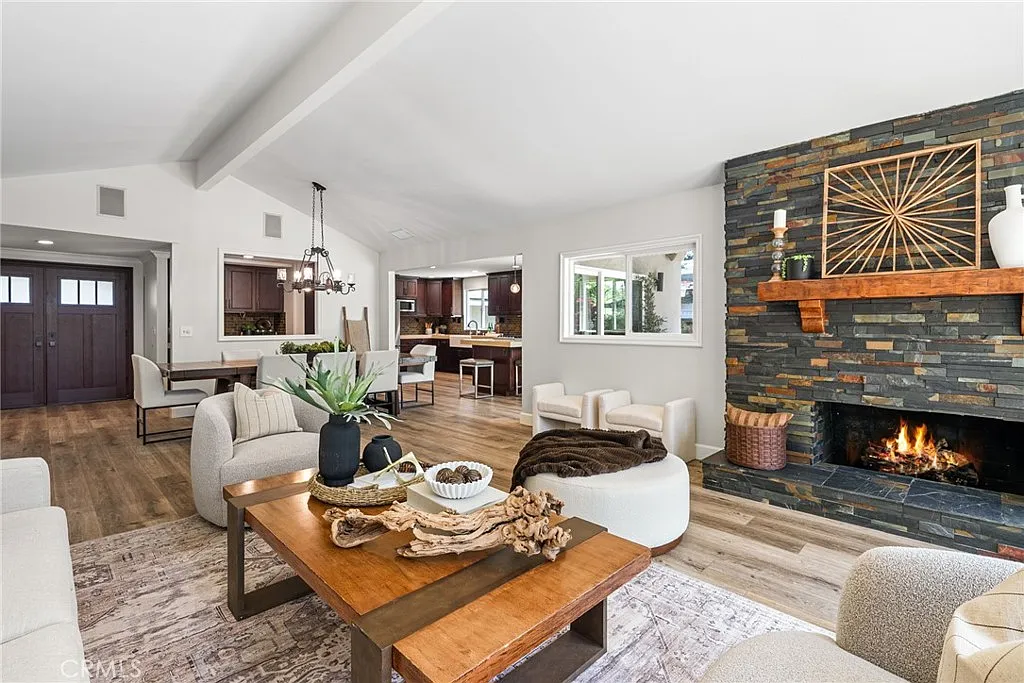
Another existing VideoTour demo photo, with its original markings. The entrance is at the left and the fireplace at the right: a narrow centered crop cannot retain the full width. Decide which features the shot needs to explain.
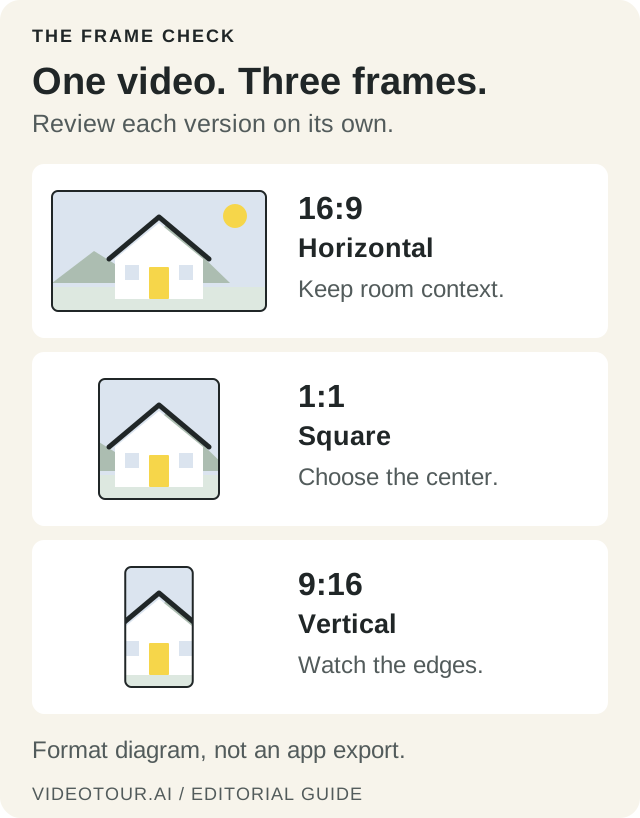
The illustration uses a simple drawing to explain centered cropping; it is not an app export. Fit can preserve the full image with space around it, while Fill can crop the edges. Review captions and important features in the downloaded version.
Inspect an existing photo-to-motion example
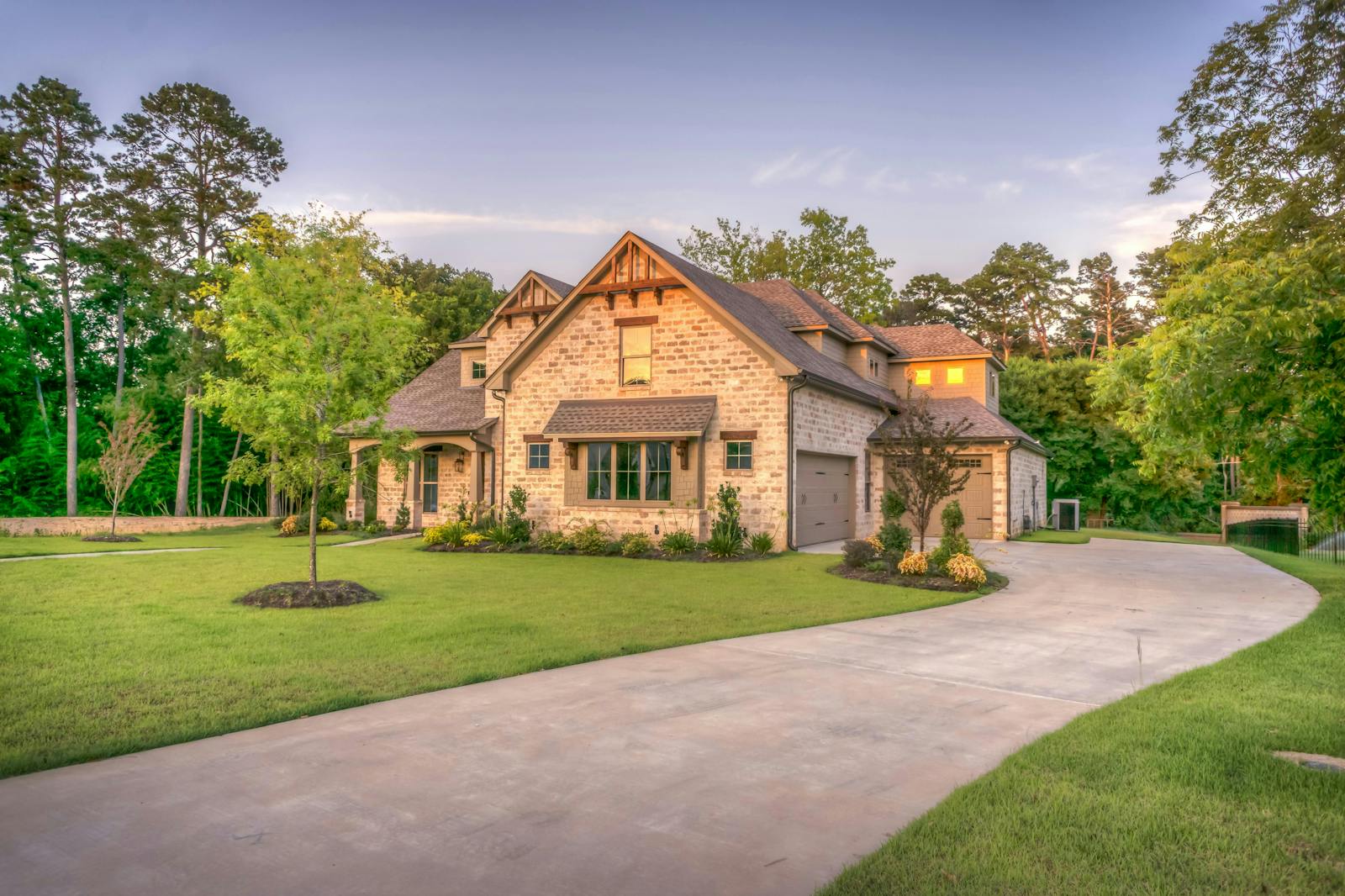
Watch the existing VideoTour.ai house-motion demonstration (MP4)
Source photo and generated scene reused from VideoTour.ai’s public product demonstration. This is a single promotional example, not a new same-listing test, complete tour or evidence of typical results. Its original plan, settings, generation time and correction history were not recorded for this comparison.
Use the pair to see what to examine: the roofline, window placement and edges of the building as the viewpoint moves. Follow the format guide for crop decisions, and the short-video ideas and scripts for focused follow-up clips.
Questions agents ask before choosing an app
Can I create a real-estate video from photos?
Yes. VideoTour.ai turns listing photos into a video; general editors also let you assemble images. Compare motion, narration, branding and export, then review the result against the original photos.Should I use a phone filming app or an editor?
Use filming guidance when you still need to capture the property. Momenzo has iPhone and Android listings. If footage is already recorded, compare editing controls; CapCut and Canva have mobile routes. Clipchamp’s desktop editor needs a supported computer, not a mobile browser.Is there a genuinely free option?
Yes, with different boundaries. VideoTour offers a first video free with no credit card. Canva and Clipchamp support free exports under the asset and account conditions above. Check the finished file, resolution and selected features before committing to a workflow.Will AI remove all the editing work?
AI can assemble material or generate motion, but someone still checks the facts, visual fidelity, captions, crop and final export. Choose based on the corrections your listing requires and the controls available to make them.Conclusion
If your listing photos are ready, create a video from your listing photos in VideoTour.ai, then review the facts and final export before sharing. If you are still choosing shots, narration or a filming route, plan your listing video first. Start with one property and one clear audience action.