

To create an Instagram Reel from real estate photos, choose one message, select views that support it and prepare a short sequence with a clear next step. A Reel should give the viewer a reason to open the full listing, ask a property question or check a confirmed viewing.
This guide focuses on producing the property video before uploading it. For the separate Instagram app workflow, see how to create a Reel in Instagram.
This guide focuses on producing the property video before uploading it. For the separate Instagram app workflow, see how to create a Reel in Instagram.
Summary
Create an AI Video Tours from PhotosTry it For Free

1. Pick one message and the matching photos
Choose a specific job: introduce a new listing, show one feature, explain a layout detail or invite viewers to an open house. Avoid combining an agent introduction, neighborhood guide and full property tour in one short post.
Select clear, permitted photographs that support the chosen message. Begin with a relevant view, then add enough context to make the feature understandable. A kitchen detail might need a wider kitchen image; a patio close-up might need a view showing its connection to the home.
Keep a small fact sheet alongside the photos: property reference, current status, verified features and the destination for the next step. If you include a price or date, plan how you will update or retire the post when it becomes stale.
Select clear, permitted photographs that support the chosen message. Begin with a relevant view, then add enough context to make the feature understandable. A kitchen detail might need a wider kitchen image; a patio close-up might need a view showing its connection to the home.
Keep a small fact sheet alongside the photos: property reference, current status, verified features and the destination for the next step. If you include a price or date, plan how you will update or retire the post when it becomes stale.
2. Copy this 25-second property Reel storyboard
This is an original planning example, not a platform requirement or a promise about performance. Replace each placeholder with verified details and adjust the timing to the actual images.
Optional narration:
Read the words aloud and remove anything the pictures do not support. For additional openings, use the short-video script library.
| Time | Photo or scene | On-screen message |
|---|---|---|
| 0–3 seconds | The featured space | “A closer look at {verified feature}” |
| 3–8 seconds | A wider contextual view | “Here is how it fits into {room}” |
| 8–14 seconds | A second useful angle | One short factual detail |
| 14–20 seconds | Another relevant room or exterior | A brief location or property reference |
| 20–25 seconds | A clean closing view | “See the complete listing” or a confirmed viewing invitation |
Optional narration:
“Here’s a closer look at {feature}. This wider view shows {verified context}. The property also includes {confirmed detail}. Open the complete listing for the current information and viewing arrangements.”
Read the words aloud and remove anything the pictures do not support. For additional openings, use the short-video script library.
3. Build the Reel in VideoTour.ai
In an existing tour’s editor, open Social posts → AI Reels. Choose the relevant Reel type and review its options. To pick photos yourself, turn off Let AI select photos automatically; selected photos are numbered in playback order, and the allowed count depends on duration.
Review the opening, property details, language, length, quality and displayed credits before generating. For a new tour, an AI Reel can also be included during creation where offered.
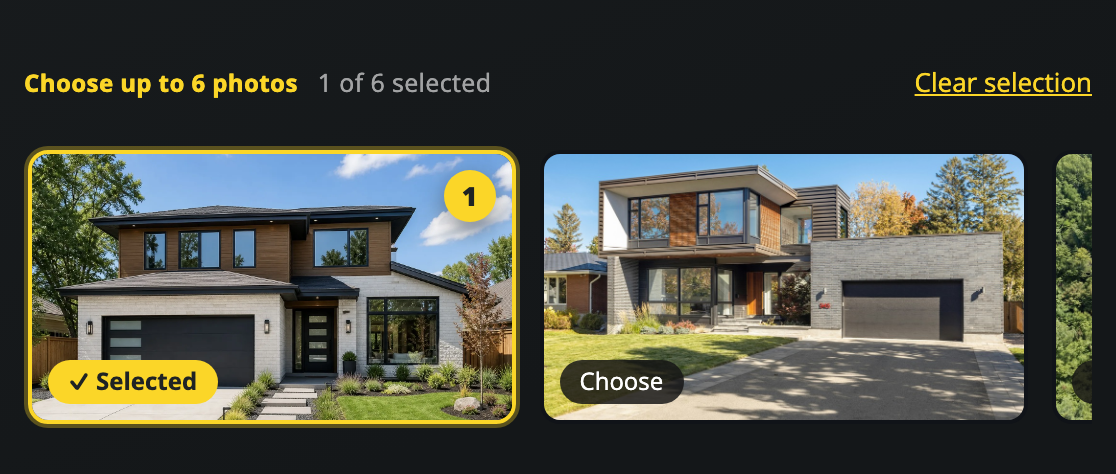
Actual VideoTour.ai controls. The numbers show the selected playback order.
Source: current VideoTour.ai Reel instructions
Use effects only when they support the message. A simple view of the feature may be more informative than a busy transition. Check generated property details against the source photographs.
Review the opening, property details, language, length, quality and displayed credits before generating. For a new tour, an AI Reel can also be included during creation where offered.
Actual VideoTour.ai controls. The numbers show the selected playback order.
Source: current VideoTour.ai Reel instructions
Use effects only when they support the message. A simple view of the feature may be more informative than a busy transition. Check generated property details against the source photographs.
4. Check the opening, room labels and final action
Open the completed Reel in its own editor. Opening Reel copy contains the property address and opening hook. Review later scene labels and the Call to action field, then apply the changes and download the finished Reel. A change to the original tour does not automatically update an already generated Reel.
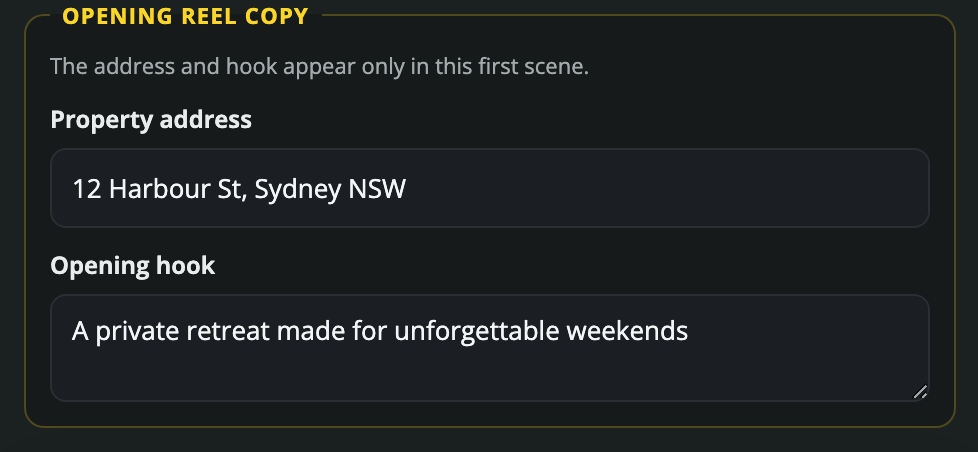
Actual opening-copy controls. Keep the property address separate from the introductory message.
Review the exported video on a phone. The opening should explain why the image matters without covering its key feature. The final action should be readable long enough to understand. Watch muted as well as with sound.
Avoid a generic “contact me” when a more useful action exists. For an open house, provide the confirmed event details. For a feature preview, direct people to the full listing or invite a specific question.
Actual opening-copy controls. Keep the property address separate from the introductory message.
Review the exported video on a phone. The opening should explain why the image matters without covering its key feature. The final action should be readable long enough to understand. Watch muted as well as with sound.
Avoid a generic “contact me” when a more useful action exists. For an open house, provide the confirmed event details. For a feature preview, direct people to the full listing or invite a specific question.
5. Prepare the Instagram post and preview it
Choose a cover that represents the property and remains readable in the placements where it appears. Keep important words away from edges and inspect the actual upload preview; the app’s interface and crops can change.
Caption structure to adapt:
Check that any music or audio is permitted for the intended business use and placement. Use accurate location information and a relevant destination. Do not rely on an unsupported “best posting time” or a fixed hashtag count to compensate for an unclear video.
For the wider account and follow-up process, see the real estate Instagram marketing guide.
Caption structure to adapt:
“A closer look at {verified feature} in {property or area}. The complete listing has the current {price or availability, if appropriate}, details and viewing arrangements. {One clear next step}.”
Check that any music or audio is permitted for the intended business use and placement. Use accurate location information and a relevant destination. Do not rely on an unsupported “best posting time” or a fixed hashtag count to compensate for an unclear video.
For the wider account and follow-up process, see the real estate Instagram marketing guide.
6. Use a launch checklist and learn from one change
- Every photo belongs to the intended property and is permitted for use.
- Status, price, address and any event time are current.
- The opening matches the feature shown.
- Generated details, room labels and narration have been reviewed.
- The vertical composition keeps important features visible.
- The cover, captions and closing action remain readable in the upload preview.
- The destination and contact route work.
- The downloaded Reel is the latest approved version.
Record the post date, message, destination, production effort, relevant replies and listing visits. If the post gets views but few next steps, inspect whether the action and destination are useful before making another version.
Change one element at a time, such as the opening sentence or the first photo. Small samples are noisy, so avoid declaring a winner from a handful of views. Use the result to improve the next Reel rather than promising a specific reach or sales result.
Ready to assemble the property portion? Explore the VideoTour.ai real estate Reel workflow.
FAQ
Can I make a real estate Reel using only photos?
Yes. Choose a focused sequence of permitted photos, add short factual labels and review the finished video. Use actual footage when you need to show continuous movement.How many photos should I use?
Use enough to explain the message without rushing. In VideoTour.ai’s manual Reel selection, the available count depends on the chosen duration.Will editing the main tour update an existing Reel?
Not automatically. Open and review the Reel separately, apply its changes and download the new finished file.What should the first line say?
Name the feature or question the video actually answers. A specific line is more useful than an unsupported claim that the home is the best deal in the area.Conclusion
Give the Reel one job, show the property clearly and make the next step easy. Review the Reel as its own finished piece of marketing, especially when the original tour or listing details change.