
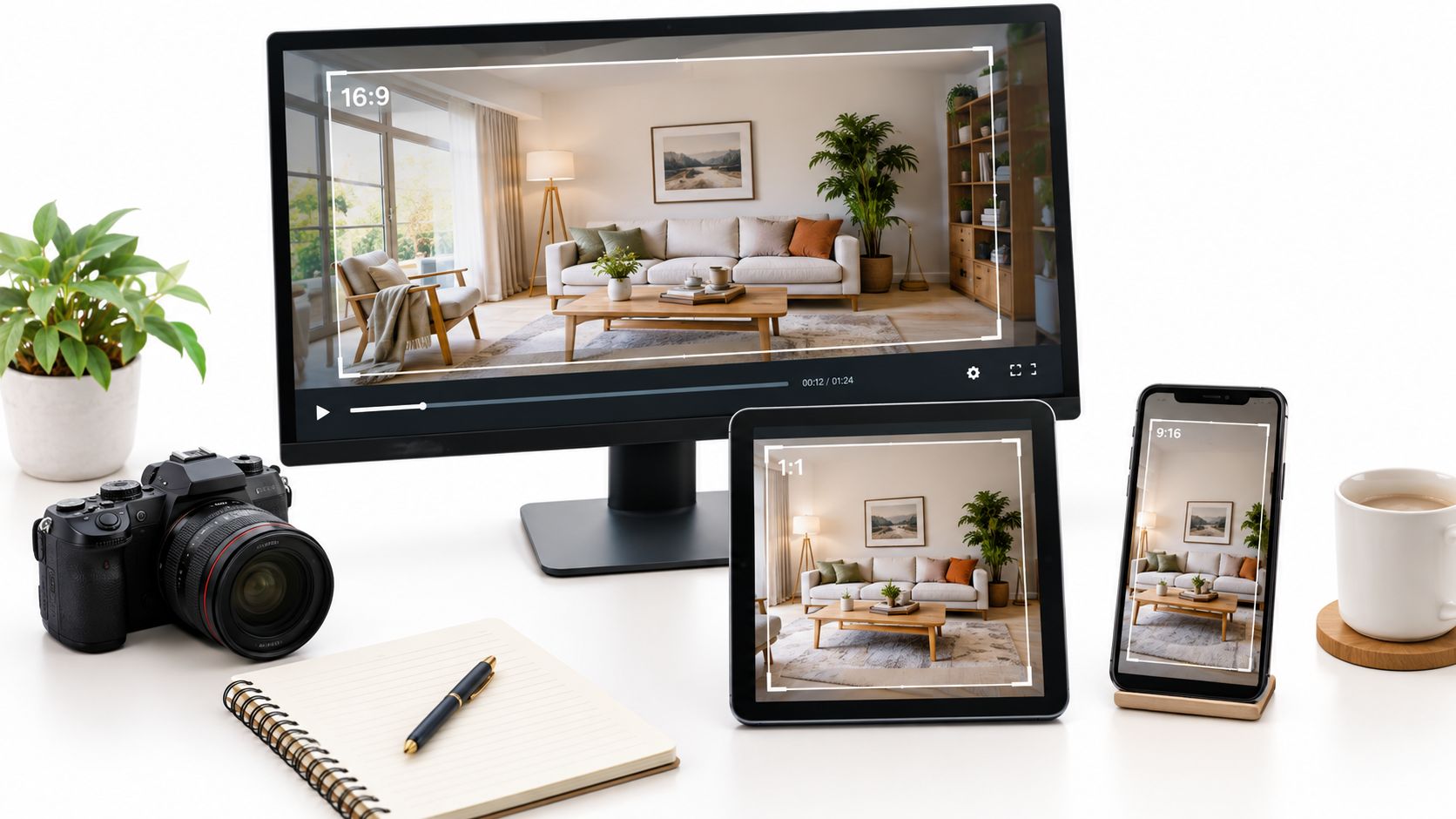
A listing tour can look polished in the MLS player and suddenly become unusable when it reaches Reels. The kitchen island disappears, the agent's lower-third covers the room label, and the exterior shot loses the front door. The file exported successfully, but the story didn't survive the frame.
That's the practical problem behind every video aspect ratio change. You aren't only changing width and height. You're deciding which parts of a property remain visible, which details buyers notice, and whether the composition feels intentional on each platform. The reliable workflow keeps a clean master, creates ratio-specific compositions, and reviews the result as a buyer would see it.
That's the practical problem behind every video aspect ratio change. You aren't only changing width and height. You're deciding which parts of a property remain visible, which details buyers notice, and whether the composition feels intentional on each platform. The reliable workflow keeps a clean master, creates ratio-specific compositions, and reviews the result as a buyer would see it.
Summary
Create an AI Video Tours from PhotosTry it For Free

Why Your Vertical Crop Cut Off the Kitchen
A real estate agent starts with a 30-second 16:9 walkthrough. The kitchen shot is wide enough to show the island, pendant lights, cabinetry, and the opening into the living room. The listing copy describes that island in detail. Then the agent sends the video to Instagram Reels, where the horizontal frame is forced into 9:16.
A center crop keeps the middle of the image and removes much of the left and right edges. If the island extends toward one side, the crop can cut it in half. The algorithm hasn't made a creative decision. It has selected a geometric window, even though the room's selling point sits outside that window.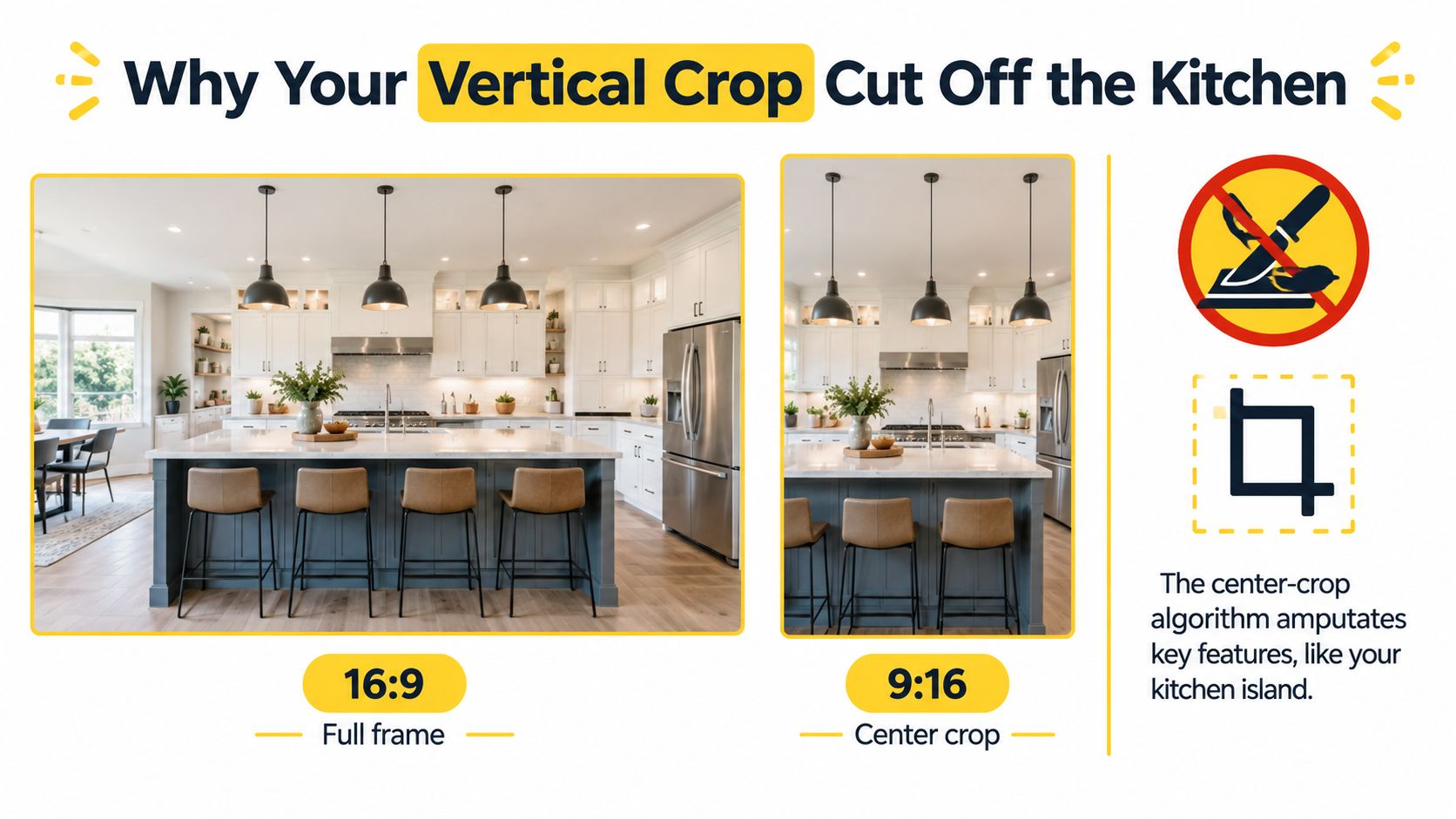
The production question should therefore come first: what must survive this shot? For a kitchen, that might be the island and its relationship to the work triangle. For a bedroom, it might be the window, bed, and wardrobe. For an exterior, it could be the entrance and the façade's proportions.
A useful shot review asks three things:
For property tours, adaptive reframing is the practical fix. The system should identify the island, fireplace, person, or text, then position that element inside the vertical composition. If one image needs the crop shifted left and the next needs it shifted right, those are separate editorial decisions, not an error in the source material.
A center crop keeps the middle of the image and removes much of the left and right edges. If the island extends toward one side, the crop can cut it in half. The algorithm hasn't made a creative decision. It has selected a geometric window, even though the room's selling point sits outside that window.
Start with the subject, not the preset
Aspect ratio describes the relationship between a frame's width and height. It doesn't tell you whether the frame contains the information a buyer needs. A 16:9 composition gives a room horizontal breathing space. A 9:16 composition prioritizes a tall, phone-first view. A 1:1 frame sits between those extremes, while 4:3 preserves a shape associated with older television and some legacy property systems.The production question should therefore come first: what must survive this shot? For a kitchen, that might be the island and its relationship to the work triangle. For a bedroom, it might be the window, bed, and wardrobe. For an exterior, it could be the entrance and the façade's proportions.
A useful shot review asks three things:
- Subject: Which architectural feature carries the message?
- Context: What surrounding space helps buyers understand scale?
- Overlay: Where can captions, logos, or agent details sit without covering the feature?
Reframing preserves meaning
The move from 16:9 to 9:16 retains only about 31.6% of the original frame width at equal height, according to the workflow guidance in this aspect-ratio production reference. That's why a fixed center crop is risky for wide interiors. The narrower frame needs a different focal point for each shot.For property tours, adaptive reframing is the practical fix. The system should identify the island, fireplace, person, or text, then position that element inside the vertical composition. If one image needs the crop shifted left and the next needs it shifted right, those are separate editorial decisions, not an error in the source material.
The Aspect Ratios Real Estate Videos Actually Use
A bright kitchen can sell the listing in 16:9 and lose its meaning in 9:16. The island disappears, the relationship between the counters and dining area breaks, and the viewer sees a tight cabinet shot instead of a usable room. Ratio selection is therefore a semantic reframing decision, not a resizing task. Choose the frame that preserves what the shot needs to communicate, then build that version in VideoTour.ai's multi-ratio export workflow.
16:9 remains the dependable widescreen master for MLS pages, websites, standard YouTube viewing, and desktop playback. Its width supports open-plan kitchens, living rooms, façades, and full walkthroughs. The format became a digital baseline through the adoption of 16:9, or 1.78:1, for widescreen television and high-definition video. The earlier move from 4:3 to widescreen also explains why older footage may require cropping, masking, or reframing when reused, as documented in the Australian Screen Online aspect-ratio history.
9:16 suits Reels, TikTok, Shorts, and Stories because it fills an upright phone display. It also exposes weak composition quickly. Wide rooms, two-subject shots, and furniture placed near the edges can lose their meaning. Use vertical delivery when the channel requires it, then select a new focal point for each shot rather than applying one centered crop to the whole tour.
1:1 fits square feed posts, carousel videos, and property announcements. It gives one feature more presence than a horizontal frame without committing to a tall composition. That makes it useful for a renovated kitchen, fireplace, bathroom finish, or other single upgrade.
4:3 still has a role when a legacy MLS or source image uses that geometry. It can retain more vertical information than a widescreen crop, although footage created for modern widescreen delivery may lose its intended balance when fitted into the older shape.
Ratio planning also controls redistribution. When property clips move between feed formats, real estate meme distribution only works when every crop preserves the listing's focal feature. The VideoTour.ai guide to video aspect ratios can help map those versions before export.
Match the ratio to the listing moment. A full tour must communicate room relationships. A vertical teaser needs one immediate visual subject. A square announcement should make one upgrade legible. The frame changes the message, so review each export as its own edit.
16:9 remains the dependable widescreen master for MLS pages, websites, standard YouTube viewing, and desktop playback. Its width supports open-plan kitchens, living rooms, façades, and full walkthroughs. The format became a digital baseline through the adoption of 16:9, or 1.78:1, for widescreen television and high-definition video. The earlier move from 4:3 to widescreen also explains why older footage may require cropping, masking, or reframing when reused, as documented in the Australian Screen Online aspect-ratio history.
9:16 suits Reels, TikTok, Shorts, and Stories because it fills an upright phone display. It also exposes weak composition quickly. Wide rooms, two-subject shots, and furniture placed near the edges can lose their meaning. Use vertical delivery when the channel requires it, then select a new focal point for each shot rather than applying one centered crop to the whole tour.
1:1 fits square feed posts, carousel videos, and property announcements. It gives one feature more presence than a horizontal frame without committing to a tall composition. That makes it useful for a renovated kitchen, fireplace, bathroom finish, or other single upgrade.
4:3 still has a role when a legacy MLS or source image uses that geometry. It can retain more vertical information than a widescreen crop, although footage created for modern widescreen delivery may lose its intended balance when fitted into the older shape.
| Aspect Ratio | Where It Ships | What It Does Well | What It Breaks |
|---|---|---|---|
| 16:9 | MLS, websites, standard YouTube | Shows room width, flow, and complete horizontal compositions | Can feel small or letterboxed in vertical feeds |
| 9:16 | Reels, TikTok, Shorts, Stories | Fills a phone screen and supports mobile-first viewing | Cuts wide rooms, side furniture, and edge captions without reframing |
| 1:1 | Square feeds, carousel posts, announcements | Gives a balanced composition for a single property feature | Reduces horizontal context and vertical headroom |
| 4:3 | Legacy MLS systems and selected source material | Retains a familiar near-square image shape | Can crop or waste space when derived from widescreen footage |
Match the ratio to the listing moment. A full tour must communicate room relationships. A vertical teaser needs one immediate visual subject. A square announcement should make one upgrade legible. The frame changes the message, so review each export as its own edit.
Crop, Pad, or Reframe
A video aspect ratio change is a composition decision, not a resizing step. Choose the treatment based on what the shot needs to communicate, then accept the trade-off that comes with it. There are three workable options: crop, pad, or reframe.
Cropping fills the target frame by removing the source edges. It works when the subject is central and the surrounding information adds little. A close shot of a sink, fireplace, or bathroom vanity often survives a crop. A wide kitchen can lose the island, cabinets, or the relationship between work areas.
Padding, also called letterboxing or pillarboxing depending on where the empty areas appear, keeps the complete source image. Use it for MLS pages, desktop presentations, or panoramic rooms where context matters more than full-screen fill. In a vertical social feed, empty side areas make the video look like a horizontal file placed inside a phone frame. The platform may also add its own treatment around the content.
Adaptive reframing changes the composition from shot to shot. The full source remains available, while the crop window moves to keep the intended subject visible. Use it when a room has an island on one side, a fireplace on the other, or captions that need to stay clear of the architecture.
A property tour built from photos has no reason to use one treatment everywhere. Each image can have its own focal point, caption position, and safe area. That shot-level judgment is what keeps a vertical export from losing the room's meaning.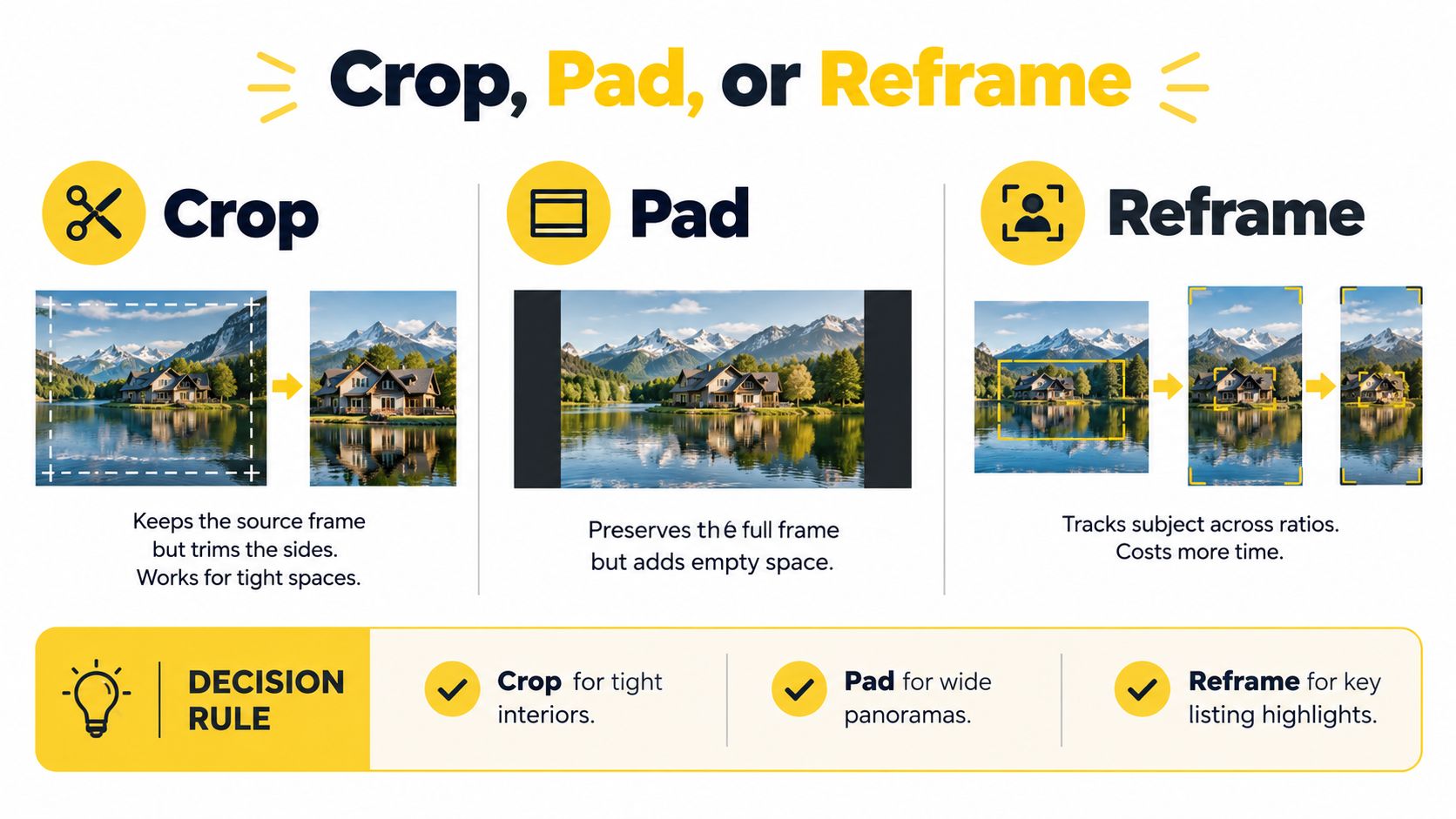 Text adds another check. Before exporting a vertical version, teams can extract text from video clips to identify addresses, room labels, and promotional overlays that need independent placement. A crop that keeps the kitchen but hides the price is still a failed edit.
People need the same review. If an agent stands near the edge of a wide frame, a center crop can remove the face or gesture. If the kitchen island and fireplace compete for attention, one fixed crop may preserve one and cut away the other.
Cropping fills the target frame by removing the source edges. It works when the subject is central and the surrounding information adds little. A close shot of a sink, fireplace, or bathroom vanity often survives a crop. A wide kitchen can lose the island, cabinets, or the relationship between work areas.
Padding, also called letterboxing or pillarboxing depending on where the empty areas appear, keeps the complete source image. Use it for MLS pages, desktop presentations, or panoramic rooms where context matters more than full-screen fill. In a vertical social feed, empty side areas make the video look like a horizontal file placed inside a phone frame. The platform may also add its own treatment around the content.
Adaptive reframing changes the composition from shot to shot. The full source remains available, while the crop window moves to keep the intended subject visible. Use it when a room has an island on one side, a fireplace on the other, or captions that need to stay clear of the architecture.
Practical rule: Crop when the subject is central, pad when the platform tolerates empty space, and reframe when the shot carries more than one important element.
A decision rule for property tours
Review each image in this order:- Test the crop first. Keep it when the subject stays intact and the room still reads clearly.
- Use padding for preservation. Choose it when removing the edges would hide an architectural relationship and the destination accepts bars.
- Re-compose important shots. Move the focal point when the crop removes a selling feature, separates an agent from the setting, or places a caption over a window or logo.
A property tour built from photos has no reason to use one treatment everywhere. Each image can have its own focal point, caption position, and safe area. That shot-level judgment is what keeps a vertical export from losing the room's meaning.
Text adds another check. Before exporting a vertical version, teams can extract text from video clips to identify addresses, room labels, and promotional overlays that need independent placement. A crop that keeps the kitchen but hides the price is still a failed edit.People need the same review. If an agent stands near the edge of a wide frame, a center crop can remove the face or gesture. If the kitchen island and fireplace compete for attention, one fixed crop may preserve one and cut away the other.
How to Change Video Aspect Ratio in VideoTour.ai
A vertical crop can turn a clear kitchen walkthrough into a partial view of a cabinet, island, or window. In VideoTour.ai, changing aspect ratio should therefore be treated as a semantic reframing decision. The goal is to preserve what makes each shot understandable, not merely force every image into a narrower box.
Open the per-shot crop controls and select the target format, such as 1:1, 4:5, 9:16, or 16:9. Adjust the focal position until the kitchen island, entrance, fireplace, or agent remains clear. A technically correct crop can still fail if it removes the feature that explains the room.
Pin shots that need manual review. Front exteriors, reflective kitchen surfaces, and primary-suite photos can confuse automatic subject detection because windows, reflections, and repeated lines compete for attention. Correct those frames before rendering. Discovering after publication that a vertical cut removed the front door wastes more time than a manual adjustment during setup.
A typical delivery can include 16:9 at 1920×1080, 9:16 at 1080×1920, and 4:5 at 1080×1350, as outlined in this platform-oriented aspect-ratio workflow. Add 1:1 when the listing plan includes a square feed placement. These are separate editorial versions, not one file resized repeatedly.
Keep crop coordinates and focal-point decisions attached to the project. If updated listing photography arrives, use the Re-render Shortcut to replace the relevant assets while preserving the production logic. That makes a ratio change an editorial revision rather than a rebuild from the beginning, and keeps the same property tour usable across MLS, websites, and social delivery.
Set the master before adjusting shots
Start a new project from the listing photo set, or open the existing tour. In Project Settings, set 16:9 at 1920×1080 as the master for MLS, property websites, and standard YouTube delivery. This gives the listing one stable source composition before you create versions for social feeds.Open the per-shot crop controls and select the target format, such as 1:1, 4:5, 9:16, or 16:9. Adjust the focal position until the kitchen island, entrance, fireplace, or agent remains clear. A technically correct crop can still fail if it removes the feature that explains the room.
Pin shots that need manual review. Front exteriors, reflective kitchen surfaces, and primary-suite photos can confuse automatic subject detection because windows, reflections, and repeated lines compete for attention. Correct those frames before rendering. Discovering after publication that a vertical cut removed the front door wastes more time than a manual adjustment during setup.
Render separate tracks
Once the per-shot framing works, choose Render, then select Multi-Ratio Export. Pick the wide, square, portrait, and vertical outputs required for the listing in one job. The master stays unchanged, while each export receives its own framing and caption-safe treatment.A typical delivery can include 16:9 at 1920×1080, 9:16 at 1080×1920, and 4:5 at 1080×1350, as outlined in this platform-oriented aspect-ratio workflow. Add 1:1 when the listing plan includes a square feed placement. These are separate editorial versions, not one file resized repeatedly.
Keep crop coordinates and focal-point decisions attached to the project. If updated listing photography arrives, use the Re-render Shortcut to replace the relevant assets while preserving the production logic. That makes a ratio change an editorial revision rather than a rebuild from the beginning, and keeps the same property tour usable across MLS, websites, and social delivery.
Platform Settings That Match Each Listing
A platform setting is an editorial decision, not a final resizing step. Before opening the render panel in VideoTour.ai, define what each destination needs to communicate, which room detail must remain visible, and where the branding can sit without competing with the property.
Use this delivery matrix as a starting point. The dimensions follow this current social-video guide, but treat them as production targets rather than permanent interface rules.
For YouTube-specific sizing rules, see the guide to YouTube video aspect ratios. Set the destination first in VideoTour.ai, then choose the ratio that supports the viewing context. A 4:5 feed version can show a wide kitchen more clearly than a 9:16 crop. A vertical teaser may need a tighter feature sequence instead of the full tour with its sides removed.
The property marketing guidance for vacation rentals and listing optimization is useful when the same production workflow serves different property categories. A home sale may lead with layout and finishes, while a short-term rental may lead with a bedroom, pool, or outdoor experience. The ratio should support that message.
Keep caption and branding decisions attached to each output. An agent lower-third can identify the speaker in the 16:9 master, while a vertical version may need the identification moved to open visual space. For a feature-led teaser, remove a persistent lower-third if it blocks the room, and retain the logo where it remains readable.
Export each version separately from the same VideoTour.ai project. The MLS viewer and the person scrolling a vertical feed are seeing different compositions, so they should receive different editorial frames.
Use this delivery matrix as a starting point. The dimensions follow this current social-video guide, but treat them as production targets rather than permanent interface rules.
| Platform | Aspect Ratio | Resolution | Best Listing Use Case |
|---|---|---|---|
| Instagram Feed | 1:1 or 4:5 | 1080×1080 or 1080×1350 | Open-house teaser, kitchen feature, or living-room flow |
| Instagram Reels | 9:16 | 1080×1920 | Mobile-first walkthrough or fast property highlight |
| TikTok | 9:16 | 1080×1920 | Attention-led vertical tour with immediate visual hook |
| YouTube Shorts | 9:16 | 1080×1920 | Short vertical sequence built around one listing feature |
| Facebook Feed | 4:5 | 1080×1350 | Feed-friendly tour with a larger portrait presence |
| YouTube | 16:9 | 1920×1080 | Complete walkthrough with agent introduction |
| MLS or property website hero | 16:9 | 1920×1080 | Full listing tour and desktop presentation |
| 1:1 | 1080×1080 | New-construction or luxury property announcement |
The property marketing guidance for vacation rentals and listing optimization is useful when the same production workflow serves different property categories. A home sale may lead with layout and finishes, while a short-term rental may lead with a bedroom, pool, or outdoor experience. The ratio should support that message.
Keep caption and branding decisions attached to each output. An agent lower-third can identify the speaker in the 16:9 master, while a vertical version may need the identification moved to open visual space. For a feature-led teaser, remove a persistent lower-third if it blocks the room, and retain the logo where it remains readable.
Export each version separately from the same VideoTour.ai project. The MLS viewer and the person scrolling a vertical feed are seeing different compositions, so they should receive different editorial frames.
Safe Zones, Captions, and the Multi-Ratio Test
“One export for every platform” sounds efficient until the caption lands beneath a control, the logo touches the crop boundary, or the agent's name disappears on mute. The platform can accept the file while the viewer loses the information that makes the tour useful.
Vertical content needs a central safe region. One current specification guide identifies an approximate 1080×1440 central safe area for 9:16 Reels and Stories content, as described in the platform-safe-area reference. Treat that as a working guide rather than a substitute for previewing the actual destination. Interface layouts change, and a safe area that works for one placement may not work for another.
Muted viewing makes this more important. The visual story should still identify the property and communicate the key feature when audio is unavailable. Check caption contrast, duration, and size on a real phone rather than judging only from an editing preview.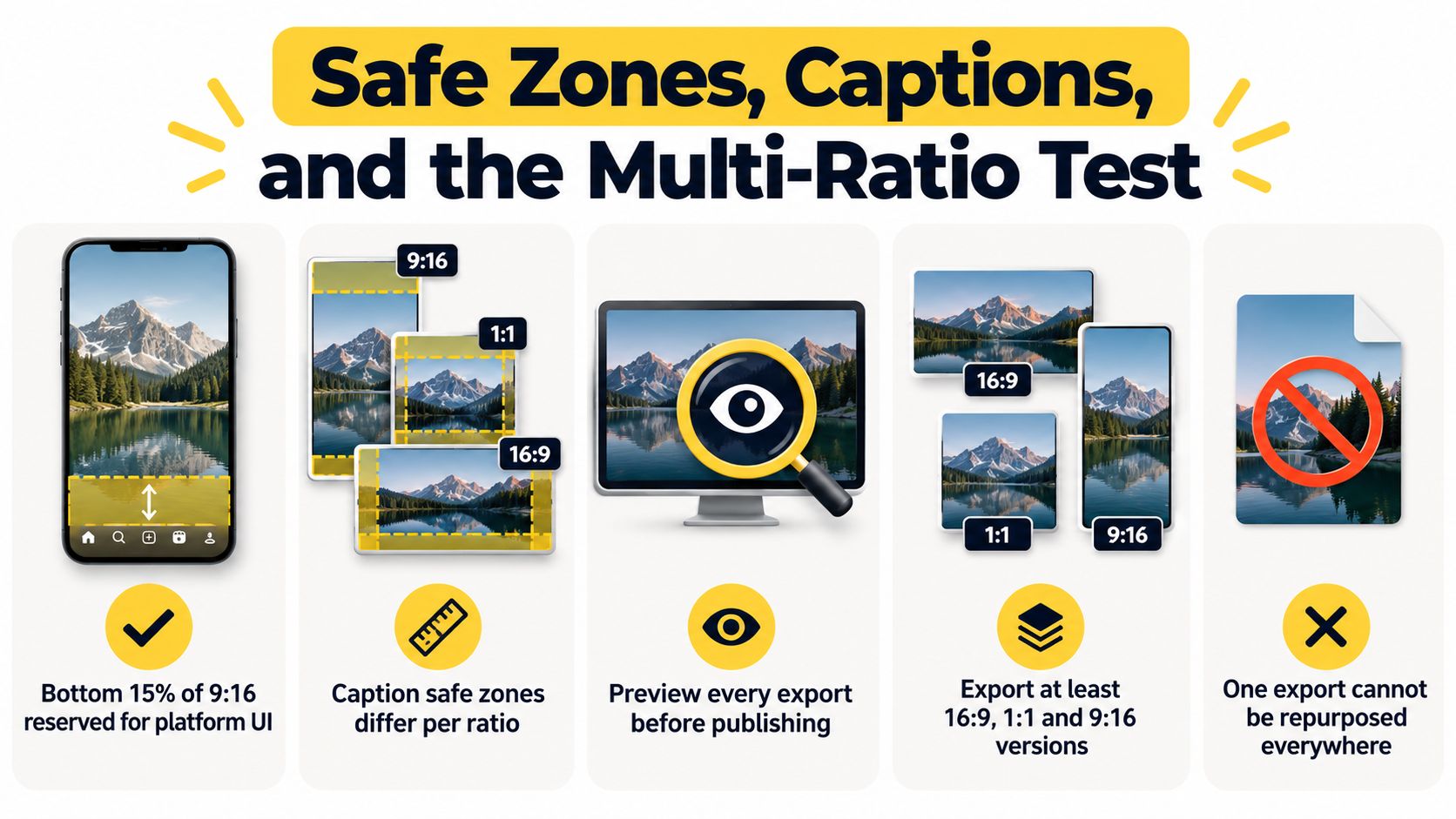
Reject a version when:
Vertical content needs a central safe region. One current specification guide identifies an approximate 1080×1440 central safe area for 9:16 Reels and Stories content, as described in the platform-safe-area reference. Treat that as a working guide rather than a substitute for previewing the actual destination. Interface layouts change, and a safe area that works for one placement may not work for another.
Captions need their own composition
Captions should explain the room without covering the room. Put the address, price, feature label, or agent identification where the chosen ratio leaves clear visual space. In a vertical export, the upper and lower portions may carry interface controls or captions, so a lower-third that works in 16:9 can become an obstruction in 9:16.Muted viewing makes this more important. The visual story should still identify the property and communicate the key feature when audio is unavailable. Check caption contrast, duration, and size on a real phone rather than judging only from an editing preview.
Run the test before publishing
Export the required ratios and play each version on its intended device. Review the first, middle, and final frames, then inspect every shot containing text or logos. Ordinary shots can go through a saliency check and receive a representative manual review, but any shot with a price, address, face, or branded overlay deserves direct attention.Reject a version when:
- Architecture is clipped: A window, doorway, island, or façade feature no longer makes sense.
- People are cut off: Faces, hands, or speaking positions fall outside the crop.
- Text is obstructed: Captions sit under interface controls or become too small to read.
- Branding is exposed: Logos touch the edge or disappear during the ratio change.
- Bars are unintended: Black or empty areas make a full-screen social export look unfinished.
A Quick Checklist Before You Hit Export
Use this pre-flight on every listing:
VideoTour.ai turns listing photos into branded property tours and supports separate horizontal, vertical, and square renders from the same project. Use VideoTour.ai to keep the master intact, adjust focal points per shot, and prepare MLS and social versions without rebuilding the tour each time.
- Lock the source plan. Keep the 16:9 master ready for MLS, websites, and standard YouTube, and identify whether a legacy 4:3 delivery is required.
- Stage the social versions. Prepare 9:16 for Reels, TikTok, Shorts, and Stories, then add 1:1 or 4:5 when the feed placement calls for it.
- Check the inner composition. Keep the kitchen island, room entrance, fireplace, windows, and other defining features inside the target crop. A centered frame isn't automatically a safe frame.
- Reserve caption space. Make sure the lower area remains clear in each ratio, then place the address, price, room label, and agent branding where viewers can read them.
- Watch without sound. Confirm that the visual sequence still identifies the property and communicates its strongest features without relying on music or voiceover.
- Review logos and lower-thirds. Move branding away from edges and interface-sensitive areas before rendering the final versions.
- Save the canonical project. Keep the master, crop decisions, focal points, and caption placements together so future photography updates don't require a complete re-edit.
VideoTour.ai turns listing photos into branded property tours and supports separate horizontal, vertical, and square renders from the same project. Use VideoTour.ai to keep the master intact, adjust focal points per shot, and prepare MLS and social versions without rebuilding the tour each time.