
A property tour video is a short, narrated walkthrough of a listing, often built from the photos an agent already has. Its job is to help serious buyers decide whether an in-person showing is worth their time. Most listing agents produce two separate versions from the same home: an unbranded cut for the MLS and a branded edit for social feeds.
You just got the photographer's gallery back on a Tuesday afternoon. The seller wants the home live by Thursday, expects social media exposure, and your calendar already holds three showings plus a listing presentation. Turning those finished photos into a disciplined screening video solves the bottleneck without booking a separate film shoot.
Summary
Create an AI Video Tours from PhotosTry it For Free
What Is a Property Tour Video and Why Do Agents Use One?
A property tour video walks prospective buyers through a home in a fixed, logical sequence so they can judge layout and fit before booking a tour. Agents use it as a digital qualification filter rather than a hype reel, pairing one unbranded cut for listing portals with a short branded version for social discovery. Think of a tour video like a listing host meeting a buyer at the front door and guiding them room by room while pointing out what matters. A static photo gallery drops the buyer inside the house with no map, letting them click straight from the backyard to a spare bedroom without ever seeing how the kitchen connects to the living room.
Buyer behavior backs up that supporting role. In the National Association of REALTORS 2025 Generational Trends report, 37% of recent buyers used an online video site as an information source while searching for a home. Among buyers who used the internet, 81% rated property photographs "very useful" and 57% rated floor plans very useful. High-resolution photos and accurate plans stay the foundation, while the video adds flow and context.
Think of a tour video like a listing host meeting a buyer at the front door and guiding them room by room while pointing out what matters. A static photo gallery drops the buyer inside the house with no map, letting them click straight from the backyard to a spare bedroom without ever seeing how the kitchen connects to the living room.Buyer behavior backs up that supporting role. In the National Association of REALTORS 2025 Generational Trends report, 37% of recent buyers used an online video site as an information source while searching for a home. Among buyers who used the internet, 81% rated property photographs "very useful" and 57% rated floor plans very useful. High-resolution photos and accurate plans stay the foundation, while the video adds flow and context.
Three Jobs a Listing Video Actually Does
When you treat a listing tour as a screening tool, it handles three distinct jobs across your marketing mix:- Rule out mismatched homes early: Buyers spot tight hallways, dated finishes, or awkward sightlines before they burn an hour driving across town, which saves your weekend for qualified prospects.
- Orient out-of-area buyers: Relocating shoppers can see how rooms connect and how natural light enters the main living space before booking a flight or sending a local agent to preview.
- Feed short-form discovery channels: Social platforms reward motion, giving you a watchable cut that earns attention in mobile feeds where photo carousels get scrolled past.
Where Does Video Rank Against Photos and Floor Plans?
Prospective buyers rank video well behind floor plans, high-resolution photos, and interactive 3D tours as their primary decision tool. Video earns its keep by answering spatial connection questions that still images leave unresolved, not by replacing core listing documentation.
According to Zillow's 2025 prospective-buyer research, buyers still lean heavily on static layouts and sharp photography when deciding which homes make their shortlist.
That gap catches a lot of agents off guard, especially if they've been pitched cinematic reels as a silver bullet. Buyers aren't rejecting video; they're telling you they won't trade verified layout data for slow-motion drone sweeps and upbeat music.
Video cannot prove room dimensions, verify square footage, substitute for seller disclosures, or convey street noise and odors. Wide framing and smooth pans can easily flatter a narrow bedroom, which leads straight to disappointed showings and eroded trust once the buyer walks in.
According to Zillow's 2025 prospective-buyer research, buyers still lean heavily on static layouts and sharp photography when deciding which homes make their shortlist.
| Listing element | Ranked most important | Source |
|---|---|---|
| Floor plans | 33% | Zillow prospective-buyer research, 2025 |
| High-resolution photos | 26% | Zillow prospective-buyer research, 2025 |
| 3D or virtual tours | 20% | Zillow prospective-buyer research, 2025 |
| Video | 4% | Zillow prospective-buyer research, 2025 |
What Video Clarifies and What It Cannot Prove
A well-sequenced walkthrough shines where photos fall short. It shows whether a kitchen island opens cleanly into the family room, how daylight shifts from the front entry to the back patio, and whether a listing described as "open concept" feels connected or cramped around a load-bearing wall. Comparing how buyers process static photos versus cinematic videos makes that division clear: stills let buyers inspect finishes closely, while motion explains transitions between rooms.Video cannot prove room dimensions, verify square footage, substitute for seller disclosures, or convey street noise and odors. Wide framing and smooth pans can easily flatter a narrow bedroom, which leads straight to disappointed showings and eroded trust once the buyer walks in.
Practical rule: Point viewers directly to the floor plan and official disclosures inside every tour, and put room dimensions on screen only after you've verified them against measured data.Before scheduling video production on your next listing, audit the media package first. Confirm that a clean floor plan is already ordered, and add one if it's missing so your video supports real spatial evidence instead of pretending to replace it.
What Must the First 15 Seconds Show a Serious Buyer?
The opening 15 seconds must answer four buyer screening questions immediately: price or headline feature, location, bedroom and bathroom count, and the single trait that sets the house apart. Serious buyers don't wait through a slow neighborhood montage to find out whether a home fits their budget and commute.
Online screening starts fast. A 2024 marketing summary citing National Association of REALTORS data on video marketing statistics for real estate notes that 41% of recent homebuyers began their process with an online search and 95% used an online tool along the way. Those shoppers scroll with a checklist in mind, and any video that hides basic facts behind moody slow-motion shots loses them before the kitchen appears.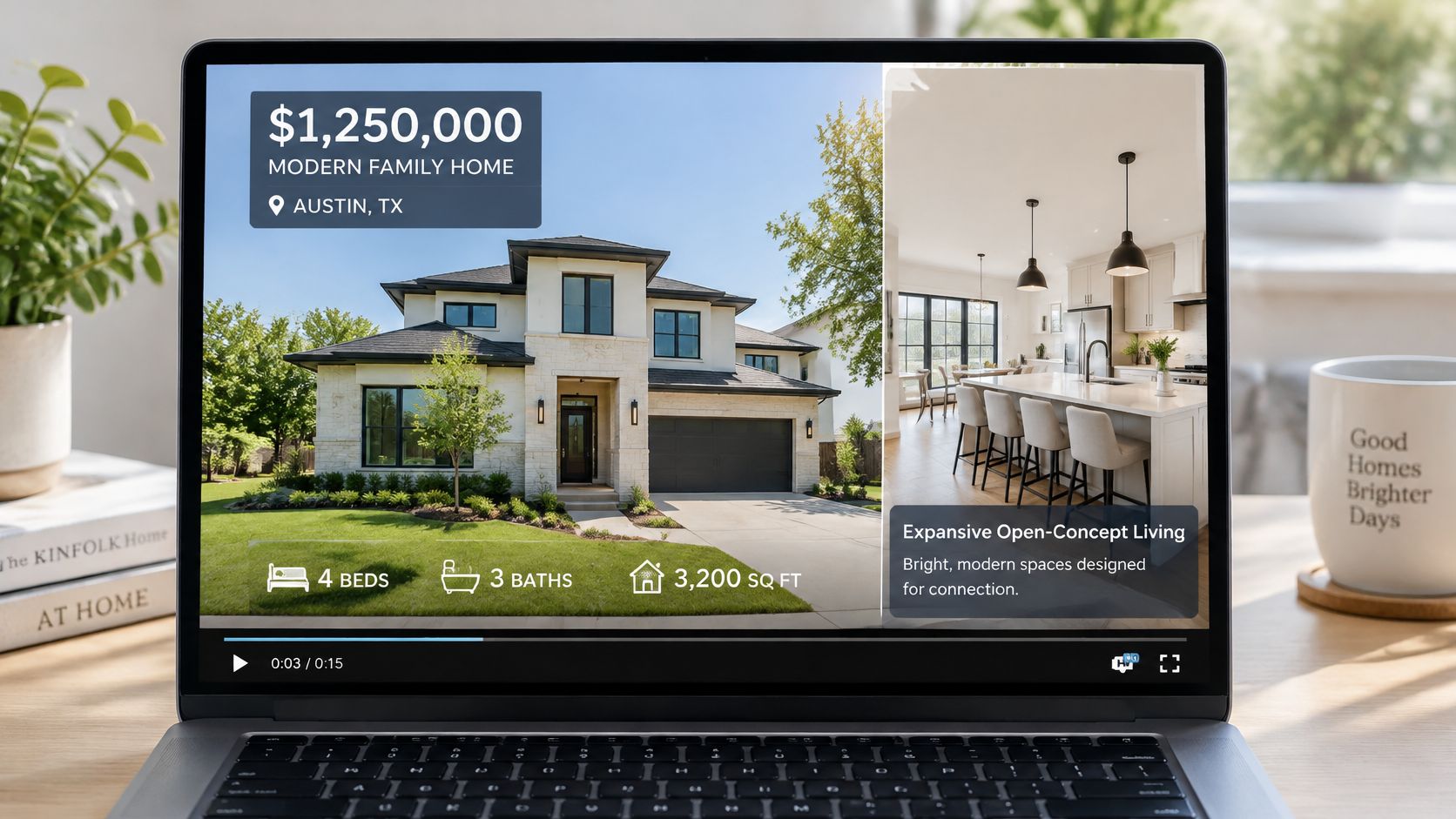 Start visually on the exterior front elevation or the single strongest room so the viewer is oriented right away, then deliver four concrete facts in order:
Run a quick three-question audit before locking the intro. If someone stopped watching at the 15-second mark, could they state the price bracket, name the area, and decide whether to keep watching? Write and approve that opening line before you pick a single photo for the timeline.
Online screening starts fast. A 2024 marketing summary citing National Association of REALTORS data on video marketing statistics for real estate notes that 41% of recent homebuyers began their process with an online search and 95% used an online tool along the way. Those shoppers scroll with a checklist in mind, and any video that hides basic facts behind moody slow-motion shots loses them before the kitchen appears.
Start visually on the exterior front elevation or the single strongest room so the viewer is oriented right away, then deliver four concrete facts in order:- Price or headline feature: Open with the asking price if your channel allows it, or lead with the headline draw such as a newly rebuilt kitchen or deep cul-de-sac lot. Sample line: "Listed at $540,000, this single-story ranch sits on a quiet quarter-acre lot."
- Location: Name the neighborhood, city, or verified commute corridor right away so out-of-area shoppers know if the map works. A simple line like "Ten minutes from downtown Austin in South Manchaca" filters buyers in two seconds flat.
- Beds and baths: State the core count plainly without fluff. Saying "Three bedrooms, two full baths, plus a dedicated study" tells families immediately whether their furniture and routines fit.
- The one differentiator: Close the opening beat with the concrete feature buyers won't find on the three other listings in that bracket, such as a detached workshop, owned solar array, or south-facing wall of windows.
Run a quick three-question audit before locking the intro. If someone stopped watching at the 15-second mark, could they state the price bracket, name the area, and decide whether to keep watching? Write and approve that opening line before you pick a single photo for the timeline.
In What Order Should the Rooms and Details Appear?
The room order should help a buyer rule a home in or out quickly. Open with the exterior, then the home's best room, give the kitchen and main living area the clearest treatment, and move through the primary suite, outdoor space, and neighborhood or amenities at the end. Pair the visuals with short on-screen callouts so muted viewers can still verify the listing as they watch.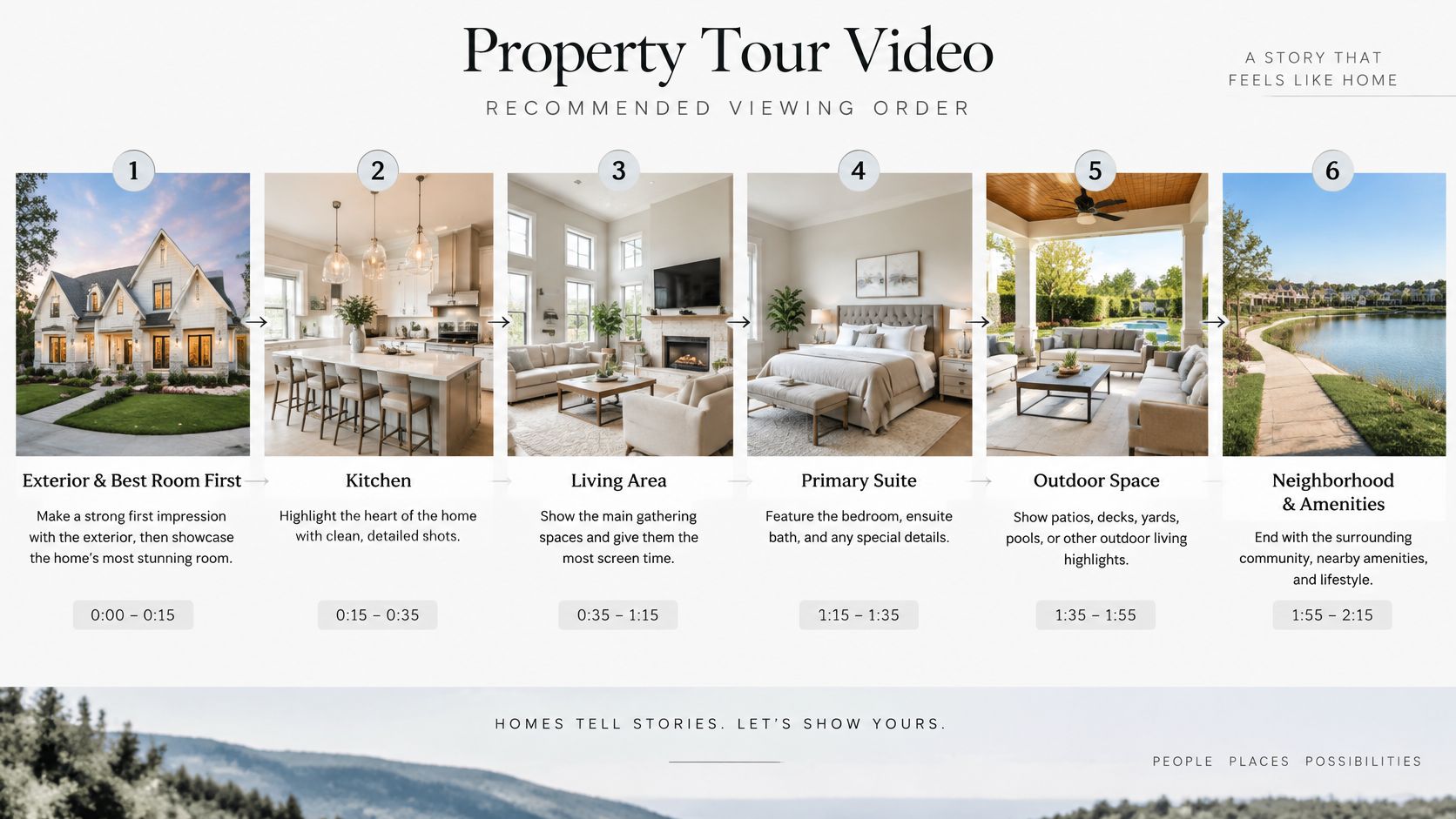 That sequence follows the way buyers weigh a house. The exterior establishes curb appeal and architectural style before the viewer commits to the rest of the tour. The best room early proves the listing deserves another minute of attention. The kitchen and main living area need more time because they carry daily use, storage questions, furniture placement, and the overall sense of layout. Because clutter or poor furniture placement stands out more clearly in motion, reviewing practical home staging tips from Willis Furniture before photo day pays off across both your gallery and your tour.
Once the main living core is established, move into the primary bedroom and bath, then the backyard, deck, or patio. Keep secondary bedrooms brief unless one works as a clear office or guest suite. Neighborhood parks, trails, or community amenities belong near the close, after viewers can attach that context to rooms they already understand. A deliberate order also makes weak spaces easier to handle. Show the flow, avoid hiding transitions, and let buyers make their own judgment instead of feeding them a promo reel.
Accessibility is not optional polish on a listing video. As highlighted in Revid.ai's real estate video marketing guide, Zillow's 2025 renter research found that recorded video tours were considered essential by 22% of renters, while 27% said the same about 3D or virtual tours. That remote audience includes viewers who are deaf, hard of hearing, watching on small phone screens, or unfamiliar with local street names. Proofread automated captions for proper names, property terminology, and stated numbers, because one misheard digit in a price or square footage figure changes the meaning of the listing.
That sequence follows the way buyers weigh a house. The exterior establishes curb appeal and architectural style before the viewer commits to the rest of the tour. The best room early proves the listing deserves another minute of attention. The kitchen and main living area need more time because they carry daily use, storage questions, furniture placement, and the overall sense of layout. Because clutter or poor furniture placement stands out more clearly in motion, reviewing practical home staging tips from Willis Furniture before photo day pays off across both your gallery and your tour.Once the main living core is established, move into the primary bedroom and bath, then the backyard, deck, or patio. Keep secondary bedrooms brief unless one works as a clear office or guest suite. Neighborhood parks, trails, or community amenities belong near the close, after viewers can attach that context to rooms they already understand. A deliberate order also makes weak spaces easier to handle. Show the flow, avoid hiding transitions, and let buyers make their own judgment instead of feeding them a promo reel.
On-Screen Callouts and Caption Accuracy
Never assume viewers can hear your voiceover. Social feeds often autoplay muted, and remote shoppers browse at work or in noisy rooms. Pull these decision facts out of the MLS remarks and place them on screen as clean text callouts:- Price and core specs: Asking price where portal rules permit, bedroom and bathroom count, and verified square footage.
- Property highlights: Major recent upgrades such as roof, HVAC, or appliances, plus verified lot size.
- Location and showing info: Assigned school district or verified commute detail, plus the open house date and time on social cuts.
Accessibility is not optional polish on a listing video. As highlighted in Revid.ai's real estate video marketing guide, Zillow's 2025 renter research found that recorded video tours were considered essential by 22% of renters, while 27% said the same about 3D or virtual tours. That remote audience includes viewers who are deaf, hard of hearing, watching on small phone screens, or unfamiliar with local street names. Proofread automated captions for proper names, property terminology, and stated numbers, because one misheard digit in a price or square footage figure changes the meaning of the listing.
A visually dramatic tour fails as a decision tool if it hides stairs, skips layout context, or falls apart the moment a viewer mutes their phone.Use high-contrast room labels, attach a plain-text transcript or summary where the platform allows it, and describe stairs, narrow entries, or step-free access strictly from verified listing facts. Never label a home "wheelchair accessible" based on photos alone. You can speed up your first caption draft with our free auto caption generator, then read every line aloud against the listing sheet before publishing. By the end of this step, you should have a locked room-by-room shot order and a verified decision-fact callout list ready for production.
Which Versions Should You Export for MLS and Social?
Export four separate deliverables from your listing photos: an unbranded horizontal tour for the MLS, a branded horizontal tour for your website and YouTube, a vertical reel for short-form mobile feeds, and a square cut for social feed placements. Separate exports prevent a stray logo or contact card from violating local MLS rules.
MLS video compliance is governed locally rather than by one national standard. According to Scene Property's guide to branded versus unbranded listing videos, many MLS boards maintain an unbranded virtual-tour field that allows only the property itself, prohibiting any agent or brokerage name, logo, phone number, website, person, yard sign, QR code, or slogan. Realcomp in Michigan, for instance, explicitly requires virtual tours to be unbranded for MLS and IDX distribution.
Prioritizing that unbranded MLS cut matches where buyers spend most of their time. In the 2025 NAR Profile of Home Buyers and Sellers summary (based on 6,103 usable responses covering July 2024 through June 2025), buyers searched for an average of 10 weeks, with 85% using an MLS website compared with 23% using social-networking websites and 5% using video-hosting websites. The MLS version serves active evaluation, while social versions catch buyers earlier in the funnel.
Build each version as its own export rather than trimming an MLS file out of a branded master and hoping you caught every watermark. Tightening crops across 16:9, 9:16, and 1:1 frames also magnifies exterior details like streaked glass or dusty window sills, so prepping the home beforehand with tips for removing monsoon dust and hard water stains from South Mountain Window Cleaning, LLC keeps sunlit shots clean across every aspect ratio.
For exact pixel dimensions and safe text zones across portals and social apps, check our guide to real estate video aspect ratios. One caution applies everywhere: an unbranded viewing link does not automatically make a video or hosting platform compliant with every local MLS policy. Before uploading, confirm your board's virtual-tour rules, verify which MLS field accepts the link, and label every exported file by destination (such as 123-Main-MLS-Unbranded.mp4 and 123-Main-IG-Vertical.mp4).
MLS video compliance is governed locally rather than by one national standard. According to Scene Property's guide to branded versus unbranded listing videos, many MLS boards maintain an unbranded virtual-tour field that allows only the property itself, prohibiting any agent or brokerage name, logo, phone number, website, person, yard sign, QR code, or slogan. Realcomp in Michigan, for instance, explicitly requires virtual tours to be unbranded for MLS and IDX distribution.
Prioritizing that unbranded MLS cut matches where buyers spend most of their time. In the 2025 NAR Profile of Home Buyers and Sellers summary (based on 6,103 usable responses covering July 2024 through June 2025), buyers searched for an average of 10 weeks, with 85% using an MLS website compared with 23% using social-networking websites and 5% using video-hosting websites. The MLS version serves active evaluation, while social versions catch buyers earlier in the funnel.
| Deliverable | Aspect ratio | Where it goes | Branding |
|---|---|---|---|
| Unbranded MLS tour | 16:9 horizontal | MLS unbranded virtual-tour field | No agent name, logo, phone, website, person, sign, QR code or slogan |
| Branded listing tour | 16:9 horizontal | Agent website, YouTube, email, listing presentation | Agent logo, colors and contact details allowed |
| Vertical reel | 9:16 vertical | Instagram, TikTok, Facebook, YouTube Shorts | Branded, subject to platform rules |
| Square cut | 1:1 square | Feed posts where square displays best | Branded, subject to platform rules |
For exact pixel dimensions and safe text zones across portals and social apps, check our guide to real estate video aspect ratios. One caution applies everywhere: an unbranded viewing link does not automatically make a video or hosting platform compliant with every local MLS policy. Before uploading, confirm your board's virtual-tour rules, verify which MLS field accepts the link, and label every exported file by destination (such as 123-Main-MLS-Unbranded.mp4 and 123-Main-IG-Vertical.mp4).
How Do You Build a Property Tour Video Step by Step?
Build your listing tour by locking the channel goal, verifying every on-screen fact against the MLS sheet, assembling high-resolution photos in walkthrough order, and running a muted mobile review before exporting separate channel files.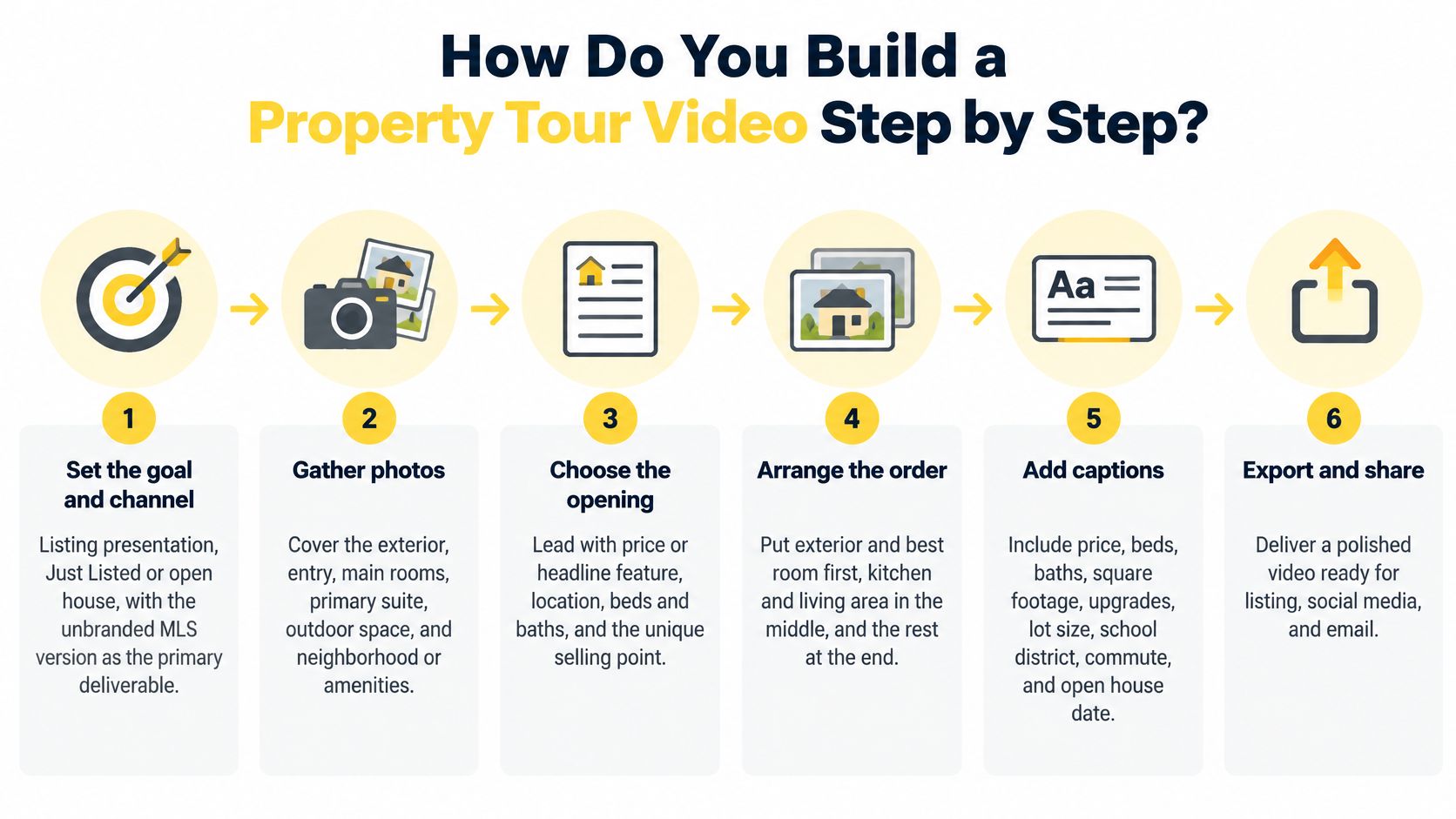 A repeatable production checklist keeps your listing address, price, and description consistent from start to finish. Follow these ten steps on every property:
- Set the goal and primary channel. Decide whether the tour supports a listing presentation, a Just Listed launch, or an open house, and make the unbranded MLS version your baseline deliverable. Common slip: cutting a vertical TikTok first and forgetting to build a clean horizontal MLS master.
- Gather and vet the source photos. Pull shots covering the exterior, entry, main living spaces, kitchen, primary suite, and outdoor space, making sure images are high-resolution enough for 1080p output without blurry upscaling. Common slip: mixing in low-res phone snaps or stock neighborhood images that don't clearly distinguish the listed home.
- Sequence the frames like a physical walk. Arrange the photos in your locked room order so transitions feel connected rather than random. Common slip: alternating exterior and interior shots back and forth, which breaks spatial orientation.
- Verify every property fact. Check the address, price, beds, baths, square footage, and upgrades line by line against the live listing record. Common slip: reusing an older pre-listing draft after a price adjustment or corrected square footage measurement.
- Select aspect ratios by destination. Generate horizontal, vertical, and square cuts from the same vetted photo sequence so framing stays intact on every screen. Common slip: uploading a horizontal video directly to vertical Reels, leaving black bars and unreadable tiny text.
- Write one to two short sentences per room. Match each narration line directly to the exact photo on screen rather than reading generic marketing adjectives. Common slip: describing a pantry or bonus closet that never appears in the frame.
- Balance audio and enable captions. Lay speech-free background music well underneath the narration so voices stay crisp, then turn on synced captions inside mobile-safe margins. Common slip: letting music overpower the narrator or letting captions collide with Instagram's bottom username overlay.
- Pick a deliberate cover image. Choose your cleanest exterior front shot or standout kitchen photo as the thumbnail rather than letting an algorithm grab a mid-transition frame. Common slip: publishing a tour whose cover frame is a blurred pan or a bathroom hallway.
- Watch the full export twice. Play it once with audio on a desktop monitor to check restrained pan-and-zoom motion (so walls and proportions stay true), then watch a second time muted on a phone screen. Common slip: speeding up camera motion so fast that viewers can't judge room width or ceiling height.
- Check portal limits before uploading. Confirm duration, codec, and branding constraints for each platform; Zillow's Showcase media guidelines, for example, specify that listing videos must be 120 seconds or less, focus exclusively on the property, and use clear visuals with smooth transitions. Common slip: attaching a 20-second agent intro to a file headed for a property-only portal slot.
How Should You Make Your First Property Tour Video?
Pick one active listing this week and produce two deliverables from the photos you already have: an unbranded horizontal MLS tour and one branded vertical reel. Run that workflow end to end once, then measure buyer response before scaling it across your inventory.
Judge the test on real buyer behavior rather than vanity metrics. Compare showing requests and pre-showing buyer questions on your test listing against a comparable active listing without a video over the same time window. Don't promise sellers guaranteed view counts or instant offers; judge whether buyers arrive at showings better informed and with fewer basic layout questions.
Consistent visual marketing is already standard practice among active agents. In the National Association of REALTORS July 2025 Technology Survey, 75% of REALTORS used social media (second only to eSignature at 79%) and 52% used drone photography or video. You don't need a multi-day shoot to keep pace, but you do need a workflow fast enough to repeat on every listing.
Choosing a Tool Without Blowing Your Margin
Your tool choice comes down to volume, speed, and cost per listing:- HeyGen: A solid fit when you want a talking AI presenter delivering market updates or custom scripts alongside listing media, though it does not connect directly to your MLS or verify property facts.
- Captions: Useful for mobile-first agents who want quick social edits and chat-based tweaks straight from listing photos.
- Matterport: Worth the extra capture cost when a complex multi-level layout or high-end home needs a self-guided 3D scan rather than a linear tour.
- AutoReel, Reel-E, and Amplifiles: Dedicated real estate photo-to-video tools that automate listing clips, though they carry a noticeably higher cost per listing video than VideoTour.ai.
Your first video shouldn't chase perfection. Ship one clean, fact-checked tour on a real listing this week so you can see how buyers react in your own market.Draft your narration in minutes using the free real estate video script generator. Your first video is free with no credit card required, and you can compare full monthly and agency options on the VideoTour.ai pricing page. Pick one active listing today, write its 15-second opening line, and put both exports on your calendar before Friday.
What Else Do Agents Ask About Property Tour Videos?
How Many Photos Can One Property Tour Video Use?
You can upload up to 60 photos per video in VideoTour.ai. Start with the exterior, kitchen, main living area, primary suite, and outdoor space, and leave out duplicate angles or weak utility shots so the tour stays tight and watchable.What Resolution Should I Export?
Export your finished tours at 720p or 1080p HD, which keeps rooms and on-screen callouts sharp across listing portals and smartphones. Never describe or market a standard HD listing export as 4K.Do Remote Buyers Rely on Video More Than Local Buyers?
Yes, remote and relocating buyers depend heavily on visual screening before booking travel or requesting a live preview. According to the National Association of REALTORS 2024 Profile of Home Buyers and Sellers, 97% of homebuyers used the internet during their search and typically viewed nine homes, including five viewed exclusively online.Can I Use a Cloned Voice or an AI Avatar?
Yes, VideoTour.ai supports voice cloning and AI avatars so you can narrate or introduce branded listing promos without setting up a studio mic. Keep every spoken detail tied strictly to verified listing facts and check your local MLS rules before uploading presenter footage to any MLS field.Can AI Staging Replace Furniture in Listing Photos?
VideoTour.ai includes AI staging to help buyers visualize empty rooms, and you can test room concepts beforehand with our free AI virtual staging tool. Always disclose virtually staged frames on screen and verify your local MLS and state advertising rules before those images enter a listing tour.How Much Does It Cost to Try?
Your first video is free with no credit card required. Paid plans cost $29 per month billed yearly or $39 per month billed monthly for 10 videos, and the Agency plan is $59 per month for 40 videos.Turn the listing photos you already have into sharp, 1080p HD property tour videos and social reels without booking another shoot or fighting editing timelines. VideoTour.ai lets you import directly from a Zillow, Redfin, or Realtor.com link, pair up to 60 photos with verified captions and voiceover, and export an unbranded MLS viewing link alongside branded social cuts. Try your first listing tour free with no credit card at VideoTour.ai.