

A property tour can look polished in the editing timeline and still fail the moment it reaches a real audience. The living room loses its windows in a vertical crop, the listing address sits underneath a Reel button, or a horizontal video arrives on a phone surrounded by black bars. The photos were strong. The problem was the frame shape.
Real estate teams now publish the same listing across MLS portals, websites, YouTube, Instagram, TikTok, Facebook, and Shorts. Each destination gives the property a different visual container. Video aspect ratios therefore belong in the creative brief, not at the end of the export process. A reliable workflow starts with the listing's distribution plan, protects the important parts of each image, and creates the required versions without rebuilding the tour from scratch.
Real estate teams now publish the same listing across MLS portals, websites, YouTube, Instagram, TikTok, Facebook, and Shorts. Each destination gives the property a different visual container. Video aspect ratios therefore belong in the creative brief, not at the end of the export process. A reliable workflow starts with the listing's distribution plan, protects the important parts of each image, and creates the required versions without rebuilding the tour from scratch.
Summary
Create an AI Video Tours from PhotosTry it For Free

Understanding Aspect Ratio Fundamentals
Aspect ratio describes the relationship between a video's width and height. The first number represents width and the second represents height. A 16:9 frame is wider than it is tall, while a 9:16 frame reverses that relationship and fills a phone held upright.
Think of the ratio as a window. A wide window shows more of the room from side to side. A tall window gives more vertical presence but shows less of the left and right edges. The image itself hasn't changed, yet the viewer's field of vision has.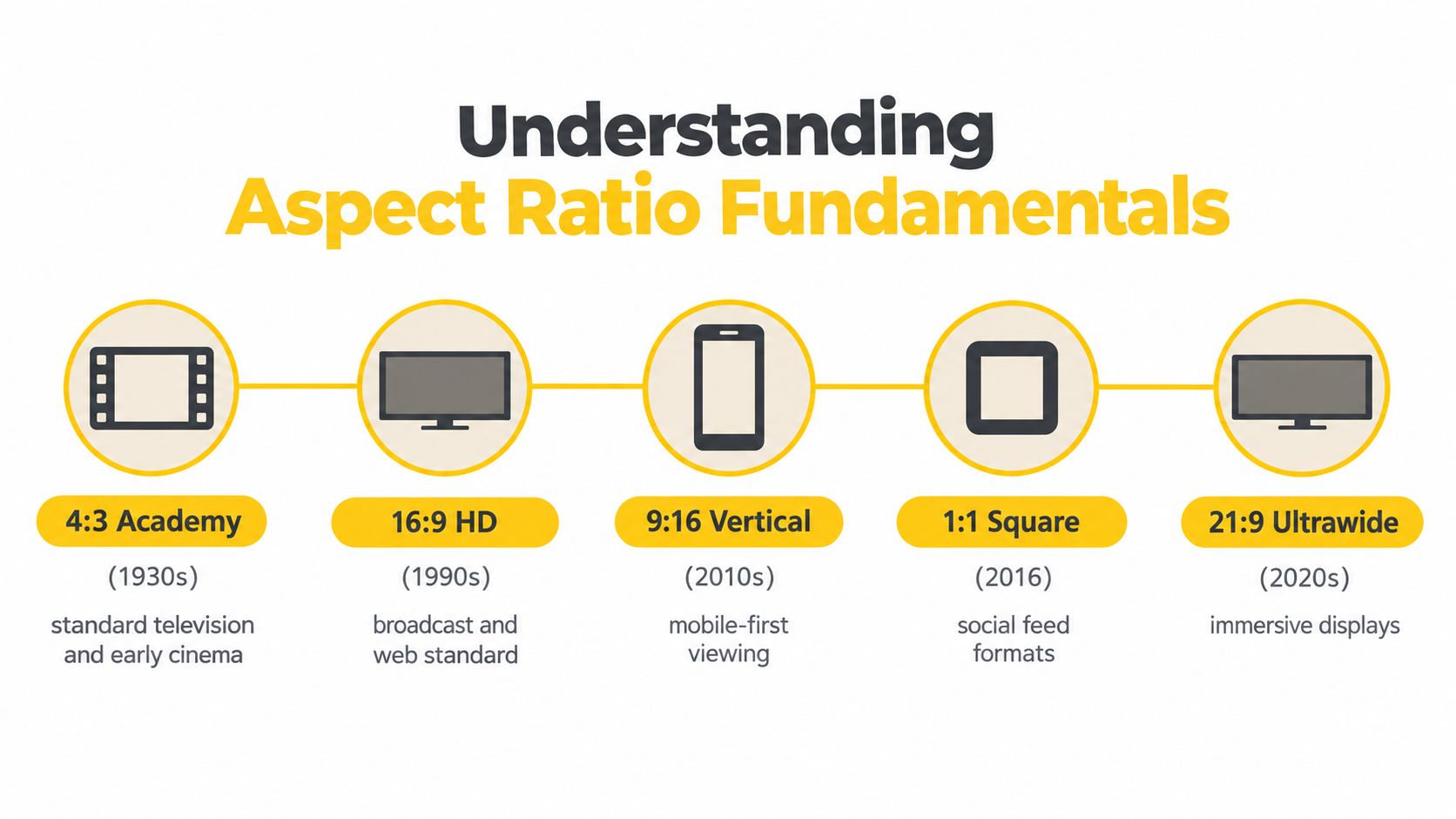
That history matters to real estate marketers working with inherited assets. A brokerage may have older listing footage, scanned brochures, or archive material that was created for a different display shape. Reusing it in a modern campaign requires a deliberate choice between cropping, padding, or redesigning the composition around the original frame.
Think of the ratio as a window. A wide window shows more of the room from side to side. A tall window gives more vertical presence but shows less of the left and right edges. The image itself hasn't changed, yet the viewer's field of vision has.
How older formats shaped today's libraries
Early cinema and television relied heavily on a nearly square 4:3 frame, also written as 1.33:1. When the Academy standardized the sound-era film frame in 1932, it set the Academy ratio at 1.37:1. The same general shape continued through television for decades, which is why older film collections, broadcast libraries, and archived property footage often look narrow on modern screens. The Australian Screen Online history of aspect ratio explains how widescreen systems became established after World War II, including 1.85:1 and anamorphic 2.35:1 formats.That history matters to real estate marketers working with inherited assets. A brokerage may have older listing footage, scanned brochures, or archive material that was created for a different display shape. Reusing it in a modern campaign requires a deliberate choice between cropping, padding, or redesigning the composition around the original frame.
The three decisions behind every conversion
When a source and destination ratio don't match, an editor has three practical options:- Fill the new frame. Enlarge the image until the destination is covered. This removes some of the original edges.
- Fit the complete image. Preserve the entire source and accept empty space around it.
- Recompose the asset. Move the crop, add new text placement, or use a different image treatment so the important detail remains visible.
Frame shape is a composition constraint, not a file-format detail.A useful workflow labels every asset by its most important visual subject before editing begins. If the subject is a fireplace, keep it central. If the selling point is a wall of windows, protect the horizontal span. If the image contains a disclosure or address, treat that information as a separate layout element rather than trusting an automatic crop.
Evaluating the Core Formats for Property Tours
Four formats cover most real estate distribution needs: 16:9, 1:1, 4:5, and 9:16. They aren't interchangeable. Each one changes how much architecture fits on screen, how captions compete with the image, and where a viewer is likely to encounter the tour.
The weakness is reach in vertical-first placements. A 16:9 file can feel small on a phone, and filling a portrait frame may sacrifice the very context that made the original tour effective. Use 16:9 as the master for formal listing presentation when compliance and architectural context take priority, but don't assume it should be the only export.
The trade-off is lateral space. A wide kitchen, open-plan living area, or long garden may need a sequence of closer shots rather than one broad image. A strong vertical tour therefore chooses images for portrait survivability instead of merely resizing a horizontal edit.
For practical guidance on turning a property sequence into a Reel, see this guide to creating an Instagram Reel. The key is to plan the sequence around what remains legible in a narrow frame.
That makes it useful for listing ads, feed posts, and photo-led campaigns where a single asset needs to work across more than one social placement. It won't replace 9:16 for a full-screen Reel or 16:9 for an MLS-oriented tour. It gives teams a deliberate third option when neither end of the spectrum fits the campaign.
| Aspect Ratio | Primary Platforms | Best Use Case |
|---|---|---|
| 16:9 | MLS embeds, listing pages, websites, YouTube | Full property tours, broad interiors, exteriors, and desktop viewing |
| 1:1 | Social feeds and profile-grid placements | Compact previews, square feed continuity, and balanced photo-led posts |
| 4:5 | Instagram and Facebook feeds | Feed-first promotion that needs more screen height without a full vertical crop |
| 9:16 | Reels, TikTok, Shorts, and Stories | Full-screen mobile discovery, fast tours, and portrait-first storytelling |
16:9 for context and formal presentation
Horizontal framing remains the practical choice when a property needs to sit comfortably on a website, YouTube page, or MLS-related listing environment. It gives wide rooms, gardens, driveways, and streets enough horizontal space to communicate layout. It also supports a cinematic sequence in which the viewer can understand how spaces connect.The weakness is reach in vertical-first placements. A 16:9 file can feel small on a phone, and filling a portrait frame may sacrifice the very context that made the original tour effective. Use 16:9 as the master for formal listing presentation when compliance and architectural context take priority, but don't assume it should be the only export.
9:16 for mobile discovery
Portrait video is designed for a phone held upright. For Reels, TikTok, Shorts, and Stories, 9:16 at 1080×1920 is a reliable production default, according to this social media video size reference. It uses the available screen more effectively, reduces forced cropping, and gives captions and faces a natural vertical layout.The trade-off is lateral space. A wide kitchen, open-plan living area, or long garden may need a sequence of closer shots rather than one broad image. A strong vertical tour therefore chooses images for portrait survivability instead of merely resizing a horizontal edit.
For practical guidance on turning a property sequence into a Reel, see this guide to creating an Instagram Reel. The key is to plan the sequence around what remains legible in a narrow frame.
4:5 as the feed compromise
Square video is easy to reuse, but it leaves valuable vertical space unused in many mobile feeds. Full 9:16 can create cropping and interface challenges when the goal is an in-feed post rather than an immersive Reel. 4:5 sits between those extremes, offering a taller presentation while retaining more side context than a portrait crop.That makes it useful for listing ads, feed posts, and photo-led campaigns where a single asset needs to work across more than one social placement. It won't replace 9:16 for a full-screen Reel or 16:9 for an MLS-oriented tour. It gives teams a deliberate third option when neither end of the spectrum fits the campaign.
Navigating Platform Rules and MLS Compliance
Social media and listing syndication ask different questions of the same video. Social platforms want an immediate, screen-filling experience that survives interface overlays. MLS and listing-page environments place greater emphasis on a compliant presentation, readable information, and a format that fits the portal or embed.
The distinction should shape the edit from the first image. A social cut may reserve space for a hook and captions. A listing cut may need to keep disclosures and property information unobstructed. Treating both as identical exports creates avoidable review work.
The opening also needs to communicate quickly. That doesn't mean cramming the first frame with text. It means selecting an exterior, signature room, or concise message that tells the viewer why the property deserves attention before the sequence becomes more detailed.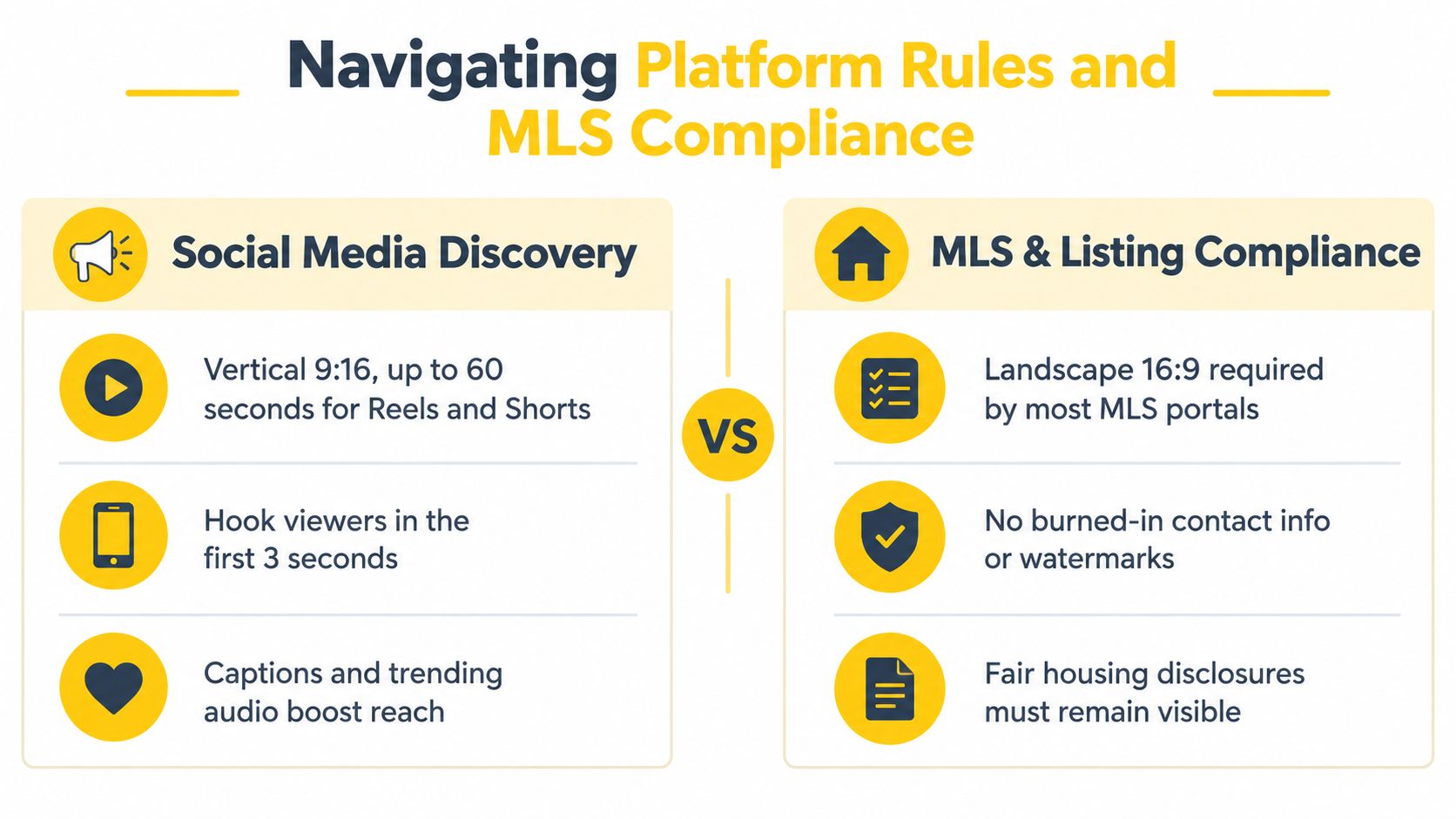
Review the listing version for more than dimensions. Check whether the frame preserves required disclosures, whether logos or contact information are permitted, and whether the file's visual treatment matches the portal's rules. A video can be visually attractive and still require changes before syndication.
For teams using a platform with listing-specific presets, the commercial use and MLS guidance can help clarify how a property video should be prepared for business distribution. The important principle is separation of purpose. Create a compliant listing cut and a social cut from the same source project, rather than modifying one file repeatedly after publication.
The distinction should shape the edit from the first image. A social cut may reserve space for a hook and captions. A listing cut may need to keep disclosures and property information unobstructed. Treating both as identical exports creates avoidable review work.
Social discovery favors protected vertical layouts
Reels, TikTok, and Shorts are built around portrait viewing. A social version should keep the address card, room label, price information, and branding away from the edges and away from areas where controls commonly appear. Captions need enough contrast to remain readable over bright walls, windows, and skies.The opening also needs to communicate quickly. That doesn't mean cramming the first frame with text. It means selecting an exterior, signature room, or concise message that tells the viewer why the property deserves attention before the sequence becomes more detailed.
MLS and listing pages need a separate review
MLS requirements vary by portal and market, so marketers should verify the current rules with the relevant service rather than assuming a social export will qualify. In practice, 16:9 remains the safer default for websites, YouTube, and MLS-oriented presentation, while portrait formats serve discovery channels. This real estate video format overview also highlights the operational need to support both horizontal listing environments and vertical social destinations.Review the listing version for more than dimensions. Check whether the frame preserves required disclosures, whether logos or contact information are permitted, and whether the file's visual treatment matches the portal's rules. A video can be visually attractive and still require changes before syndication.
For teams using a platform with listing-specific presets, the commercial use and MLS guidance can help clarify how a property video should be prepared for business distribution. The important principle is separation of purpose. Create a compliant listing cut and a social cut from the same source project, rather than modifying one file repeatedly after publication.
Build a dual-track publishing map
A simple matrix prevents last-minute decisions:- MLS and listing page: Start with a horizontal composition, keep required information visible, and inspect every disclosure.
- YouTube presentation: Use the horizontal version when the tour needs room context and a conventional viewing experience.
- Reels, TikTok, and Shorts: Use a portrait version with centered subjects and UI-safe text.
- Instagram and Facebook feeds: Consider 4:5 when the campaign needs more vertical presence without sacrificing as much side context.
Mastering Composition and Safe Zones
A multi-format video is won or lost before the export screen. If the original photo places the important subject at the extreme edge, no automatic reframing system can preserve every version cleanly. Photographers, agents, and marketers need to select images with the final destinations in mind.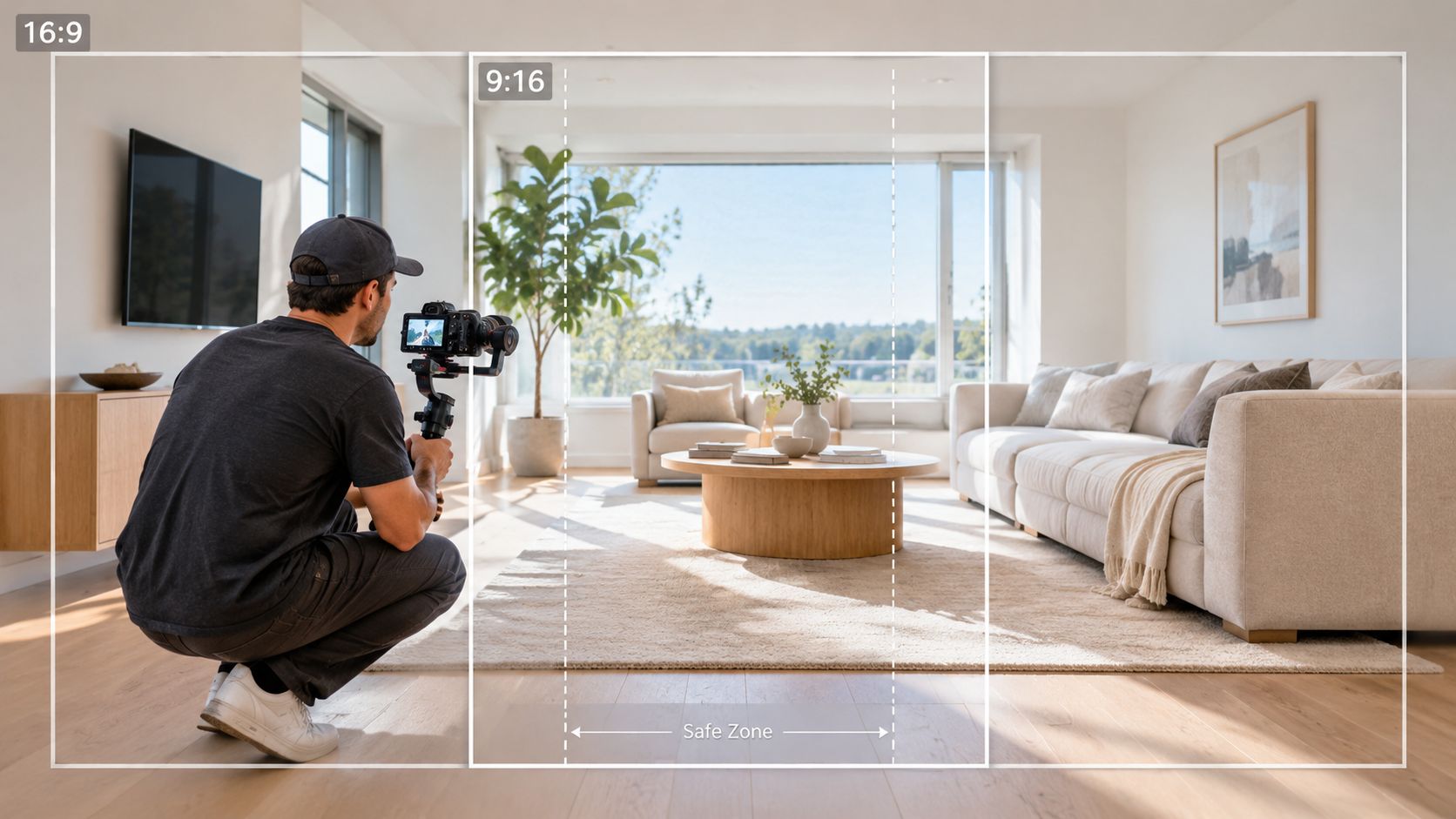
Use these selection rules:
Address cards should be short and placed where they won't compete with buttons or captions. Room labels should sit over a quiet area of the image, not over patterned tile or a bright window. Agent branding should support recognition without occupying the only area that shows the room's key feature.
Aspect-ratio mismatch can remove approximately 44% of the horizontal frame area when a 16:9 source is converted to 9:16 through cropping, as described in Adobe's guide to common video aspect ratios. That loss explains why a sofa edge, window wall, or exterior context can disappear even when the source photo looked generous.
Start with the subject, not the canvas
Before adding motion, identify the visual reason each image belongs in the tour. A kitchen photo may sell the island, the natural light, or the connection to the dining area. A bedroom may depend on the windows and built-in storage. Mark that priority mentally, then check whether it sits close enough to the center to survive a portrait crop.Use these selection rules:
- Protect the architectural story: Choose images that show relationships between spaces, not only isolated details.
- Avoid edge-dependent selling points: Don't rely on a feature that sits at the far left or right unless the edit can pan toward it.
- Separate text from photography: Add address cards, labels, and branding in the editing layout so they can move independently for each ratio.
- Check faces and signage: Keep people, agent details, and important signs away from crop boundaries.
Use a central safe zone
The central safe zone is the part of the frame most likely to remain visible when a platform or editor reframes the asset. It isn't a universal pixel measurement because interface layouts and devices differ. Treat it as a visual discipline: keep essential information comfortably inside the middle area, with additional breathing room around it.Address cards should be short and placed where they won't compete with buttons or captions. Room labels should sit over a quiet area of the image, not over patterned tile or a bright window. Agent branding should support recognition without occupying the only area that shows the room's key feature.
Aspect-ratio mismatch can remove approximately 44% of the horizontal frame area when a 16:9 source is converted to 9:16 through cropping, as described in Adobe's guide to common video aspect ratios. That loss explains why a sofa edge, window wall, or exterior context can disappear even when the source photo looked generous.
Review the crop as a buyer would
Don't approve a multi-format export by checking only the first frame. Scrub through the entire tour and ask three questions:- Can the viewer identify the room and its main feature?
- Can the viewer read every label without moving away from the image?
- Does the sequence still feel spatially coherent after the crop changes?
Automating Multi-Format Video Exports
The recurring problem isn't creating one property video. It's creating the right versions for every listing without asking an agent or editor to repeat the same adjustments. Manual work often includes changing the canvas, repositioning photo crops, resizing text, checking the music timing, and exporting again. That process becomes especially inefficient when the source is a photo set and the creative treatment should remain consistent.
An AI photo-to-video workflow can separate the content from the delivery format. The team uploads the listing photos once, establishes the visual treatment, and then renders horizontal, portrait, or square versions from the same project. The system can apply motion such as pan, zoom, and tilt, synchronize music with the sequence, and preserve reusable branding settings while the canvas changes.
The same principle applies to music and pacing. A sequence that feels measured in a wide-format listing tour may need tighter visual changes in a vertical social cut. Auto-synchronization can reduce the mechanical work, but a human should still review whether the order tells a persuasive property story.
Teams should also confirm how each generated file is downloaded, named, and stored. Clear naming such as property, channel, and format prevents a compliant listing export from being confused with a social version. Guidance on managing final files is available in this resource about downloading a completed video.
For teams checking the portrait canvas before publishing, these Instagram video size specifications provide a useful reference alongside the platform's current publishing interface. Specifications can change, so the final review should happen where the video will be posted.
An AI photo-to-video workflow can separate the content from the delivery format. The team uploads the listing photos once, establishes the visual treatment, and then renders horizontal, portrait, or square versions from the same project. The system can apply motion such as pan, zoom, and tilt, synchronize music with the sequence, and preserve reusable branding settings while the canvas changes.
What to automate
A useful multi-format workflow should handle more than resizing. Look for capabilities that address the complete production chain:- Photo selection and sequencing: Arrange the gallery into a coherent tour without rebuilding the order for each channel.
- Intelligent reframing: Move the focal area when a horizontal image becomes portrait, rather than applying the same center crop everywhere.
- Text adaptation: Keep captions, room labels, and branding inside a safe area for the selected output.
- Reusable styling: Store fonts, colors, logo treatments, and thumbnail choices so every listing remains recognizable.
- Fast revisions: Let the team preview the result, change an image or timing, and render again without starting a new project.
Keep the master project editable
Automation works best when the source project remains flexible. If a room label is permanently burned into an image, a portrait export may place it under a platform control. If the text remains an editable layer, the system or editor can move it for the new frame.The same principle applies to music and pacing. A sequence that feels measured in a wide-format listing tour may need tighter visual changes in a vertical social cut. Auto-synchronization can reduce the mechanical work, but a human should still review whether the order tells a persuasive property story.
Teams should also confirm how each generated file is downloaded, named, and stored. Clear naming such as property, channel, and format prevents a compliant listing export from being confused with a social version. Guidance on managing final files is available in this resource about downloading a completed video.
For teams checking the portrait canvas before publishing, these Instagram video size specifications provide a useful reference alongside the platform's current publishing interface. Specifications can change, so the final review should happen where the video will be posted.
Building a Scalable Video Marketing Workflow
A scalable system begins with one source of truth, not one universal file. Keep the original photo set, the editable project, the approved branding, and the distribution decisions together. Then create channel-specific outputs from that source instead of downloading, modifying, and re-uploading whatever version was published last.
Mark focal points. Identify the feature that must survive each crop. If the room depends on a wide view, flag it for horizontal framing or a controlled movement in portrait.
Create the layout system. Set approved fonts, colors, logo treatment, disclosure placement, and caption style before rendering. A repeatable toolkit protects brand consistency while allowing the frame to change.
Render the distribution set. Prepare the landscape listing version, the portrait discovery version, and a feed-friendly version when the campaign needs it. Each should have its own crop review, even when all versions come from the same timeline.
Inspect on destination devices. Review the file on a desktop listing page and on a phone. Check text, room context, contrast, interface collisions, and the opening frame before scheduling.
Archive clearly. Store the project and exports under the property name with channel-specific labels. This keeps future revisions tied to the correct source and reduces duplicate editing.
Production costs can also be controlled without making the property look improvised. These low-cost video production tips are useful for deciding where automation, existing photography, and selective human review can replace unnecessary production overhead.
Standardizing video aspect ratios gives a brokerage more than cleaner exports. It creates a repeatable handoff between photography, marketing, compliance, and publishing. Agents can focus on the listing message, while the workflow protects the visual hierarchy across MLS, websites, feeds, and full-screen mobile placements.
VideoTour.ai turns a listing photo set into editable property video tours with motion, captions, music, branding, and multiple aspect-ratio outputs for listing pages and social channels. Upload your next photo set, review the portrait versions, and visit VideoTour.ai to build a workflow that reduces manual re-editing.
A practical listing sequence
Select for story. Choose images that introduce the property, establish the main living spaces, show differentiating features, and close with a clear next step. Don't let the order follow the photographer's folder automatically.Mark focal points. Identify the feature that must survive each crop. If the room depends on a wide view, flag it for horizontal framing or a controlled movement in portrait.
Create the layout system. Set approved fonts, colors, logo treatment, disclosure placement, and caption style before rendering. A repeatable toolkit protects brand consistency while allowing the frame to change.
Render the distribution set. Prepare the landscape listing version, the portrait discovery version, and a feed-friendly version when the campaign needs it. Each should have its own crop review, even when all versions come from the same timeline.
Inspect on destination devices. Review the file on a desktop listing page and on a phone. Check text, room context, contrast, interface collisions, and the opening frame before scheduling.
Archive clearly. Store the project and exports under the property name with channel-specific labels. This keeps future revisions tied to the correct source and reduces duplicate editing.
Production costs can also be controlled without making the property look improvised. These low-cost video production tips are useful for deciding where automation, existing photography, and selective human review can replace unnecessary production overhead.
Standardizing video aspect ratios gives a brokerage more than cleaner exports. It creates a repeatable handoff between photography, marketing, compliance, and publishing. Agents can focus on the listing message, while the workflow protects the visual hierarchy across MLS, websites, feeds, and full-screen mobile placements.
VideoTour.ai turns a listing photo set into editable property video tours with motion, captions, music, branding, and multiple aspect-ratio outputs for listing pages and social channels. Upload your next photo set, review the portrait versions, and visit VideoTour.ai to build a workflow that reduces manual re-editing.