

In 2025, 46% of U.S. REALTORS® used AI-generated content such as listing descriptions, according to a National Association of REALTORS® press release. Real estate video editing is moving the same way because hiring a videographer or editor typically costs hundreds of dollars per listing, takes days, and stretches longer with every revision. Strong listing edits balance fast turnaround, factual layout, and MLS compliance instead of chasing cinematic flair.
Summary
Create an AI Video Tours from PhotosTry it For Free
How Much Does Real Estate Video Editing Cost and Take?
A professional videographer or editor typically costs hundreds of dollars per listing and takes days to deliver, and every round of revisions adds more wait time. In 2024, videography for properties under 5,000 square feet was typically priced at $200-$300, according to a Real Estate Bees survey of more than 2,000 active real estate photographers.
The table below compares the three main editing routes on cost, turnaround, revision effort, and branding control.
DIY software avoids vendor fees, yet it trades cash for evenings spent adjusting keyframes, resizing clips, and exporting separate files. An automated photo-to-video route removes that calendar drag. At VideoTour.ai, we turn the listing photos you already have into consistent, ready-to-post videos in minutes, without another shoot or editing timeline.
Keep the scope of this comparison clear before picking a workflow. The figures above measure cost, speed, and visual consistency across listings, not creative storytelling or live camera craft. For a deeper look at how production fees add up across a year of listings, review our real estate video cost breakdown.
Once you know what your schedule and budget allow, three practical questions shape the actual work. You need to know which editing choices clarify a home's layout, which compliance rules govern your script and visuals, and when a listing still warrants a human editor.
The table below compares the three main editing routes on cost, turnaround, revision effort, and branding control.
| Option | Typical cost per listing | Turnaround | Revisions | Branding consistency |
|---|---|---|---|---|
| Professional videographer or editor | Hundreds of dollars; $200-$300 for properties under 5,000 sq ft (Real Estate Bees, 2024) | Days | Each revision adds more days | Tied to the editor's templates and file handoff |
| DIY editing software | Your hours plus any software subscription | Hours of hands-on editing | You make every revision yourself | You set and maintain it |
| AI video from listing photos | Lowest cost per listing among dedicated real estate video tools | Minutes to generate, plus a few minutes of review | Preview and customize before download | Logo, colors and fonts applied to every listing |
Why turnaround and revisions stall listing launches
Most real estate professionals don't skip listing video because they dislike software. They skip it because waiting days for an outside edit means a property goes live on the MLS without motion assets during its peak launch window. When a seller asks to swap out a bedroom clip or fix a price overlay, a traditional editor pushes delivery back again.DIY software avoids vendor fees, yet it trades cash for evenings spent adjusting keyframes, resizing clips, and exporting separate files. An automated photo-to-video route removes that calendar drag. At VideoTour.ai, we turn the listing photos you already have into consistent, ready-to-post videos in minutes, without another shoot or editing timeline.
Keep the scope of this comparison clear before picking a workflow. The figures above measure cost, speed, and visual consistency across listings, not creative storytelling or live camera craft. For a deeper look at how production fees add up across a year of listings, review our real estate video cost breakdown.
Once you know what your schedule and budget allow, three practical questions shape the actual work. You need to know which editing choices clarify a home's layout, which compliance rules govern your script and visuals, and when a listing still warrants a human editor.
Why Do Buyers Expect Video Alongside Listing Photos?
Nearly every buyer searches online, and more than half browse video platforms during their hunt, yet buyers still rate still photography far above video for usefulness. That gap makes listing video a complement that extends strong photography rather than a replacement for it.
The National Association of REALTORS® 2025 Profile of Home Buyers and Sellers, which surveyed people who completed a purchase or sale between July 2024 and June 2025, found that 97% of buyers used the internet during their home search. In that same survey, 83% of buyers rated listing photos very useful, while only 29% rated videos very useful. Still photography carries the factual weight of a listing, and no amount of camera motion can rescue dim or cluttered source shots.
Agents already publish across social feeds and tour platforms, yet most routine listings still go out with static galleries alone. That execution gap is a coverage problem. Turning existing listing photos into clean video gives every property a presence where half of buyers already browse, without stretching your production budget.
The National Association of REALTORS® 2025 Profile of Home Buyers and Sellers, which surveyed people who completed a purchase or sale between July 2024 and June 2025, found that 97% of buyers used the internet during their home search. In that same survey, 83% of buyers rated listing photos very useful, while only 29% rated videos very useful. Still photography carries the factual weight of a listing, and no amount of camera motion can rescue dim or cluttered source shots.
Closing the listing video coverage gap
Even though buyers rely on photos first, a wide gap sits between buyer habits and agent execution. According to NAR-derived buyer and seller figures compiled by Convrt Media, 52% of buyers used an online video site during their search, while only 12% of sellers reported that their agent used video to market the property. Meanwhile, the NAR 2025 REALTORS® Technology Survey found that 75% of REALTORS® used social media and 52% used drone photography or video.| Measure | Figure | Source and year |
|---|---|---|
| Buyers rating listing photos very useful | 83% | NAR 2025 Profile of Home Buyers and Sellers |
| Buyers rating videos very useful | 29% | NAR 2025 Profile of Home Buyers and Sellers |
| Buyers who used an online video site | 52% | NAR 2025 Profile of Home Buyers and Sellers |
| Sellers reporting their agent used video to market the property | 12% | NAR-derived buyer and seller data, 2025 |
| REALTORS® using social media | 75% | NAR 2025 REALTORS® Technology Survey |
| REALTORS® using drone photography or video | 52% | NAR 2025 REALTORS® Technology Survey |
Consultation rule: Cite the exact year and source behind every media figure you share with a seller, put photography first in the marketing budget, and position video as the second layer that widens reach.Be disciplined about how you present these numbers at a listing appointment. Buyer and agent survey data describes search behavior, not proof that a video caused a sale or raised the final closing price. If you want additional benchmarks to ground seller conversations, browse our collection of real estate video marketing statistics, or pair your photo workflow with broader campaign strategy from the revid.ai real estate video guide.
What Does a Listing Video Edit Actually Involve?
A listing video edit works like a guided walk through a house, not a random slideshow. Each still photograph is a stop along that viewing path, and every editing decision controls how long the buyer pauses at each stop and which doorway they step through next.
When a buyer tours a home in person, they start at the curb, cross the threshold, check the main living spaces and kitchen, move to the bedrooms and baths, and finish in the yard. A strong edit mirrors that physical route so viewers can map the floor plan in their head without pausing or rewinding.
Here's how a structured listing timeline moves from the entry through the main living spaces.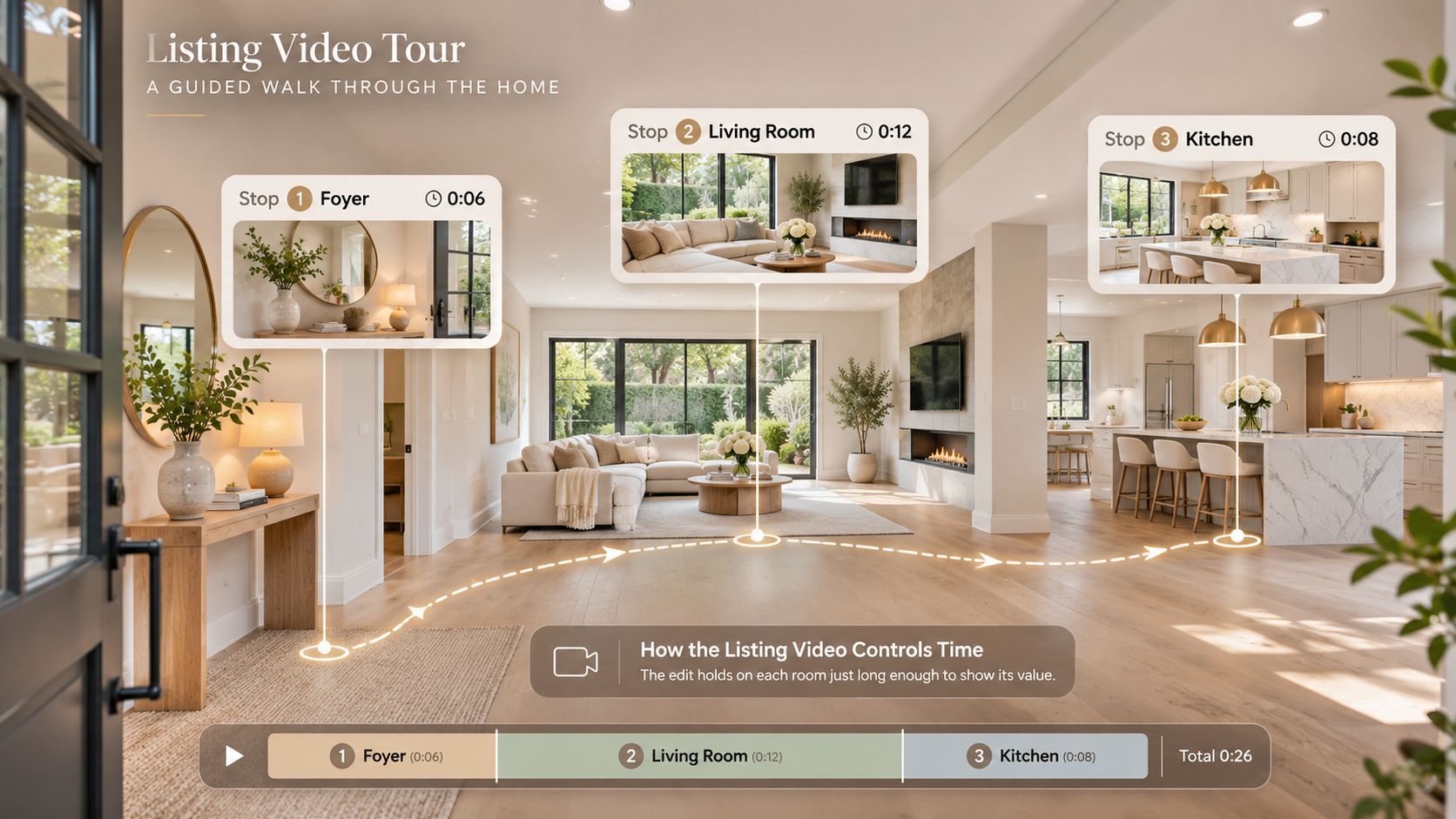
Small technical choices decide whether that extra attention helps or confuses the buyer. A slow push-in draws focus toward remodeled cabinetry or a brick hearth, while rapid transitions and spin effects break spatial continuity so rooms feel disconnected. Keep voiceover anchored to verifiable listing details, and label any AI staging, day-to-night edits, or lifestyle inserts clearly so buyers never mistake generated visuals for the property's current physical state.
Watch the short walkthrough below to see how restrained pacing and clear room transitions hold spatial continuity from shot to shot.
When a buyer tours a home in person, they start at the curb, cross the threshold, check the main living spaces and kitchen, move to the bedrooms and baths, and finish in the yard. A strong edit mirrors that physical route so viewers can map the floor plan in their head without pausing or rewinding.
Here's how a structured listing timeline moves from the entry through the main living spaces.
Six core editing terms in plain English
Understanding six basic terms lets you review any AI export or give crisp notes to a freelance editor without wasting a revision round.- Pan and zoom motion: Slow, controlled movement across a still image that simulates a gentle camera slide or push-in toward a focal point like a kitchen island.
- Keyframes: The start and end markers that tell the software exactly where a pan or zoom begins, how far it travels, and when it stops.
- Pacing: The rhythm and hold length of each shot, giving high-value rooms more screen time while moving crisply past connectors.
- The hook: The opening three seconds of the video, usually anchored by the best exterior angle or hero room to establish location and property type right away.
- Voiceover: Spoken narration tied strictly to verifiable property facts such as bed count, square footage, updates, and lot features.
- The master: The clean, complete edit from which every branded social cut and unbranded MLS link is derived.
Why editing choices change buyer comprehension
Motion keeps viewers on a listing page longer, provided the edit stays legible. A platform-data summary cited by Real Estate Agent Leads reports an average viewing time of 3 minutes 41 seconds for video listing views compared with 48 seconds for photo-only pages. Treat that figure as an engagement benchmark from a platform summary rather than a guarantee of offers or closed sales.Small technical choices decide whether that extra attention helps or confuses the buyer. A slow push-in draws focus toward remodeled cabinetry or a brick hearth, while rapid transitions and spin effects break spatial continuity so rooms feel disconnected. Keep voiceover anchored to verifiable listing details, and label any AI staging, day-to-night edits, or lifestyle inserts clearly so buyers never mistake generated visuals for the property's current physical state.
Watch the short walkthrough below to see how restrained pacing and clear room transitions hold spatial continuity from shot to shot.
Every motion move, cut, and text callout should help the viewer read the property's layout. If the audience notices the editing effect before they notice the room, strip the effect back.
Which Video Formats Do Listings and Social Channels Need?
Treat your MLS listing video and your social media reel as separate delivery masters rather than shrinking one file to fit every channel. Horizontal 16:9 fits MLS pages, property sites, and YouTube, while vertical 9:16 fits mobile feeds where 70% of buyers search on a phone or tablet, according to NAR buyer behavior figures cited by CutPro Media.
Encoding settings matter just as much once compression hits social apps. Exporting 1080p SDR files in H.264/AAC MP4 at roughly 8 Mbps for 24-30 fps footage, or 12 Mbps for 48-60 fps footage, keeps crisp interior edges without bloated file sizes. Pair that bitrate with restrained pan-and-zoom keyframes so vertical motion doesn't distort ceiling lines or make small bathrooms look warped.
Follow the same four-step pipeline on every listing so nothing ships clipped:
| Format | Aspect ratio | Where it runs | Edit rule |
|---|---|---|---|
| Horizontal master | 16:9 | MLS pages, property websites, YouTube | Build as the clean master; keep room edges and text in frame |
| Vertical reel | 9:16 | Instagram Reels, TikTok, YouTube Shorts | Compose separately; a 16:9 crop removes about 68% of image area |
| Square cut | 1:1 | Social feed posts | Recompose and check on a phone before posting |
| 1080p encoding | H.264/AAC MP4 | All versions | About 8 Mbps at 24-30 fps; about 12 Mbps at 48-60 fps |
| Safe zones | Vertical reels | Captions, logos and calls to action | Keep away from the outer edges where mobile controls overlay |
Why auto-cropping ruins listing rooms
Center-cropping a widescreen tour into a vertical reel strips out the visual context buyers need. According to Sprout Social's video specifications guide, converting a 16:9 video to 9:16 removes approximately 68% of the original image area. In real estate, that missing margin holds wall corners, window sightlines, kitchen countertops, and lower-third captions, leaving an awkward close-up of a dining chair unless you compose vertical framing independently.Encoding settings matter just as much once compression hits social apps. Exporting 1080p SDR files in H.264/AAC MP4 at roughly 8 Mbps for 24-30 fps footage, or 12 Mbps for 48-60 fps footage, keeps crisp interior edges without bloated file sizes. Pair that bitrate with restrained pan-and-zoom keyframes so vertical motion doesn't distort ceiling lines or make small bathrooms look warped.
A repeatable multi-format export pipeline
Mobile interfaces cover the top, bottom, and right edges of vertical reels with profile icons, captions, and like buttons. Keeping your own text overlays, logos, and calls to action inside the center safe zone prevents platform menus from blocking your listing address or phone number. For exact dimensions across each channel, check our guide to video aspect ratios for real estate.Follow the same four-step pipeline on every listing so nothing ships clipped:
- Build a clean 16:9 master first with balanced pacing, accurate room order, and full frame visibility.
- Compose the 9:16 vertical reel independently using subject-aware positioning so focal points stay centered.
- Encode each delivery file at 1080p with the matching bitrate for your frame rate.
- Play every exported file on your phone before publishing to catch covered captions, clipped logos, or jarring crops.
What MLS and Fair Housing Rules Apply to My Edits?
The flashiest edit is rarely the safest one to upload, because MLS-safe editing is governed by local rules and federal fair housing standards rather than visual polish alone. Local MLS policies determine what can appear in a listing tour, so never assume an unbranded export is compliant everywhere without checking your own board's rules first.
According to Showcase Videos' breakdown of MLS video rules, no single national branded-versus-unbranded standard exists across U.S. markets. NAR's model multiple-listing policy defines listing content broadly to include photographs, graphics, audio, video recordings, and virtual tours, and bars other participants from advertising a listing without the listing broker's prior consent. Videos can be used for listing marketing, and an unbranded version can be prepared when an MLS requires it, while your branded cut with agent name, brokerage, logo, and contact info stays on social channels.
Simulated visuals carry the same scrutiny. AI staging, day-to-night effects, and AI actors can make a property look materially different from its real condition if viewers aren't told what was altered. Some platforms, MLSs, and local rules require disclosure of AI-edited or virtually staged images, and a video made with VideoTour.ai is not automatically compliant with them.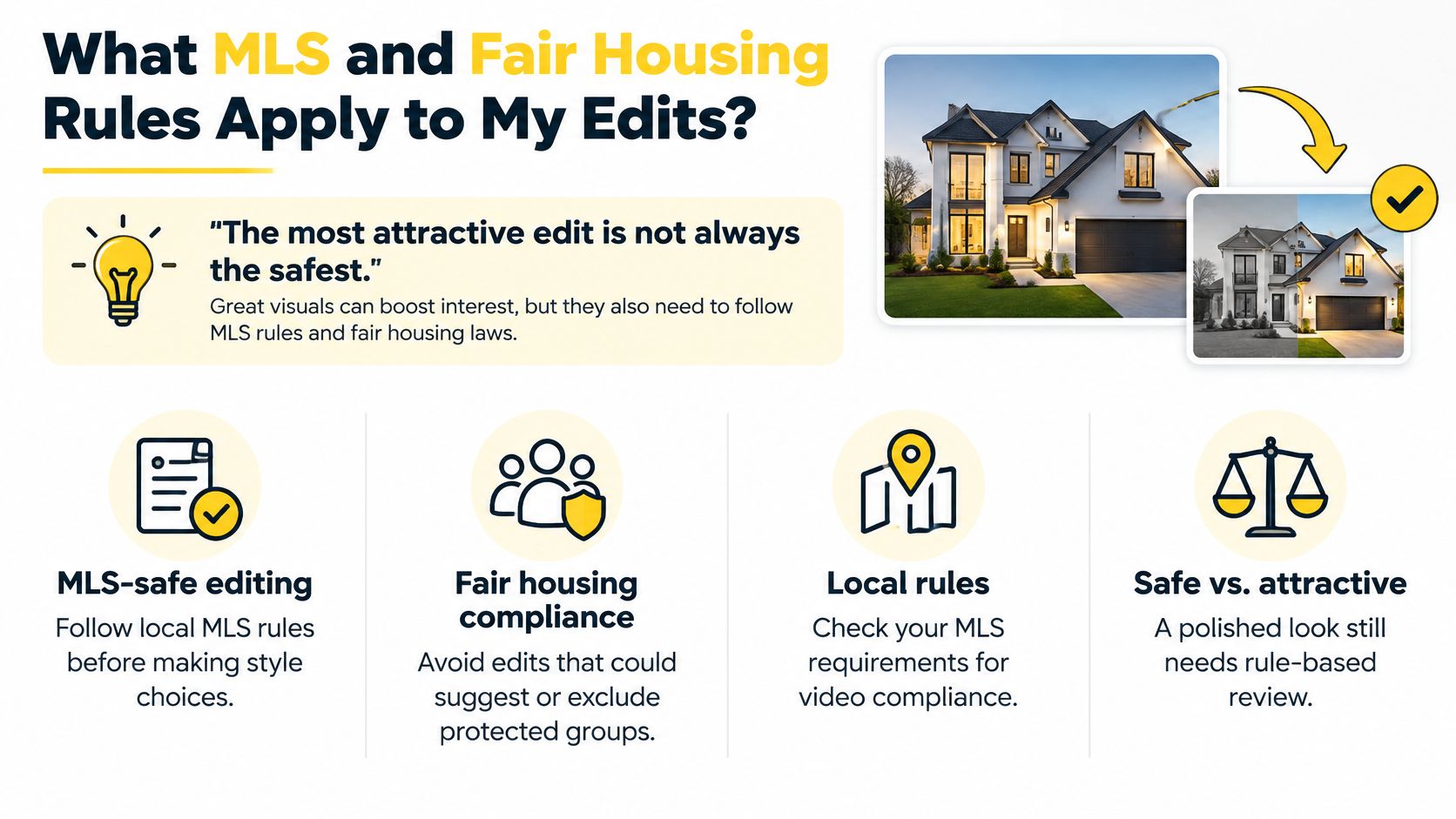
According to Showcase Videos' breakdown of MLS video rules, no single national branded-versus-unbranded standard exists across U.S. markets. NAR's model multiple-listing policy defines listing content broadly to include photographs, graphics, audio, video recordings, and virtual tours, and bars other participants from advertising a listing without the listing broker's prior consent. Videos can be used for listing marketing, and an unbranded version can be prepared when an MLS requires it, while your branded cut with agent name, brokerage, logo, and contact info stays on social channels.
True picture standards and risky narration
Visual tricks and automated scripts create compliance hazards fast. As outlined in Property Video Generator's guide to MLS video rules, NAR's Article 12 requires REALTORS® to present a "true picture" in advertising, and fair housing advertising rules reach oral statements, photographs, illustrations, and symbols, not merely typed listing remarks. Phrases that sneak into AI-written narration, such as "steps from" (which raises disability accessibility concerns) or "perfect for families" (which signals familial status preference), can trigger fair housing violations even when the agent didn't write them by hand.Simulated visuals carry the same scrutiny. AI staging, day-to-night effects, and AI actors can make a property look materially different from its real condition if viewers aren't told what was altered. Some platforms, MLSs, and local rules require disclosure of AI-edited or virtually staged images, and a video made with VideoTour.ai is not automatically compliant with them.
Compliance reality: More realism isn't automatically safer. Aggressive AI effects and unchecked narration can make a listing appear materially different from the source photos you took on site.
Four checks before any listing video goes live
Before generating or exporting any property video, verify every retained photo belongs to the property and is useful, confirm that address, price, room counts, and area units match the live listing, and double-check the selected agent and contact details. For specific policy notes on commercial distribution, review our commercial use and MLS video guidelines.- Verify the photos and facts: Confirm every still matches the current property and that price, square footage, and bed/bath counts align with the MLS sheet.
- Audit the script and captions: Read every spoken line and on-screen caption for subjective claims, steering language, or fair housing red flags.
- Document original versus simulated visuals: Track which frames are untouched photographs and which use AI staging, twilight conversion, or AI presenters, and add disclosures where local rules require them.
- Get broker sign-off before publishing: Have your managing broker or compliance desk confirm both the unbranded MLS version and the branded social cut meet local board requirements.
Should I Use AI or a Human Editor for Each Listing?
Use AI editing for routine listings built from still photos, and hire a human editor for live-action footage, drone flights, luxury properties that need a custom story, or interviews with the agent or sellers. Splitting the workload by listing type keeps every property covered without spending a human editor's time on standard residential inventory.
Automated video production has moved well beyond early adopters. A 2025 Wyzowl survey of 266 video marketers found that 63% had used AI video tools to help create or edit marketing videos, while 37% had not. For agents managing multiple active listings, the practical gain is simple: every listing can get a clean, consistent video instead of only the occasional flagship home.
The decision is not cinematic polish. Treat each listing video as a factual route through the property that must survive MLS review, social posting, and client scrutiny. Speed matters, but so do revisions, format accuracy, and the final check against the live listing.
 VideoTour.ai is an AI real estate video maker for US listing agents, brokerages, real estate marketing agencies, and real estate photographers. It turns listing photos into ready-to-share videos with cinematic motion, captions, music, and branding. One professional video tour can use up to 60 photos and include music, transitions, and branding.
The platform supports MLS-safe property videos, real estate reels, lifestyle videos, virtual staging videos, AI avatar videos, cinematic 3D text, AI transition effects, AI drone videos, voiceover and voice cloning, video branding, AI generated music, music video, and video landing pages. It also provides video solutions for real estate, hotel, and Airbnb listings, with use cases for agents, photographers, teams, brokerages, luxury agents, property managers, vacation rentals, and hotels.
VideoTour.ai claims to be trusted by 40,000+ real estate professionals. Its videos are full HD, without watermark, and presented as ready for social media, MLS, and client presentations. Your first video is free with no credit card, and plans run $29/month billed yearly or $39 billed monthly for 10 videos, with Agency at $59 for 40 videos on the VideoTour.ai pricing page.
That cost structure changes the editing decision. If a listing has usable photos and standard facts, AI gives you a repeatable first cut fast. If the edit needs custom camera work, sound design, or a distinct editorial story, a human editor still earns the fee.
The AI vs. professional real estate video comparison covers that line for different price points. My rule is simple: use AI when the job is fast, factual, and photo based. Use a human when the property needs a custom shoot, live footage, or a story that depends on timing and judgment.
Automated video production has moved well beyond early adopters. A 2025 Wyzowl survey of 266 video marketers found that 63% had used AI video tools to help create or edit marketing videos, while 37% had not. For agents managing multiple active listings, the practical gain is simple: every listing can get a clean, consistent video instead of only the occasional flagship home.
The decision is not cinematic polish. Treat each listing video as a factual route through the property that must survive MLS review, social posting, and client scrutiny. Speed matters, but so do revisions, format accuracy, and the final check against the live listing.
| Tool | Best fit | Honest note | Cost per listing video |
|---|---|---|---|
| VideoTour.ai | Listing and social videos from existing photos | Needs your review for compliance before publishing | Paid plans with a monthly video allowance |
| Reel-E | Dedicated real estate video editing | Full featured, but a higher per-video cost than the lowest option | Paid plans with a higher per-video cost |
| Amplifiles | Dedicated real estate video creation | Solid choice if you want a dedicated real estate tool, at a higher per-video cost | Paid plans with a higher per-video cost |
| AutoReel | Automated real estate reels | Quick reels, but check the per-video cost against your listing volume | Paid plans with a higher per-video cost |
| DaVinci Resolve | Manual editing with advanced color and audio | Free, with a steep learning curve and hands-on time per listing | Free, with your editing time |
| CapCut | Captioned social reels | Fast for social edits, but each listing is built by hand | Free tier, with your editing time |
How dedicated AI tools compare with manual editors
Dedicated real estate platforms save hours because they handle sequencing and formatting without a blank timeline. Reel-E, Amplifiles, and AutoReel are all real options built for property marketing, though their per-video economics depend on plan limits and listing volume. Manual tools like DaVinci Resolve and CapCut avoid per-listing fees, yet every property requires hands-on assembly, captions, color tweaks, and separate exports by format.VideoTour.ai is an AI real estate video maker for US listing agents, brokerages, real estate marketing agencies, and real estate photographers. It turns listing photos into ready-to-share videos with cinematic motion, captions, music, and branding. One professional video tour can use up to 60 photos and include music, transitions, and branding.The platform supports MLS-safe property videos, real estate reels, lifestyle videos, virtual staging videos, AI avatar videos, cinematic 3D text, AI transition effects, AI drone videos, voiceover and voice cloning, video branding, AI generated music, music video, and video landing pages. It also provides video solutions for real estate, hotel, and Airbnb listings, with use cases for agents, photographers, teams, brokerages, luxury agents, property managers, vacation rentals, and hotels.
VideoTour.ai claims to be trusted by 40,000+ real estate professionals. Its videos are full HD, without watermark, and presented as ready for social media, MLS, and client presentations. Your first video is free with no credit card, and plans run $29/month billed yearly or $39 billed monthly for 10 videos, with Agency at $59 for 40 videos on the VideoTour.ai pricing page.
That cost structure changes the editing decision. If a listing has usable photos and standard facts, AI gives you a repeatable first cut fast. If the edit needs custom camera work, sound design, or a distinct editorial story, a human editor still earns the fee.
When a human editor earns the fee
Automation stops where live cinematography begins. If you paid a licensed drone pilot to capture a waterfront lot, filmed a walking interview with the seller, or are marketing a custom estate where architectural storytelling drives the buyer's emotion, hire a human editor. Custom sound design, multi-camera matching, and nuanced color grading on live-action footage can justify extra days and budget.The AI vs. professional real estate video comparison covers that line for different price points. My rule is simple: use AI when the job is fast, factual, and photo based. Use a human when the property needs a custom shoot, live footage, or a story that depends on timing and judgment.
How Do I Edit a Listing Video Step by Step?
Build every photo-based listing video in the same repeatable order: pick your hero frame, confirm photo accuracy, sequence the floor plan, apply subtle motion and factual narration, separate your branded and unbranded exports, and check the final cut on a phone. A listing video is a factual route through the property that has to survive MLS review, so a fixed checklist prevents the sloppy mistakes that trigger revisions, warnings, or a pulled tour.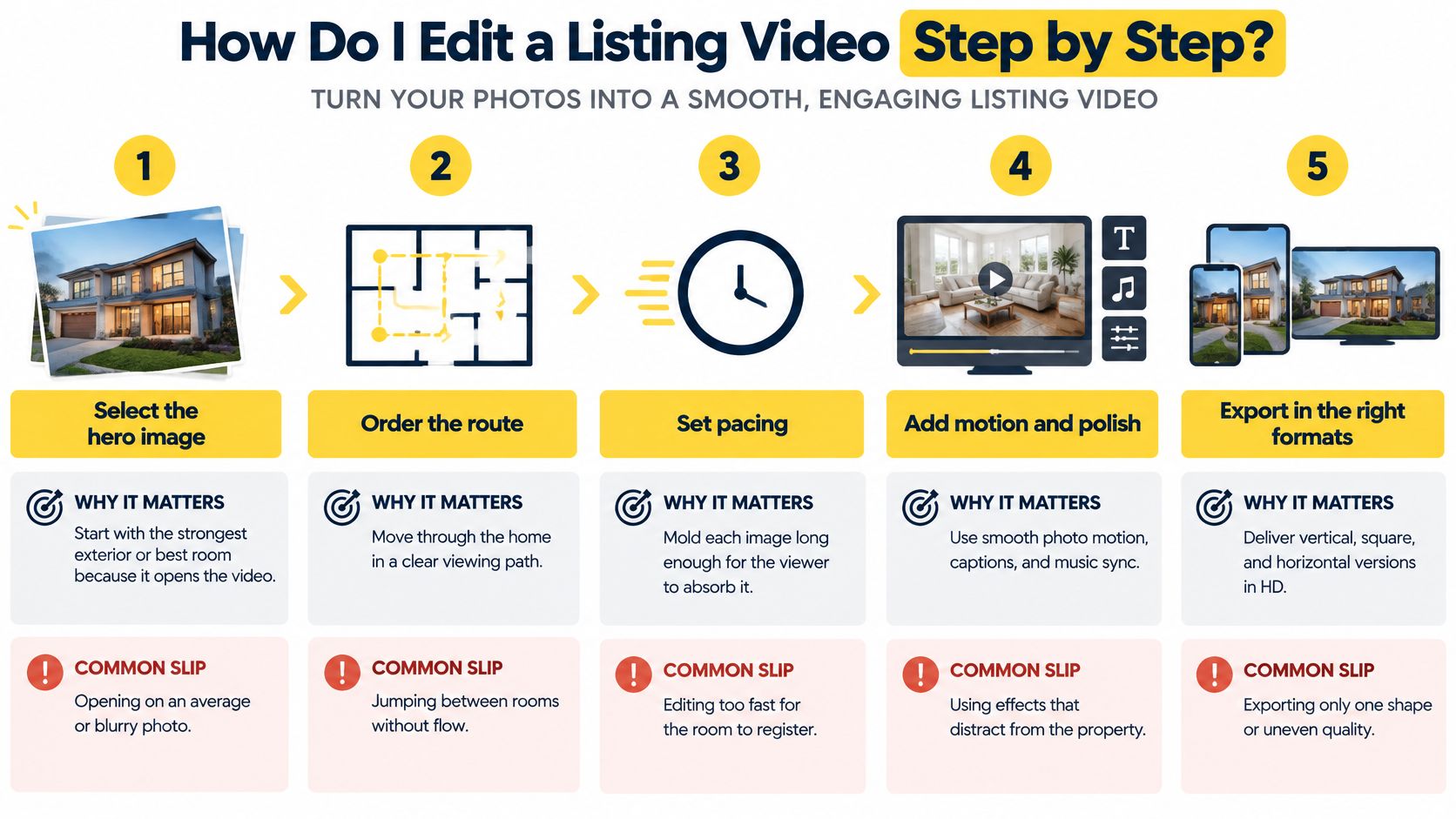
Inside the platform, creating a property tour follows a clear 14-step sequence: choose the industry and listing goal, start from a listing URL or upload photos, verify your photos and their order, check property information, select the agent, pick the video shape, set language and on-screen words, add optional narration, choose the soundtrack, select optional animations, pick the cover image, decide on a reel, check the summary to generate once, and then review, correct, and share. That final review step is where you catch a wrong price or misplaced photo before it reaches the MLS. Running the same structured sequence on every listing turns video from a one-off chore into a launch habit measured in minutes.
Eight steps from raw photos to published listing video
- Select the hero image first. Choose the strongest exterior shot or brightest main living space because that opening frame earns the buyer's attention in the first three seconds. Common slip: opening on a dark foyer or narrow hallway that hides what makes the home worth touring.
- Verify every still belongs to the listing and adds value. Strip out duplicate angles, blurry frames, and anything that doesn't clarify layout or condition, then confirm the address, price, room counts, and area units match the current listing and the selected agent and contact details are correct. Common slip: accidentally keeping a photo from a neighboring condo unit or a shared amenity that misrepresents the private lot.
- Order the shots along a logical viewing route. Walk the viewer from exterior to entry, living areas, kitchen, bedrooms, bathrooms, outdoor space, and finally your call to action. Common slip: bouncing from the backyard to an upstairs bedroom and back to the kitchen, which leaves viewers unable to picture the floor plan.
- Set restrained pan and zoom motion. Subtle movement brings still rooms to life while keeping doorways, cabinets, and window frames square. Common slip: cranking up zoom speed or heavy scale changes that make compact rooms look artificially stretched.
- Draft your hook and script from verifiable facts. Pull real numbers and finish details straight from the listing sheet, and speed up drafting with our free real estate hook generator and real estate video script generator. Common slip: stuffing scripts with vague hype adjectives the home can't back up during an in-person showing.
- Layer voiceover, music, and readable captions. Keep background music tucked beneath speech and generate clean subtitles with our auto caption generator for silent mobile viewers. Common slip: placing captions too close to the bottom or side edges where phone controls cover the text.
- Apply branding and separate your MLS file. Add your logo, brokerage details, and contact card to the social reel while keeping the unbranded MLS version completely clear of agent promotion. Common slip: uploading a watermarked social export to an MLS field that strips or flags branded tours.
- Preview the final export on a phone. Watch the finished video end to end on a small screen with sound off and sound on before posting. Common slip: approving the edit on a large desktop monitor and missing tiny text or cropped corners on mobile.
Streamlining the workflow from a listing URL
Downloading dozens of high-resolution photos, renaming files, and setting up fresh timelines is where most DIY workflows stall. VideoTour.ai removes that setup work by letting you start each tour from a listing URL or by uploading the photos directly.Inside the platform, creating a property tour follows a clear 14-step sequence: choose the industry and listing goal, start from a listing URL or upload photos, verify your photos and their order, check property information, select the agent, pick the video shape, set language and on-screen words, add optional narration, choose the soundtrack, select optional animations, pick the cover image, decide on a reel, check the summary to generate once, and then review, correct, and share. That final review step is where you catch a wrong price or misplaced photo before it reaches the MLS. Running the same structured sequence on every listing turns video from a one-off chore into a launch habit measured in minutes.
What Do Agents Ask About Real Estate Video Editing?
Treat the edit like a factual route through the property, not a highlight reel that happens to have rooms in it. These are the six questions I would settle before a tour is posted, because each one affects either turnaround, revisions, or MLS review.
Which photos make the cut? Keep only photos that belong to the property and help the route make sense. Before generation, confirm the retained set is useful, in the right order, and free of near-duplicates that slow pacing.
What listing facts must match before export? Address, price, room counts, area units, the selected agent, and contact details should match the current listing. If one field changed after the photos were shot, fix the data before the video is generated, not after comments point it out.
Do I need a branded version and an MLS version? Often, yes. Use branding for social, email, and client presentations, and prepare an unbranded version when an MLS requires it. A video is not automatically compliant just because it looks clean; some platforms, MLSs, and local rules require disclosure for AI-edited or virtually staged images.
How do I keep revisions cheap? Review for facts first, polish second. Check whether the visual order follows a sensible walk through the home, then confirm on-screen words, narration choice, soundtrack, cover image, and agent details. A missed price digit costs more than a plain transition.
Can existing photos carry the whole video? For most listing marketing, yes. VideoTour.ai turns the listing photos you already have into consistent, ready-to-post videos in minutes, without another shoot or editing timeline. I would still budget a review pass, because speed only helps if the listing survives scrutiny.
When do I finish in my own editor? Use the platform export when the tour is ready for MLS, social, and client delivery. If you need advanced outro editing or clip merging, do that after export in your own editor rather than forcing the listing workflow to behave like a film project.
How many photos can one listing video use?
VideoTour.ai supports up to 60 photos per video, which is enough to cover exterior angles, main living rooms, bedrooms, baths, and outdoor amenities on most residential listings. Curate out near-duplicates before uploading so pacing stays brisk.
Can I export a listing video in 4K?
No, VideoTour.ai exports in 720p and 1080p HD rather than 4K. Standard 1080p HD meets the delivery baseline for MLS portals, YouTube property tours, and mobile social feeds without creating oversized upload files.
Can I use my own voice for listing narration?
Yes, voice cloning is available so your listing tours can sound like you without recording a fresh audio track for every property. Make sure you have clear permission for any cloned voice you use and verify your local MLS and disclosure rules before publishing.
Can I import a listing from a Zillow, Redfin, or Realtor.com link?
Yes, you can import listing photos and details directly from a Zillow, Redfin, or Realtor.com URL. Always review the imported price, room counts, and photo order before generating the final cut.
How long does an AI listing video take?
AI video generation takes minutes plus a few minutes of review to verify facts, captions, and framing. Traditional editing with a videographer or freelance editor typically takes days, with extra delays for revisions.
Can I use AI avatars in a listing video?
Yes, VideoTour.ai includes AI avatars for agent intros and branded social clips. Before publishing any listing video that features an AI presenter, review your local MLS policies and fair housing disclosure requirements.
VideoTour.ai turns the listing photos you already have into 720p and 1080p HD property tours and social reels in vertical, square, and horizontal formats, complete with voice cloning, captions, branding, and an unbranded MLS viewing link. Try your first listing video free with no credit card and build a faster, more consistent editing workflow at VideoTour.ai.