
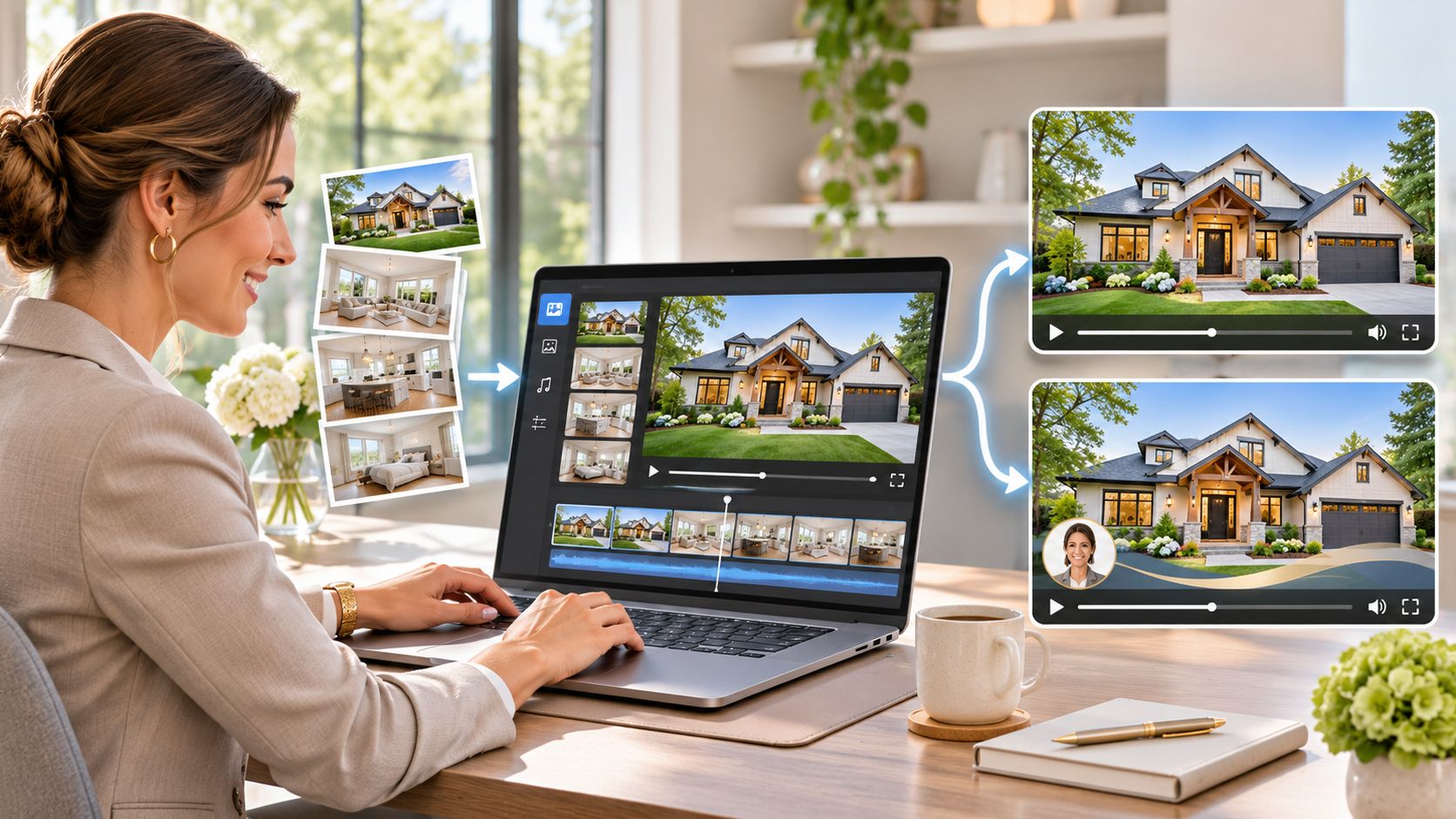
An MLS video is a listing video published in a Multiple Listing Service virtual-tour field so agents and buyers can watch the property. Most MLSs require it to be unbranded, with no agent name, logo, phone number or website, and each MLS writes its own rules, so confirm yours before you upload anything.
So why does the wrong file keep going up? Because most agents treat a listing video as one asset. It isn't. The same two minutes of footage has to survive two different distribution systems with opposite goals, and the file that performs best on Instagram is often the exact file an MLS will reject.
That gap is where listings get pulled, compliance emails get sent, and a photographer's afternoon gets wasted on a re-export. The fix isn't more caution. It's treating the MLS cut and the social cut as two planned outputs from one shoot, each with its own audit before it publishes.
Summary
Create an AI Video Tours from PhotosTry it For Free

What Is an MLS Video and Where Does It Appear?
An MLS video is a listing video uploaded to, or linked from, a Multiple Listing Service virtual-tour field so agents and buyers can watch the property. Most MLSs require it to be unbranded, with no agent name, logo, phone number or website, and each MLS writes its own rules, so confirm yours before uploading.
Think of the MLS version as the property's public record and the branded reel as the agent's storefront sign. The public record describes the house. The storefront sign tells people who to call. Mixing them is the single most common production error in listing video.
The contrast is easiest to see at the kitchen table, with the tour open on a laptop.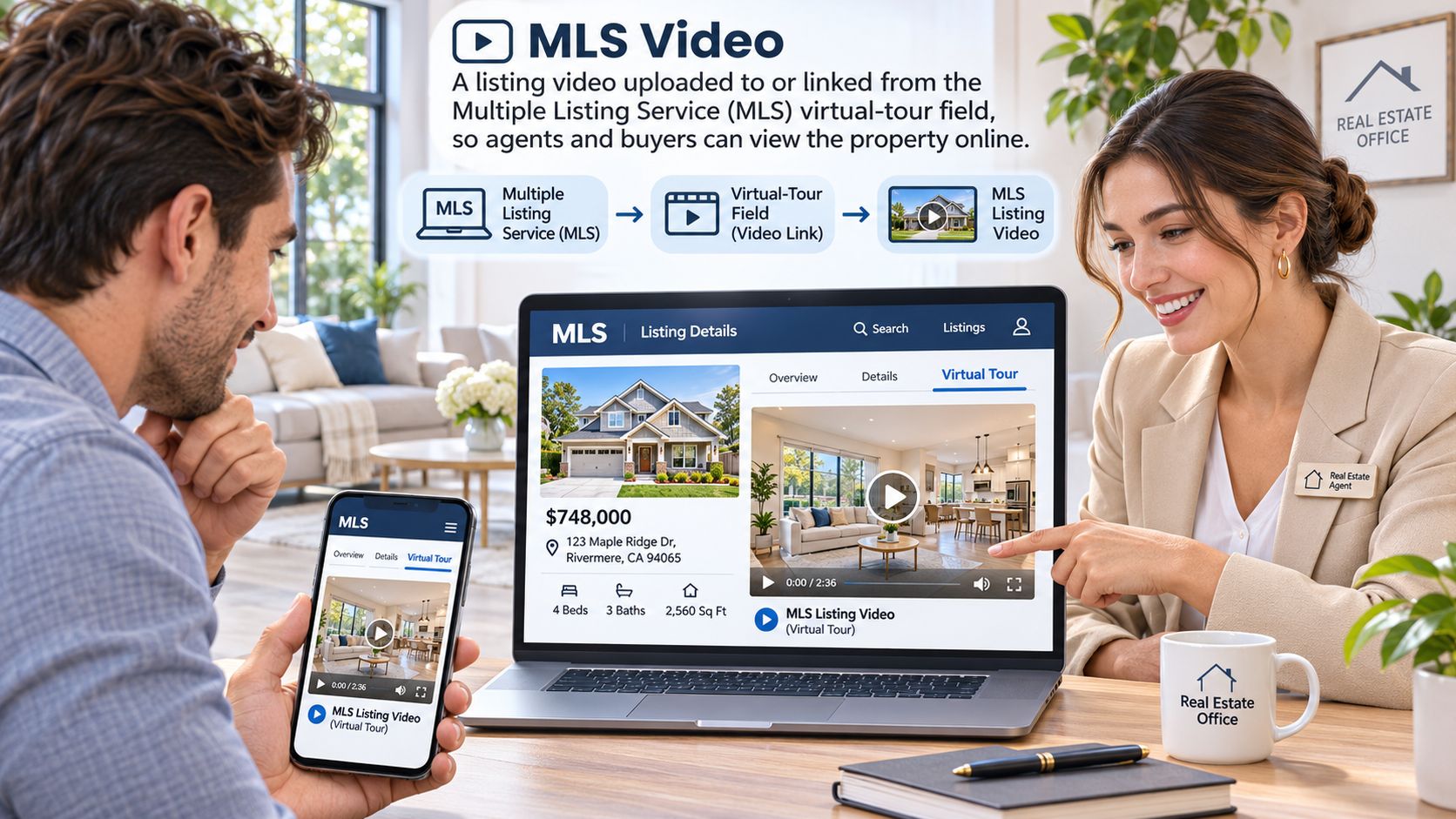 An agent will typically meet four placements. The MLS virtual-tour field is the primary one, and it feeds IDX syndication to broker websites and portals where the MLS permits it. Zillow Showcase runs its own upload workflow with its own file requirements. Then there are the agent's own channels: Instagram, TikTok, Facebook and YouTube, where branding is the entire point.
Video also supplements listing photos rather than replacing them. Buyers still lean on the still gallery to compare finishes and floor plans, which is why a video that buries the photography under motion graphics tends to underperform a clean one.
Before you generate anything, answer two questions. Where will this file publish, and will the agent's identity be visible there? If the answer to the second question is yes and the destination is an MLS field, you have a version-control problem to solve before the first frame renders.
Think of the MLS version as the property's public record and the branded reel as the agent's storefront sign. The public record describes the house. The storefront sign tells people who to call. Mixing them is the single most common production error in listing video.
The contrast is easiest to see at the kitchen table, with the tour open on a laptop.
An agent will typically meet four placements. The MLS virtual-tour field is the primary one, and it feeds IDX syndication to broker websites and portals where the MLS permits it. Zillow Showcase runs its own upload workflow with its own file requirements. Then there are the agent's own channels: Instagram, TikTok, Facebook and YouTube, where branding is the entire point.Video also supplements listing photos rather than replacing them. Buyers still lean on the still gallery to compare finishes and floor plans, which is why a video that buries the photography under motion graphics tends to underperform a clean one.
Before you generate anything, answer two questions. Where will this file publish, and will the agent's identity be visible there? If the answer to the second question is yes and the destination is an MLS field, you have a version-control problem to solve before the first frame renders.
Which Video Rules and Market Figures Matter in 2026?
Two separate rule sets decide whether a listing video publishes cleanly, the destination platform's upload requirements and your MLS's virtual-tour policy, and the market figures explain why the effort is worth making. Read them as different kinds of information, because they answer different questions.
Start with the platform rules. Zillow's Showcase workflow caps video at 120 seconds or less, requires a file upload rather than a link or embed, and wants the video focused exclusively on the listing. That ceiling belongs to Zillow. It is not a national MLS duration rule, and treating it as one will leave you guessing at the wrong moment.
Then the MLS example. An industry summary of MLS requirements notes that SmartMLS asks for uploaded virtual-tour videos to be publicly accessible without a login or password and unbranded, per Swarmify's summary of MLS video rules. Confirm the same point with your own MLS rather than assuming it carries over.
Now the demand side. The National Association of REALTORS' 2025 generational-trends data shows 51% of buyers found the home they purchased through the internet, against 29% through an agent. Among online searchers, 83% rated listing photos very useful while only 29% said the same of listing videos, and 37% used an online video site during their search. On the supply side, just 12% of sellers reported their agent used video to market the home.
That gap is the opportunity. Agents who want to know how the same footage gets resized for each channel should read up on video aspect ratios for real estate listings. And the NAR 2024 Technology Survey found 52% of respondents named social media as the tool producing the highest share of quality leads, ahead of CRM at 32% and local MLS systems at 26%, which is the argument for producing a social cut alongside the MLS file.
One reading rule before you quote any of this to a seller. A usefulness rating and a lead-share figure describe how buyers and agents behave. Neither one proves a specific listing will sell faster because it has video.
| Item | Value | Audience and date | Source |
|---|---|---|---|
| Zillow Showcase video length | 120 seconds or less | Zillow Showcase rules, current published guidance | Zillow Showcase help guidance |
| Zillow Showcase delivery | Uploaded as a file, not a link or embed | Zillow Showcase rules, current published guidance | Zillow Showcase help guidance |
| MLS virtual-tour video access | Public without login and unbranded | One MLS example (SmartMLS), as summarized in industry guidance | Neutral industry summary of MLS rules |
| Videos rated very useful | 29% (listing photos 83%) | U.S. online home buyers who searched online, 2025 NAR generational-trends data | NAR 2025 generational-trends data |
| Sellers whose agent used video | 12% | U.S. sellers, 2025 NAR generational-trends data | NAR 2025 generational-trends data |
| Social media, highest share of quality leads | 52% | NAR members, 2024 Technology Survey | NAR 2024 Technology Survey |
Then the MLS example. An industry summary of MLS requirements notes that SmartMLS asks for uploaded virtual-tour videos to be publicly accessible without a login or password and unbranded, per Swarmify's summary of MLS video rules. Confirm the same point with your own MLS rather than assuming it carries over.
Now the demand side. The National Association of REALTORS' 2025 generational-trends data shows 51% of buyers found the home they purchased through the internet, against 29% through an agent. Among online searchers, 83% rated listing photos very useful while only 29% said the same of listing videos, and 37% used an online video site during their search. On the supply side, just 12% of sellers reported their agent used video to market the home.
That gap is the opportunity. Agents who want to know how the same footage gets resized for each channel should read up on video aspect ratios for real estate listings. And the NAR 2024 Technology Survey found 52% of respondents named social media as the tool producing the highest share of quality leads, ahead of CRM at 32% and local MLS systems at 26%, which is the argument for producing a social cut alongside the MLS file.
One reading rule before you quote any of this to a seller. A usefulness rating and a lead-share figure describe how buyers and agents behave. Neither one proves a specific listing will sell faster because it has video.
Why Does an MLS Video Need an Unbranded Version?
Because the MLS virtual-tour field is a public record of the property, not an advertisement for the agent, and a branded file can be ruled ineligible for that field or for downstream IDX syndication. Compliance here is a distribution problem, not a single national specification.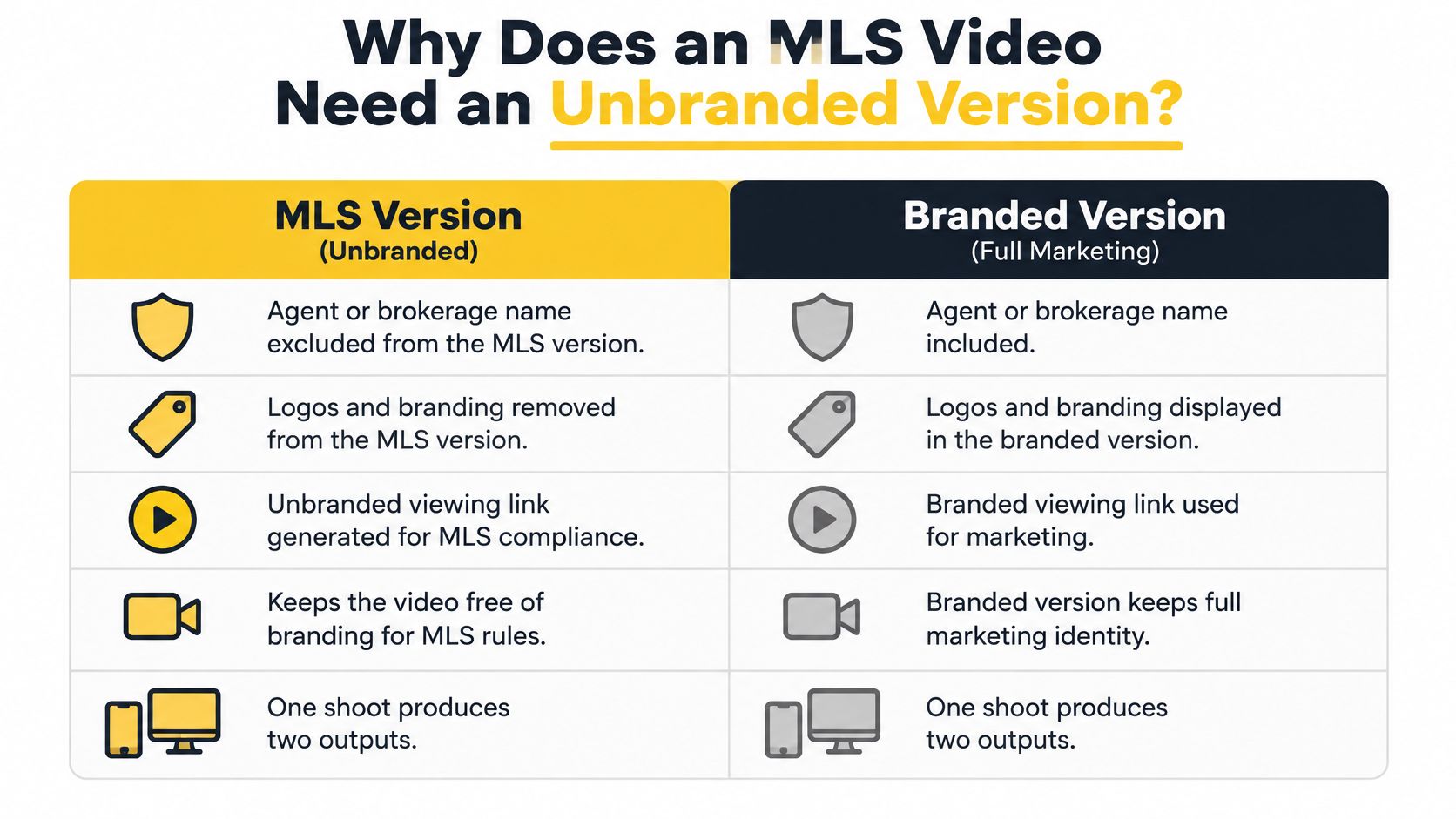 The unbranded requirement usually covers more than a logo. Expect to strip the agent or brokerage name, phone number, email, website, team identity, QR code, lead form, and any narration that invites a viewer to call. Arch2Video's breakdown of MLS video rules frames this as two render targets from one set of footage, and that framing is the right one to build a workflow around.
Both failure modes cost the agent. Branding inside the MLS variant can knock the video out of the field it was made for. Stripping branding from the social variant removes the attribution and lead capture that made the reel worth posting.
Here's the video walkthrough of the same comparison:
Agents sometimes worry that going unbranded kills attribution. It doesn't, as long as the branded versions still go out. An unbranded viewing link can carry the tour on the MLS side while the agent posts branded reels and a branded horizontal cut elsewhere. Same photos, two outputs, and the MLS version carries no agent identity at all. If you want the mechanics of keeping both, branding rules for AI real estate videos covers how the two versions stay separated.
The unbranded requirement usually covers more than a logo. Expect to strip the agent or brokerage name, phone number, email, website, team identity, QR code, lead form, and any narration that invites a viewer to call. Arch2Video's breakdown of MLS video rules frames this as two render targets from one set of footage, and that framing is the right one to build a workflow around.| Element | MLS version | Branded version |
|---|---|---|
| Agent name, logo, phone, email, website | Excluded | Included |
| Team identity, QR code, lead form, contact invitation in narration | Excluded | Included |
| Address, price, room counts and areas from the listing | Included, accurate to listing | Included, accurate to listing |
| Opening, closing and end frames | No agent identity in any frame | Agent branding allowed |
| Where it goes | MLS virtual-tour field and IDX syndication where the MLS allows | Agent website, Instagram, TikTok, Facebook, YouTube, email, ads |
| Risk if mixed up | Branding can make the video ineligible for the MLS field or IDX | Without branding, attribution and lead capture are lost |
Here's the video walkthrough of the same comparison:
Working rule: name the two exports differently, store them in different folders, and never let the branded file touch an MLS upload field.A pre-upload audit for the MLS file takes about ninety seconds. Check the opening frame, the closing frame, every lower third and end card, the captions and the audio track for a name, number, URL or logo. Then watch it once with the sound off, because a visual watermark is easy to miss when you're listening to the narration.
Agents sometimes worry that going unbranded kills attribution. It doesn't, as long as the branded versions still go out. An unbranded viewing link can carry the tour on the MLS side while the agent posts branded reels and a branded horizontal cut elsewhere. Same photos, two outputs, and the MLS version carries no agent identity at all. If you want the mechanics of keeping both, branding rules for AI real estate videos covers how the two versions stay separated.
What Must I Confirm With My MLS Before Uploading?
Five things, and you should get each answer from your own MLS rather than from another market's rulebook. The checklist below runs in a single sitting.
Once the answers are in hand, pick one recent listing with its photos already delivered. Write the script from listing facts only, then build both versions from that single set of images. The AI real estate video maker produces a clean unbranded MLS viewing link plus branded vertical, square and horizontal social versions from one upload, and the first video is free with no credit card. Note that an unbranded viewing link doesn't remove names or logos already burned into a video, so check the file itself against your MLS rules. When you're ready to budget across a pipeline, the VideoTour.ai pricing page lists the plans: $29 per month billed yearly for 10 videos works out to about $2.90 per video, $39 billed monthly for 10 videos to about $3.90, and the Agency plan at $59 for 40 videos to about $1.48.
Confirm the MLS version is compliant before the branded reel for that listing goes live. Not after.
- Branding rules. Does the public virtual-tour field accept any agent identity, or none at all? Look on the MLS rules page or FAQ, and ask support if the wording is ambiguous.
- Accepted file types or link hosts. Some MLSs take an uploaded file, others accept a hosted link, and some accept both with conditions on the host.
- Length or size limits. Find the ceiling before you build, because trimming after export means re-checking frames and captions.
- File versus link. This decides your delivery format, and it's the question agents skip most often.
- AI or virtual staging disclosure rules. If the video uses virtual staging, AI narration or materially altered imagery, ask whether a notation or label is required.
When the answer is unclear: request written confirmation from MLS support before uploading, and keep that email with the listing record.Rules vary by MLS, so a checklist borrowed from a market three states away can be worse than no checklist at all. The VideoTour.ai help center article on commercial use and MLS rules makes the same point from the tool side, and it's worth reading before you assume a generated file clears your board.
Once the answers are in hand, pick one recent listing with its photos already delivered. Write the script from listing facts only, then build both versions from that single set of images. The AI real estate video maker produces a clean unbranded MLS viewing link plus branded vertical, square and horizontal social versions from one upload, and the first video is free with no credit card. Note that an unbranded viewing link doesn't remove names or logos already burned into a video, so check the file itself against your MLS rules. When you're ready to budget across a pipeline, the VideoTour.ai pricing page lists the plans: $29 per month billed yearly for 10 videos works out to about $2.90 per video, $39 billed monthly for 10 videos to about $3.90, and the Agency plan at $59 for 40 videos to about $1.48.
Confirm the MLS version is compliant before the branded reel for that listing goes live. Not after.
How Do I Build an MLS-Ready Video From Listing Photos?
Run these nine steps in order, and generate the unbranded file before the branded one. Building the compliant version first means the branded edits can't leak into it later.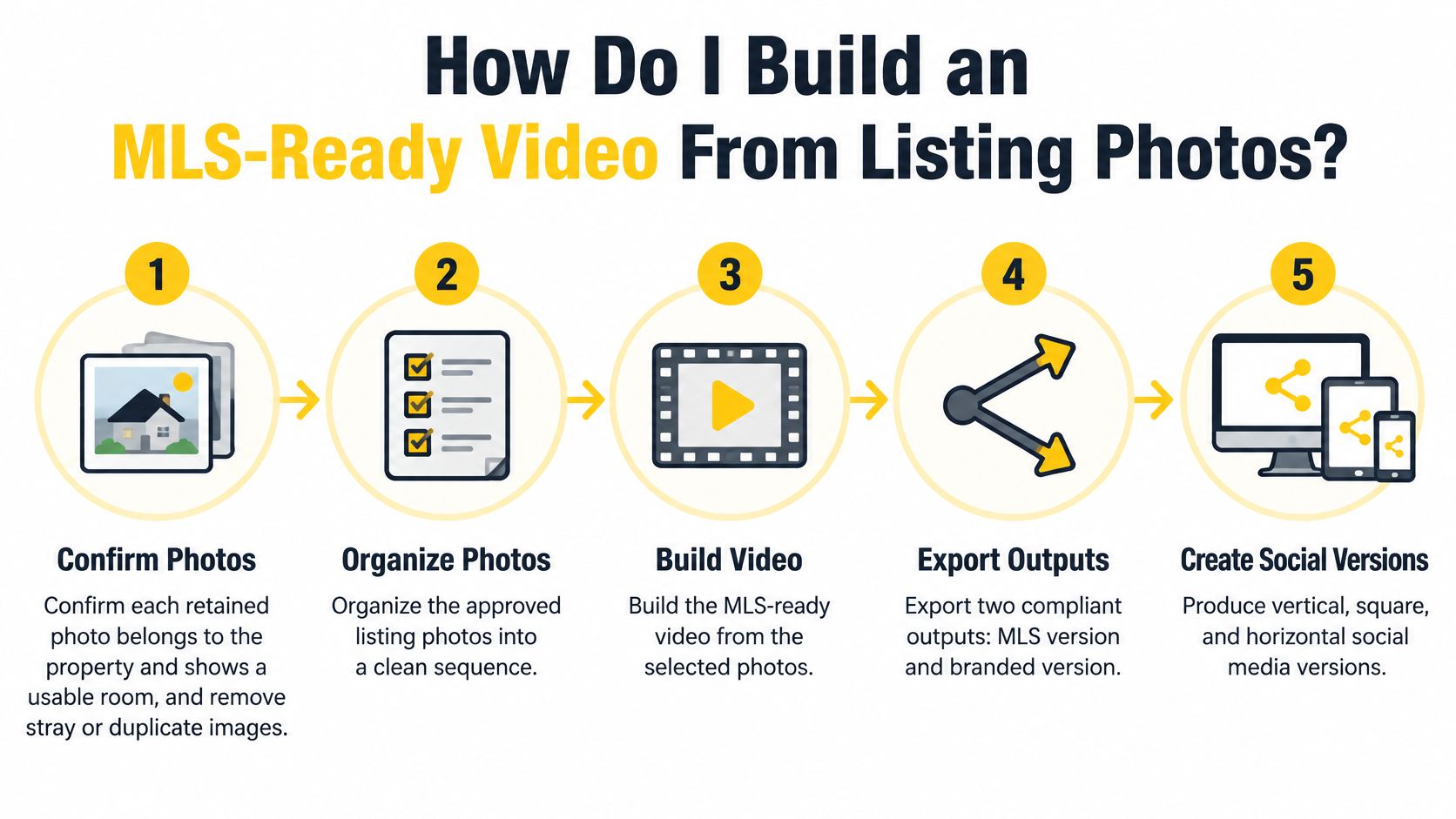
The engagement case for motion is real but should be read carefully. Aktion Productions' roundup of real estate video statistics cites Zillow-reported data from March 2020 through February 2021 showing listings with a Zillow 3D Home tour were viewed 65% more often and favorited 75% more often than listings without one. Those are association-level results, not a controlled experiment, so treat them as a reason to preserve room order and spatial clarity, not as a forecast.
By the end you should have two labelled files, an unbranded master and a branded set, plus a record of which source photos went into each. For the photo-to-video workflow in more depth, turning listing photos into video tours walks through the same sequence.
- Qualify the photos. Confirm each retained image belongs to the property and shows a usable room, then delete duplicates, stray shots and anything shot at a strange angle. A stray photo from the neighbor's kitchen is a misrepresentation, not a bonus frame.
- Verify the facts. Check the address, price, room counts and area units against the live listing, and confirm the agent name and contact details you'll use in the branded version. Getting this right once saves a re-render.
- Order the rooms. Open on a quick exterior, move to the strongest living area, then the kitchen, primary suite, notable amenities, and a closing property detail. Keep the full cut short enough for the strictest destination on your list.
- Write from listing facts. Every narration line should describe something the photos or listing data establish. If a line needs an assumption, cut it.
- Add music and motion. Use restrained pan and zoom so room order stays legible. Aggressive movement between rooms destroys the spatial continuity that makes video useful in the first place.
- Generate the unbranded MLS version first. No agent identity in any frame, caption or audio track. Doing this before branding means there's no cleaning step later.
- Generate the branded variants. Vertical for Reels, TikTok and Shorts, square for feed placements, horizontal for YouTube and the brokerage site, all from the same project.
- Caption it properly. More on that below, because automatic transcription is where accuracy breaks.
- Run a final frame audit on both files. Watch each one end to end, then export the MLS file in the format your MLS confirmed it accepts.
Check every proper noun, street name, room label and dimension against the listing before publishing. A caption that says "3 bed" on a four-bedroom listing is a factual error with your name on it.Captions also need re-checking per destination, since platform rendering and safe areas can crop text that looked fine in the editor. And when captions are the only thing carrying a disclosure, they need to be right in every export.
The engagement case for motion is real but should be read carefully. Aktion Productions' roundup of real estate video statistics cites Zillow-reported data from March 2020 through February 2021 showing listings with a Zillow 3D Home tour were viewed 65% more often and favorited 75% more often than listings without one. Those are association-level results, not a controlled experiment, so treat them as a reason to preserve room order and spatial clarity, not as a forecast.
By the end you should have two labelled files, an unbranded master and a branded set, plus a record of which source photos went into each. For the photo-to-video workflow in more depth, turning listing photos into video tours walks through the same sequence.
How Do I Keep AI and Staged Footage Accurate?
Use the original photos as the factual boundary and disclose anything you changed. The riskiest additions are virtual staging, day-to-night edits, AI narration, lifestyle actors and avatars, drone-style transitions, and motion effects that flatter a small room into a large one.
Video is often the first impression, because the impact can be greater than it first appears. NAR's 2025 buyer and seller research found 88% of sellers' agents said listing photos were much more important or more important to clients, compared with 47% for videos, per the 2025 Home Buyers and Sellers Generational Trends report. Photos are still the backbone. Video is the hook that gets someone to open the gallery.
That division of labor sets the standard. The video should never show a view, a room size, a finish, an amenity or a surrounding that the photos and listing don't establish. A camera move that implies an ocean glimpse through a window the photo shows as a fence is a misrepresentation, and the buyer finds out at the showing.
Three checks catch most of it. Label any staged or materially altered room wherever the MLS or platform requires a disclosure. Keep scripts free of claims like a view or a finish unless a photo shows it. Read every narration line against the listing before export, out loud, because spoken errors are harder to spot on a page.
Agents comparing AI tools should weigh how each one handles disclosure and source-photo integrity, not just output polish. TopToolAdvisor's scored video tool shortlist is a reasonable starting comparison, and what virtual staging means in practice explains where staging stops being a visual aid and starts being a claim.
Video is often the first impression, because the impact can be greater than it first appears. NAR's 2025 buyer and seller research found 88% of sellers' agents said listing photos were much more important or more important to clients, compared with 47% for videos, per the 2025 Home Buyers and Sellers Generational Trends report. Photos are still the backbone. Video is the hook that gets someone to open the gallery.
That division of labor sets the standard. The video should never show a view, a room size, a finish, an amenity or a surrounding that the photos and listing don't establish. A camera move that implies an ocean glimpse through a window the photo shows as a fence is a misrepresentation, and the buyer finds out at the showing.
Three checks catch most of it. Label any staged or materially altered room wherever the MLS or platform requires a disclosure. Keep scripts free of claims like a view or a finish unless a photo shows it. Read every narration line against the listing before export, out loud, because spoken errors are harder to spot on a page.
The test I'd apply: if a buyer walking the home in person would be surprised by something the video showed, the video misrepresented it. Fix the frame, not the showing.Keep the source project and the unedited photos as an evidence trail. If a seller or a compliance officer questions a frame six weeks later, the original images answer faster than any explanation. Disclosure rules differ by MLS and by platform, so each destination gets its own check rather than one blanket label.
Agents comparing AI tools should weigh how each one handles disclosure and source-photo integrity, not just output polish. TopToolAdvisor's scored video tool shortlist is a reasonable starting comparison, and what virtual staging means in practice explains where staging stops being a visual aid and starts being a claim.
Why Do MLS Videos Get Rejected and How Do I Fix Them?
The most common cause is a contact detail left in the file, usually a phone number on the closing card or a logo watermark in a corner. Almost everything on this list is fixable in minutes once you know which rule it broke.
Here's the pattern, cause by cause.
An agent name or phone number on the end card. Re-export the unbranded version from the source project. End cards are the last thing edited and the first thing checked, which is why they're the most common failure.
A logo watermark or URL in a corner. Same fix, and check the opening frame too, since title cards carry branding as often as closing cards do.
Login-protected hosting. Move the tour to a public link and test it in a private browser window. A tour behind a password can't be reviewed by anyone downstream.
A branded file uploaded by mistake. This happens when both exports live in the same folder with near-identical names. Rename them and re-upload the clean one.
A Zillow Showcase submitted as a link or embed. Zillow's published help guidance requires a file upload for Showcase video, so a hosted virtual-tour link won't substitute. The same guidance caps Showcase video at 120 seconds or less, requires it to focus exclusively on the listing, and bars brokerage advertising, recruitment content and brand watermarks. Agents may appear briefly to introduce themselves and their brokerage, but branding beyond that introduction isn't permitted, per Zillow's Showcase media upload guidance.
A cut that runs long. Trim to the ceiling and re-check that the trimmed ending doesn't leave a stray branded frame.
Captions belong on this list too. Auto-generated captions that misspell a street name or misstate a room count contradict the listing details in the same record, which is a straightforward accuracy problem. Fix them before publishing rather than after a flag.
If an MLS rejects a video without a clear reason: ask for the specific rule in writing, compare your file against that wording line by line, and resubmit the corrected version with a note.Hosting and branding problems resolve quickly. A branded source project is the harder case, because the MLS file has to be rebuilt from clean assets before it can pass.
What Do Agents Ask Most About MLS Video?
Do all MLSs require unbranded listing videos? Most do for the public virtual-tour field, but the wording and the enforcement differ, so read your own MLS rules rather than a national summary.
Can an MLS video be a link instead of a file? Some MLSs accept a link to a publicly accessible viewing page, while Zillow Showcase requires a file upload. Confirm which one your destination wants before you export.
Is a branded MLS video ever allowed? Rarely in the public virtual-tour field. If you're unsure whether a specific placement permits agent branding, ask your MLS before uploading.
Can I use AI narration or AI avatars in a listing video? Often yes, subject to your MLS's disclosure rules. Keep every claim accurate to the photos and the listing data regardless of who or what delivers the line.
Do listing videos need captions? Accessibility guidance points to WCAG 2.1 Success Criterion 1.2.2 for prerecorded video, and automatic captions should always be checked for property-specific terms like street names and measurements.
Do social reels and MLS videos need different aspect ratios? Yes. Vertical for Reels, TikTok and Shorts, horizontal for YouTube and brokerage sites, and square for feed placements that crop tall frames badly.
VideoTour.ai turns the listing photos you already have into two finished outputs from one upload: an unbranded MLS viewing link for the tour and branded vertical, square and horizontal versions for social. You get up to 60 photos per video, HD exports, captions and AI staging, and your first video is free with no credit card. Check your MLS rules against the file, then head to VideoTour.ai and build the compliant version first.