
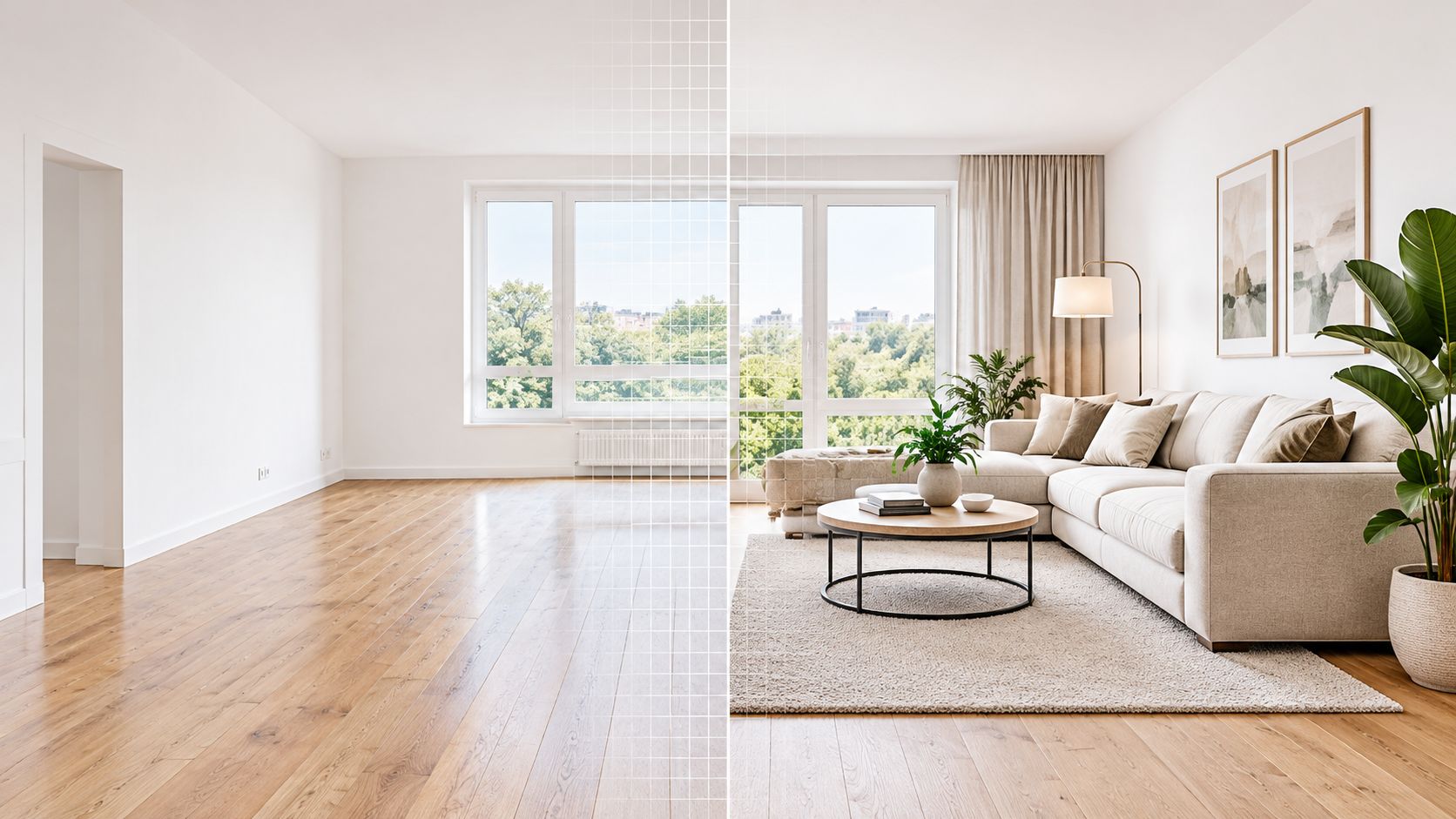
Virtual staging means digitally adding furniture, décor, and other interior elements to a photograph of an unfurnished property. Unlike a virtual tour, it changes the listing image itself, while photo-to-video tools animate that image and AI video tours assemble images into a branded viewing experience.
You may be looking at an empty living room, a vacant rental, or a room with furniture that doesn't photograph well, and wondering which digital format will help buyers understand it fastest. The answer depends on the job. Staging helps viewers interpret scale and intended use. Photo-to-video adds movement to existing stills. An AI tour packages the property into a shareable presentation.
The phrase virtual staging meaning sounds simple, but the practical boundary is more important than the dictionary definition. What may be changed? What must remain accurate? When should you stage a photo before animating it, and when is an unstaged image more trustworthy? This guide answers those questions for agents and marketing teams who need attractive listing assets without creating false expectations.
You may be looking at an empty living room, a vacant rental, or a room with furniture that doesn't photograph well, and wondering which digital format will help buyers understand it fastest. The answer depends on the job. Staging helps viewers interpret scale and intended use. Photo-to-video adds movement to existing stills. An AI tour packages the property into a shareable presentation.
The phrase virtual staging meaning sounds simple, but the practical boundary is more important than the dictionary definition. What may be changed? What must remain accurate? When should you stage a photo before animating it, and when is an unstaged image more trustworthy? This guide answers those questions for agents and marketing teams who need attractive listing assets without creating false expectations.
Summary
Create an AI Video Tours from PhotosTry it For Free

What You Will Learn About Virtual Staging
The working definition is straightforward: virtual staging is the digital addition of furniture, décor, and styling to a real property photograph. The room itself remains unchanged. A sofa, rug, dining table, artwork, or bed is rendered into the image so a viewer can understand how the space might function.
That makes virtual staging a visualization tool, not evidence that the displayed furnishings exist in the property. It also makes it different from a virtual tour. A tour presents a navigable or sequential view of the home, while staging modifies individual listing imagery.
Agents usually need to solve three separate jobs:
That makes virtual staging a visualization tool, not evidence that the displayed furnishings exist in the property. It also makes it different from a virtual tour. A tour presents a navigable or sequential view of the home, while staging modifies individual listing imagery.
Agents usually need to solve three separate jobs:
- Understand the concept: Know what the edited image represents and how it differs from physical staging, a tour, or a video.
- Choose the right format: Decide whether the listing needs a staged still, animated photos, a captioned tour, or a combination.
- Protect accuracy: Preserve the original image, label the altered version, and avoid changes that hide defects or misrepresent permanent features.
Practical rule: Treat every staged image as an illustration of possibility. Treat the original photograph as the record of the property's existing visual condition.The rest of the decision is operational. You need a clean source photo, an appropriate design choice, a quality check, and a publishing workflow that keeps the alteration visible to viewers. Once those pieces are in place, staging can support the listing funnel without being mistaken for a promise about the transaction.
How the Virtual Staging Workflow Actually Runs
Consider a vacant living room photographed with a wide lens. The walls, windows, flooring, and doorways are visible, but there's no sofa to establish scale. A sound workflow doesn't begin by dropping in attractive furniture at random. It begins by protecting the geometry of the room.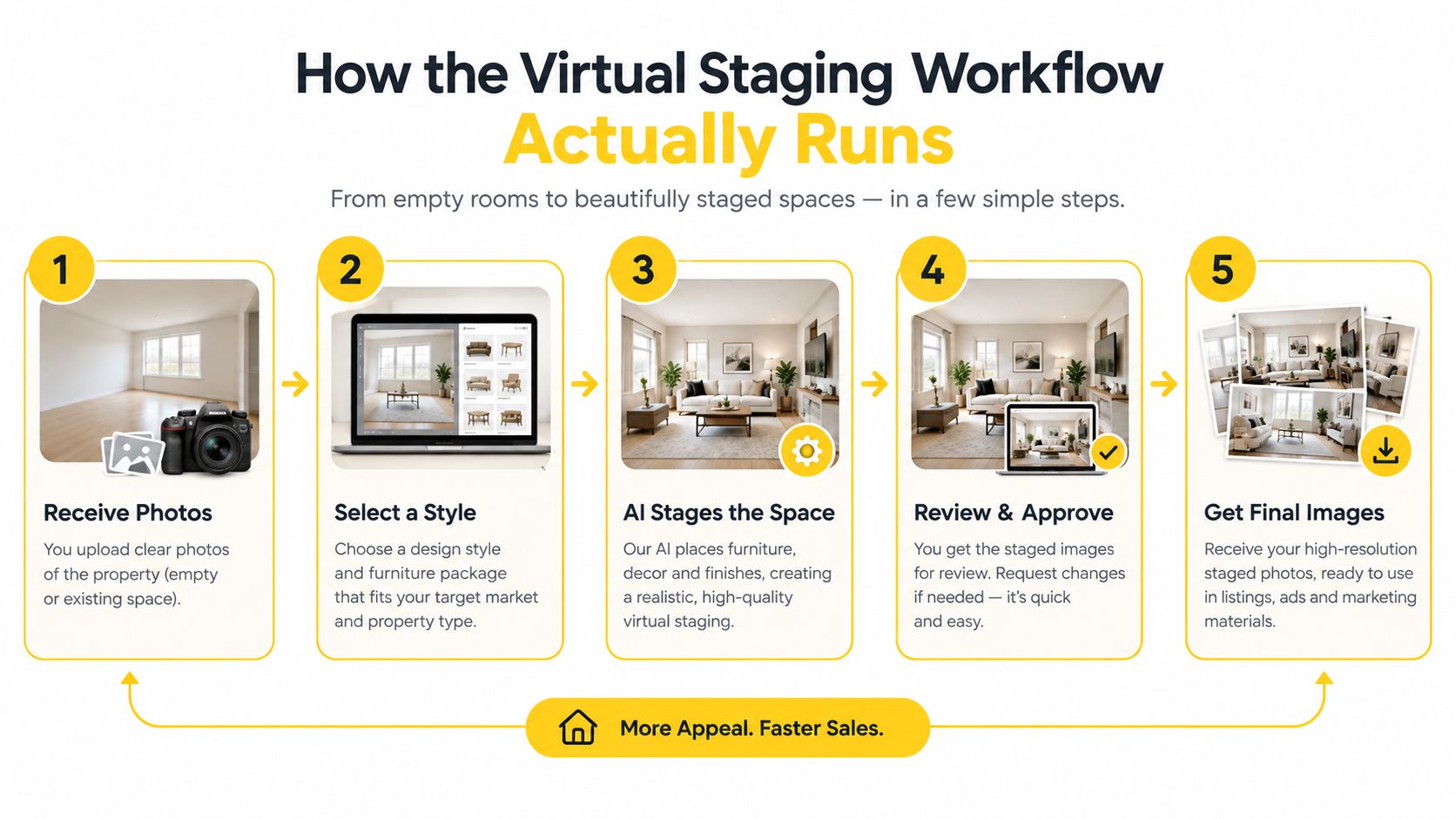
Next, staging software identifies surfaces and boundaries. It needs to distinguish the floor from the wall, understand where the windows sit, and determine which objects should appear in front of or behind the rendered furniture. Furniture layers are then added with attention to scale, occlusion, lighting, and shadows.
The creative decision comes before the final export. A contemporary apartment may suit restrained furniture and neutral décor, while a traditional home may need warmer materials and more classic proportions. The purpose isn't to decorate according to personal taste. It's to make the room's likely use legible without distracting from the property.
A vacant room isn't the only candidate. An occupied home may benefit from digital furniture replacement when the existing pieces obscure circulation or don't suit the listing. Tight rooms require extra care, because oversized virtual furniture can make the space appear smaller or create an impossible walking path.
For a room-specific production reference, see how to virtually stage a room. The same staged still can later support controlled pan, zoom, captions, and aspect-ratio conversions, provided animation doesn't obscure furniture boundaries or disclosure text.
From source photo to staged image
First, the team selects a clean, perspective-consistent photograph. A tilted camera, heavy distortion, blocked doorway, or poorly exposed window makes accurate rendering harder. The original file is saved before any editing begins.Next, staging software identifies surfaces and boundaries. It needs to distinguish the floor from the wall, understand where the windows sit, and determine which objects should appear in front of or behind the rendered furniture. Furniture layers are then added with attention to scale, occlusion, lighting, and shadows.
The creative decision comes before the final export. A contemporary apartment may suit restrained furniture and neutral décor, while a traditional home may need warmer materials and more classic proportions. The purpose isn't to decorate according to personal taste. It's to make the room's likely use legible without distracting from the property.
A vacant room isn't the only candidate. An occupied home may benefit from digital furniture replacement when the existing pieces obscure circulation or don't suit the listing. Tight rooms require extra care, because oversized virtual furniture can make the space appear smaller or create an impossible walking path.
Quality control before publication
A useful checklist includes:- Compare geometry: Check that walls, windows, doors, flooring, and fixed fixtures match the original.
- Check proportions: Confirm that furniture fits the room and doesn't block access.
- Review shadows: Look for lighting directions that conflict with the source photograph.
- Preserve versions: Keep the unstaged original alongside the edited file.
- Add disclosure: Mark the image as virtually staged wherever it's published.
- Prepare formats: Export the image for the listing, social posts, and video layouts without cropping away important context.
For a room-specific production reference, see how to virtually stage a room. The same staged still can later support controlled pan, zoom, captions, and aspect-ratio conversions, provided animation doesn't obscure furniture boundaries or disclosure text.
Benefits and Real Limitations of Staged Listing Images
An empty room forces a viewer to perform mental work. They must estimate whether a sofa will fit, decide where a dining table could go, and infer whether the room functions as a living area, office, or bedroom. Virtual staging supplies visual cues that reduce that interpretation effort during online comparison.
That benefit sits within a wider staging context. The NAR 2021 Profile of Home Staging recorded a median expenditure of $1,500 when sellers used a staging service, compared with $300 when the agent personally staged the property. In the same report, 23% of sellers' agents said staging increased buyers' offered dollar value by 1% to 5%. Those figures describe staging generally, not the independent effect of digitally staged images.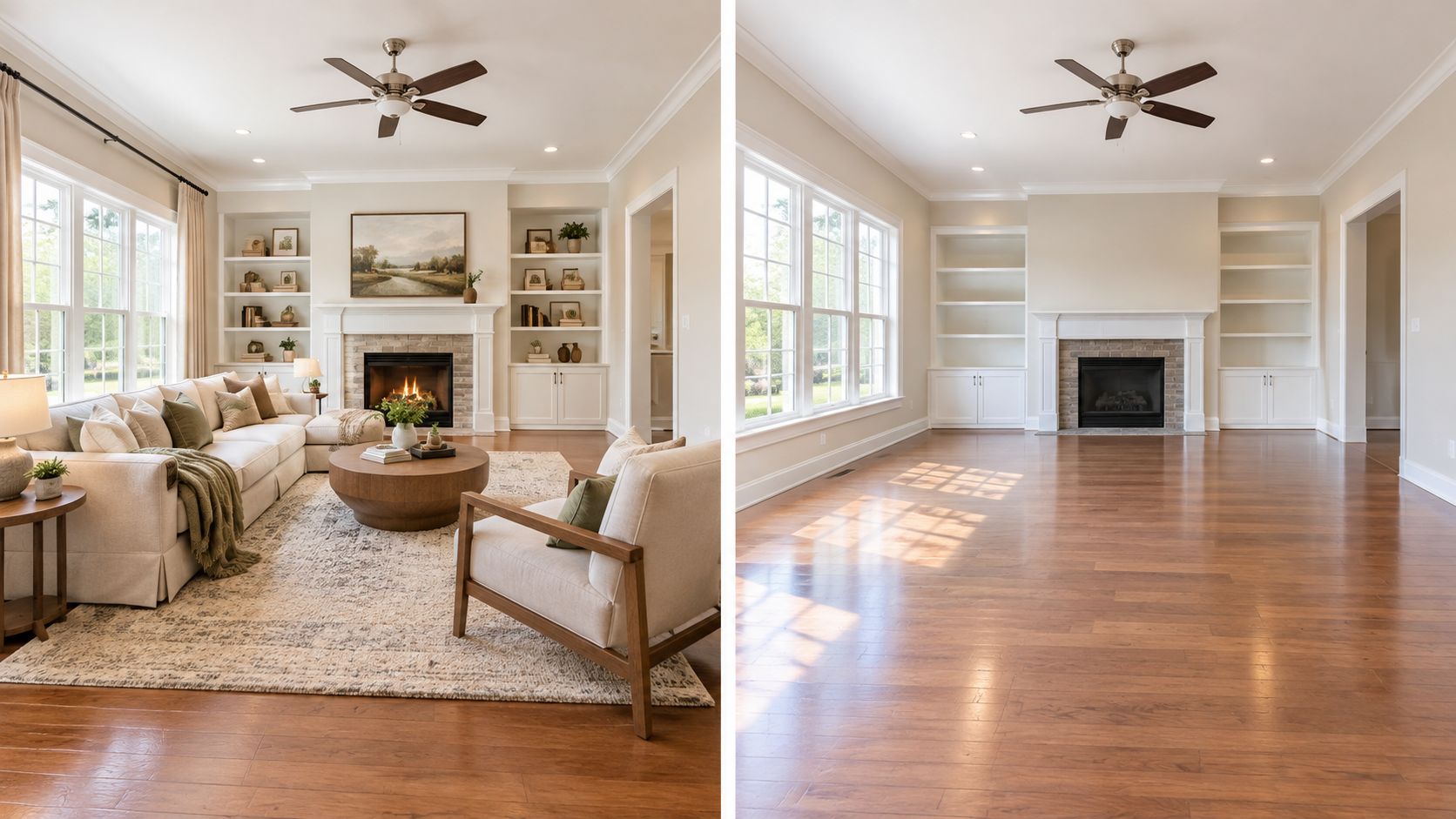
The available survey evidence doesn't isolate virtual staging's independent effect on sale price or time on market. Claims that digitally staged images alone guarantee a particular financial or speed outcome go beyond the cited evidence. The sound expectation is narrower and more useful: staging can improve visual understanding, while the transaction still depends on the property, price, market, and buyer response.
That benefit sits within a wider staging context. The NAR 2021 Profile of Home Staging recorded a median expenditure of $1,500 when sellers used a staging service, compared with $300 when the agent personally staged the property. In the same report, 23% of sellers' agents said staging increased buyers' offered dollar value by 1% to 5%. Those figures describe staging generally, not the independent effect of digitally staged images.
Where staged imagery helps
Virtual staging is particularly useful when:- A room is vacant: Furniture establishes scale and suggests a practical layout.
- A room has an unclear purpose: A spare room can be shown as an office, bedroom, or flexible space, as long as the image is labeled as a concept.
- Physical staging is difficult: Remote properties and occupied homes may not be convenient to furnish.
- A listing needs visual consistency: Similar furniture styles across key rooms can create a coherent presentation.
- A still needs to become video: A staged source image can supply more visual context for a social clip or listing presentation.
What it cannot do
Virtual staging won't repair poor source photography. It can't correct a misleading camera angle, resolve a structural concern, or make a small room physically larger. It also doesn't replace an in-person inspection, property disclosures, or a buyer's need to see the actual condition.The available survey evidence doesn't isolate virtual staging's independent effect on sale price or time on market. Claims that digitally staged images alone guarantee a particular financial or speed outcome go beyond the cited evidence. The sound expectation is narrower and more useful: staging can improve visual understanding, while the transaction still depends on the property, price, market, and buyer response.
Comparing Virtual Staging With Photo-to-Video and AI Video Tours
Agents often treat these formats as competing choices because they all begin with property imagery. They solve different communication problems, though. Virtual staging changes what a viewer sees in a still image, photo-to-video changes how that image moves, and an AI video tour changes how the full set is packaged.
A staged image works well where the viewer needs to inspect a room. MLS galleries, listing pages, brochures, and presentations benefit from a clear frame that can be studied. The image should show the room's real boundaries and disclose the digital furniture.
Photo-to-video works well where motion helps earn attention. A slow pan across a staged living room can introduce the space in a social feed, while a measured zoom can emphasize a fireplace or a view. Motion should remain controlled. Fast transitions, excessive effects, or camera movement across rendering artifacts can make a staged image feel less credible.
An AI video tour creates a finished narrative from a photo set. It can order rooms, add captions, apply branding, and synchronize music or timing. That format is useful when an agent needs a share-ready listing presentation rather than a single explanatory image. VideoTour.ai is one example of a photo-to-video platform that can turn staged or unstaged stills into vertical, horizontal, or square video outputs.
A single listing can use all three layers without confusing the audience. Start with original photographs. Create staged versions for the rooms where scale or function is unclear. Publish those images with disclosure, then use the approved stills in a vertical reel for social discovery and a horizontal tour for a listing presentation or longer-form channel.
The photo-to-video maker guide provides useful context for the animation layer. The decision rule is simple: stage when the viewer needs help imagining use, animate when the viewer needs help noticing, and build a tour when the viewer needs help understanding the whole property.
A staged image works well where the viewer needs to inspect a room. MLS galleries, listing pages, brochures, and presentations benefit from a clear frame that can be studied. The image should show the room's real boundaries and disclose the digital furniture.
Photo-to-video works well where motion helps earn attention. A slow pan across a staged living room can introduce the space in a social feed, while a measured zoom can emphasize a fireplace or a view. Motion should remain controlled. Fast transitions, excessive effects, or camera movement across rendering artifacts can make a staged image feel less credible.
An AI video tour creates a finished narrative from a photo set. It can order rooms, add captions, apply branding, and synchronize music or timing. That format is useful when an agent needs a share-ready listing presentation rather than a single explanatory image. VideoTour.ai is one example of a photo-to-video platform that can turn staged or unstaged stills into vertical, horizontal, or square video outputs.
Choose by the buyer task
| Buyer task | Suitable format | Why it fits |
|---|---|---|
| Understand an empty room | Virtual staging | Furniture gives scale and intended use |
| Stop a fast-scrolling viewer | Photo-to-video | Motion creates a more active visual entry point |
| Review the whole listing quickly | AI video tour | A sequence connects rooms and information |
| Study permanent features | Original still image | It preserves the property's actual visual condition |
The photo-to-video maker guide provides useful context for the animation layer. The decision rule is simple: stage when the viewer needs help imagining use, animate when the viewer needs help noticing, and build a tour when the viewer needs help understanding the whole property.
MLS Compliance and Disclosure for Digitally Altered Images
The difficult question isn't whether software can add a sofa. It's whether the finished image could cause a buyer to believe that a digitally created element, altered view, repaired surface, or changed fixture exists in the property.
A practical boundary separates temporary styling from the property itself. Adding a movable chair or rug is different from changing a wall, floor, fixture, window view, dimension, or defect. The more an edit changes a permanent condition, the greater the representation risk.
California provides a concrete example. AB 723 took effect January 1, 2026, and requires licensed real-estate professionals to disclose digitally altered images in sale advertisements and provide access to the original, unaltered image. The cited coverage identifies added or removed furniture as within the law's scope, so agents working in California should review the rule and applicable professional guidance before publishing altered imagery.
A practical boundary separates temporary styling from the property itself. Adding a movable chair or rug is different from changing a wall, floor, fixture, window view, dimension, or defect. The more an edit changes a permanent condition, the greater the representation risk.
California provides a concrete example. AB 723 took effect January 1, 2026, and requires licensed real-estate professionals to disclose digitally altered images in sale advertisements and provide access to the original, unaltered image. The cited coverage identifies added or removed furniture as within the law's scope, so agents working in California should review the rule and applicable professional guidance before publishing altered imagery.
A safer publishing workflow
Use the same disciplined process even when a specific local rule differs:- Keep the original: Store the unaltered source image with the listing project.
- Label the edit: Use clear wording such as “Virtually staged image” where viewers will see it.
- Avoid concealment: Don't use furniture, lighting, retouching, or cropping to hide defects.
- Protect dimensions: Don't make a room appear larger or alter architectural geometry.
- Separate categories: Distinguish virtually staged imagery from artistic enhancement, virtual renovation, and fully AI-generated scenes.
- Check local rules: Confirm MLS and state requirements before distributing the image across advertising channels.
Realism raises the duty to disclose. The more convincing the rendering looks, the easier it is for a viewer to mistake a possibility for an existing condition.
Putting It All Together for Your Next Listing
The next listing decision is usually sequencing, not selection. Begin with accurate, perspective-consistent source photos. Then ask which rooms need help with scale or use, create staged versions for those rooms, and retain the originals for comparison and disclosure.
From there, animate the approved assets rather than treating motion as permission to hide uncertainty. A staged still can become a social clip, while an unstaged image may be more appropriate for a feature where the buyer needs to inspect the existing condition. The strongest workflow uses the same source set across formats, but it doesn't force every image into the same treatment.
Before publishing, confirm five things:
The core meaning stays consistent: virtual staging helps viewers understand what a room could be, while accurate photography shows what is there. Use both deliberately, then publish each asset with enough context for buyers to tell the difference.
Use your next listing's existing photo set to create a clearly disclosed staged image, then turn the approved stills into social and listing-ready video formats with VideoTour.ai. Start with the rooms that are hardest to interpret, preserve the originals, and review every final asset before sharing it with buyers.
From there, animate the approved assets rather than treating motion as permission to hide uncertainty. A staged still can become a social clip, while an unstaged image may be more appropriate for a feature where the buyer needs to inspect the existing condition. The strongest workflow uses the same source set across formats, but it doesn't force every image into the same treatment.
Before publishing, confirm five things:
- The source photographs show the true geometry and permanent features.
- Staged and unstaged versions are both retained.
- Every altered image is clearly labeled.
- Vertical, horizontal, and square outputs preserve the disclosure.
- Video motion doesn't obscure furniture edges, defects, or architectural details.
The core meaning stays consistent: virtual staging helps viewers understand what a room could be, while accurate photography shows what is there. Use both deliberately, then publish each asset with enough context for buyers to tell the difference.
Use your next listing's existing photo set to create a clearly disclosed staged image, then turn the approved stills into social and listing-ready video formats with VideoTour.ai. Start with the rooms that are hardest to interpret, preserve the originals, and review every final asset before sharing it with buyers.