

Your listing photos are ready, but you still need a reel and a tour link. To make a real estate video from photos, select accurate images, arrange a walkthrough, import or upload them, generate and review the draft, then add narration and captions before preparing separate MLS and social versions.
Summary
Create an AI Video Tours from PhotosTry it For Free
How Do You Make a Real Estate Video From Photos?
Make a real estate video from photos by choosing 15-60 accurate listing photos, ordering them as a walkthrough, uploading them or importing a Zillow, Redfin or Realtor.com listing into an AI real estate video maker, generating a draft, reviewing and customizing it, adding voice, music and captions, and exporting an unbranded MLS viewing link plus vertical, square and horizontal social cuts.
Build for the destinations before you generate. A listing tour needs to explain the property, while a social reel needs to introduce it quickly. Neither should imply a room connection, finish or feature the photographs don't support.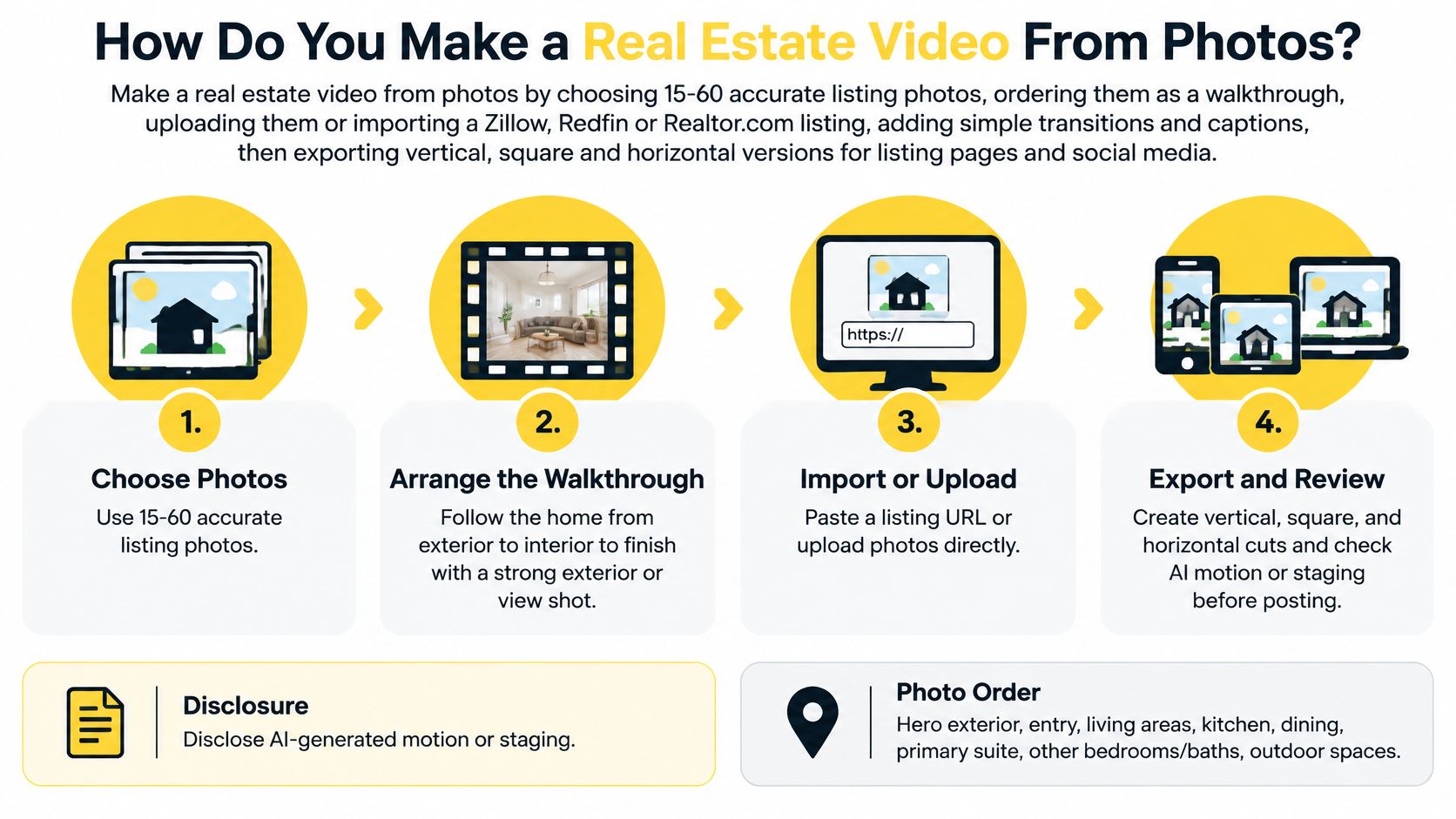 Use these phases to keep the job moving:
Build for the destinations before you generate. A listing tour needs to explain the property, while a social reel needs to introduce it quickly. Neither should imply a room connection, finish or feature the photographs don't support.
Use these phases to keep the job moving:- Select for accuracy. Remove weak images and near-duplicates using the photo criteria below.
- Establish the route. Group rooms into the walkthrough order rather than the photographer's filename order.
- Choose your editing approach. Match the tool to your source material and available editing time.
- Build the draft. Start with a listing URL or uploaded files, then verify the imported details.
- Add the presentation layers. Review narration, soundtrack, captions and social branding.
- Prepare distribution. Separate the MLS viewing link from channel-specific social exports.
Practical rule: Budget your attention for photo selection and final review, not for watching the generation screen.VideoTour.ai emails you when the draft is ready. Your first action today is to choose the photo set for one listing and confirm each room appears once in the sequence, with additional angles included only when they explain something new.
Which Listing Photos Go in the Video and in What Order?
Choose sharp, accurate photographs and keep related rooms together. NAR buyer research cited by Mark Studios places photos ahead of other listing media for usefulness, so motion should support the photography, not disguise its weaknesses.
How online buyers rated listing media
The following ratings cover buyers who used the internet, as reported in Mark Studios' summary of NAR buyer research.
For buyers in 2024, 46% began by looking online and 70% used a phone or tablet, according to the NAR buyer trends report. Lead with your strongest exterior image, and make sure room details read clearly on a small screen: wide compositions survive vertical crops better than tight detail shots.
For example, at three seconds per image, 15 photos produce about 45 seconds, 30 produce about 90 seconds, and 60 produce about three minutes before transitions. That's a timing calculation, not a recommended length for every listing.
Remove these first:
VideoTour.ai animates your real photos rather than inventing rooms. A photo sequence can still suggest continuity that isn't there, so don't place disconnected spaces together as though they're adjacent. A basement shot dropped between two upstairs bedrooms reads as part of the same floor even when it isn't.
Build this sequence once and treat it as the master: the same ordered set feeds the unbranded MLS version and the branded social cuts, so getting the route right here saves rework at export.
If layout or lot configuration drives the purchase decision, a floor plan, site plan or suitable 3D tour may deserve the budget before narration. Test your edit by asking whether a buyer could follow the route without mistaking it for proof of dimensions or exact room connections.
How online buyers rated listing media
The following ratings cover buyers who used the internet, as reported in Mark Studios' summary of NAR buyer research.
| Listing media | Rated very useful | Source |
|---|---|---|
| Listing photos | 83% | NAR buyer research, cited by Mark Studios |
| Floor plans | 57% | NAR buyer research, cited by Mark Studios |
| Virtual tours | 41% | NAR buyer research, cited by Mark Studios |
| Video | 29% | NAR buyer research, cited by Mark Studios |
Cut before you sequence
A practical starting set is 15–30 high-quality photos. VideoTour.ai accepts up to 60 per video, but capacity isn't a target.For example, at three seconds per image, 15 photos produce about 45 seconds, 30 produce about 90 seconds, and 60 produce about three minutes before transitions. That's a timing calculation, not a recommended length for every listing.
Remove these first:
- Repetitive angles: Keep the view that best explains the room. Two shots of the same kitchen island earn their place only if each shows something the other misses, such as the sightline into the living area.
- Poor source files: Replace dark, blurred or low-resolution images. Motion and zoom amplify softness rather than hide it.
- Private details: Exclude visible documents, security information and identifying personal items.
- Misleading edits: Reject imagery that no longer represents the property accurately. Some MLSs and local rules require disclosure of AI-edited or virtually staged images, so confirm your board's policy before the video goes anywhere.
Follow a recognizable route
Arrange the photos as hero exterior, entry, living areas, kitchen, dining, primary suite, other bedrooms and baths, outdoor spaces, then a closing exterior or view. Use our photo arrangement guide when adjusting the sequence.VideoTour.ai animates your real photos rather than inventing rooms. A photo sequence can still suggest continuity that isn't there, so don't place disconnected spaces together as though they're adjacent. A basement shot dropped between two upstairs bedrooms reads as part of the same floor even when it isn't.
Build this sequence once and treat it as the master: the same ordered set feeds the unbranded MLS version and the branded social cuts, so getting the route right here saves rework at export.
If layout or lot configuration drives the purchase decision, a floor plan, site plan or suitable 3D tour may deserve the budget before narration. Test your edit by asking whether a buyer could follow the route without mistaking it for proof of dimensions or exact room connections.
Which Tool Should You Use for a Listing Video?
Use a dedicated listing tool when you want a generated draft from property photos or a listing URL. Choose a manual editor when precise control matters more than avoiding timeline work.
Listing video tools compared by starting material and cost
VideoTour.ai has the lowest subscription cost per listing video among the dedicated real estate tools compared here, using the stated allowances. That doesn't make it cheaper than a free manual editor, and unused video allowances increase your effective cost.
An AI tool reduces assembly work; it doesn't remove editorial responsibility. A manual editor gives you finer control, but that control only helps if you have time to use it.
Listing video tools compared by starting material and cost
| Tool | Starting material | Best for | Cost per listing video |
|---|---|---|---|
| VideoTour.ai | Listing URL or up to 60 photos | Narrated listing videos with MLS and social cuts from one project | About $2.90 with annual Independent billing; about $1.48 with Agency, using the full allowance |
| Reel-E | Listing photos | Dedicated property reels | About $15 or more per video, reported comparison benchmark; confirm current pricing |
| CapCut | Photos and clips you arrange yourself | Captioned social Reels with manual control | Free plan; your editing time |
| iMovie | Photos and clips you arrange yourself | Simple edits on Apple devices | Free on Apple devices; your editing time |
| DaVinci Resolve | Photos and footage | Detailed color and audio control | Free version; steep learning curve |
- VideoTour.ai: Fits agents who want narration and destination-specific versions without assembling every scene manually.
- Reel-E: A property-focused alternative worth evaluating for its reel workflow; verify its current subscription terms.
- CapCut: Useful for hands-on social editing, but you own the sequencing, captions and crop decisions.
- iMovie: A straightforward option for Apple users building a restrained photo tour.
- DaVinci Resolve: Offers extensive color and audio control, with more setup and learning than a basic listing reel requires.
Compare the work, not just the features
For broader context, FruitPunch's AI video generator rankings can help you distinguish general-purpose generators from property-specific workflows. Our comparison of video apps for realtors focuses that decision on listing marketing.An AI tool reduces assembly work; it doesn't remove editorial responsibility. A manual editor gives you finer control, but that control only helps if you have time to use it.
How Do You Start and Generate the First Draft?
Open Create a video, select the property's industry and listing goal, then either import the listing or upload your photos. Check every input before generating, because errors in the source details carry into the draft and get harder to spot once motion is applied.
Start in the AI real estate video maker with the route that matches your available material.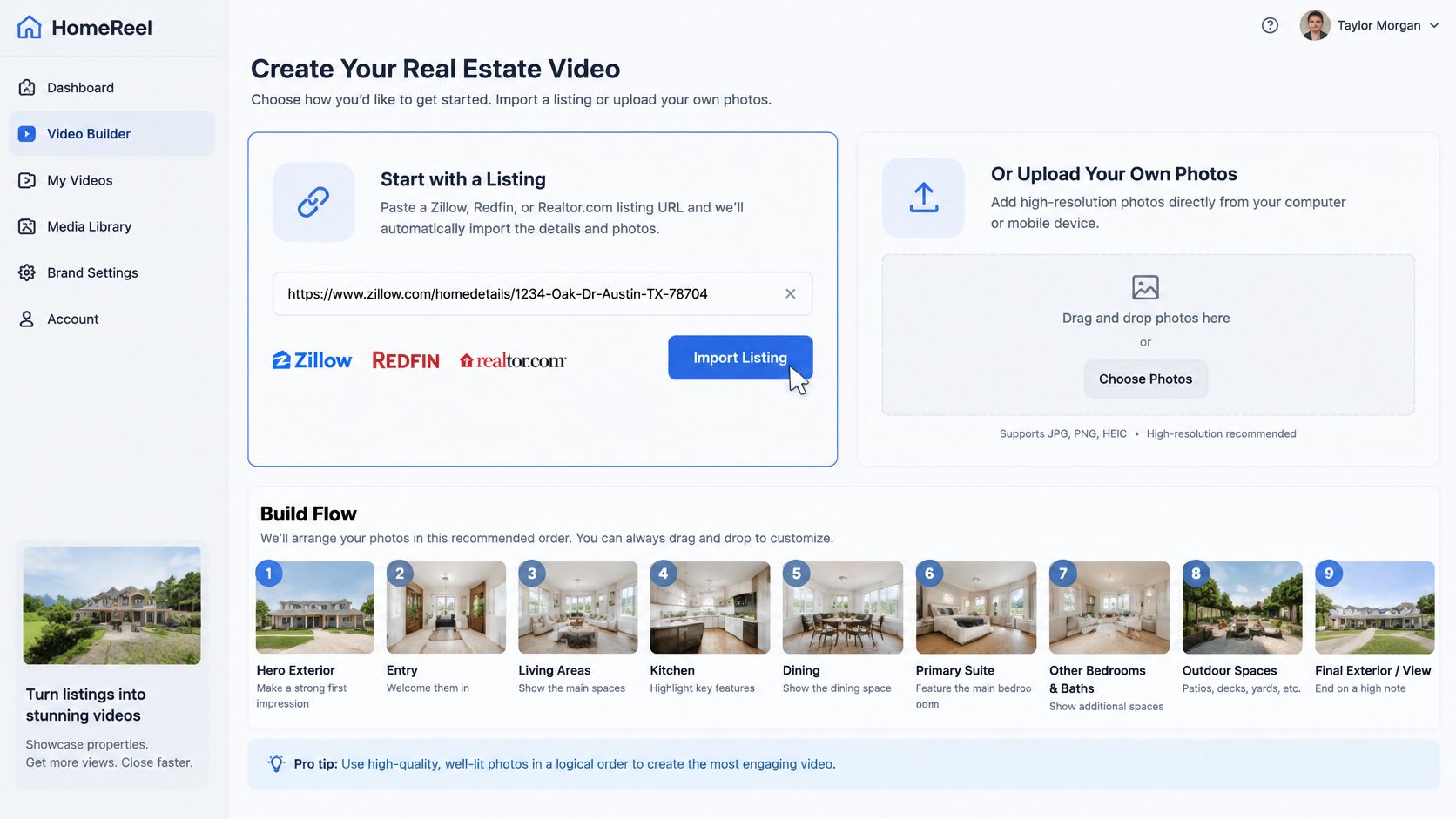
Then inspect it against the original photos and listing information. Check window views, permanent fixtures, room labels and any scene that appears to reveal space beyond the source image. The tool animates your real photos rather than synthesizing new rooms, so anything that looks wrong traces back to a source image or a fact field you can fix.
For additional ideas about turning still images into a concise message, Adwave's small business photo video ad tips offer a useful general reference. With a listing, factual representation takes priority over a dramatic advertising effect.
Start in the AI real estate video maker with the route that matches your available material.
- Import a live listing. Paste an individual Zillow, Redfin or Realtor.com property URL into Listing URL, then select Import Listing to pull in photos and property details. Use the individual property page rather than a search-results page.
- Or upload your own files. Drop image files into the photo area or browse your device; a single tour accepts up to 60 photos. This route suits a photographer's original delivery or a listing that isn't public yet.
- Verify photos and property information. Reorder the selected images so the strongest exterior opens the sequence, and check the address, bedroom count, bathrooms and other listing facts. Imported information can lag behind your latest correction, so confirm it against the live listing record.
- Set the presentation. Choose the agent, the video shape, language and on-screen words, optional narration, the soundtrack and any animations, then pick a cover image that represents the property clearly instead of a small detail shot. Set the shape with the destination in mind: horizontal for the MLS version, vertical for social cuts.
- Check the summary and generate once. Use the generation time to prepare your property-fact checklist instead of starting a second project.
- Preview and correct. Swap a weak photo, add your own footage to the tour, reorder scenes and adjust the script. If a camera-style move makes a room look distorted or changes its apparent proportions, replace the source photo rather than explaining away the problem.
Review like a buyer, then like an agent
Play the draft on a phone with the sound off. The opening frame should show the home's best exterior immediately, and the room sequence should still make sense with no narration at all.Then inspect it against the original photos and listing information. Check window views, permanent fixtures, room labels and any scene that appears to reveal space beyond the source image. The tool animates your real photos rather than synthesizing new rooms, so anything that looks wrong traces back to a source image or a fact field you can fix.
For additional ideas about turning still images into a concise message, Adwave's small business photo video ad tips offer a useful general reference. With a listing, factual representation takes priority over a dramatic advertising effect.
A polished draft is ready for review, and a rule check comes before publication: some MLSs, platforms and local rules require disclosure of AI-edited media, and a generated video is not automatically compliant with them.
How Do You Add Voiceover, Music, Captions and Branding?
Add each layer to explain the property without competing with the photographs. Narration and labels should use verified listing facts, music should stay beneath speech, and branding belongs on the social versions rather than the unbranded MLS version.
Draft with the Real Estate Video Script Generator, then refine the opening using the Real Estate Hook Generator. Read the script aloud and remove unsupported renovation dates, overstated views and claims about materials you haven't verified.
Say what the property offers, not who should live there. Describing a covered patio is useful; assigning the home to a demographic group isn't.
You can replace a photo or add your own footage to an existing property tour. If an image is wrong, fix the scene itself instead of asking narration to compensate.
Write narration you can verify
Choose an AI voice, clone your own voice with permission, or upload your own audio. Our AI voiceover guide for real estate helps you evaluate the presentation without treating a natural-sounding voice as evidence of accuracy.Draft with the Real Estate Video Script Generator, then refine the opening using the Real Estate Hook Generator. Read the script aloud and remove unsupported renovation dates, overstated views and claims about materials you haven't verified.
Say what the property offers, not who should live there. Describing a covered patio is useful; assigning the home to a demographic group isn't.
Balance the remaining layers
- Music: Choose a track licensed for commercial listing marketing and your intended destinations. Lower it until every spoken word remains clear on a phone speaker.
- Captions: Keep text brief, high-contrast and synchronized with the corresponding room. The Auto Caption Generator can help prepare captions, but check spelling, numbers and line breaks yourself.
- Property labels: Use confirmed bedroom counts, square footage, parking and outdoor features. Don't turn a visually appealing room into an unsupported feature claim.
- Branding: Apply your logo, colors, fonts and contact information to social cuts. Leave those elements out of the unbranded viewing version.
You can replace a photo or add your own footage to an existing property tour. If an image is wrong, fix the scene itself instead of asking narration to compensate.
Editorial check: If a promotional line needs a disclaimer to become true, cut the line.Finish the social version with a concrete action, such as requesting a showing or opening the property details. Confirm that the destination works before publishing.
Which Versions Should You Export and Where Do They Go?
Prepare every destination from one master edit, keeping the unbranded MLS viewing link separate from branded social files. Reframe individual scenes rather than cropping a completed horizontal video.
Export sizes by destination
These sizes follow PropWalk's listing-video format guidance.
For social exports, H.264 MP4 at 24–30 fps, with around 8–12 Mbps for 1080p, is a practical target described in the Sprout Social video specifications guide. VideoTour.ai offers 720p and 1080p HD output.
A VideoTour.ai video isn't automatically compliant with your MLS or local disclosure requirements. An unbranded link is a delivery option, not a compliance guarantee.
Play every export on a phone before posting. Check cropping, caption placement, soundtrack levels, audio clipping and the viewing link itself.
Export sizes by destination
These sizes follow PropWalk's listing-video format guidance.
| Destination | Aspect ratio and size | Notes |
|---|---|---|
| Instagram Reels, TikTok, YouTube Shorts | 9:16, 1080 × 1920 | Full-screen vertical; keep price, address and CTA center-safe |
| Instagram or Facebook feed | 4:5, 1080 × 1350 | Uses more vertical feed space than square |
| Square feed post | 1:1 | Useful across several feeds |
| YouTube and listing-page embeds | 16:9, 1920 × 1080 | Horizontal tour for larger screens |
| Unbranded MLS viewing link | Link rather than uploaded file where required | Size and acceptance rules set by your MLS |
Publish the right asset
Use our video aspect ratio guide when a vertical crop cuts off a doorway, island or other important feature.- MLS: Add the unbranded viewing URL in the designated tour field. Beycome's video and 3D tour requirements explain that MLS systems generally accept URLs and often prohibit logos, contact details, websites, text overlays, watermarks, financial information and people. Check your local rules.
- Zillow and listing pages: Attach the unbranded link wherever the current listing form accepts a tour URL. Check Zillow's current requirements before posting; portal support and listing permissions can change.
- Social channels: Publish vertical cuts to Instagram Reels, TikTok and YouTube Shorts, then square or supported portrait cuts to feeds.
- YouTube and your website: Use the horizontal tour for regular video viewing and property-page embeds.
Check alterations before release
Disclose AI-generated motion or staging as required by the destination and applicable rules. Preserve the originals, compare altered scenes against the actual property, and label materially changed imagery where required, consistent with the Council of Multiple Listing Services compliance guidance.A VideoTour.ai video isn't automatically compliant with your MLS or local disclosure requirements. An unbranded link is a delivery option, not a compliance guarantee.
Play every export on a phone before posting. Check cropping, caption placement, soundtrack levels, audio clipping and the viewing link itself.
Frequently Asked Questions About Listing Videos From Photos
You don't need another property shoot to create a photo-based listing video. You need permission to use the images and a final accuracy review before sharing the result.
VideoTour.ai turns existing listing photos into video tours and social cuts, with a preview you can customize before sharing. Visit VideoTour.ai to try your first video free with no credit card, then review the property details and prepare your separate MLS and social versions.
Do I need a camera or editing skills?
No. You can build the video from existing listing photos without filming or working through a manual editing timeline. VideoTour.ai creates motion from your real listing photos rather than synthesizing new rooms, and one property tour can hold up to 60 photos.How long does one video take from start to finish?
VideoTour.ai generates a draft in minutes. The speed is in the generation, not the whole job: allow additional review time to correct scenes, narration and destination-specific versions before downloading.What if motion or staging doesn't match the property?
Replace or reorder the source photo in the preview, or swap in your own footage for a scene that didn't translate well. Don't publish a scene you can't verify against the home, even if it looks convincing.How much does it cost?
The first video is free with no credit card. Compare VideoTour.ai pricing: Independent is $29/month billed yearly or $39 billed monthly for 10 videos, while Agency is $59/month for 40 videos.Is the MLS link the same file I post on Instagram?
No. The MLS viewing option is an unbranded link, while your social cuts can carry branding and use platform-specific framing. Treat them as separate deliverables produced from one master edit, not one file pushed everywhere.Can I use photos I found online?
Only use media you created or have written permission to reuse. Importing a listing URL doesn't grant rights to another photographer's images or override a listing site's terms.VideoTour.ai turns existing listing photos into video tours and social cuts, with a preview you can customize before sharing. Visit VideoTour.ai to try your first video free with no credit card, then review the property details and prepare your separate MLS and social versions.