

An automated video maker converts existing photos into formatted, branded videos in minutes without cameras or editors. VideoTour.ai exemplifies the category by generating MLS-safe tours and multi-aspect social clips from up to 60 listing photos.
That sounds like a creative shortcut, but the more important shift is operational. Video is no longer an occasional campaign asset that an agent can commission when time and budget allow. Cisco's forecast projected consumer internet video traffic would grow 4.3-fold between 2017 and 2022, reaching 240.2 exabytes per month and increasing from 73% to 82% of consumer internet traffic (Cisco Global Cloud Index forecast).
The uncomfortable part is that automation doesn't remove responsibility. It moves the hard work from cutting clips to controlling rights, reviewing property accuracy, protecting brand consistency, and making the result usable for people who can't reliably see or hear a fast social video.
That sounds like a creative shortcut, but the more important shift is operational. Video is no longer an occasional campaign asset that an agent can commission when time and budget allow. Cisco's forecast projected consumer internet video traffic would grow 4.3-fold between 2017 and 2022, reaching 240.2 exabytes per month and increasing from 73% to 82% of consumer internet traffic (Cisco Global Cloud Index forecast).
The uncomfortable part is that automation doesn't remove responsibility. It moves the hard work from cutting clips to controlling rights, reviewing property accuracy, protecting brand consistency, and making the result usable for people who can't reliably see or hear a fast social video.
Summary
Create an AI Video Tours from PhotosTry it For Free

What an Automated Video Maker Actually Does
An automated video maker is software that takes source material, usually photos, text, logos, music, and property details, then assembles those inputs into a finished video with limited manual editing. For a real estate team, the typical input is a listing photo set. The output may include a property tour, a vertical Reel, a square social asset, a horizontal web video, captions, music, voiceover, and a branded closing frame.
The workflow is straightforward: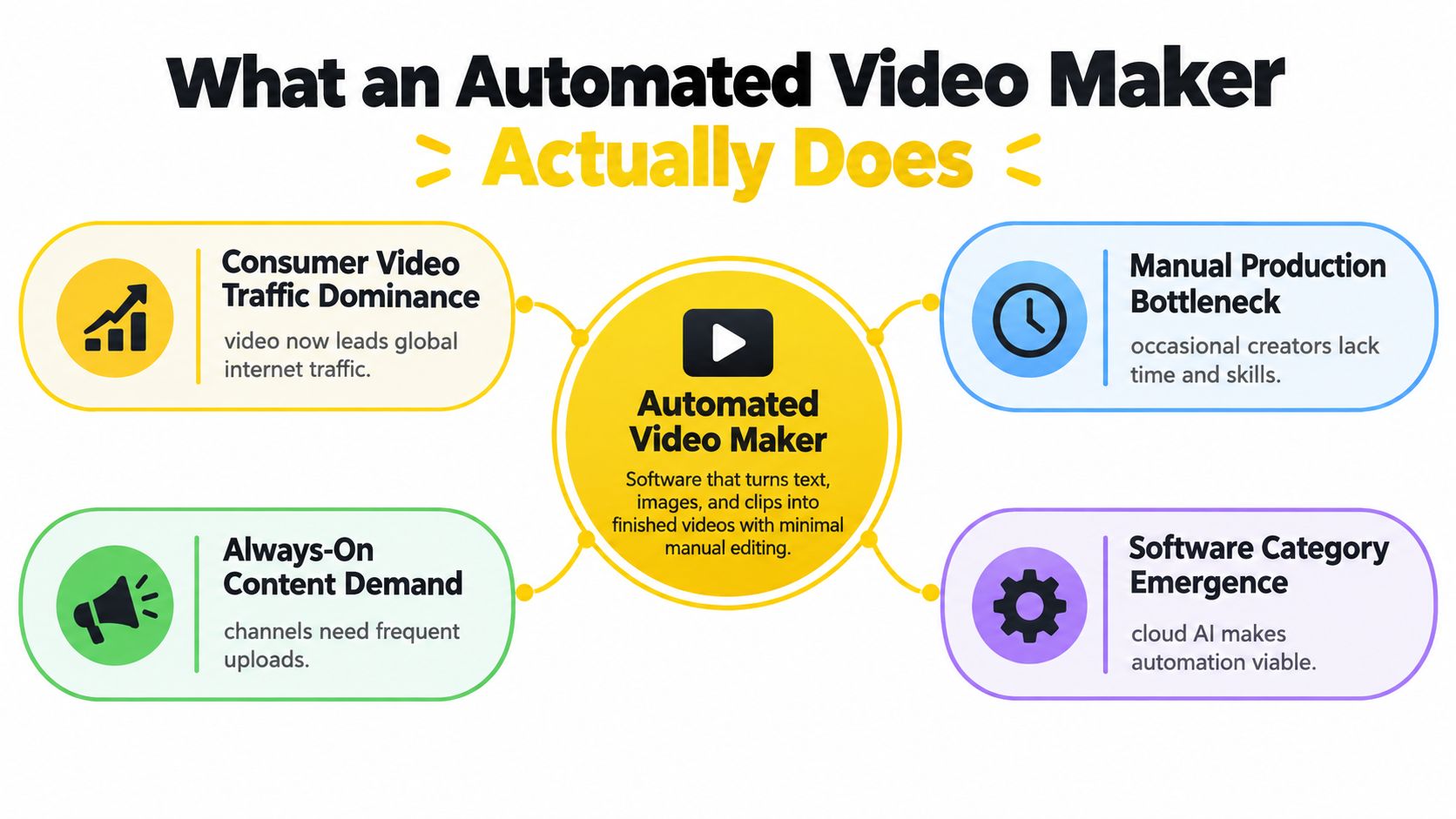 The category became necessary because manual editing doesn't scale cleanly across listings and channels. An agent who waits for a videographer, sends revisions through email, and requests a new export for every platform has created a production queue. That queue becomes more expensive as the brokerage publishes more listings, more often.
A photo-to-video workflow also changes what counts as usable source material. A still gallery becomes a sequence with movement, captions, music, and branded framing. For a practical explanation of how this process works, the photo-to-video maker guide provides useful context. Teams that are also reviewing broader marketing infrastructure may find an all-in-one digital experience platform useful for connecting content, publishing, and audience workflows.
The right mental model is not “AI makes a film.” It's a repeatable rendering system for approved property assets. That distinction matters. The system can accelerate assembly, but a broker or marketing lead still owns the final decision about whether the video is accurate, permitted, accessible, and fit for publication.
The workflow is straightforward:
- Upload the source assets. The system receives listing photographs, property information, branding, and any approved audio.
- Choose a format and style. Templates determine pacing, typography, transitions, logo placement, and caption treatment.
- Automate the edit. The software applies motion to still images, orders scenes, synchronizes music, and renders text.
- Review the result. A human checks the crop, claims, captions, rights, and property representation.
- Export the variants. One project can produce versions suited to different placements rather than separate manually edited timelines.
The category became necessary because manual editing doesn't scale cleanly across listings and channels. An agent who waits for a videographer, sends revisions through email, and requests a new export for every platform has created a production queue. That queue becomes more expensive as the brokerage publishes more listings, more often.A photo-to-video workflow also changes what counts as usable source material. A still gallery becomes a sequence with movement, captions, music, and branded framing. For a practical explanation of how this process works, the photo-to-video maker guide provides useful context. Teams that are also reviewing broader marketing infrastructure may find an all-in-one digital experience platform useful for connecting content, publishing, and audience workflows.
The right mental model is not “AI makes a film.” It's a repeatable rendering system for approved property assets. That distinction matters. The system can accelerate assembly, but a broker or marketing lead still owns the final decision about whether the video is accurate, permitted, accessible, and fit for publication.
Core Automation Capabilities Inside the Software
The useful features aren't the ones that sound futuristic. They're the ones that remove repetitive work without creating a review problem downstream.
This removes the need to build a motion path for every photograph. It doesn't remove the need to inspect the result, especially when a photo includes text, a logo, a doorway, or a feature that must remain visible.
The operational gain comes from repeatability. Every listing can follow an approved structure, such as exterior, entry, living areas, kitchen, bedrooms, amenities, and contact frame, without an editor rebuilding the sequence from scratch.
Caption placement is also a rendering issue. Text near the top or bottom of a vertical frame may collide with platform controls, so the system needs a protected caption zone rather than a decorative text layer placed wherever space happens to be available.
The trade-off is creative flexibility. A template that is too rigid can make every property feel interchangeable. Maintain a small library of approved styles, then let reviewers choose the right treatment for the property and audience.
A smart renderer adjusts focal points, motion bounds, and safe text regions for each canvas. Separate manual projects invite inconsistent captions, outdated logos, and mismatched music. Teams comparing broader automation stacks can use this guide to compare automation tools for LLMrefs, but property marketers should prioritize rendering reliability over an impressive feature count.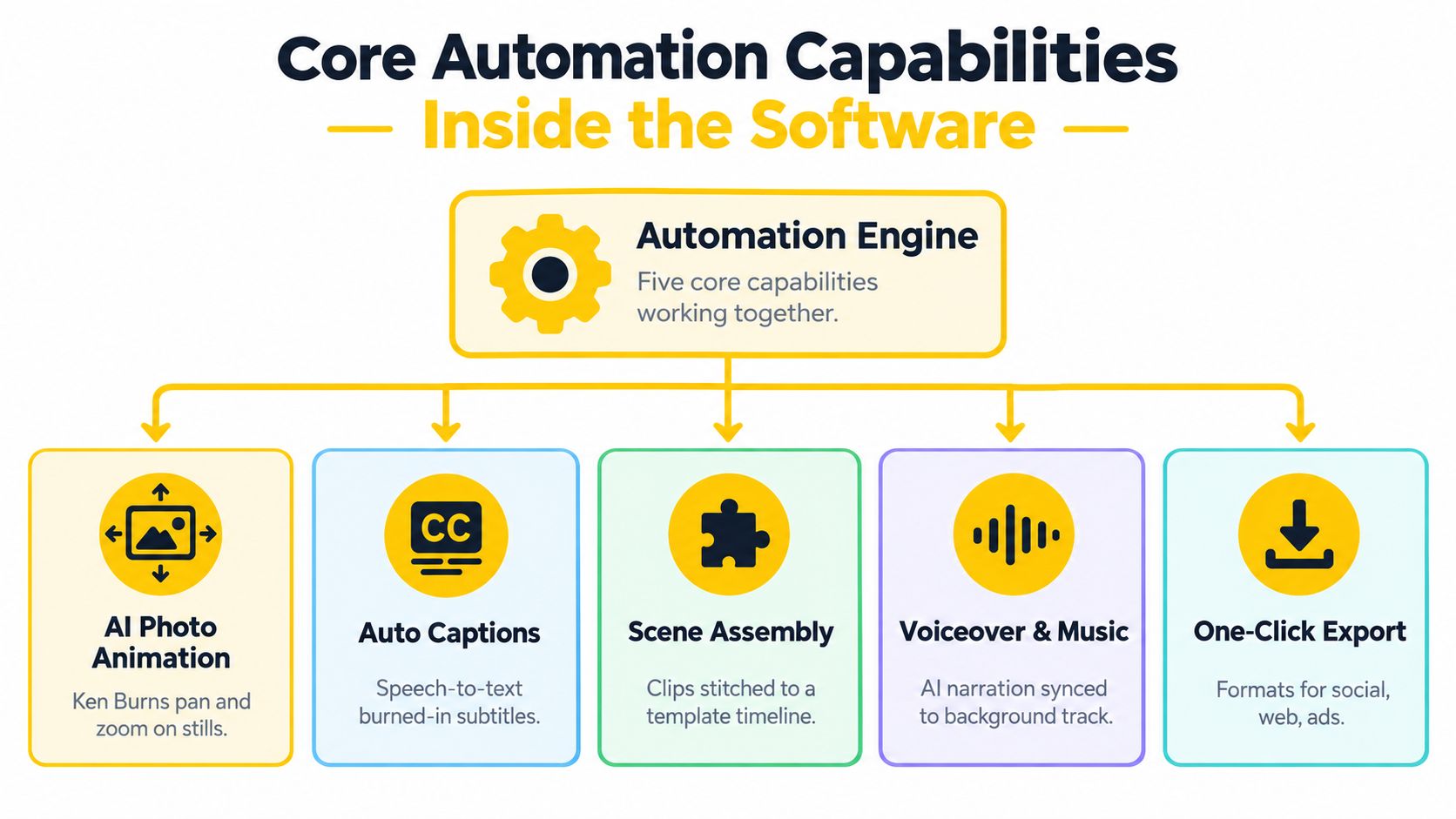
Motion turns static photos into a sequence
AI photo animation applies controlled pan, zoom, tilt, and other movement to still images. A good system preserves the subject of the image instead of applying the same center crop to every room. It should also avoid aggressive movement that makes a quiet interior feel unstable or obscures architectural details.This removes the need to build a motion path for every photograph. It doesn't remove the need to inspect the result, especially when a photo includes text, a logo, a doorway, or a feature that must remain visible.
Assembly and audio create a usable rhythm
Scene assembly places images on a template timeline, while music tools select or apply a track and align cuts or transitions to its rhythm. Voiceover can add context, but it introduces a separate licensing and consent question, particularly when a cloned voice is used.The operational gain comes from repeatability. Every listing can follow an approved structure, such as exterior, entry, living areas, kitchen, bedrooms, amenities, and contact frame, without an editor rebuilding the sequence from scratch.
Captions make information survive muted playback
Automatic captioning converts spoken content into timed text, and templates can apply a consistent style. Captions need human review because names, addresses, room features, and neighborhood terms are easy for speech recognition systems to misread.Caption placement is also a rendering issue. Text near the top or bottom of a vertical frame may collide with platform controls, so the system needs a protected caption zone rather than a decorative text layer placed wherever space happens to be available.
Templates protect the brand
Templates lock in fonts, colors, logo treatment, title cards, transitions, and calls to action. Brokerages gain consistency. A listing video shouldn't look completely different depending on which employee opened the editor.The trade-off is creative flexibility. A template that is too rigid can make every property feel interchangeable. Maintain a small library of approved styles, then let reviewers choose the right treatment for the property and audience.
Multi-aspect rendering is not simple resizing
A production-grade renderer should derive variants from one timeline. Short-form vertical video commonly uses 9:16 at 1080×1920, portrait feeds use 4:5 at 1080×1350, and horizontal web or long-form video uses 16:9 at 1920×1080 (aspect-ratio guidance from Photofy).A smart renderer adjusts focal points, motion bounds, and safe text regions for each canvas. Separate manual projects invite inconsistent captions, outdated logos, and mismatched music. Teams comparing broader automation stacks can use this guide to compare automation tools for LLMrefs, but property marketers should prioritize rendering reliability over an impressive feature count.
Business Benefits That Move the Needle for Marketers
Video production has become a baseline capability. Wyzowl's 2025 survey reported that 91% of businesses use video as a marketing tool, while 93% of video marketers consider it important to their overall strategy. The series has tracked the same question for 11 years, which makes the result more useful as a market benchmark than as a novelty (Wyzowl video marketing statistics).
The implication for brokerages is clear. The question isn't whether video belongs in the marketing mix. The question is whether the team can create enough accurate, on-brand video without turning every listing into a production project.
If a listing needs a corrected room label or a new contact detail, a templated system can make the revision without reopening an entire creative process. The reviewer still checks the export, but the correction doesn't require recreating the project.
That predictability is the useful financial benefit. A team can evaluate subscription cost, usage allowances, staff review time, and any AI credits against its current production process without pretending every video has the same creative value.
The team should still review each canvas. Automation reduces rework, but a vertical crop can remove a fireplace, a view, or a key caption if the source image wasn't prepared with the focal point in mind.
Don't confuse consistency with sameness. Keep the production rules stable while allowing the image order, narration, and selected template to reflect the property.
The implication for brokerages is clear. The question isn't whether video belongs in the marketing mix. The question is whether the team can create enough accurate, on-brand video without turning every listing into a production project.
Speed changes the publishing decision
A manual workflow often forces marketers to decide which listings deserve video. An automated workflow makes video a standard output from the same approved photo set. That changes speed from a convenience into a coverage decision.If a listing needs a corrected room label or a new contact detail, a templated system can make the revision without reopening an entire creative process. The reviewer still checks the export, but the correction doesn't require recreating the project.
Cost becomes easier to control
Automation can reduce dependence on external editors and videographers for routine photo tours. It won't replace specialists for high-concept campaigns, filmed walkthroughs, complex narration, or distinctive brand films. It does make repetitive listing production more predictable.That predictability is the useful financial benefit. A team can evaluate subscription cost, usage allowances, staff review time, and any AI credits against its current production process without pretending every video has the same creative value.
One timeline expands distribution
Multi-format output removes a common operational failure: publishing a well-designed vertical video while leaving the website, email campaign, or listing presentation with an unsuitable crop. A shared timeline keeps the core message, branding, and music synchronized across versions.The team should still review each canvas. Automation reduces rework, but a vertical crop can remove a fireplace, a view, or a key caption if the source image wasn't prepared with the focal point in mind.
Consistency compounds across a portfolio
Reusable styles give every listing a recognizable visual system. That includes logo placement, typography, colors, opening treatment, caption style, and contact information. Consistency is especially valuable when multiple agents, assistants, and agencies publish on behalf of one brokerage.Don't confuse consistency with sameness. Keep the production rules stable while allowing the image order, narration, and selected template to reflect the property.
Automated Workflow vs Traditional Manual Production
Manual editing remains the right choice when the brief depends on filmed performance, custom cinematography, complex storytelling, or detailed visual compositing. For routine property tours, however, it creates a bottleneck that automation handles more efficiently.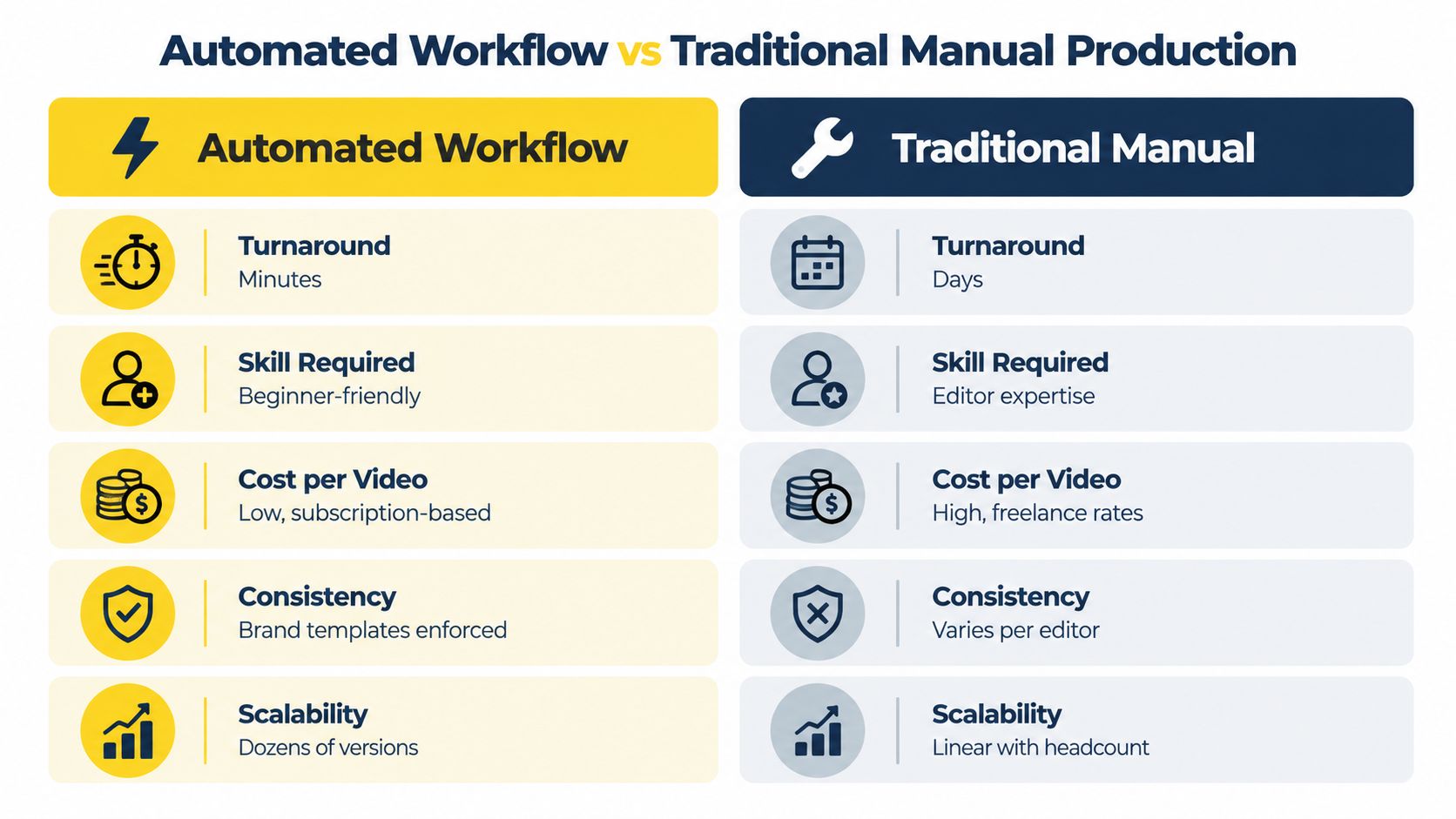
The strongest advantage is not that automation makes every video better. It makes acceptable, repeatable video available more often. That matters for listings where the source material already exists and the primary need is clear presentation across channels.
Manual production offers more control, but control has a price. It also creates dependency on a particular editor's availability, preferences, and interpretation of the brand. A brokerage that needs dozens of variations cannot scale a linear editing process indefinitely by adding more review requests.
For a more detailed comparison of synthetic and professionally produced property content, see the AI versus professional real estate video analysis. The sensible conclusion isn't that one workflow wins universally. It's that property marketers should match the workflow to the content risk and the required production volume.
| Production question | Automated workflow | Traditional manual workflow |
|---|---|---|
| Turnaround | A project can render in minutes after asset approval | Scheduling, editing, and feedback create a longer queue |
| Skill requirement | A trained coordinator can work from templates | An editor must manage timeline, motion, audio, and exports |
| Cost structure | Subscription or usage cost plus review time | External or internal production time for each project |
| Revisions | Change inputs, rerender, and inspect the result | Reopen the project and repeat affected edits |
| Multi-format delivery | Derive variants from one timeline | Rebuild or manually adapt each version |
Manual production offers more control, but control has a price. It also creates dependency on a particular editor's availability, preferences, and interpretation of the brand. A brokerage that needs dozens of variations cannot scale a linear editing process indefinitely by adding more review requests.
Practical rule: Use automation for repeatable listing formats, and reserve manual production for videos where the creative treatment is itself the product.Human review remains essential in the automated workflow. Reviewers should verify that the software hasn't cropped out a defining property feature, invented a visual impression through an aggressive effect, misstated a fact in a caption, or placed the call to action under platform controls.
For a more detailed comparison of synthetic and professionally produced property content, see the AI versus professional real estate video analysis. The sensible conclusion isn't that one workflow wins universally. It's that property marketers should match the workflow to the content risk and the required production volume.
Selection Criteria for Real Estate Marketers
A feature list won't tell you whether an automated video maker is safe for a brokerage. Test the workflow against the decisions your team makes every week.
Check the photo limit against your real listing sets. VideoTour.ai, for example, accepts up to 60 photos per listing, provides MLS-oriented options, and supports browser revisions according to the platform information supplied for this guide. Treat those as workflow characteristics to verify during a trial, not as a substitute for your own MLS review.
During a pilot, download the actual file and inspect it on a phone, desktop, and the intended publishing platform. Check audio levels, caption contrast, crop safety, logo clarity, and transitions. A polished browser preview doesn't guarantee a clean downstream upload.
Start with property-specific controls
Look for MLS-safe presets, clear rules around animated imagery, and controls that distinguish photo motion from invented property features. A slow pan across a real photograph is different from generating a balcony, changing a room's appearance, or adding an AI drone view that viewers could mistake for captured footage.Check the photo limit against your real listing sets. VideoTour.ai, for example, accepts up to 60 photos per listing, provides MLS-oriented options, and supports browser revisions according to the platform information supplied for this guide. Treat those as workflow characteristics to verify during a trial, not as a substitute for your own MLS review.
Test the brand system before the render
A serious evaluation should answer practical questions:- Brand controls: Can the team lock fonts, colors, logos, contact details, and closing frames?
- Watermark policy: Are paid exports watermark-free, and does the watermark appear in previews or downloads?
- Revision model: Can staff change image order, timing, captions, and aspect ratio without paying for every correction?
- Team access: Can agents, coordinators, and approvers work without sharing credentials?
- Plan predictability: Are monthly allowances clear, and are premium animations or voice features charged through optional credits?
Inspect the export, not just the preview
For delivery, 1080p video commonly targets 8 to 12 Mbps, using H.264 in an MP4 container at approximately 24 to 30 frames per second. Keep a higher-bitrate master because social platforms re-encode uploads, and low bitrate can expose banding in skies, walls, gradients, and slow camera moves (social video export guidance).During a pilot, download the actual file and inspect it on a phone, desktop, and the intended publishing platform. Check audio levels, caption contrast, crop safety, logo clarity, and transitions. A polished browser preview doesn't guarantee a clean downstream upload.
Compliance and Accessibility Questions Most Reviews Skip
The riskiest assumption is that an automated property video is safe because it uses real listing photos. The software can still apply unlicensed music, generate an unauthorized voice, alter the apparent condition of a property, or produce a visual that conflicts with MLS rules.
The U.S. Copyright Office's 2025 report concluded that AI outputs are copyrightable only when a human contributes sufficient expressive elements. Merely supplying prompts isn't enough to meet the originality threshold (U.S. Copyright Office report notice). In practice, document the source photos, approved music and voice licenses, human edits, disclosure decisions, and final approver.
Accessibility requires more than turning on captions. Blind and low-vision viewers may need meaningful descriptions of rooms, layouts, exterior features, and on-screen text. Deaf and hard-of-hearing viewers need accurate synchronized captions, not a music-led edit with decorative words. Research on short-form video identifies rapid visual changes, on-screen text, and music overlays as barriers for blind and low-vision audiences (research on accessibility barriers in short-form video).
The U.S. Copyright Office's 2025 report concluded that AI outputs are copyrightable only when a human contributes sufficient expressive elements. Merely supplying prompts isn't enough to meet the originality threshold (U.S. Copyright Office report notice). In practice, document the source photos, approved music and voice licenses, human edits, disclosure decisions, and final approver.
Build a rights and accuracy checklist
- Asset ownership: Record who supplied each photograph, logo, track, voice, and clip.
- Commercial permission: Confirm that music, stock material, AI voices, and voice clones are licensed for the intended channels.
- Synthetic disclosure: Disclose material alterations or generated scenes when a viewer could reasonably mistake them for actual property features.
- MLS review: Use presets and approval rules that reflect the relevant MLS, brokerage, and advertising requirements.
- Human authorship: Keep a record of the human choices that shaped the final edit, rather than treating prompts as the entire creative contribution.
Accessibility requires more than turning on captions. Blind and low-vision viewers may need meaningful descriptions of rooms, layouts, exterior features, and on-screen text. Deaf and hard-of-hearing viewers need accurate synchronized captions, not a music-led edit with decorative words. Research on short-form video identifies rapid visual changes, on-screen text, and music overlays as barriers for blind and low-vision audiences (research on accessibility barriers in short-form video).
Production standard: Publish an attention-optimized Reel alongside an accessibility-first version with descriptive narration, precise captions, calmer pacing, and a text or web alternative.That dual-output approach is better than forcing one fast-cut asset to serve every viewer. It also improves information quality, because the team must describe the property's contents instead of relying on visual implication.
Putting It All Together With a 30-Day Pilot Plan
A useful pilot should test the entire operating system, not just whether the generated video looks attractive.
The best automated video maker isn't the one with the most effects. It's the one that gives your team a repeatable path from approved listing photos to accurate, accessible, branded exports.
VideoTour.ai turns listing photo sets into branded property tours and social-ready videos with automated motion, captions, music, voiceover, and multi-format exports. Use a pilot to test its MLS-oriented presets, review workflow, rights documentation, and accessibility outputs before expanding across your brokerage. Visit VideoTour.ai to evaluate the workflow with your own property assets.
- Select two representative listings each week. Include different property types, image qualities, room layouts, and branding needs.
- Render every required format from one timeline. Inspect vertical, portrait, square, and horizontal outputs for crop, caption, and logo errors.
- Run compliance and accessibility checks. Confirm source rights, music and voice permissions, MLS suitability, synthetic disclosures, caption accuracy, and the accessibility-first alternative.
- Compare the workflow with your current baseline. Track turnaround, staff review time, revisions, finished-video cost, and the number of usable outputs.
The best automated video maker isn't the one with the most effects. It's the one that gives your team a repeatable path from approved listing photos to accurate, accessible, branded exports.
VideoTour.ai turns listing photo sets into branded property tours and social-ready videos with automated motion, captions, music, voiceover, and multi-format exports. Use a pilot to test its MLS-oriented presets, review workflow, rights documentation, and accessibility outputs before expanding across your brokerage. Visit VideoTour.ai to evaluate the workflow with your own property assets.