
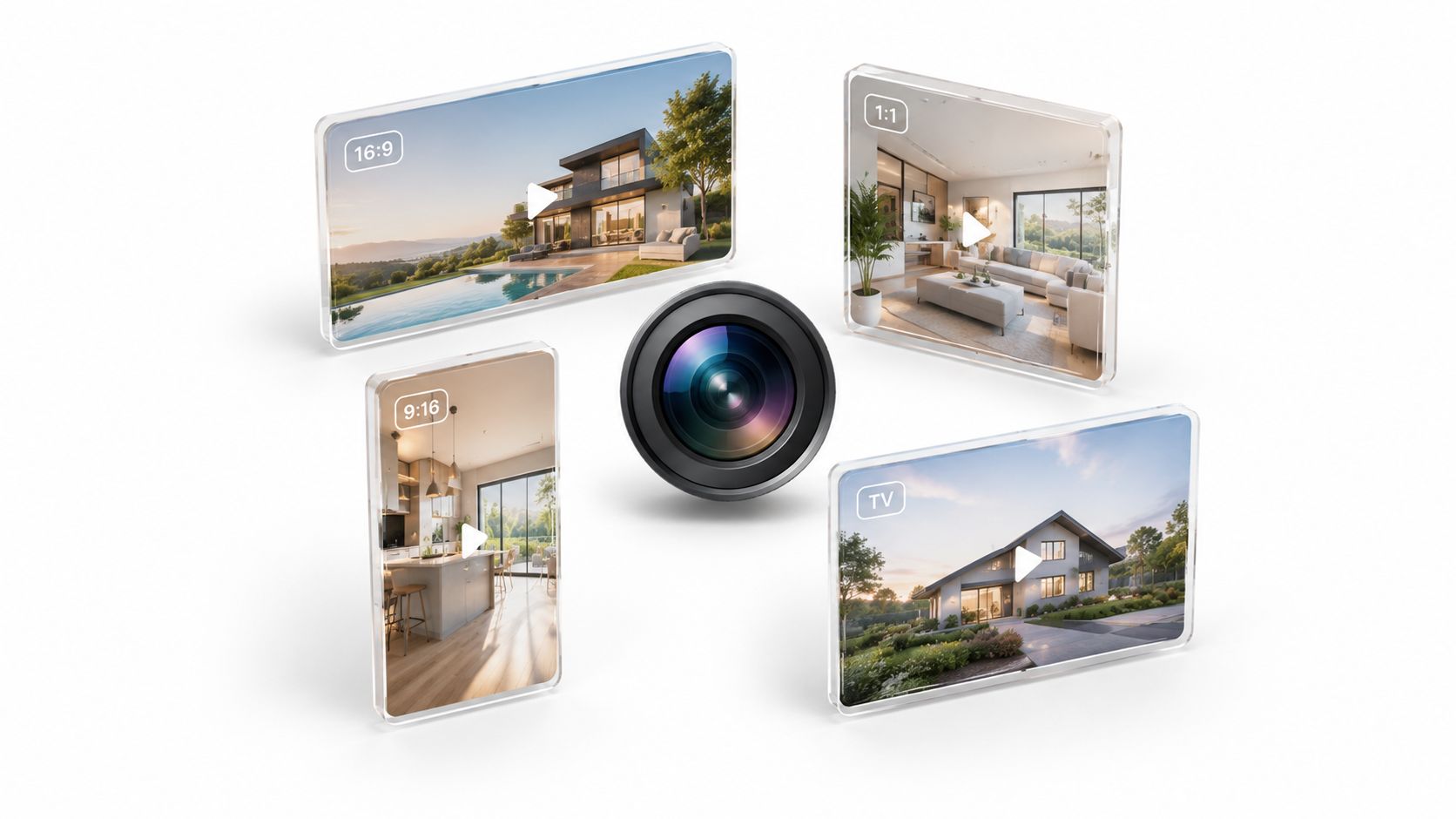
16:9 is the universal default for horizontal video, while 9:16 dominates mobile vertical video. Real estate tours benefit from both, because the same property story often needs a wide version for listings and a vertical version for social feeds.
You've uploaded a polished walkthrough of a bright kitchen, spacious living room, and a well-tended garden. On your laptop, the composition looks balanced. Then the social preview crops the kitchen island, the listing platform displays empty bars around the footage, and the vertical version cuts away the very features that make the property appealing.
That problem usually starts before export. Aspect ratio is the relationship between a video's width and height, so it determines how much of a room fits inside the frame, where text can sit, and whether a video feels native on a viewer's screen. It's not just an editing preference. It's a distribution decision.
You've uploaded a polished walkthrough of a bright kitchen, spacious living room, and a well-tended garden. On your laptop, the composition looks balanced. Then the social preview crops the kitchen island, the listing platform displays empty bars around the footage, and the vertical version cuts away the very features that make the property appealing.
That problem usually starts before export. Aspect ratio is the relationship between a video's width and height, so it determines how much of a room fits inside the frame, where text can sit, and whether a video feels native on a viewer's screen. It's not just an editing preference. It's a distribution decision.
Summary
Create an AI Video Tours from PhotosTry it For Free

Introduction to Common Video Aspect Ratios
Every video has a shape. A wide frame gives you room for architecture, room-to-room movement, and long horizontal lines. A tall frame fills a phone screen and gives faces, doorways, and vertical details more visual space. A square frame sits between those choices, while an older frame can preserve footage that was never designed for modern displays.
For property marketers, the hidden cost of choosing the wrong shape is often lost information. A crop can remove a fireplace from a living-room shot, hide the edge of a swimming pool, or cut off a “for sale” message. Adding bars can preserve the whole image, but the result may feel less immersive. Stretching the image avoids bars but distorts walls, windows, and people.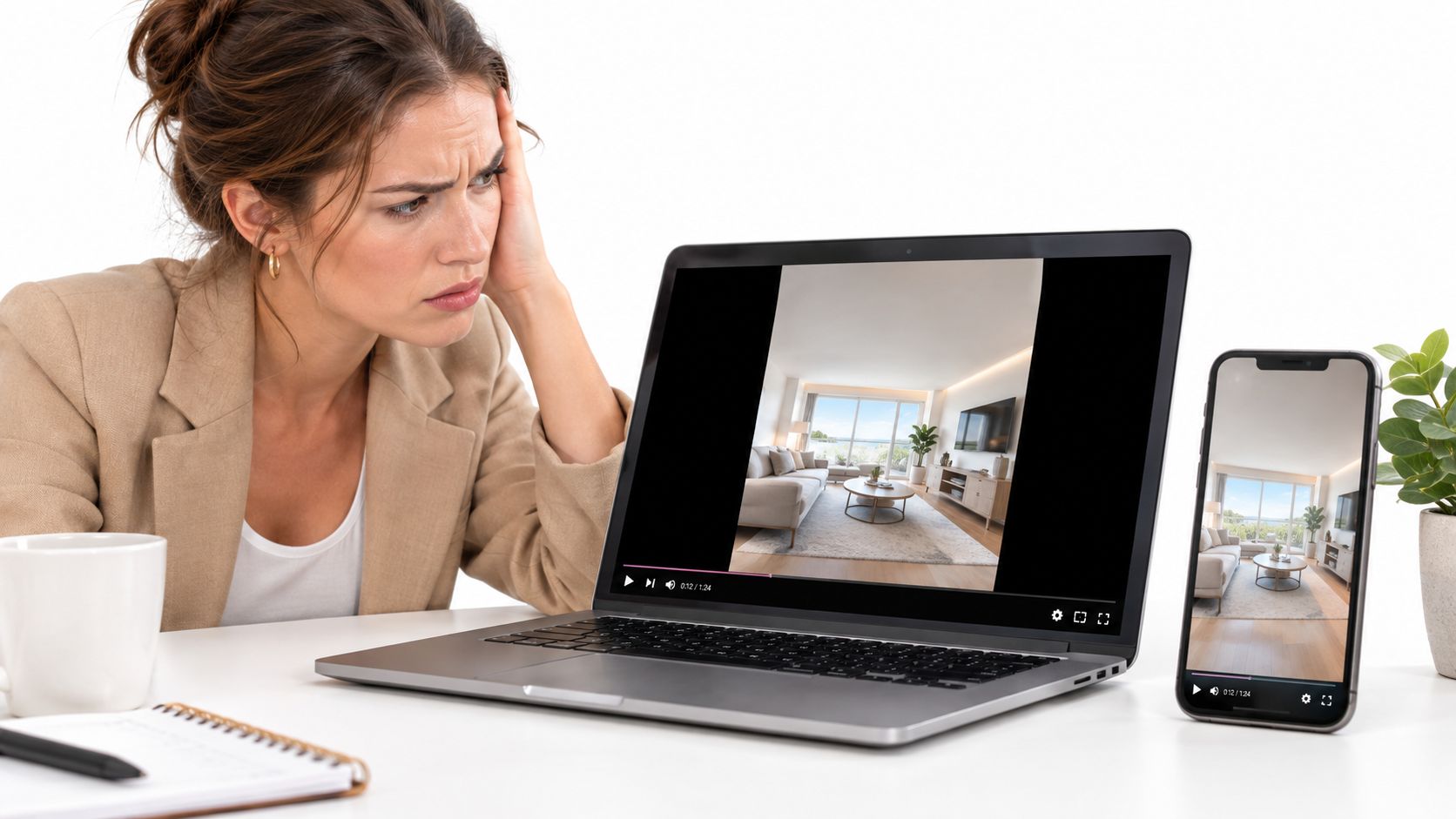
For property marketers, the hidden cost of choosing the wrong shape is often lost information. A crop can remove a fireplace from a living-room shot, hide the edge of a swimming pool, or cut off a “for sale” message. Adding bars can preserve the whole image, but the result may feel less immersive. Stretching the image avoids bars but distorts walls, windows, and people.
Why the frame matters before editing
Start with the destination, not the camera setting. Ask where the finished tour will appear first:- An MLS or property website usually needs a clean horizontal presentation.
- A YouTube walkthrough benefits from a wide frame that suits desktop and television viewing.
- Instagram Reels, TikTok, and YouTube Shorts need a vertical composition that fills a phone display.
- A feed post or branded property card may work better as a square or moderately tall crop.
Practical rule: Protect the property details first, then optimize the frame for the platform where viewers will see them.This guide focuses on the common video aspect ratios that matter most for real estate, hospitality, and short-term rental content. You'll learn what each shape emphasizes, where it fits, and how to create multiple versions from one planned tour without rebuilding the entire edit.
The Most Used Aspect Ratios Explained
Aspect ratio is written as width compared with height. In 16:9, the frame is sixteen units wide for every nine units high. In 9:16, that relationship is turned vertically. The numbers describe shape, not image quality. Resolution is a separate decision.
It works well for a home tour because a wide frame can include a room's width, furniture arrangement, and architectural lines together. A slow pan across a kitchen or a lateral movement through an open-plan space feels natural. For practical delivery, creators commonly export 16:9 at 1920×1080 for Full HD or 1280×720 for HD, formats that preserve a familiar delivery path for televisions, desktop players, and websites, as Adobe's video aspect ratio guide explains.
Use it for a fast property hook, such as a doorway reveal, a statement fireplace, or a sequence of three standout amenities. Don't assume a horizontal walkthrough will survive an automatic vertical crop. If the original shot places the subject near the edge, the crop may remove it completely.
For a modern property campaign, 4:3 is usually a source format rather than a first choice. It can appear in archive footage, older user-generated clips, or historical material showing a building's earlier condition. Preserve it with pillarboxing when the original framing matters, or crop carefully when a current platform requires a wider or taller output.
For real estate, a square cut can highlight a renovated bathroom, a styled dining table, or a concise text-led feature. If the shot depends on a broad view, keep the key detail near the center and avoid placing essential information at the extreme edges.
When image quality and delivery dimensions are also part of the decision, this guide to finding the right 4K video format can help clarify the difference between frame shape and resolution.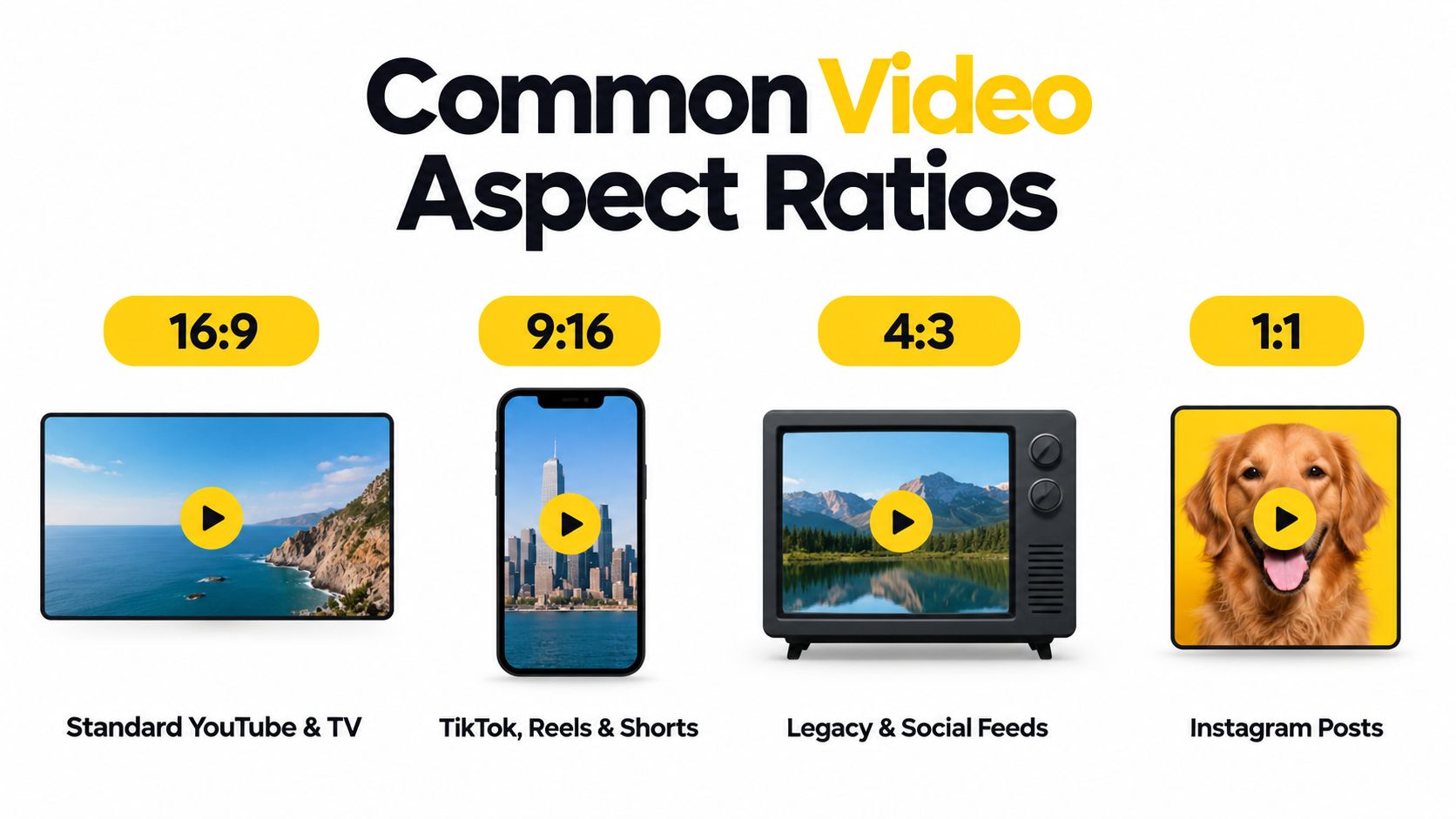
16:9 for wide property stories
The 16:9 ratio, also written as 1.77:1, is the standard horizontal canvas for most modern television and digital video. Kerns H. Powers proposed it in 1984 as a compromise between 4:3 television and wider cinema formats, and the U.S. ATSC standard adopted a 16:9 picture in 1996, with resolutions up to 1920×1080, as documented in this history of the 16:9 aspect ratio.It works well for a home tour because a wide frame can include a room's width, furniture arrangement, and architectural lines together. A slow pan across a kitchen or a lateral movement through an open-plan space feels natural. For practical delivery, creators commonly export 16:9 at 1920×1080 for Full HD or 1280×720 for HD, formats that preserve a familiar delivery path for televisions, desktop players, and websites, as Adobe's video aspect ratio guide explains.
9:16 for phone-first attention
The 9:16 ratio is a tall, vertical frame. It matches the way people hold a phone and gives a short-form video more screen presence in mobile-first feeds. A vertical cut can make a front door, staircase, person, or tall window feel prominent, but it has less room for a wide kitchen, panoramic view, or full exterior elevation.Use it for a fast property hook, such as a doorway reveal, a statement fireplace, or a sequence of three standout amenities. Don't assume a horizontal walkthrough will survive an automatic vertical crop. If the original shot places the subject near the edge, the crop may remove it completely.
4:3 for legacy footage
The 4:3 ratio, or 1.33:1, was the universal video format of the twentieth century and remained the default shape for standard television broadcasts for decades. The Academy ratio for 35mm film was standardized at 1.37:1 in 1932, close to 4:3, which helped make the shape familiar in cinema and television, according to the history of the 4:3 aspect ratio?oldformat=true).For a modern property campaign, 4:3 is usually a source format rather than a first choice. It can appear in archive footage, older user-generated clips, or historical material showing a building's earlier condition. Preserve it with pillarboxing when the original framing matters, or crop carefully when a current platform requires a wider or taller output.
1:1 for balanced feed presentation
The 1:1 square ratio gives equal width and height. It can make a single room, product detail, logo, or agent introduction feel direct in a feed. It also limits the amount of architecture visible at once, so it's better for focused moments than for a full-room walkthrough.For real estate, a square cut can highlight a renovated bathroom, a styled dining table, or a concise text-led feature. If the shot depends on a broad view, keep the key detail near the center and avoid placing essential information at the extreme edges.
When image quality and delivery dimensions are also part of the decision, this guide to finding the right 4K video format can help clarify the difference between frame shape and resolution.
When to Use Horizontal and Vertical Formats
Horizontal and vertical video tell the same property story from different physical perspectives. Wide framing gives the viewer more space from left to right, which suits room layouts, exterior elevations, driving approaches, and wide hospitality spaces. Vertical framing uses the full phone display and concentrates attention on a narrower visual path.
For a YouTube walkthrough, choose 16:9. The wide frame supports longer sequences, room context, and desktop or television viewing. The same recommendation generally applies to an MLS-friendly export and a website embed where the property needs to look complete rather than tightly cropped.
For Reels, TikTok, and Shorts, choose 9:16. Build the composition around the phone frame instead of treating vertical as a last-minute crop. Keep the agent, headline, room feature, or action within the central safe area, and leave enough visual breathing room for interface elements that may appear over the video.
Use 1:1 when the content belongs in a square feed presentation, such as a focused feature or branded announcement. Keep 4:3 for legacy material when preserving the original image is more important than matching a current widescreen standard. The video aspect ratio overview from OBSBOT also distinguishes the wide default from mobile-first vertical placements and explains why platform context should guide the export.
Before selecting an orientation, run through three questions:
For a YouTube walkthrough, choose 16:9. The wide frame supports longer sequences, room context, and desktop or television viewing. The same recommendation generally applies to an MLS-friendly export and a website embed where the property needs to look complete rather than tightly cropped.
For Reels, TikTok, and Shorts, choose 9:16. Build the composition around the phone frame instead of treating vertical as a last-minute crop. Keep the agent, headline, room feature, or action within the central safe area, and leave enough visual breathing room for interface elements that may appear over the video.
Use 1:1 when the content belongs in a square feed presentation, such as a focused feature or branded announcement. Keep 4:3 for legacy material when preserving the original image is more important than matching a current widescreen standard. The video aspect ratio overview from OBSBOT also distinguishes the wide default from mobile-first vertical placements and explains why platform context should guide the export.
A practical platform comparison
| Aspect Ratio | Primary Platforms | Best Use Case |
|---|---|---|
| 16:9 | YouTube, televisions, monitors, websites, MLS-friendly delivery | Full property tours, room sequences, exterior views, and long-form presentations |
| 9:16 | Instagram Reels, TikTok, YouTube Shorts | Mobile hooks, quick room reveals, agent-led clips, and short social edits |
| 1:1 | Social feeds and square post layouts | Single-room highlights, amenity features, and compact branded posts |
| 4:3 | Archives, legacy libraries, and selected feed uses | Historical footage or source material that needs its original framing preserved |
- Where will the viewer watch? A phone feed favors vertical. A listing page, laptop, or television favors horizontal.
- What must remain visible? Wide rooms and vistas need lateral space. Tall windows, staircases, and people may benefit from vertical space.
- What is the content's job? A complete tour needs context. A social hook needs one clear visual idea quickly.
How to Choose the Right Aspect Ratio for Your Tour
Choose the master ratio before you arrange images, add motion, or write captions. The master should protect the version with the greatest information burden, usually the complete horizontal tour. From that source, you can build tighter vertical and square variations without allowing an automatic crop to make creative decisions for you.
If you're working from still images, inspect every photo in the intended ratios before committing to the sequence. A wide exterior may work beautifully in 16:9 but lose the front entrance in 9:16. Choose a different crop, reposition the image, or use a separate shot for the vertical version instead of accepting a damaged composition.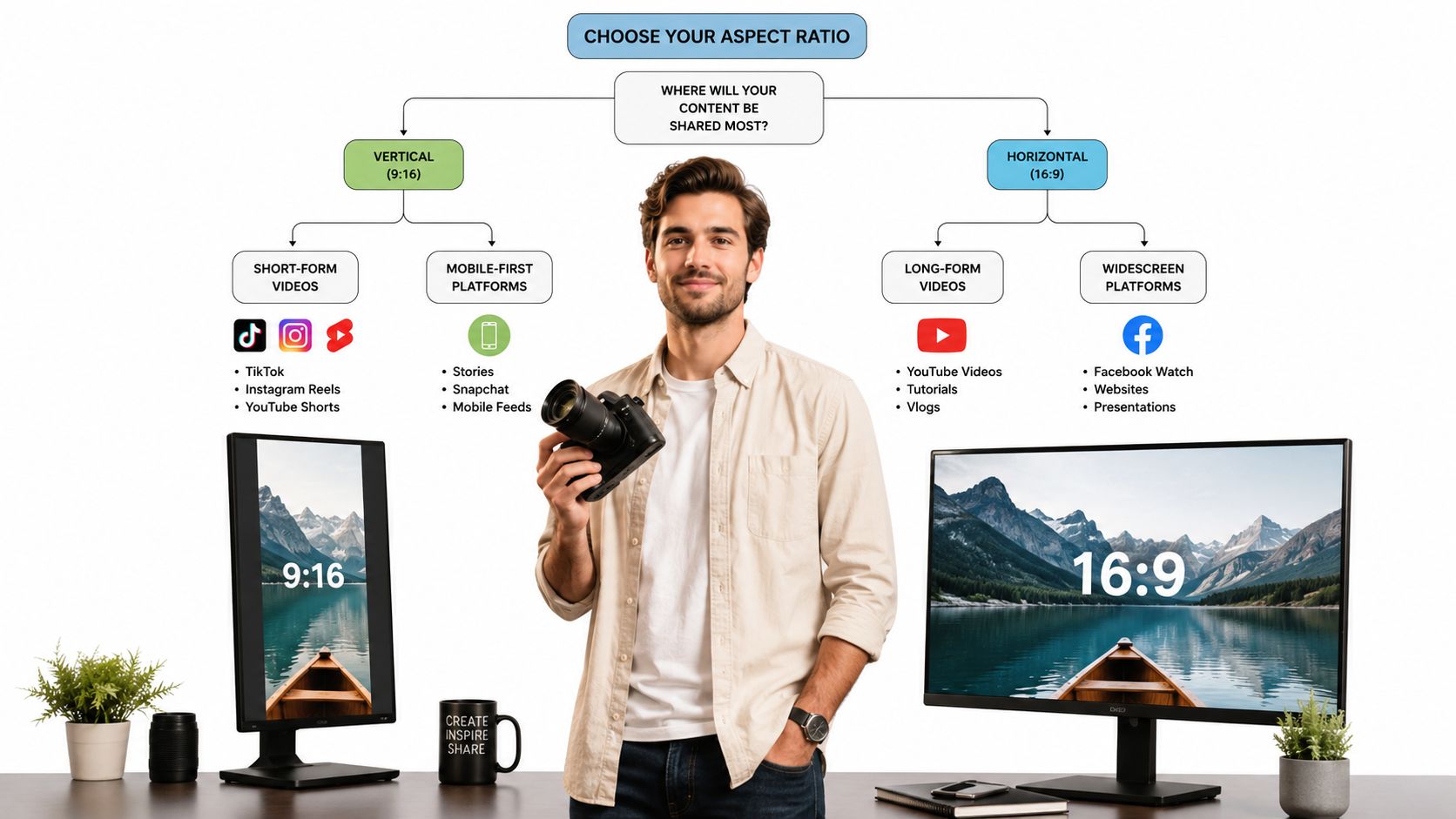
A useful workflow is to create one 16:9 master, one 9:16 social cut, and an optional 1:1 feed cut. Check the first and last frame, room labels, agent details, logos, and calls to action in each version. The VideoTour.ai format selection help article provides additional guidance for choosing a format when preparing a property video.
Step 1 Start with distribution
Write the delivery list beside the project before editing:- Full listing presentation: Build around 16:9 so rooms, exteriors, and transitions retain their context.
- Mobile discovery clip: Build a 9:16 version around the strongest visual hook and the most important text.
- Feed feature: Use 1:1 when a single detail needs a compact, balanced presentation.
- Archive insert: Keep 4:3 material intact unless the crop clearly improves the current edit.
Step 2 Compose for future crops
During capture or photo selection, keep important subjects away from the extreme edges. For a room, include enough surrounding context that a narrower crop can still show the feature being promoted. For a person speaking to camera, leave room above the head and around the shoulders so a vertical edit doesn't make the framing feel cramped.If you're working from still images, inspect every photo in the intended ratios before committing to the sequence. A wide exterior may work beautifully in 16:9 but lose the front entrance in 9:16. Choose a different crop, reposition the image, or use a separate shot for the vertical version instead of accepting a damaged composition.
Step 3 Build repeatable exports
Keep one organized project with the source images, music, captions, logo, and shot order. Duplicate the layout for each destination, then adjust the crop and text position rather than starting from an empty timeline. Review every version at its intended shape before delivery.A useful workflow is to create one 16:9 master, one 9:16 social cut, and an optional 1:1 feed cut. Check the first and last frame, room labels, agent details, logos, and calls to action in each version. The VideoTour.ai format selection help article provides additional guidance for choosing a format when preparing a property video.
Protect the story, not just the center of the frame. A centered crop can still hide the feature that makes the listing persuasive.
Aspect Ratios and Video Tour Workflows
A strong multi-format workflow begins with the asset set. Gather photos and clips by property area, identify the images that establish location and scale, and mark the details that sell the experience. A hero exterior, a kitchen-wide shot, a primary bedroom, and a distinctive amenity may all need different treatment when the frame changes.
Motion also needs planning. A slow horizontal pan can reveal a wide room in 16:9, but the same move may become a distracting sweep in 9:16. A vertical version may work better with a measured push toward a fireplace, a stairway, or a tall window. When creators plan those movements as adaptable beats, they can preserve the property narrative while changing the crop.
Use consistent fonts, logo placement, music treatment, and caption styling across all exports. Then inspect the title-safe areas separately. A caption that sits comfortably in 16:9 may cover a countertop or face in 9:16. Move it for the new composition rather than shrinking it until it becomes difficult to read.
A converter can help when the source already exists, but conversion alone doesn't solve composition. Tools such as VideoTour.ai's video aspect ratio converter are useful when a team needs to switch a prepared tour between horizontal, vertical, and square layouts, provided someone still checks the crop and visual hierarchy.
For projects outside property marketing, the same preparation applies to specialized communication. A conference team, for example, may need AV translation for conference livestreams alongside video delivery, which makes clear labeling and consistent screen composition even more important.
Motion also needs planning. A slow horizontal pan can reveal a wide room in 16:9, but the same move may become a distracting sweep in 9:16. A vertical version may work better with a measured push toward a fireplace, a stairway, or a tall window. When creators plan those movements as adaptable beats, they can preserve the property narrative while changing the crop.
Organize the edit around reusable beats
Build the tour from short visual units rather than one continuous composition. Each unit should communicate one idea:- arrival and exterior context
- entry and first impression
- main living space
- kitchen or signature feature
- bedroom or workspace
- outdoor area or amenity
- closing brand and contact frame
Use consistent fonts, logo placement, music treatment, and caption styling across all exports. Then inspect the title-safe areas separately. A caption that sits comfortably in 16:9 may cover a countertop or face in 9:16. Move it for the new composition rather than shrinking it until it becomes difficult to read.
Batch export with a review pass
Export the planned ratios together from the same source project. Name files by property, destination, and ratio so an agent or marketing team can identify the correct version without opening every file. Review the opening frame, transitions, text, and final contact information at full size.A converter can help when the source already exists, but conversion alone doesn't solve composition. Tools such as VideoTour.ai's video aspect ratio converter are useful when a team needs to switch a prepared tour between horizontal, vertical, and square layouts, provided someone still checks the crop and visual hierarchy.
For projects outside property marketing, the same preparation applies to specialized communication. A conference team, for example, may need AV translation for conference livestreams alongside video delivery, which makes clear labeling and consistent screen composition even more important.
One source project can support several destinations, but each destination still deserves a deliberate composition review.The practical payoff is fewer emergency re-edits. Instead of asking an editor to rescue a crop after publication, the team can prepare the wide listing version and the mobile variations while the visual decisions are still fresh.
Conclusion and Practical Takeaways
Aspect ratio is a distribution choice disguised as a frame setting. The right shape keeps a room legible, protects the details that support a property's appeal, and helps the video look intentional wherever a viewer encounters it.
Use this checklist before you export:
Check the ratio at the planning stage, not after a platform has altered the file. That small decision prevents avoidable re-edits and keeps the property looking complete across every destination.
VideoTour.ai converts property photo sets into ready-to-share tours with horizontal 16:9, vertical 9:16, and square 1:1 options, along with automated motion, captions, music, and branding. Upload a listing and try VideoTour.ai to create platform-ready versions from one organized property project.
Use this checklist before you export:
- Choose 16:9 for full real estate tours, YouTube walkthroughs, websites, televisions, and MLS-friendly horizontal delivery.
- Choose 9:16 for Reels, TikTok, Shorts, and other phone-first clips built around quick visual hooks.
- Choose 4:3 when you need to preserve archival or legacy footage rather than force it into a modern shape.
- Choose 1:1 for focused feed posts, amenity highlights, and square brand compositions.
- Create variants from one organized project so the wide, vertical, and square versions share the same property story without sharing every crop.
Check the ratio at the planning stage, not after a platform has altered the file. That small decision prevents avoidable re-edits and keeps the property looking complete across every destination.
VideoTour.ai converts property photo sets into ready-to-share tours with horizontal 16:9, vertical 9:16, and square 1:1 options, along with automated motion, captions, music, and branding. Upload a listing and try VideoTour.ai to create platform-ready versions from one organized property project.