
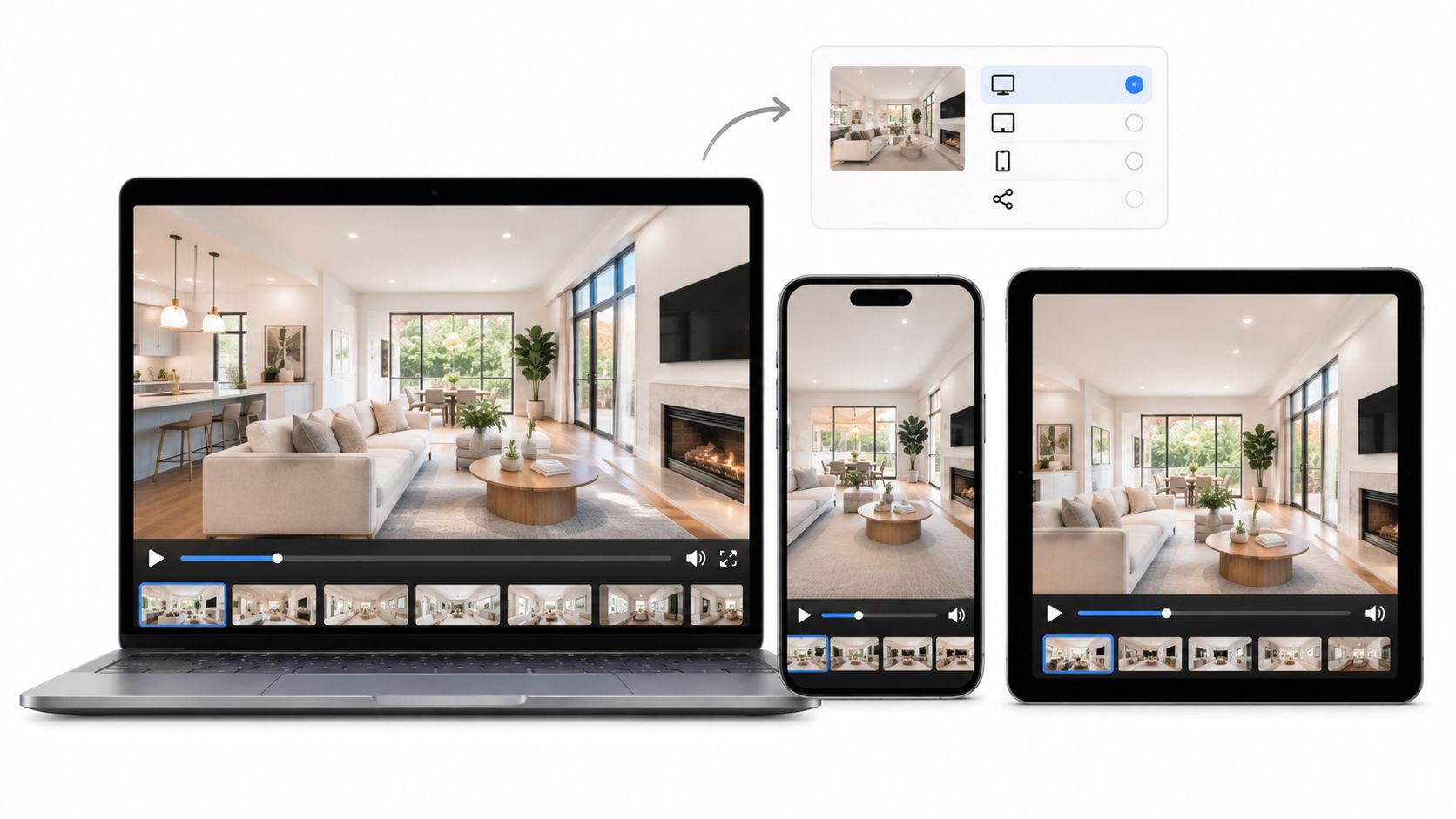
Export 1920x1080 progressive H.264 High Profile in an MP4 with AAC audio at the source frame rate, usually 30 fps for photo-motion tours. A 720p copy for email and separate vertical and square files for social are the only other exports most property teams need.
The popular advice to choose the newest codec confuses compression efficiency with successful delivery. A smaller file isn't an improvement if a listing portal rejects it, an agent can't preview it, or a social crop removes the room's most useful feature.
The best HD video format is therefore a delivery decision, not a picture-quality contest. Start with the destinations buyers will use, then choose the exports that preserve property detail without creating unnecessary upload and playback problems.
The popular advice to choose the newest codec confuses compression efficiency with successful delivery. A smaller file isn't an improvement if a listing portal rejects it, an agent can't preview it, or a social crop removes the room's most useful feature.
The best HD video format is therefore a delivery decision, not a picture-quality contest. Start with the destinations buyers will use, then choose the exports that preserve property detail without creating unnecessary upload and playback problems.
Summary
Create an AI Video Tours from PhotosTry it For Free

Best HD Format for Each Destination and Aspect Ratio
Use a horizontal H.264 MP4 as the delivery master, then create destination-specific versions from the original photos. Don't make every version by cropping that finished horizontal video. The export settings can be correct while the composition is wrong.
For example, a wide kitchen photograph might show the island, dining area, and garden entrance together. A narrow center crop could retain the island but remove the features that explain how the space connects. Repositioning the original photograph, changing the motion path, or using a different image is a better editorial decision than accepting an automatic crop.
Treat the higher upload references as starting points for files that a platform will process again. Treat the lower web range as an opportunity to test a smaller viewing copy. Neither is a substitute for checking fine textures, moving edges, and captions in the rendered result.
The archive row has a different purpose. An editing master should preserve your ability to revise the work, not satisfy an upload limit. Keeping the original photos, project settings, music permissions, and branding assets is more useful than keeping only a heavily compressed final video.
The guide to video aspect ratios is useful when deciding which canvas to build before adding motion and text. Make that choice before finishing the edit, not after the captions have been positioned.
Technical correctness also doesn't guarantee a persuasive tour. Pinnacle Property Media's guide to real estate videos that attract buyers offers useful context for deciding what the video should communicate, rather than treating export settings as the entire marketing strategy.
For example, a wide kitchen photograph might show the island, dining area, and garden entrance together. A narrow center crop could retain the island but remove the features that explain how the space connects. Repositioning the original photograph, changing the motion path, or using a different image is a better editorial decision than accepting an automatic crop.
Recommended HD export by destination
The following are working export targets, not promises of platform acceptance. The practical delivery ranges follow Dacast's video-encoding guidance, which supports H.264 MP4 as a compatibility baseline, approximately 4–6 Mbps for full-HD delivery, and 2–3.5 Mbps for smaller 720p copies.| Destination | Format to export | Resolution and frame rate | Target bitrate | Why it wins there |
|---|---|---|---|---|
| MLS listing upload | MP4, H.264 High Profile, AAC-LC | 1920x1080, progressive, 30 fps | 8 Mbps reference | Broad compatibility with listing workflows |
| Property website or landing page | MP4, H.264 High Profile | 1920x1080, source frame rate | 4–6 Mbps practical range | Smaller transfers while retaining interior detail |
| Reels, TikTok, YouTube Shorts | MP4, H.264, vertical | 1080x1920, 30 fps | 8 Mbps starting reference | Deliberate vertical composition rather than an automatic crop |
| Square feed post | MP4, H.264, square | 1080x1080, 30 fps | About 6 Mbps starting target | A feed-specific layout with room for readable captions |
| Email or messaging | MP4, H.264, horizontal | 1280x720, 30 fps | 2–3.5 Mbps | Reduces download and attachment size |
| Editing master or archive | Original media and project, optionally a ProRes MOV | 1920x1080 timeline, source frame rate | Preserve source settings or use the editing codec's preset | Retains material for re-editing rather than public delivery |
| Optional HEVC derivative | MP4, H.265/HEVC | 1920x1080, source frame rate | 4–6 Mbps starting range | An additional file for confirmed modern-device playback |
The archive row has a different purpose. An editing master should preserve your ability to revise the work, not satisfy an upload limit. Keeping the original photos, project settings, music permissions, and branding assets is more useful than keeping only a heavily compressed final video.
Build compositions, not just file variants
Use the same photo set to build each layout, but review the property story independently. A horizontal tour can establish room relationships; a vertical version may need closer compositions and a different image order. A square version may need shorter captions or a different placement for the property address.The guide to video aspect ratios is useful when deciding which canvas to build before adding motion and text. Make that choice before finishing the edit, not after the captions have been positioned.
Technical correctness also doesn't guarantee a persuasive tour. Pinnacle Property Media's guide to real estate videos that attract buyers offers useful context for deciding what the video should communicate, rather than treating export settings as the entire marketing strategy.
Practical rule: Keep a dependable horizontal delivery master, then export only the additional layouts your distribution plan actually uses.A brokerage posting to listing pages and vertical social channels may not need a square export. An agent sending a property-page link may not need an attachment-sized video. A standard workflow should reduce decisions, not require every possible render.
720p, 1080i and 1080p Compared
A 1080 frame contains 2,073,600 pixels, compared with 921,600 in a 720p frame, a difference of 2.25 times, according to the format information summarized by IEEE's high-definition video resource. That additional spatial detail matters when the subject includes cabinetry, architectural lines, signage, or a wide room with several points of interest.
Resolution alone doesn't describe how the image is delivered. The final letter distinguishes progressive scanning from interlacing, and that distinction can matter more than the apparent size of the frame.
Say a camera records a sweep across a living room in an interlaced mode. Exporting that source without proper deinterlacing can leave jagged moving edges in the web version. Recording progressively avoids that particular conversion problem, although it doesn't excuse poor shutter settings or overly fast camera movement.
Don't select an interlaced preset merely because it says HD. For newly created photo-motion tours, there's little reason to introduce interlacing into a workflow intended for phones, browsers, and listing pages.
A higher-resolution export can retain more of a good source, but it can't restore detail missing from a blurred photograph. Before increasing bitrate, inspect the original image, the amount of enlargement, and the motion applied to it.
Resolution alone doesn't describe how the image is delivered. The final letter distinguishes progressive scanning from interlacing, and that distinction can matter more than the apparent size of the frame.
| HD option | Image structure | Practical implication |
|---|---|---|
| 720p | Complete progressive frames at the smaller HD resolution | Useful when transfer size is the binding constraint |
| 1080i | Alternating fields rather than complete progressive frames | Requires careful handling before web delivery |
| 1080p | Complete progressive frames at full-HD resolution | The straightforward choice for modern property-tour delivery |
Why interlacing creates avoidable work
With interlaced footage, the fields represent different moments in motion. If software combines them incorrectly, a moving window frame, fence, or roofline can develop comb-like edges. The footage may look acceptable while paused on a static room and fail during a pan.Say a camera records a sweep across a living room in an interlaced mode. Exporting that source without proper deinterlacing can leave jagged moving edges in the web version. Recording progressively avoids that particular conversion problem, although it doesn't excuse poor shutter settings or overly fast camera movement.
Don't select an interlaced preset merely because it says HD. For newly created photo-motion tours, there's little reason to introduce interlacing into a workflow intended for phones, browsers, and listing pages.
Detail still depends on the source
ITU-R BT.709 provides the shared HDTV framework for colorimetry, frame structure, and signal encoding. Its role is interoperability, not a guarantee that every file using those parameters will look equally good.A higher-resolution export can retain more of a good source, but it can't restore detail missing from a blurred photograph. Before increasing bitrate, inspect the original image, the amount of enlargement, and the motion applied to it.
- Choose the progressive preset: Avoid unnecessary field conversion in a web-first workflow.
- Inspect architectural edges: Door frames, railings, and rooflines reveal motion-processing problems quickly.
- Use the smaller export intentionally: Choose it for transfer constraints, not as a repair for a weak source.
H.264 Versus H.265 for Delivery
H.264 is the safer default when you don't control the recipient's software. H.265, also called HEVC, becomes attractive when you control playback and can verify that the devices and processors involved support it.
The distinction is economic as much as technical. H.264 spends more bandwidth to reduce compatibility risk. HEVC spends more encoding effort to reduce the amount of data transferred.
The comparison below summarizes those trade-offs.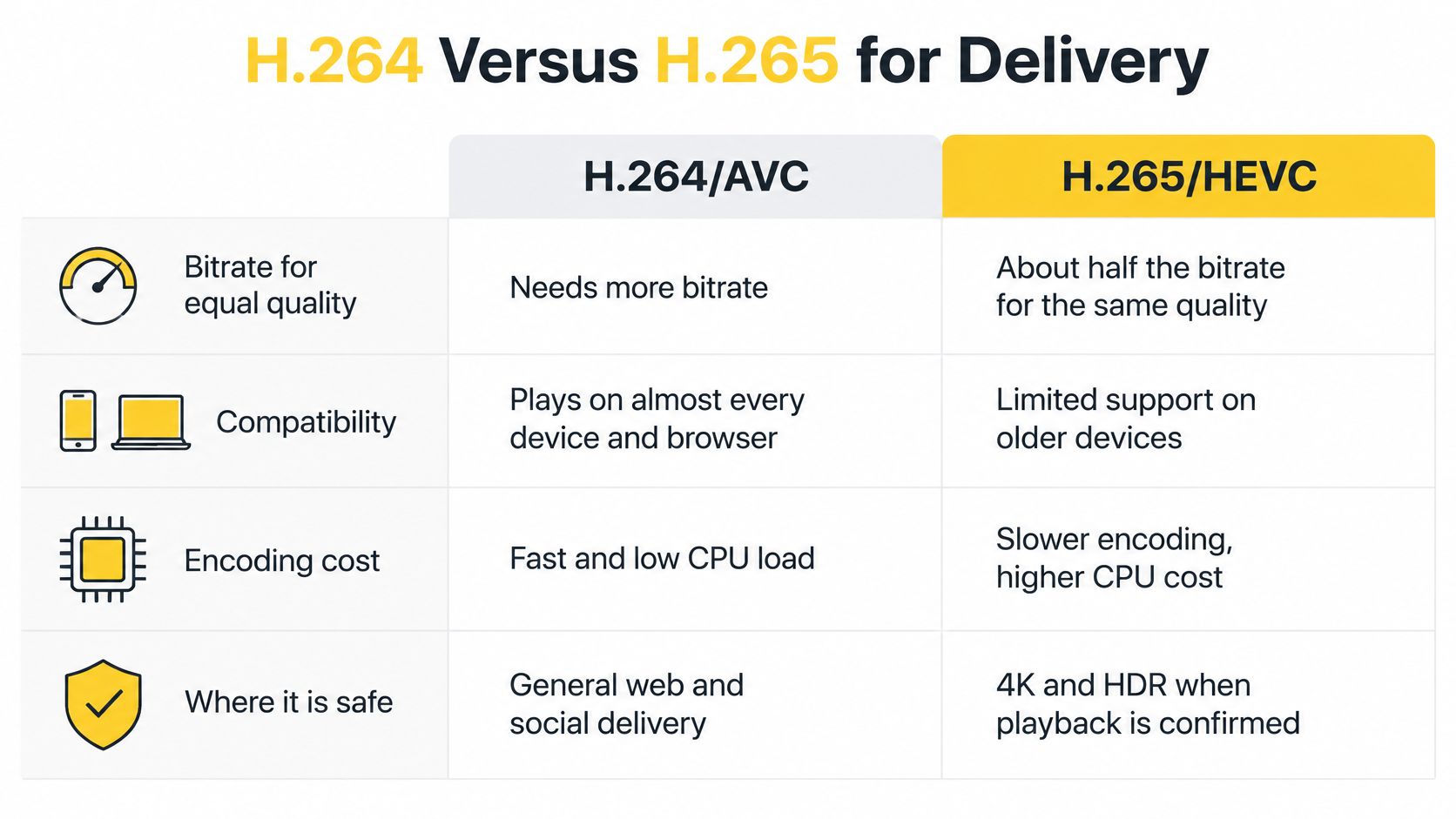
H.264 and H.265 for 1080p delivery
Those ranges aren't fixed quality thresholds. A slow pan across a clean interior and a fast drone pass over trees present different compression problems. Texture, motion, encoder preset, and the quality measure used all influence the result.
For property tours, compare the most demanding scenes rather than judging only the opening title. Watch foliage, patterned upholstery, roof tiles, and moving text. A codec comparison is useful only if the smaller file preserves the details your audience needs.
Don't reduce resolution just because you've changed codecs. First test whether better compression can preserve the intended image at a smaller transfer size. The newer codec is the wrong default when its savings create extra conversion, support, or upload work.
The distinction is economic as much as technical. H.264 spends more bandwidth to reduce compatibility risk. HEVC spends more encoding effort to reduce the amount of data transferred.
The comparison below summarizes those trade-offs.
What the efficiency figures actually mean
Comparative testing summarized by Ampex's H.264-versus-H.265 document reports approximately 50% lower bitrate at equivalent objective quality for HEVC at 1080p, and approximately 61% lower bitrate under subjective assessment. As a practical starting range, that suggests HEVC may approach H.264 quality at 4–6 Mbps rather than 8–12 Mbps, not that every encoder will deliver the same reduction.H.264 and H.265 for 1080p delivery
| Codec | 1080p bitrate for similar quality | Compatibility | Encoding cost | Best for |
|---|---|---|---|---|
| H.264/AVC in MP4 | 8–12 Mbps reference range | Broad support across browsers, phones, listing workflows, and social platforms | Low to moderate | Unknown or mixed recipients |
| H.265/HEVC in MP4 | About 4–6 Mbps starting range | Less uniform on older browsers, phones, and third-party ingest systems | Higher computation per file | Controlled or confirmed modern-device distribution |
For property tours, compare the most demanding scenes rather than judging only the opening title. Watch foliage, patterned upholstery, roof tiles, and moving text. A codec comparison is useful only if the smaller file preserves the details your audience needs.
Confirm the entire delivery chain
Test HEVC through the actual workflow before making it a default. Upload a sample to the listing portal, allow processing to finish, then inspect the published result on a phone and in the browser your clients use.- Check ingest: Confirm that the destination accepts and processes the file.
- Check playback: Verify that the published version starts, seeks, and plays with sound.
- Check operations: Make sure agents and marketing staff can preview and reuse the file without conversion.
A successful local preview proves that your computer can decode the file. It doesn't prove that the listing workflow can deliver it.Use HEVC for an authenticated property library, a controlled hosting system, or another destination where playback support is known. Keep the H.264 MP4 available for sharing outside that environment.
Don't reduce resolution just because you've changed codecs. First test whether better compression can preserve the intended image at a smaller transfer size. The newer codec is the wrong default when its savings create extra conversion, support, or upload work.
MP4, MOV and ProRes for Editing and Archiving
MP4 and MOV are containers, the wrappers that hold video, audio, and related information. H.264, HEVC, and ProRes are codecs, the methods used to encode the video inside those wrappers.
That's why a filename alone doesn't tell you whether a file is suitable for a listing portal. A MOV containing an editing codec and an MP4 containing a delivery codec can serve very different purposes, even when both play in an editing application.
An editing archive answers a different question: can someone reconstruct or revise this tour later? The answer depends on retaining source media and project information, not just choosing a large export file.
Containers and editing masters compared
Changing the wrapper doesn't improve the picture by itself. If the encoded video is unchanged, moving it into another supported container doesn't restore texture or undo compression.
Likewise, exporting an already compressed delivery file into ProRes won't recover discarded detail. It may make a subsequent editing workflow more convenient, but it isn't a replacement for the original photographs or camera files.
Archive for reconstruction; export for playback. Uploading an editing-oriented file creates no benefit when the destination only needs a finished viewing copy.
That's why a filename alone doesn't tell you whether a file is suitable for a listing portal. A MOV containing an editing codec and an MP4 containing a delivery codec can serve very different purposes, even when both play in an editing application.
Separate delivery from preservation
Forasoft's H.264/AVC explanation describes the codec's combination of HD support, compression efficiency, and broad adoption. For mixed property-marketing workflows, that makes H.264 video with AAC audio in MP4 a sensible delivery choice.An editing archive answers a different question: can someone reconstruct or revise this tour later? The answer depends on retaining source media and project information, not just choosing a large export file.
Containers and editing masters compared
| Format | Container and codec | Typical 1080p data rate | Compatibility | Role |
|---|---|---|---|---|
| MP4 | H.264 or HEVC video, AAC audio | Use the selected delivery profile | Broad with H.264; verify HEVC support | Upload and share |
| MOV with H.264 | MOV container, H.264 video | Same video data rate as MP4 at equal encoding settings | Use when the destination explicitly accepts it | Confirmed-platform delivery or handoff |
| ProRes editing master | Usually MOV with ProRes video | Set by the chosen ProRes profile and frame rate | Intended for compatible editing applications | Editing and preservation |
Likewise, exporting an already compressed delivery file into ProRes won't recover discarded detail. It may make a subsequent editing workflow more convenient, but it isn't a replacement for the original photographs or camera files.
Keep an archive someone can reopen
For a project likely to return to Adobe Premiere Pro, Final Cut Pro, or DaVinci Resolve, preserve the materials the editor needs:- Source media: Original photographs, camera clips, voiceover, and approved music files.
- Project information: The edit, image order, timing, motion settings, and caption text.
- Brand assets: Logos, fonts where licensing permits, and approved graphic treatments.
- Reference export: A final viewing copy that shows the intended result.
Archive for reconstruction; export for playback. Uploading an editing-oriented file creates no benefit when the destination only needs a finished viewing copy.
File Size Math for Uploads and Storage
Estimate video size with megabits per second × duration in seconds ÷ eight = megabytes. For variable-bitrate exports, use the average bitrate, not the maximum setting; audio and container overhead increase the final file size.
YouTube's upload guidance gives SDR references of 8 Mbps for 1080p at 24, 25, or 30 fps and 12 Mbps at 48, 50, or 60 fps. Using those references, a five-minute video contains approximately 300 MB or 450 MB of video data, respectively, before audio and container overhead.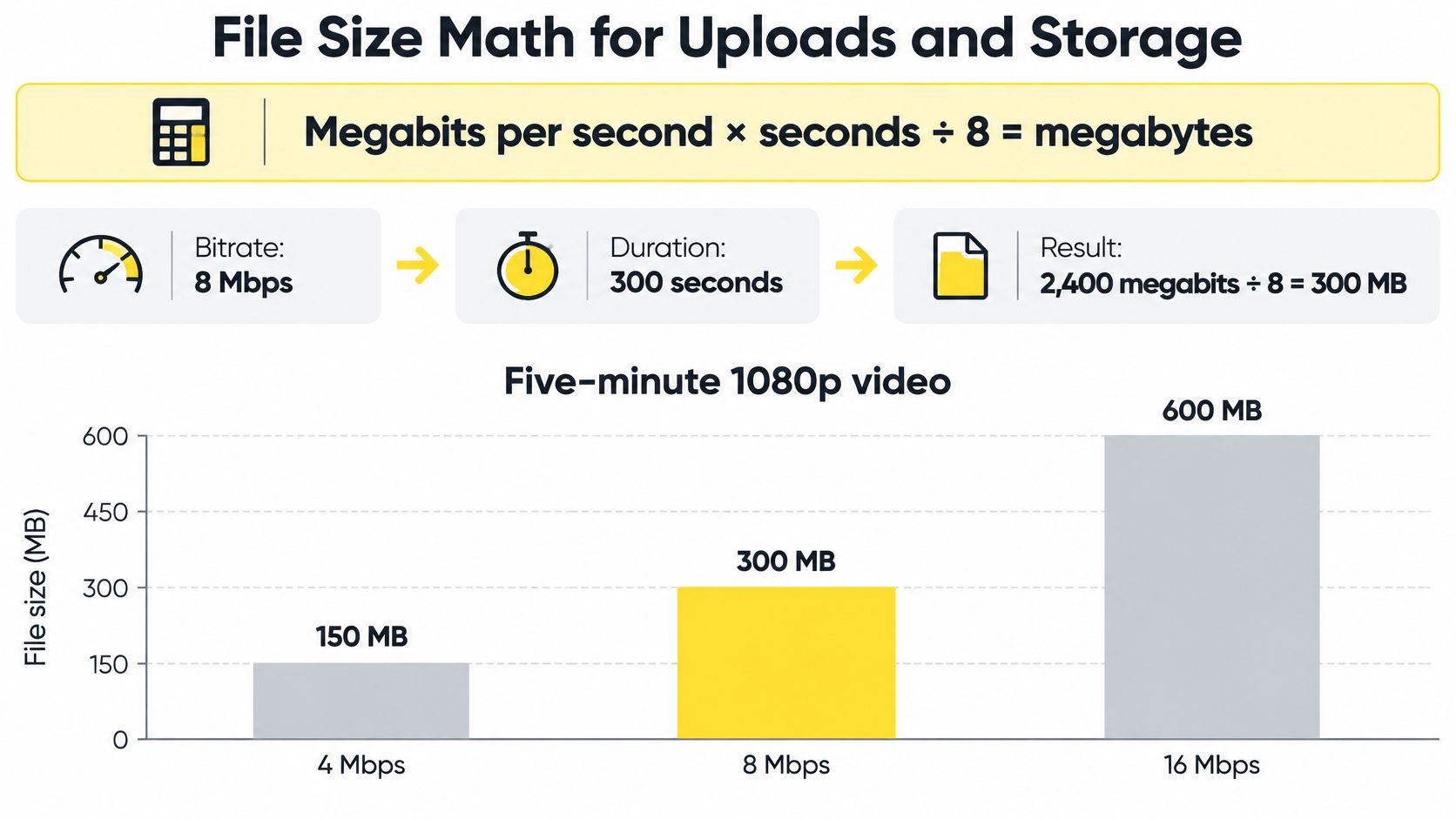
Five-minute HD file sizes by bitrate
For a hypothetical short teaser, the same arithmetic makes the attachment decision clearer: reducing duration can save more space than a small bitrate adjustment. Check the recipient's actual limit before promising an attached video, and use a hosted viewing link when the file won't fit comfortably.
StreamGen's guide to troubleshoot pixelated Twitch broadcasts offers related diagnostic context for bitrate and visible compression, although live-broadcast settings shouldn't be copied directly into a property-video export preset.
After rendering, follow the video download instructions, inspect the actual file size, and compare it with your estimate. A large mismatch is a reason to inspect average bitrate, duration, and audio settings before distributing the file.
YouTube's upload guidance gives SDR references of 8 Mbps for 1080p at 24, 25, or 30 fps and 12 Mbps at 48, 50, or 60 fps. Using those references, a five-minute video contains approximately 300 MB or 450 MB of video data, respectively, before audio and container overhead.
Estimate before rendering
The calculated values below apply the same arithmetic to the working delivery profiles. They're planning estimates, not attachment guarantees or platform file-size limits.Five-minute HD file sizes by bitrate
| Delivery profile | Bitrate | Five-minute file size | Use when |
|---|---|---|---|
| 720p H.264, email and mobile | 2–3.5 Mbps | About 75–131 MB | Smaller downloads or slow connections |
| 1080p H.264, web practical range | 4–6 Mbps | About 150–225 MB | Property sites and general sharing |
| 1080p H.264, 30 fps reference | 8 Mbps | About 300 MB | Standard uploads where accepted |
| 1080p H.264, 60 fps reference | 12 Mbps | About 450 MB | Deliverables that genuinely need the higher frame rate |
Diagnose the cause before adding bitrate
Fast photo zooms, drone sweeps, grain, and dense textures can expose compression weaknesses. Inspect those moments before raising the bitrate of an entire tour. Sometimes slowing an unnecessary zoom produces a cleaner result without increasing transfer size.StreamGen's guide to troubleshoot pixelated Twitch broadcasts offers related diagnostic context for bitrate and visible compression, although live-broadcast settings shouldn't be copied directly into a property-video export preset.
Budget the transfer: Decide where the file must go before spending time rendering a version that's too large to send.Match the source frame rate rather than converting unnecessarily. For a photo-based timeline, choose a consistent project rate and avoid generating extra frames without a delivery reason.
After rendering, follow the video download instructions, inspect the actual file size, and compare it with your estimate. A large mismatch is a reason to inspect average bitrate, duration, and audio settings before distributing the file.
Confirm Your Export Settings Before You Publish
A photo-to-video workflow should let the marketing team adjust composition without rebuilding the campaign from scratch. Look for control over image order, timing, layout, captions, and aspect ratio, then preview each version before downloading it.
VideoTour.ai is one option alongside desktop editors: it creates tours from photo sets, supports horizontal, vertical, and square versions without separate projects, and provides HD downloads. It also offers unlimited re-renders and downloads, watermark-free exports on paid plans, listing-oriented presets, and email delivery of renders.
Email needs a separate presentation check. BEDHEAD's discussion of fallback designs for video emails is useful when planning a thumbnail or other fallback that directs recipients to the viewing page.
Confirm that playback starts, captions remain readable, audio behaves as intended, and the property's important features survive the final composition. The destination decides whether the export is correct.
VideoTour.ai turns property photo sets into video tours with adjustable timing, captions, branding, and aspect-ratio versions. Use it to prepare your horizontal listing tour and the social or smaller sharing copies your campaign needs, then check each export at its intended destination before publishing.
VideoTour.ai is one option alongside desktop editors: it creates tours from photo sets, supports horizontal, vertical, and square versions without separate projects, and provides HD downloads. It also offers unlimited re-renders and downloads, watermark-free exports on paid plans, listing-oriented presets, and email delivery of renders.
Run a destination-specific export check
Treat the following as an export sequence, not a requirement to publish every version.- Export the horizontal delivery master. Use the H.264 MP4 preset and preserve the project's source frame rate. Check the first frame, final frame, audio, and property details.
- Build the vertical version. Reposition photographs and captions rather than accepting an automatic center crop. Preview against the destination app's interface overlays.
- Create the square version if needed. Check caption wrapping and whether the room still reads clearly in the tighter composition.
- Prepare the smaller sharing copy. Confirm the recipient's attachment limit, or send a hosted viewing link instead.
- Verify the specific MLS rules. Check accepted formats, file-size and duration limits, and branding restrictions before uploading. A listing-oriented preset doesn't replace the board's current requirements.
- Preserve the edit materials. Keep original files and project information; retain an editing master when future revisions or a handoff justify it.
Email needs a separate presentation check. BEDHEAD's discussion of fallback designs for video emails is useful when planning a thumbnail or other fallback that directs recipients to the viewing page.
Approve the published result
Open the actual MLS page, property landing page, and social post on a phone. Don't approve the campaign solely from the downloaded file.Confirm that playback starts, captions remain readable, audio behaves as intended, and the property's important features survive the final composition. The destination decides whether the export is correct.
VideoTour.ai turns property photo sets into video tours with adjustable timing, captions, branding, and aspect-ratio versions. Use it to prepare your horizontal listing tour and the social or smaller sharing copies your campaign needs, then check each export at its intended destination before publishing.