
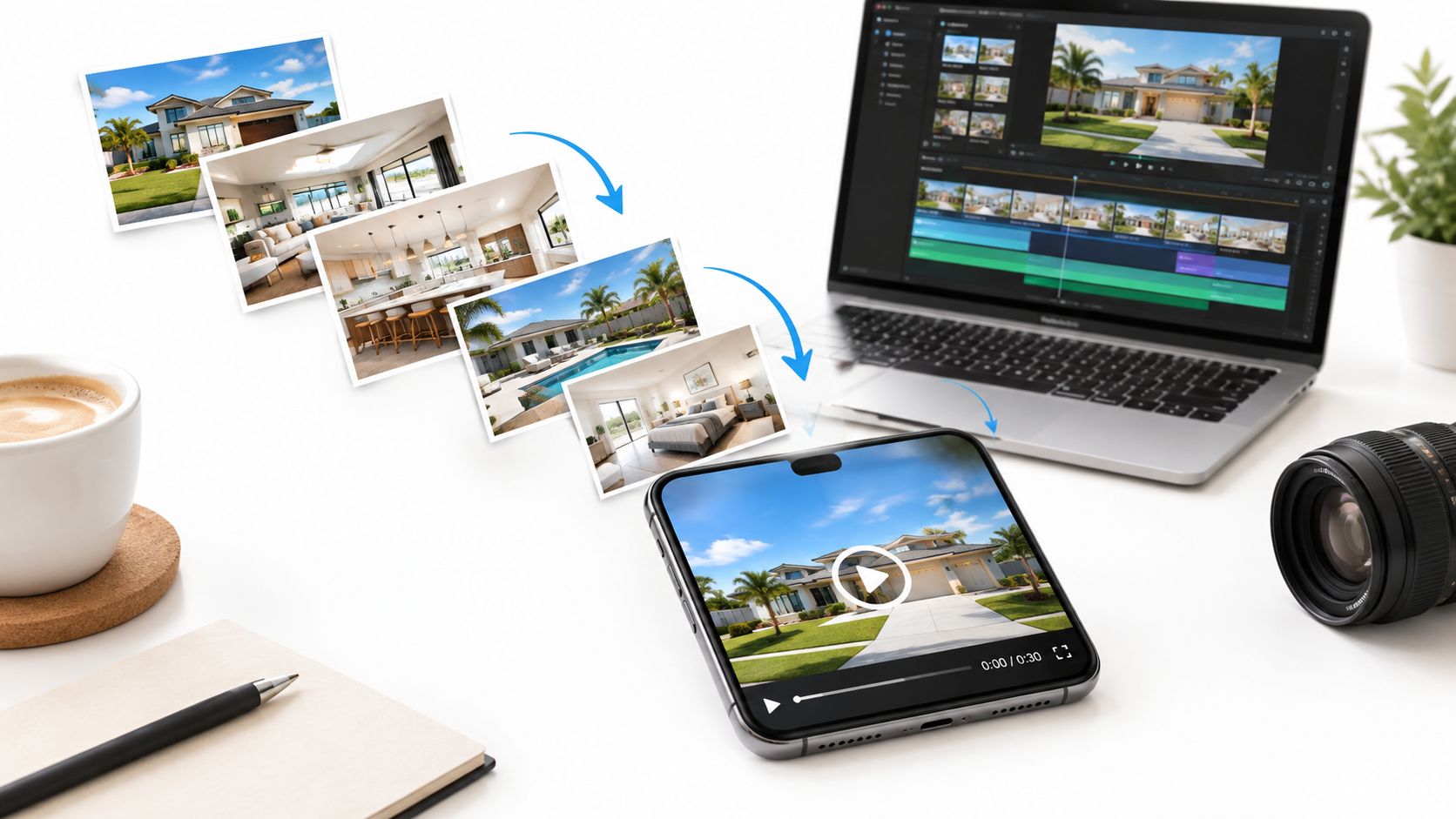
You've got a new listing, a folder of polished photos, and a deadline to get the property in front of buyers. Someone suggests turning the images into a video ad. Before you spend time adjusting motion, music, and captions, ask a more useful question: what action should this ad generate, and how will you know it did?
Real estate video ads are a measurement problem first and a creative problem second. Video can earn attention, but attention isn't the same as a qualified inquiry or a booked showing. The right approach is to match the format to the listing, test it against a clear comparison, and spend more only when the results support it.
Real estate video ads are a measurement problem first and a creative problem second. Video can earn attention, but attention isn't the same as a qualified inquiry or a booked showing. The right approach is to match the format to the listing, test it against a clear comparison, and spend more only when the results support it.
Summary
Create an AI Video Tours from PhotosTry it For Free

When a Photo-to-Video Ad Is Worth the Effort
A photo-to-video ad earns its place when it helps buyers understand or notice something that a gallery alone doesn't communicate quickly. That might be a distinctive view, an unusual layout, a renovation, or the relationship between the home and its location. It can also help reach remote prospects who need visual context before they decide whether to visit.
But video isn't a universal upgrade. Buyers' agents rate listing photos as highly important to clients more often than video, 73% versus 48%, and only 5% of buyers reportedly purchased based solely on a virtual tour, showing, or open house without physically seeing the property, according to industry findings on real estate video marketing. Those figures are a useful warning against treating a video view as proof of purchase intent. Strong photography and in-person showings still matter.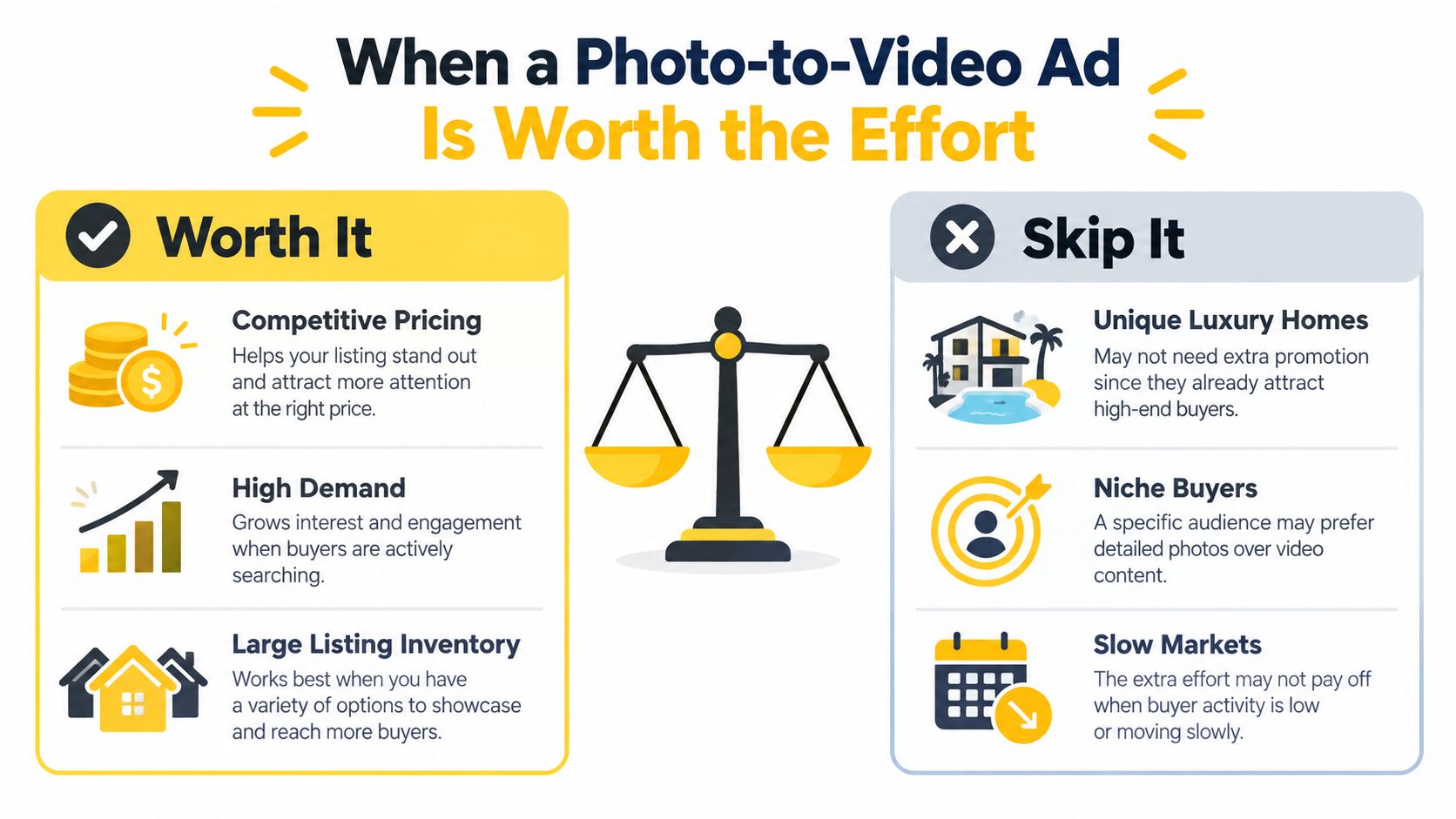
A longer cinematic piece is more appropriate when the property's appeal depends on a deliberate walkthrough, detailed finishes, or a broader sense of scale. By contrast, if a starter rental is likely to move quickly in a high-demand area, or a hot listing already has strong photography and buyer interest, another video may add work without changing the outcome.
Set one campaign objective before production. “Get more engagement” is too vague. Choose a measurable action such as booked showings, qualified inquiries, or listing-page saves, then use the creative and call to action to support it.
But video isn't a universal upgrade. Buyers' agents rate listing photos as highly important to clients more often than video, 73% versus 48%, and only 5% of buyers reportedly purchased based solely on a virtual tour, showing, or open house without physically seeing the property, according to industry findings on real estate video marketing. Those figures are a useful warning against treating a video view as proof of purchase intent. Strong photography and in-person showings still matter.
Start with the listing and the objective
A photo-to-video cut is a sensible choice when you already have good listing photos and need adaptable content for social feeds, a property page, or paid distribution. It's particularly practical for listings with a clear visual hook or for agents who need a repeatable way to turn existing assets into channel-ready creative. New construction may need something different if buyers can't infer the layout from photos. A floor-plan-led edit or a fuller tour can answer questions a montage can't.A longer cinematic piece is more appropriate when the property's appeal depends on a deliberate walkthrough, detailed finishes, or a broader sense of scale. By contrast, if a starter rental is likely to move quickly in a high-demand area, or a hot listing already has strong photography and buyer interest, another video may add work without changing the outcome.
Set one campaign objective before production. “Get more engagement” is too vague. Choose a measurable action such as booked showings, qualified inquiries, or listing-page saves, then use the creative and call to action to support it.
Practical rule: If you can't name the action the ad should produce, don't spend on the edit yet.For a broader perspective on local listing promotion, this guide for Brisbane property agents offers useful context on how property advertising fits into an agent's marketing mix. Use it to inform distribution, but make the video decision based on your listing and your campaign objective.
Preparing Your Photos and Script Before Production
A smooth production starts with selection, not software. Review the full photo set and keep the images that make the home easier to understand or harder to scroll past. A typical shoot may have many usable shots, but a short ad doesn't need every angle. Remove near-duplicates, dim images, and photos that don't support the property's strongest selling point.
Draft the opening and captions before you open an editor. A simple scaffold keeps the message focused:
Short-form property videos under 60 seconds have been reported to generate 2.5 times more social shares than longer videos, according to real estate marketing statistics. Treat that as a directional benchmark, not a promise about your own campaign. Your practical pre-flight check is simple: confirm the hook, verify every property fact, remove redundant photos, decide the CTA, and identify which aspect ratios you'll need before production begins.
Build the sequence around the hook
Put the strongest differentiator first. That could be the price, location, view, renovation, or a clear view of the floor plan. Don't begin with a logo animation or a slow exterior if the best reason to keep watching is the bright kitchen or the view from the balcony.Draft the opening and captions before you open an editor. A simple scaffold keeps the message focused:
- Hook: Lead with a concrete reason to stop. For a luxury condo, that could be the waterfront view; for a suburban home, it might be the renovated kitchen or a useful layout.
- Facts: State only verified details, such as the number of bedrooms, location, or a feature shown in the listing materials.
- Lifestyle: Connect the space to a practical use, without inventing amenities or making unsupported promises.
- Call to action: Choose one next step, such as booking a showing or viewing the listing details.
Short-form property videos under 60 seconds have been reported to generate 2.5 times more social shares than longer videos, according to real estate marketing statistics. Treat that as a directional benchmark, not a promise about your own campaign. Your practical pre-flight check is simple: confirm the hook, verify every property fact, remove redundant photos, decide the CTA, and identify which aspect ratios you'll need before production begins.
The Photo-to-Video Production Workflow
A good photo-to-video workflow is a series of deliberate choices. Upload the approved listing images, arrange them in the order buyers should see them, and decide which moments need motion. A slow pan or zoom can add movement to an interior photo without making the room feel distorted. Tilt can suit an image where vertical details matter. Outdoor and amenity shots may benefit from a restrained lifestyle overlay, provided the effect doesn't imply a feature that isn't there.
Branding should identify the agent without delaying the listing. A short logo treatment or restrained 3D text can work; an extended introduction often spends valuable opening time on the brand instead of the home. Before export, review image order, timing, text placement, aspect ratio, and the full ad on a mobile screen.
For a useful perspective on how photographs and motion work together, see Silva Marketing on converting visuals. The key is not to decorate every frame. Each effect should help a buyer read the space, notice a feature, or understand the next step.
If your editor supports revisions, use them to create meaningful alternatives rather than polishing one cut endlessly. Change one element at a time, such as the opening shot, the hook, or the CTA. A photo-to-video platform such as VideoTour.ai can automate motion, captions, music, and branding from listing photos, while allowing adjustments to image order, timing, layout, and aspect ratio before download.
A final preview is mandatory. Check that the motion doesn't make rooms look larger or differently shaped, that every caption is factual, and that the CTA appears long enough to read. The finished file should be a controlled creative choice, not just a polished export.
Make motion and audio serve the property
Choose music for pace and tone, not because a track is trending. If a tool auto-selects a track and syncs it to the visuals, listen through the full preview. Music shouldn't drown out narration, and the ad should still make sense when someone watches with the sound off. Captions should carry the important facts, use readable contrast, and stay clear of the edges where platform interface elements may cover them.Branding should identify the agent without delaying the listing. A short logo treatment or restrained 3D text can work; an extended introduction often spends valuable opening time on the brand instead of the home. Before export, review image order, timing, text placement, aspect ratio, and the full ad on a mobile screen.
For a useful perspective on how photographs and motion work together, see Silva Marketing on converting visuals. The key is not to decorate every frame. Each effect should help a buyer read the space, notice a feature, or understand the next step.
If your editor supports revisions, use them to create meaningful alternatives rather than polishing one cut endlessly. Change one element at a time, such as the opening shot, the hook, or the CTA. A photo-to-video platform such as VideoTour.ai can automate motion, captions, music, and branding from listing photos, while allowing adjustments to image order, timing, layout, and aspect ratio before download.
A final preview is mandatory. Check that the motion doesn't make rooms look larger or differently shaped, that every caption is factual, and that the CTA appears long enough to read. The finished file should be a controlled creative choice, not just a polished export.
Aspect Ratios, Length, and Platform Cuts
One export rarely works equally well everywhere. A vertical cut is built for phone-first discovery, a square version suits feed placements, and a horizontal edit can give viewers more room to follow a property sequence. Don't treat the three formats as crops of one master. The opening image, text placement, pacing, and CTA should fit the way people use each placement.
The workflow facts support producing a 9:16 cut, with 1:1 and 16:9 derivatives for other placements. The exact runtime should follow the platform, audience, and amount of information the listing needs. Shorter isn't automatically better if a buyer needs more context, and longer isn't justified just because you have more photos.
These runtimes are production targets, not guarantees of performance. The practical distinction is that each cut should earn its length. A vertical discovery ad can move quickly from hook to CTA, while a horizontal listing-page version may need more time to show the progression between spaces.
Plan a shared image sequence first, then tailor each edit. Keep key text away from edges in vertical layouts, avoid placing important details where square crops will cut them, and use the horizontal version to communicate room relationships. For more detail on framing trade-offs, consult this guide to video aspect ratios. For export decisions such as file format and output quality, RevelRaw's export settings for content creators can help you prepare platform-ready files.
Before publishing, ask the editor or tool for each intended aspect ratio, its own opening, and a CTA that matches the destination. A vertical ad that tells viewers to book a showing shouldn't send them to a generic profile page if the booking path is elsewhere. Match the ending to the next click.
The workflow facts support producing a 9:16 cut, with 1:1 and 16:9 derivatives for other placements. The exact runtime should follow the platform, audience, and amount of information the listing needs. Shorter isn't automatically better if a buyer needs more context, and longer isn't justified just because you have more photos.
| Platform Cut Reference for Real Estate Video Ads | Aspect ratio | Ideal length | Hook style | Primary KPI |
|---|---|---|---|---|
| Reels, TikTok, YouTube Shorts | 9:16 | Under 60 seconds | Lead with the strongest visual or listing differentiator | Qualified inquiries or showing requests |
| Social feed and retargeting | 1:1 | Around 45 to 60 seconds | Use a clear property benefit with readable captions | Listing-page sessions or saves |
| MLS, YouTube, listing pages | 16:9 | Up to 90 seconds | Establish the property and its layout before detailing rooms | Completed views and viewing requests |
Plan a shared image sequence first, then tailor each edit. Keep key text away from edges in vertical layouts, avoid placing important details where square crops will cut them, and use the horizontal version to communicate room relationships. For more detail on framing trade-offs, consult this guide to video aspect ratios. For export decisions such as file format and output quality, RevelRaw's export settings for content creators can help you prepare platform-ready files.
Before publishing, ask the editor or tool for each intended aspect ratio, its own opening, and a CTA that matches the destination. A vertical ad that tells viewers to book a showing shouldn't send them to a generic profile page if the booking path is elsewhere. Match the ending to the next click.
KPIs and A/B Testing That Actually Prove Lift
Impressions tell you how many people received an opportunity to see an ad. Views and watch time help diagnose whether the creative held attention. Neither proves that video created buyer demand. To evaluate business impact, connect the ad to actions closer to a showing: listing-page sessions, qualified inquiries, booked appointments, and cost per qualified lead.
Choose the metric that matches the objective. If you're trying to introduce a property to a new audience, discovery measures such as view-through rate and saves can indicate whether the creative is earning attention. If you need showings, measure the actions that lead to one. Don't celebrate a rise in views if the listing page receives no relevant visits.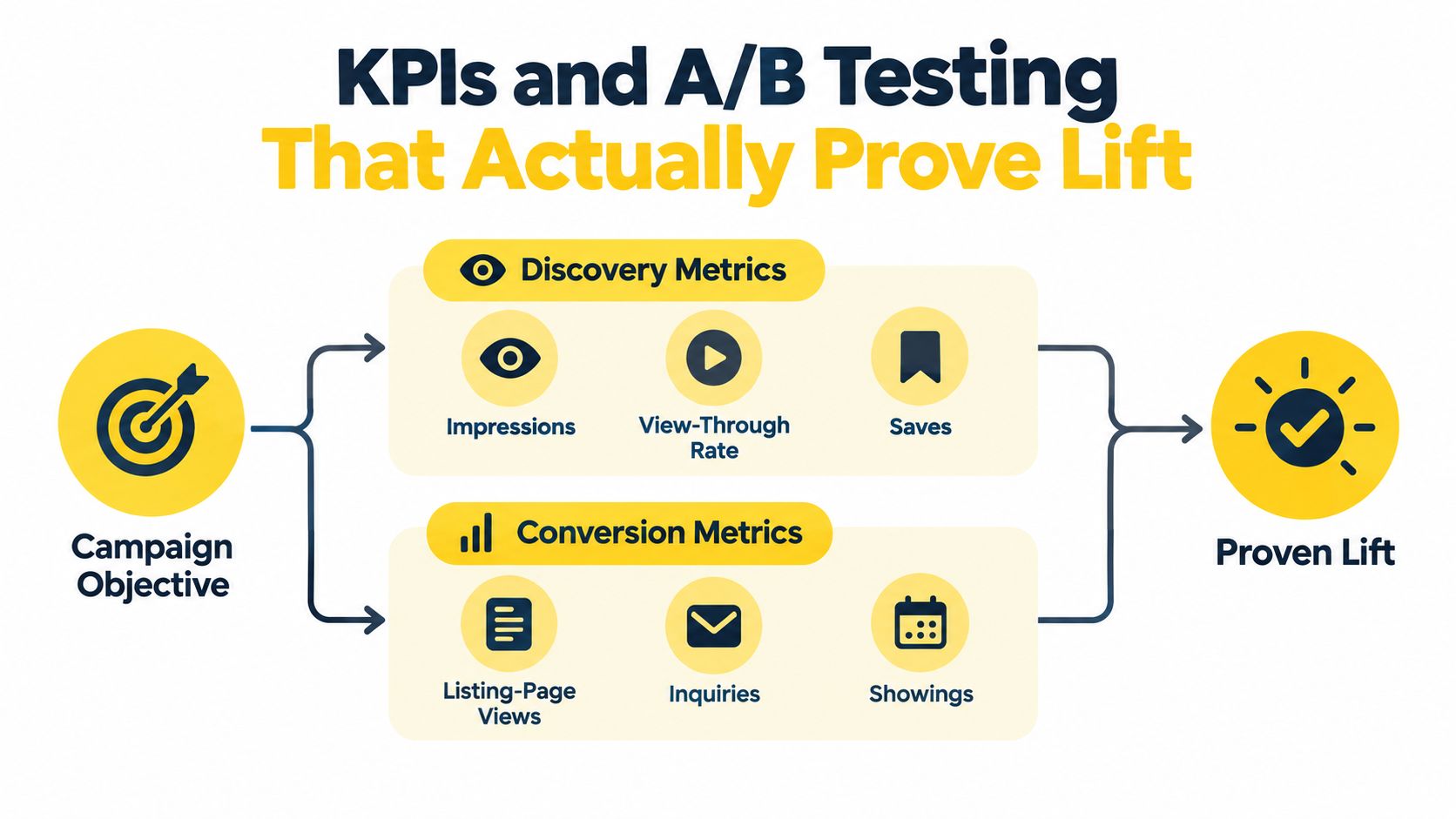
This won't answer every question about how video performs across different markets or property types. It will, however, give you a more defensible read than comparing unrelated campaigns. If you change the creative, audience, and landing page at once, you won't know which change mattered.
The frequently repeated claim that listings with video receive 403% more inquiries than listings without video is observational, as described in the real estate video marketing guide. That difference may reflect other factors, such as which properties or agents choose to use video. Don't treat it as proof that video caused the extra inquiries. The same source reports an average online video ad completion rate of 29%, a reminder to inspect early drop-off instead of optimizing only for impressions.
Use the test results to diagnose specific problems:
Choose the metric that matches the objective. If you're trying to introduce a property to a new audience, discovery measures such as view-through rate and saves can indicate whether the creative is earning attention. If you need showings, measure the actions that lead to one. Don't celebrate a rise in views if the listing page receives no relevant visits.
Run a controlled test
Set up a comparison that holds the campaign constant. Keep the listing, audience, budget, CTA, landing page, and campaign period consistent. Then rotate or randomize two to three video variants and compare them against a photo-only control. Track completed views, listing-page sessions, inquiry rate, booked-showing rate, and cost per qualified lead separately.This won't answer every question about how video performs across different markets or property types. It will, however, give you a more defensible read than comparing unrelated campaigns. If you change the creative, audience, and landing page at once, you won't know which change mattered.
The frequently repeated claim that listings with video receive 403% more inquiries than listings without video is observational, as described in the real estate video marketing guide. That difference may reflect other factors, such as which properties or agents choose to use video. Don't treat it as proof that video caused the extra inquiries. The same source reports an average online video ad completion rate of 29%, a reminder to inspect early drop-off instead of optimizing only for impressions.
Use the test results to diagnose specific problems:
- Slow opening: If viewers leave early, replace the intro with the property's strongest feature.
- Unreadable captions: Preview on a phone and simplify text that viewers can't read at a glance.
- Music overpowering narration: Lower the track or remove narration that adds little.
- Inaccurate AI-generated details: Verify the final copy against the listing facts before publishing.
MLS Compliance, Captions, and Accessibility Guardrails
Treat compliance as part of production. Before exporting, check the MLS rules that apply to runtime, agent branding, watermarks, music, and video content. Requirements can differ, so don't assume a file approved for social is automatically suitable for an MLS listing.
Review property claims by hand. Confirm room names, dimensions, amenities, and any other details shown on screen. Avoid fair-housing-sensitive language that could misrepresent who the home is for. Keep a record of the approved photos and revisions so you can trace the final ad back to the claims and assets used.
Use an accessibility-first pre-export checklist:
Review property claims by hand. Confirm room names, dimensions, amenities, and any other details shown on screen. Avoid fair-housing-sensitive language that could misrepresent who the home is for. Keep a record of the approved photos and revisions so you can trace the final ad back to the claims and assets used.
Make the message work without sound
Many viewers encounter social video with sound off. Captions should therefore communicate the core listing facts and CTA, not merely repeat a voiceover that carries all the meaning. Automated captioning can misread addresses, measurements, school names, and legal disclaimers, so a person needs to review and correct the final file.Use an accessibility-first pre-export checklist:
- Keep key facts visible: Show bedrooms, bathrooms, price, location, and the CTA in readable on-screen text.
- Check caption presentation: Use sufficient contrast and a font size that remains legible on a phone.
- Prepare silent and captioned versions: Confirm the message still makes sense when muted.
- Review translation materials: Export subtitles or a transcript when you need multilingual versions.
- Protect music rights: Confirm the track is licensed for every intended placement, including social, paid distribution, and MLS use.
A video isn't ready because it plays. It's ready when the facts are accurate, the rights are clear, and the message survives a sound-off viewing.For practical information about MLS-oriented use, consult VideoTour.ai's commercial-use and MLS guidance. Then apply the rules of the specific MLS and platforms where you'll publish.
Choosing the Right Format for Your Listing and Budget
Choose the format by matching the property's selling challenge to the buyer's next decision. A competitive suburban listing with strong photography may need a concise social cut that introduces the best feature and points to showings. A luxury home or a property aimed at remote buyers may justify a longer walkthrough that explains scale and finishes. New construction often benefits from a floor-plan-first edit, especially when photos alone don't make the layout clear.
If the home is likely to sell quickly because demand is already strong, don't assume video is a necessary expense. Use the campaign objective to decide whether it can improve discovery or help qualify interest. If neither outcome is plausible, put the effort into accurate photos, pricing, and listing details instead.
How often should I refresh the creative? Refresh it when the opening no longer matches the listing's strongest current selling point, the campaign's audience changes, or the ad stops producing useful actions. Don't change a working ad to make it look new.
When should I retire the video? Retire it when the listing details change, the property sells, the CTA becomes outdated, or the creative repeatedly attracts attention without generating the campaign's intended action. Accuracy matters more than keeping an old asset in circulation.
The default plan is straightforward: define one goal, choose the shortest format that can communicate the property accurately, and compare video with a photo-only control. Use a social cut when the goal is discovery, a fuller edit when buyers need more context, and no video when you can't identify a useful job for it.
VideoTour.ai turns property photos into share-ready video tours with motion, captions, music, and branding, with options for social formats and MLS use. If you've got a listing ready, visit VideoTour.ai to build and review a photo-to-video cut before you commit your campaign budget.
If the home is likely to sell quickly because demand is already strong, don't assume video is a necessary expense. Use the campaign objective to decide whether it can improve discovery or help qualify interest. If neither outcome is plausible, put the effort into accurate photos, pricing, and listing details instead.
Three practical questions
Should I shoot vertical and horizontal in the same session? Yes, when you're capturing original footage. Plan framing for both rather than assuming a horizontal shot will crop cleanly into vertical. With photo-to-video production, ask for separate aspect-ratio edits from the same approved photo set.How often should I refresh the creative? Refresh it when the opening no longer matches the listing's strongest current selling point, the campaign's audience changes, or the ad stops producing useful actions. Don't change a working ad to make it look new.
When should I retire the video? Retire it when the listing details change, the property sells, the CTA becomes outdated, or the creative repeatedly attracts attention without generating the campaign's intended action. Accuracy matters more than keeping an old asset in circulation.
The default plan is straightforward: define one goal, choose the shortest format that can communicate the property accurately, and compare video with a photo-only control. Use a social cut when the goal is discovery, a fuller edit when buyers need more context, and no video when you can't identify a useful job for it.
VideoTour.ai turns property photos into share-ready video tours with motion, captions, music, and branding, with options for social formats and MLS use. If you've got a listing ready, visit VideoTour.ai to build and review a photo-to-video cut before you commit your campaign budget.