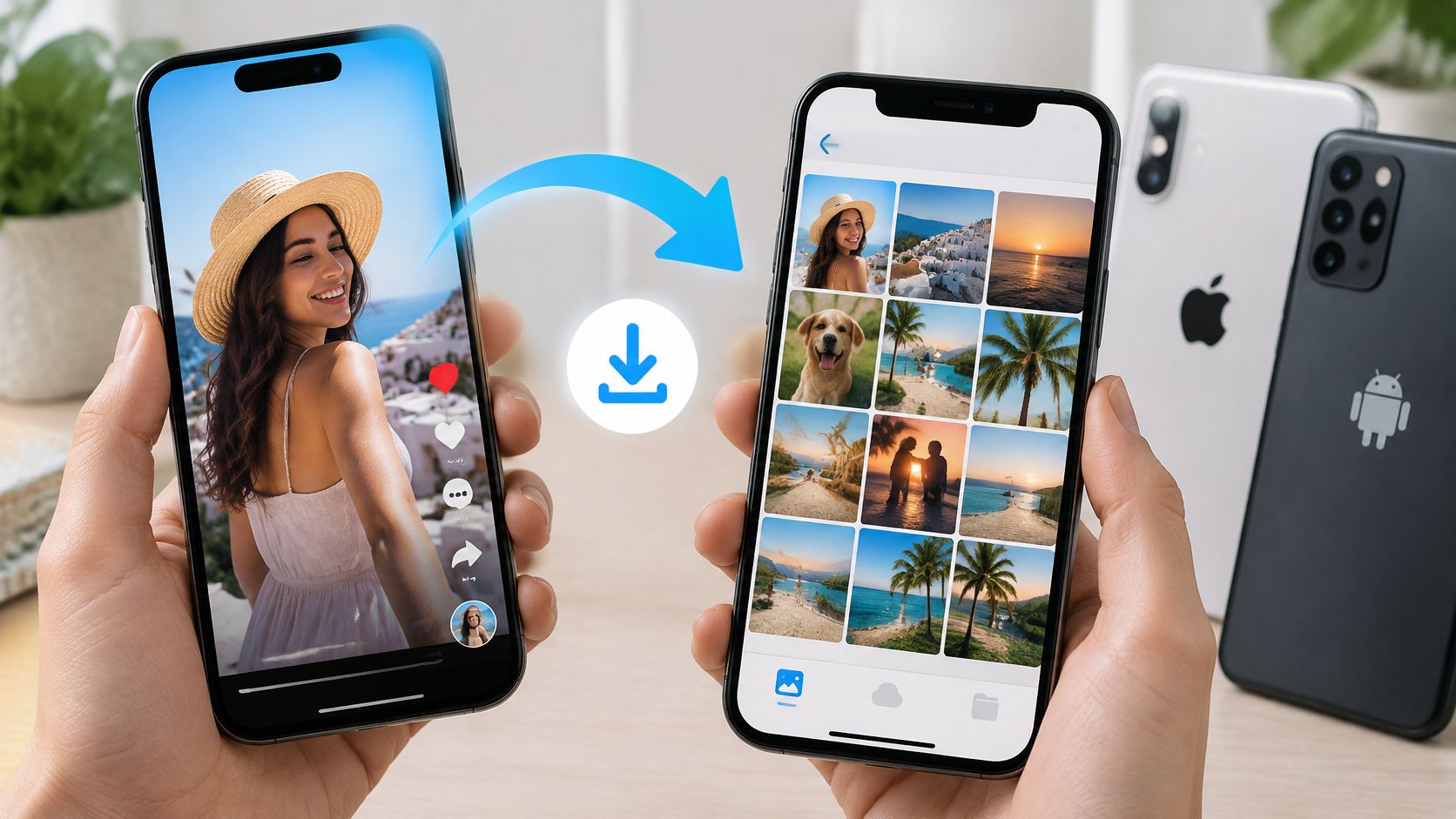
You can tap Save on a Reel, see it in Instagram later, and still have no video file on your phone. That's the confusion behind most searches for how to download Reel to camera roll. Instagram uses similar words for different things, a bookmark, a draft, and an actual export, and only one of them puts a playable file in Photos or Gallery.
It matters because Reels now take up a large share of attention. Instagram Reels accounted for 46% of the time U.S. users spent in the Instagram app in 2025, up from 37% in 2024, according to Sensor Tower data reported by CNBC and published by Market Intelligence Tools. If you're saving a listing tour, a tutorial, or a client clip for reuse, you need the file itself, not just a pointer back to a post that could change or disappear.
It matters because Reels now take up a large share of attention. Instagram Reels accounted for 46% of the time U.S. users spent in the Instagram app in 2025, up from 37% in 2024, according to Sensor Tower data reported by CNBC and published by Market Intelligence Tools. If you're saving a listing tour, a tutorial, or a client clip for reuse, you need the file itself, not just a pointer back to a post that could change or disappear.
Summary
Create an AI Video Tours from PhotosTry it For Free
Which Save Option Puts a Reel in Your Camera Roll
Only Save in the editing view and Download from the share menu put a real video file in your camera roll. Save draft doesn't. It keeps an editable project inside Instagram.
That's also different from bookmarking a post to find later. If you mainly want to organize other people's posts inside the app, these Instagram bookmarking tips for local businesses cover that separate habit. A bookmark helps you find a post again. It doesn't give you a file you can upload elsewhere.
Screen recording is a last resort. You'll capture likes, captions, progress bars, or other controls if they appear on screen, and the quality won't match a true export. Use it only for a quick personal reference, not for a client video you plan to repost.
| Save option | Where it appears | Result on the phone |
|---|---|---|
| Save draft | Share screen before posting | Project stays inside Instagram, no camera-roll file |
| Save from editing view | Swipe from left to right in the editing view, then tap Save | Device-level copy in the photo library |
| Download from share menu | Share options on a published Reel you own or that allows downloads | MP4 saved to the phone, Instagram library music may be missing |
| Screen recording | Phone's built-in screen recorder | Lower-quality capture that includes on-screen controls |
Why drafts feel like downloads
A draft looks saved because you can reopen it and keep editing. But it's stored on that device inside the app. You can't open it from another phone, and it can disappear if you uninstall Instagram.That's also different from bookmarking a post to find later. If you mainly want to organize other people's posts inside the app, these Instagram bookmarking tips for local businesses cover that separate habit. A bookmark helps you find a post again. It doesn't give you a file you can upload elsewhere.
Rule of thumb: For your own unpublished Reel, use Save. For your own published Reel, use Download from the share options. For someone else's Reel, check permission first.Download is a mobile feature on supported devices, not a computer feature. If you're working on a desktop, move the source video to your phone first or export it from your editor. Don't expect the same button in a browser.
Screen recording is a last resort. You'll capture likes, captions, progress bars, or other controls if they appear on screen, and the quality won't match a true export. Use it only for a quick personal reference, not for a client video you plan to repost.
Save Your Own Reel to the Camera Roll Before Posting
Saving before you post is the cleanest route for your own content. You get a device copy while you still control the edit, and you don't have to pull the video back down later.
While recording a Reel, select "Next" to open the editing view, swipe from left to right, and tap "Save" at the bottom. That action writes a copy to your phone's photo library. Instagram offers a second option nearby, "Save draft," and the two produce very different things. Save draft keeps the project inside the app so you can reopen it. Save produces a file, an actual video sitting on your device that you can move, back up, or upload somewhere else.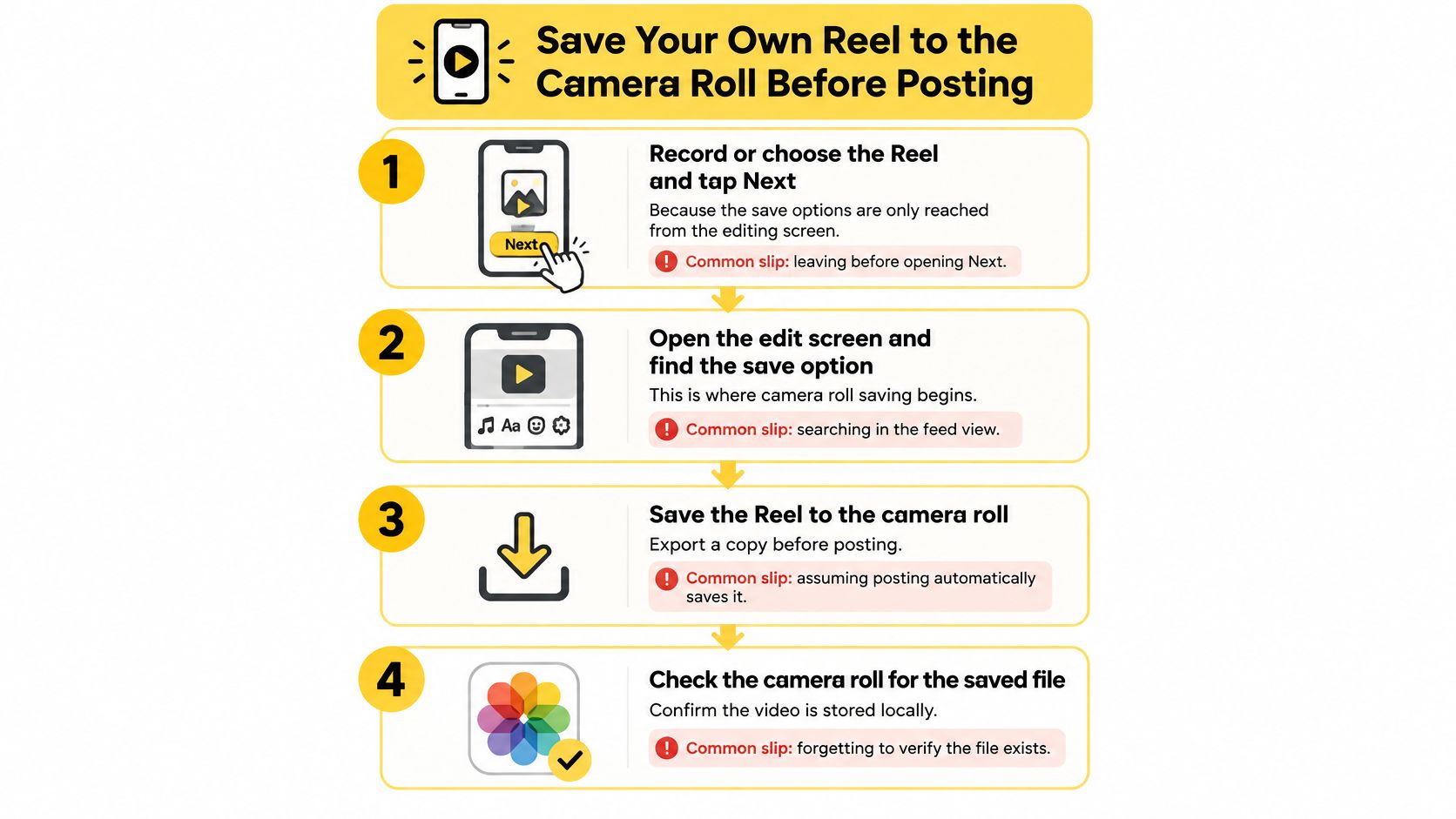
A keeper plays at full length, keeps the correct vertical aspect ratio, and shows the cover frame you chose. It should also play with no internet connection. Turn on airplane mode for ten seconds and test it. If it opens offline and matches your preview, you've got a real copy.
One caveat trips up nearly everyone who cross-posts: a device copy saved from Instagram can come down without the music you added from Instagram's library, because licensed tracks often don't travel with the exported file. Listen to the saved video with the sound on, not just muted playback. If the audio is missing, that file still works as a visual master, but you'll want the original, unedited video as your reference before posting the same clip to another platform.
You can also save a copy of a finished video to your computer or phone before it ever reaches Instagram. That pre-upload file is often better than anything you download back later, especially for branded property tours with logos, captions, and voiceover.
While recording a Reel, select "Next" to open the editing view, swipe from left to right, and tap "Save" at the bottom. That action writes a copy to your phone's photo library. Instagram offers a second option nearby, "Save draft," and the two produce very different things. Save draft keeps the project inside the app so you can reopen it. Save produces a file, an actual video sitting on your device that you can move, back up, or upload somewhere else.
The steps, and where people slip
- Record or choose the Reel, then tap Next. The save options live in the editing view, so you won't find them in the feed or on your profile grid. The common slip is backing out before you tap Next.
- Swipe from left to right in the editing view. This reveals the save controls. If you're hunting through stickers, text, and audio tools, you're looking in the wrong layer of the editor.
- Tap Save at the bottom. This creates the camera-roll copy. Tapping Save draft only stores the project in the app, so don't assume the two do the same job. One is a project, the other is a file.
- Open your photo library and check the newest video. On iPhone, open Photos and look in Recents. On Android, open Gallery or Google Photos. Play it all the way through before you post.
- Update Instagram if Save is missing. Older app versions can hide or move controls. Update, reopen the draft, and go back to the editing view rather than starting over.
What a good saved file looks like
On iPhone, the file may take a moment to appear in Recents. On Android, it often lands in a Movies or Instagram folder, so sorting by date is the fastest way to find it.A keeper plays at full length, keeps the correct vertical aspect ratio, and shows the cover frame you chose. It should also play with no internet connection. Turn on airplane mode for ten seconds and test it. If it opens offline and matches your preview, you've got a real copy.
One caveat trips up nearly everyone who cross-posts: a device copy saved from Instagram can come down without the music you added from Instagram's library, because licensed tracks often don't travel with the exported file. Listen to the saved video with the sound on, not just muted playback. If the audio is missing, that file still works as a visual master, but you'll want the original, unedited video as your reference before posting the same clip to another platform.
You can also save a copy of a finished video to your computer or phone before it ever reaches Instagram. That pre-upload file is often better than anything you download back later, especially for branded property tours with logos, captions, and voiceover.
Download a Reel From Another Account Safely
A public Reel can be downloaded only when the creator hasn't disabled downloads. A private account's Reels are limited to approved followers. If the button isn't there, that usually isn't a bug.
Instagram's Help Center states that the download feature is available on supported mobile devices but not on computers, and identifies "Download" as an action available from a Reel's sharing options. Creators can manage who can see, share, and download their Reels, so you may not see the option even on a supported phone.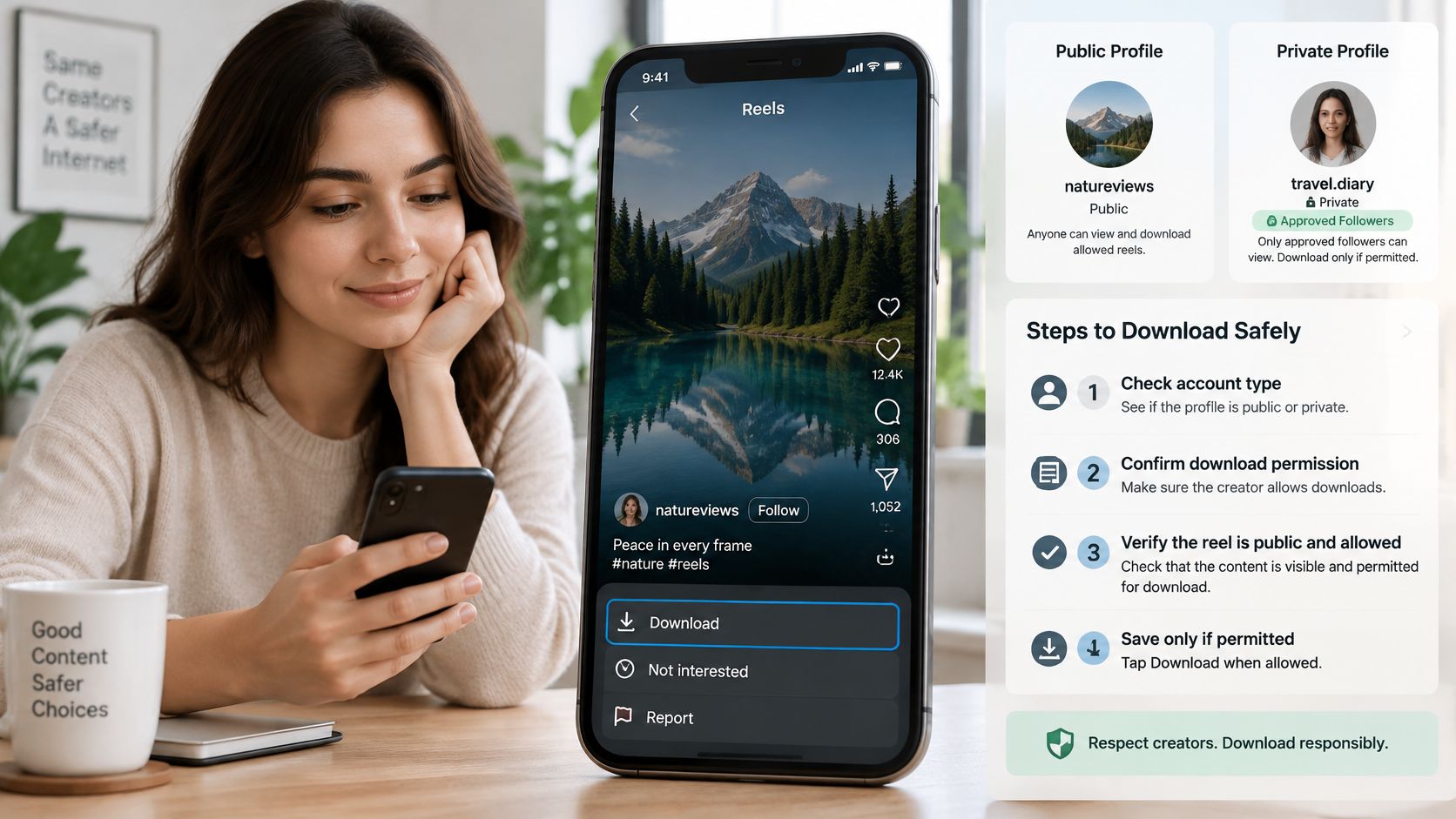
Ask the owner for the original file instead. If they send a link, ask whether you can repost it, where, and how they'd like to be credited. Write down who gave permission and keep that note with the file, in the same folder or in the file name.
Say a seller sends you a Reel of their home and says you can share it. That's permission to share, not necessarily permission to cut it into an ad. Ask one follow-up question now and you won't have to pull a post down later.
Before you send a listing link to a client, open the source post yourself and confirm the download setting. If your team needs a reusable copy, preserve the original master before publishing rather than assuming Instagram will hand it back.
Instagram's Help Center states that the download feature is available on supported mobile devices but not on computers, and identifies "Download" as an action available from a Reel's sharing options. Creators can manage who can see, share, and download their Reels, so you may not see the option even on a supported phone.
| Case | Download option | What to do |
|---|---|---|
| Your unpublished draft | Yes, through Save in the editing view | Export to the camera roll before uninstalling the app |
| Your own published Reel | Yes, through the share options | Save or download, then keep an original master |
| Public account with downloads on | Yes, if the creator allows it | Download and credit the creator when reposting |
| Private account or downloads disabled | No | Ask the owner for the original file with permission |
When the button is missing
Don't go looking for a third-party downloader site to get around a disabled setting. Those sites create privacy, copyright, and malware risk, and a missing button usually means the creator chose to hide it. For a business handling client property footage, that risk isn't worth a convenience copy.Ask the owner for the original file instead. If they send a link, ask whether you can repost it, where, and how they'd like to be credited. Write down who gave permission and keep that note with the file, in the same folder or in the file name.
Say a seller sends you a Reel of their home and says you can share it. That's permission to share, not necessarily permission to cut it into an ad. Ask one follow-up question now and you won't have to pull a post down later.
Before you send a listing link to a client, open the source post yourself and confirm the download setting. If your team needs a reusable copy, preserve the original master before publishing rather than assuming Instagram will hand it back.
Fix Missing Audio, Old Edits and Failed Saves
The most confusing failure is a video that saves correctly and plays in silence. Your phone probably isn't broken. Instagram doesn't keep music from its licensed library in the downloaded file, so the export can be silent or altered by design.
Instagram's Help Center guidance on downloaded Reels warns that a downloaded Reel does not retain music added from Instagram's licensed music library. If you need background on why a track can trigger a claim after reposting, see our notes on music copyright claims.
A missing Download button is different. That one depends on the creator, and you can't fix it from your side. The same applies to a draft lost after a reinstall. Once it's gone, your recovery option is the master file you kept elsewhere, which is why that habit matters.
If a file still fails after you've checked permissions, updated the app, and re-exported, run the checklist in the final section before you post anything.
Instagram's Help Center guidance on downloaded Reels warns that a downloaded Reel does not retain music added from Instagram's licensed music library. If you need background on why a track can trigger a claim after reposting, see our notes on music copyright claims.
| Symptom | Likely cause | Fix |
|---|---|---|
| No Save or Download option | Creator disabled downloads or the account is private | Ask the owner for the file or use your own master |
| Saved video has no music | Instagram library music is not kept in the download | Add platform-native music after downloading |
| Phone shows an older version | Downloadable file was made before the last edit | Re-export after finishing all changes |
| Draft gone after reinstalling | Drafts are stored on the device only | Export finished videos outside Instagram |
| Video not in Photos or Gallery | Draft-only save or blocked storage permission | Save again and check photo permissions |
Which fixes you control
Missing audio, old edits, and a file that isn't in Photos usually take minutes. Add music inside TikTok, YouTube Shorts, or Instagram after you upload the clean video there. Re-export after your final caption, cover, and trim changes, not before. Then check that Instagram has permission to write to your photo library in your phone settings.A missing Download button is different. That one depends on the creator, and you can't fix it from your side. The same applies to a draft lost after a reinstall. Once it's gone, your recovery option is the master file you kept elsewhere, which is why that habit matters.
A silent export isn't always a failed save. Sometimes it's Instagram honoring a music license that only applies inside Instagram.If the problem is in a client-facing video we made for you, email VideoTour.ai support with the project link and timecodes. The team will help correct the motion, restore eligible credits, and recommend settings to prevent the issue from repeating. Timecodes matter. "The middle looks wrong" is hard to act on, while "the kitchen clip at 0:08 jumps" gets fixed faster.
If a file still fails after you've checked permissions, updated the app, and re-exported, run the checklist in the final section before you post anything.
Keep a Master Copy and Confirm Before You Share
A camera-roll file is a convenience copy. It isn't always your master. It may be missing licensed music, and it may not be the version you'd want to hand to a client, upload to an MLS-linked page, or reuse six months later.
A finished Reel exists in two layers. The master is the completed video from your original editor: your voiceover, captions, logo, and music you have the right to use. The platform copy is what you upload to Instagram, TikTok, or YouTube Shorts, where you may add each app's native music and stickers for that audience.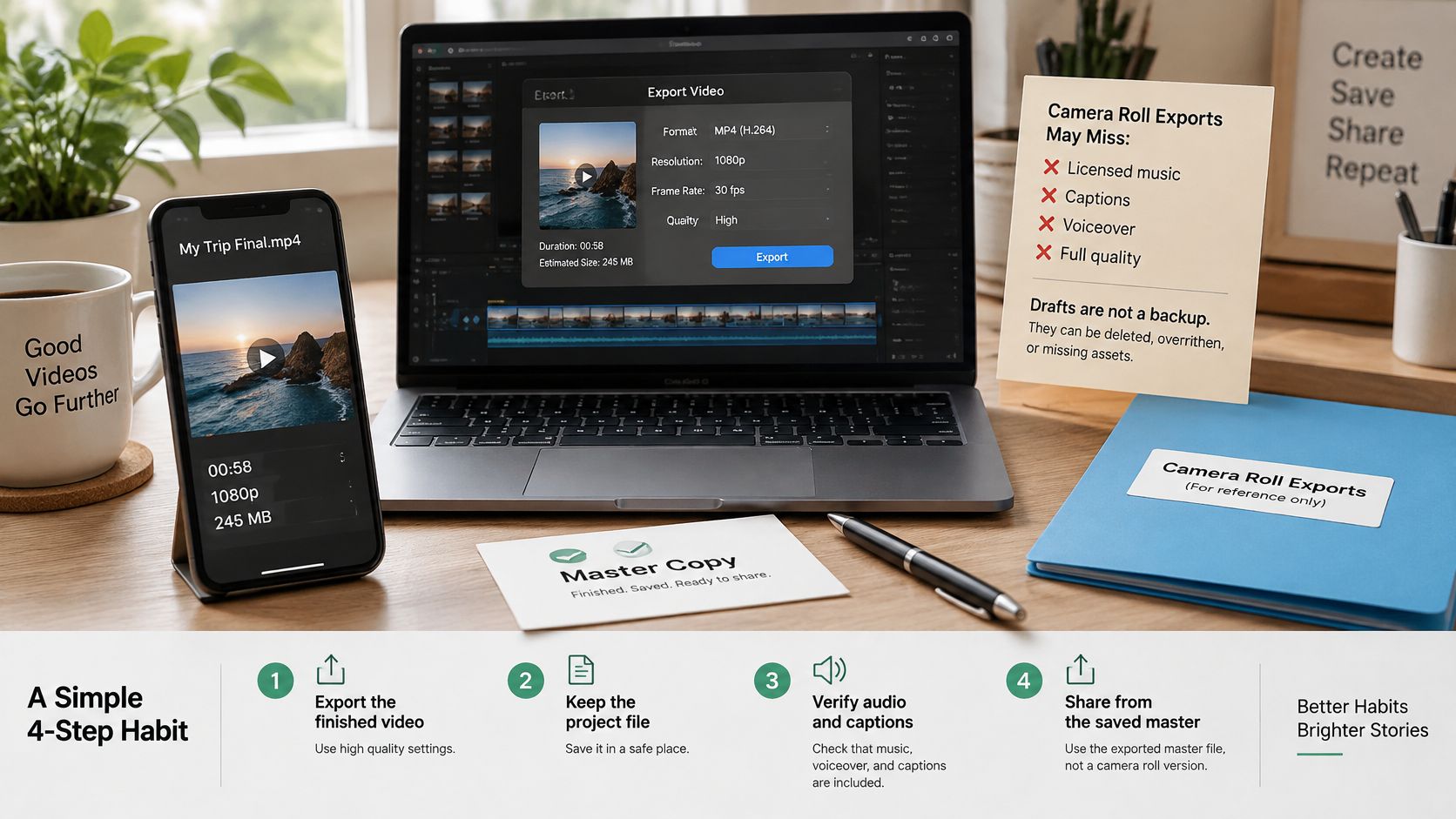
Format is part of that check. If you're exporting for reuse across platforms, these Instagram Reels upload specs for 2026 are a useful reference for dimensions and file requirements before you upload. A master that meets spec the first time doesn't need to be cropped, stretched, or re-rendered under deadline pressure.
A share link is still not a master. Download the file and store it yourself.
Reels are built for sharing, which is exactly why the original file gets separated from the post so easily. Reels were reshared more than 4.5 billion times per day across Instagram and Facebook in 2025, according to Meta, as reported by Mark Studios' Instagram Reels research. A reshare spreads the post. It doesn't preserve your editable, rights-safe source.
Run this checklist on your next Reel before you post it. It takes less time than rebuilding a lost edit, and it turns a fragile in-app draft into a file you can reuse.
Turn your listing photos into a polished, ready-to-post Reel and download the finished HD file to your phone or computer, so you keep a clean master before anything goes to Instagram. Visit VideoTour.ai to create your first property video from a link or photo set, customize the branding, captions, and music, and share it as a link or a file your whole team can use.
A finished Reel exists in two layers. The master is the completed video from your original editor: your voiceover, captions, logo, and music you have the right to use. The platform copy is what you upload to Instagram, TikTok, or YouTube Shorts, where you may add each app's native music and stickers for that audience.
A four-step master habit
- Export from the original editor before uploading. Save at full resolution with your custom cover. Do this while the project is still open, not after you've closed the app and moved on to the next listing.
- Keep that file unedited and easy to find. Name it by listing and date, for example "12-Oak-Street-tour-2026-07-30." Store it in cloud storage your teammates can reach, not only on one agent's phone.
- Add platform music separately when you cross-post. A track that's fine inside Instagram may not travel to TikTok or a client presentation. Check the rights for uploaded or AI-selected audio before you reuse it, and check our before-you-share checklist if you're sending the video outside your team.
- Record what you used. Note the music, captions, cover, and any permission you received. A short note in the same folder saves you from guessing later when a seller asks for the video again.
Format is part of that check. If you're exporting for reuse across platforms, these Instagram Reels upload specs for 2026 are a useful reference for dimensions and file requirements before you upload. A master that meets spec the first time doesn't need to be cropped, stretched, or re-rendered under deadline pressure.
Confirm before you share
Run through this short list with the actual file, not from memory:- Sound: The file plays with the audio you expect, at a level you can hear without turning the volume all the way up.
- Latest edit: The captions, cover, and final clip match the last change you made.
- Full length: The ending isn't cut off, and the call to action is still there.
- Photo library: The video appears in Photos or Gallery and plays offline.
- Master stored: A copy exists outside Instagram, in a place a teammate could find without your phone.
A share link is still not a master. Download the file and store it yourself.
Reels are built for sharing, which is exactly why the original file gets separated from the post so easily. Reels were reshared more than 4.5 billion times per day across Instagram and Facebook in 2025, according to Meta, as reported by Mark Studios' Instagram Reels research. A reshare spreads the post. It doesn't preserve your editable, rights-safe source.
Run this checklist on your next Reel before you post it. It takes less time than rebuilding a lost edit, and it turns a fragile in-app draft into a file you can reuse.
Turn your listing photos into a polished, ready-to-post Reel and download the finished HD file to your phone or computer, so you keep a clean master before anything goes to Instagram. Visit VideoTour.ai to create your first property video from a link or photo set, customize the branding, captions, and music, and share it as a link or a file your whole team can use.