
Captions can consume roughly half of a Deaf or hard-of-hearing viewer's visual attention, and a 2025 review of 36 peer-reviewed studies found that those viewers may skip a video entirely when captions are missing or poor (ACM review of caption quality research). Read that as a design brief rather than a fun fact. Text that pulls attention away from the kitchen island, the asking price, or the agent's face has already cost you the thing the caption was meant to support.
The mechanical part of how to add subtitles to Reels takes about four minutes on a phone. The part that decides whether the subtitles help or mislead takes longer, because automatic speech recognition treats a street name, a price and a bedroom count exactly the way it treats filler words: as sounds to guess at.
Five decisions separate a caption file that helps from one that misleads. Which route you take, how the transcript gets corrected, what gets reviewed before publishing, how the text is laid out for a small screen, and what you do on the days the native tool doesn't appear.
The mechanical part of how to add subtitles to Reels takes about four minutes on a phone. The part that decides whether the subtitles help or mislead takes longer, because automatic speech recognition treats a street name, a price and a bedroom count exactly the way it treats filler words: as sounds to guess at.
Five decisions separate a caption file that helps from one that misleads. Which route you take, how the transcript gets corrected, what gets reviewed before publishing, how the text is laid out for a small screen, and what you do on the days the native tool doesn't appear.
Summary
Create an AI Video Tours from PhotosTry it For Free
Which Subtitle Method Fits Your Reel
Half of U.S. viewers use subtitles at least some of the time, and roughly one in three use them always or often, according to a 2025 AP-NORC survey summarized in Opus research on caption strategy. The same source cites National Institute on Deafness and Other Communication Disorders figures showing that approximately 15% of American adults, or 37.5 million people, report some trouble hearing. Captions aren't a niche add-on for a Reel. They're part of the expected format.
Four routes get you there, and each one breaks differently.
Here's the decision rule I'd use. One speaker with clean audio starts with the Instagram captions sticker, because it's free, inside the app, and finished before the coffee goes cold. A long script or a second language calls for a transcription tool and a subtitle file imported into an editor you already trust. A Reel that must look identical on TikTok, YouTube Shorts and a listing page gets its subtitles burned in, because nothing else survives the trip across platforms.
That last point is the trade-off people miss. Burned-in text stays on the frame regardless of what a viewer does with their settings. Native captions can be switched on or off, which respects viewer choice and also means the words are invisible to anyone who never finds the toggle.
Four routes get you there, and each one breaks differently.
| Method | Where it works | Best for | Main limitation |
|---|---|---|---|
| Instagram captions sticker | Reels built in the Instagram app | Single speaker, short clips, quick turnaround | Accuracy varies; names, prices and numbers need manual checks |
| Captions from a video editing app | Drafts that are edited before export | Multi-take edits and fine timing control | Extra export step; the text still needs review |
| Transcription tool with an uploaded subtitle file | Any editor, file-based | Long scripts, multilingual speech and precise timing | Adds an export and upload step; the file must match the final cut |
| Burned-in subtitles | Exported video that plays anywhere | Same look on Instagram, TikTok, YouTube Shorts and listing pages | Viewers can't turn it off; editing requires a re-export |
That last point is the trade-off people miss. Burned-in text stays on the frame regardless of what a viewer does with their settings. Native captions can be switched on or off, which respects viewer choice and also means the words are invisible to anyone who never finds the toggle.
Whatever route you pick, name the one check it demands. Sticker route, every proper noun and number. File route, the file matches the final cut. Burned-in route, legibility with sound off on a phone.Composition matters as much as the wording, and the framing rules in this guide to how to create a Reel for Instagram apply before a single caption line lands on the timeline. Pick one route for the Reel in front of you and write down its check before you start.
How to Add Native Captions in Instagram, Step by Step
The captions sticker is the fastest route and the one I'd start with on a clean, single-speaker Reel. It's also a draft generator. The workflow that makes it usable is two passes: generate first, then review every line against the audio, correcting names, terminology, numbers, punctuation and timing, with meaningful non-speech cues added where they change what the viewer understands (University of Baltimore social media accessibility guidance). That guidance sets the target at roughly 99% accuracy, synchronized to speech, with standard capitalization and punctuation.
The sequence below runs in the order you'll tap it, on a phone, on a Reel you've already filmed and edited.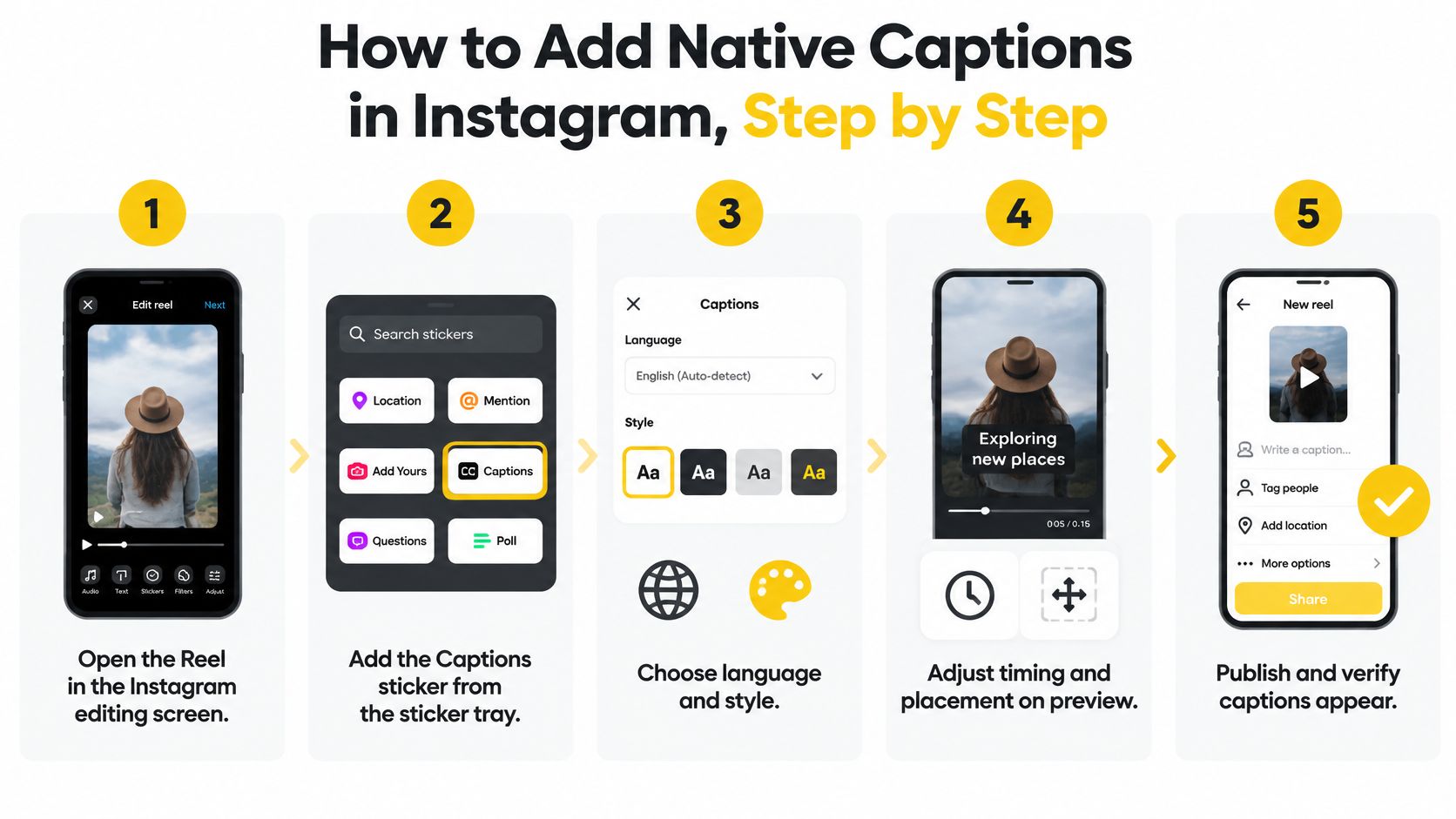
The sequence below runs in the order you'll tap it, on a phone, on a Reel you've already filmed and edited.
Run the native pass in seven steps
- Add the Captions sticker first. Open the Reel in the editing screen, tap the sticker tray and choose Captions. You start from a transcript instead of a blank frame, which turns the rest of the job into correction rather than typing.
- Read the transcript before you watch anything. Fix names, street names and numbers in the list first. The most common slip is leaving the auto-spelling of a property name untouched because it looks plausible at a glance.
- Play at normal speed and check each boundary. Drift of half a second makes text appear before the word is spoken, and viewers read that as sloppy editing even when every word is correct.
- Split dense captions and re-time them. A line carrying a whole sentence forces the viewer to read while the next shot is already moving. Shorten it, split it, and give the second half its own slot.
- Caption the sounds that carry meaning. [music], [door closes], a doorbell, a knock. If a sound tells the viewer something the words don't, write it down.
- Move captions clear of prices, logos and calls to action. The lower right corner is where Instagram's own controls sit. Keep text above the listing facts you want read and away from faces.
- Preview muted, then with sound on. Publish only if both versions make sense, because a large share of your audience meets the video in silence.
A caption that arrives half a second early reads as wrong even when every word is right.Native captions are preferable whenever they're available, since viewers get them as platform captions they can turn on or off for their own needs. When the Reel is done, confirm the words land in step with speech and that the muted version still delivers the address and the price.
Review Auto-Captions Before Anything Goes Live
A study of 300 videos found at least one caption error in 19.7% of videos that contained captions, and among the videos with errors the average word-error rate was 7.9%, ranging from 0.5% to 35.7% (VoxBooster analysis of short-form caption statistics). The spread matters more than the average, because a clip at the top of that range had roughly one word in three wrong. The same source notes that YouTube's machine-learning captions cover Shorts as well as long-form video and that the platform warns automated text can be inaccurate because of pronunciation, accents, dialects and background noise.
In a listing video, the failures cluster in the words nobody proofreads.
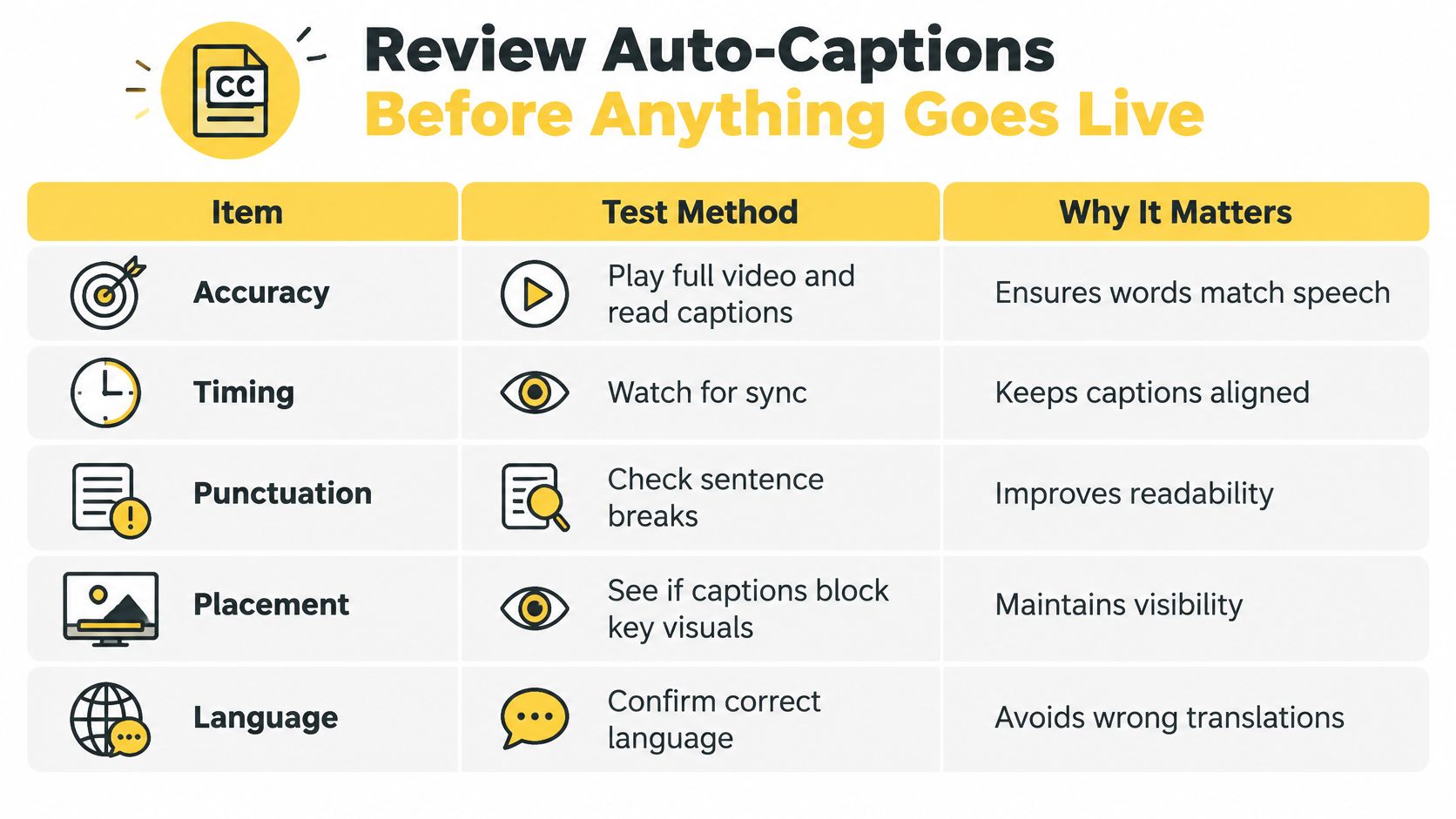
In a listing video, the failures cluster in the words nobody proofreads.
| Item | How to test it | Why it matters |
|---|---|---|
| Proper names | Play at normal speed and compare each spelling with the listing | Auto-spelled property names slip through unnoticed |
| Street names and addresses | Pause on each address caption and check it against the source | A wrong address misdirects viewers |
| Prices | Check each price against the listing before publishing | A wrong price spreads with the video |
| Room dimensions and bedroom counts | Pause on each caption and confirm against the floor plan | A "30 bedroom" error damages trust |
| Neighborhood names | Confirm each name is written as one word or the correct phrase | A split neighborhood name looks careless |
| Numbers and technical terms | Verify digits, units and jargon on full playback | Technical terms and fast speech are common error sources |
| Punctuation and speaker changes | Check capitalization and mark each speaker change | Two speakers can merge into one line |
Why the trust cost lands on the number
A three-bedroom listing captioned as "30 bedroom", or a neighborhood name broken into two unrelated words, undermines confidence in the price and the property at the same time. Viewers who spot one wrong figure start discounting every other figure on screen, including the ones you got right.Test on playback, not on the timeline. Caption errors hide while you scrub in the editor and surface the moment the Reel runs at speed.Play the clip at normal speed, pause on each caption boundary, and correct anything that changes a fact. Accuracy beats speed here: a correction costs a few seconds of your afternoon, while a wrong price travels with the video for as long as it stays up. No Reel goes live until every item on that list has been verified on a full playback.
Style Subtitles So They Read on a Phone
Treat subtitle design as a constraint, the way you'd treat a 9:16 frame or a 30-second cut. In a review of subtitle quality research, legibility and readability appeared in 44 of 180 studies (24.4%), placement and eye strain in 36 (20.0%), and caption accuracy or incongruity in 33 (18.3%) (ACM subtitle quality review). Readability isn't a stylistic preference. It's the most frequently studied quality problem in the field.
WCAG-based guidance commonly specifies a minimum 4.5:1 contrast ratio for normal text, which is the number that decides whether your captions survive a bright window at midday.
Set the style once rather than line by line. In VideoTour.ai's editor, caption style settings chosen before a video is created apply to every caption in that video, and that's the behavior to aim for in any tool: one typeface, one size, one placement rule, checked once.
When the text fails, fix contrast first, placement second, length third. Those three carry most of the readability problem.
WCAG-based guidance commonly specifies a minimum 4.5:1 contrast ratio for normal text, which is the number that decides whether your captions survive a bright window at midday.
| Setting | Target value | Why it matters |
|---|---|---|
| Text contrast | At least 4.5:1 against the background | Keeps text legible over bright interiors and window light |
| Caption zone | Lower quarter of the frame reserved for captions | Keeps captions clear of listing facts and platform controls |
| Lines per caption | Two lines at most | Lets each phrase stay on screen long enough to read |
| Words per screen | Around 7 to 10 words, split at natural phrase breaks | Prevents text overload on a small screen |
| Display time | Long enough to read at normal speaking pace | Protects comprehension for slower readers |
Build the frame before the text
Compose with the lower quarter of the frame reserved, and keep the price, the address and the agent branding outside that band. Where footage moves from a bright window into a darker room, add a semi-opaque background or an outline, because text that reads on one wall vanishes on the next.Set the style once rather than line by line. In VideoTour.ai's editor, caption style settings chosen before a video is created apply to every caption in that video, and that's the behavior to aim for in any tool: one typeface, one size, one placement rule, checked once.
Contrast first. If the text disappears against window light, no font choice or animation rescues it.
The phone test
Watch the first, middle and last seconds on an actual phone, not on your desktop preview. Run it once with sound off and once with sound on, and check that nothing sits behind Instagram's controls or over a face. If a Reel carries a generated voiceover, the guide to showing voiceover subtitles covers where that setting lives.When the text fails, fix contrast first, placement second, length third. Those three carry most of the readability problem.
How to Burn In Subtitles When Native Captions Fail
Native captions aren't guaranteed. Instagram's help documentation says Reel and video captions are generated with speech recognition and that the feature isn't available on computers, while separate help material indicates availability can vary by device or account (Instagram Help Center on Reels captions). The sticker is a convenience, not a commitment.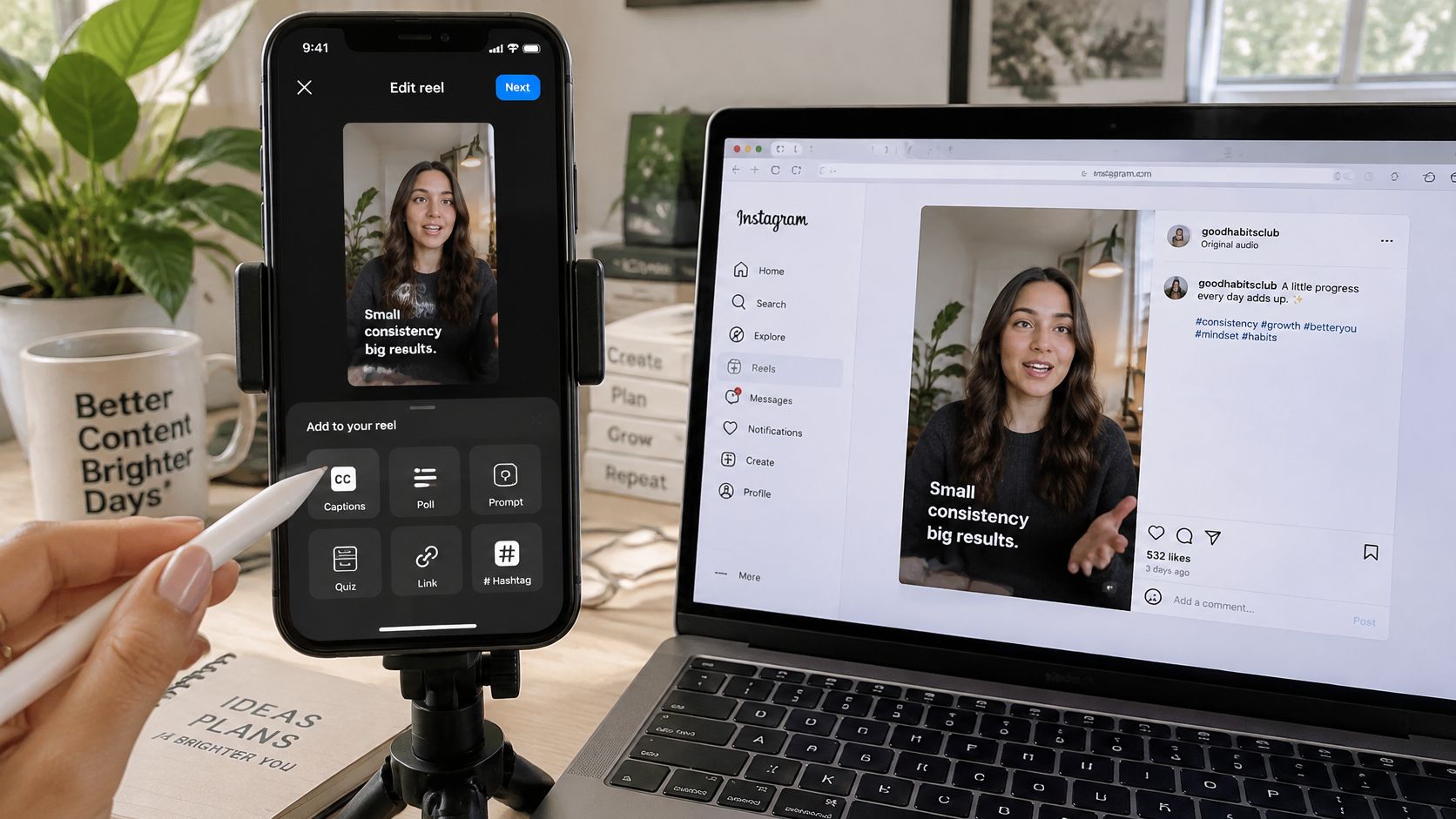 The fallback workflow keeps the text portable, so one verified pass covers every destination the Reel will land on.
For a tour in a second language, build a second subtitle file, verify proper nouns and multilingual speech by hand, and burn in the version that matches the viewer you're speaking to. Before publishing, play the MP4 with sound off on a phone and confirm no caption sits under Instagram's controls.
The fallback workflow keeps the text portable, so one verified pass covers every destination the Reel will land on.- Keep an editable subtitle file before export. A transcript you can reopen means corrections don't require rebuilding the video. A transcription pass gets you there faster than typing; an auto caption generator produces that file from the audio, and the file is what makes later fixes cheap.
- Check names and property terms against the audio. Read the file, don't skim it. Bilingual tours and unusual neighborhood names are where speech recognition gives up first.
- Burn the verified captions into a 9:16 export. Keep them inside the safe area, above the zone where Instagram's controls appear.
- Reposition separately for other shapes. A square or horizontal cut needs its own caption placement. Reusing vertical coordinates puts text over a listing's lower third.
- Download the MP4, find it on your phone and upload the actual video as a Reel.
- Keep one unburned copy. Future corrections then cost a re-export, not a re-shoot.
For a tour in a second language, build a second subtitle file, verify proper nouns and multilingual speech by hand, and burn in the version that matches the viewer you're speaking to. Before publishing, play the MP4 with sound off on a phone and confirm no caption sits under Instagram's controls.
Auto-captions are a draft, not an accessibility guarantee. Treat the verified file as the asset and the video as one of its outputs.
Confirm Captions Pass Before You Post
The final check takes about the length of the Reel and runs on every cut, including the square and horizontal versions headed to other feeds.
When listing volume outgrows one person, the answer is a repeatable process rather than a faster editor, and it's often worth it to hire social media manager who owns this checklist across every property. Run the four-point check on your next Reel before it goes live.
VideoTour.ai builds the captioned Reel from the photos you already have, with caption style chosen before generation so every line matches your branding and stays readable with the sound off. You add up to 60 photos, pick your industry, music and caption style, then generate vertical, square and horizontal versions from one project and download the MP4 for Instagram, TikTok or a listing page. Start with a free video at VideoTour.ai.
- Route and its check. Confirm which subtitle route this Reel uses and that its single required check is done.
- Facts on playback. Verify every name, price and number against the listing while the Reel plays at normal speed.
- The phone test. Watch the first, middle and last seconds on a phone, once muted and once with sound on.
- Clear space. Confirm captions sit clear of faces, prices, logos and calls to action.
When listing volume outgrows one person, the answer is a repeatable process rather than a faster editor, and it's often worth it to hire social media manager who owns this checklist across every property. Run the four-point check on your next Reel before it goes live.
VideoTour.ai builds the captioned Reel from the photos you already have, with caption style chosen before generation so every line matches your branding and stays readable with the sound off. You add up to 60 photos, pick your industry, music and caption style, then generate vertical, square and horizontal versions from one project and download the MP4 for Instagram, TikTok or a listing page. Start with a free video at VideoTour.ai.