
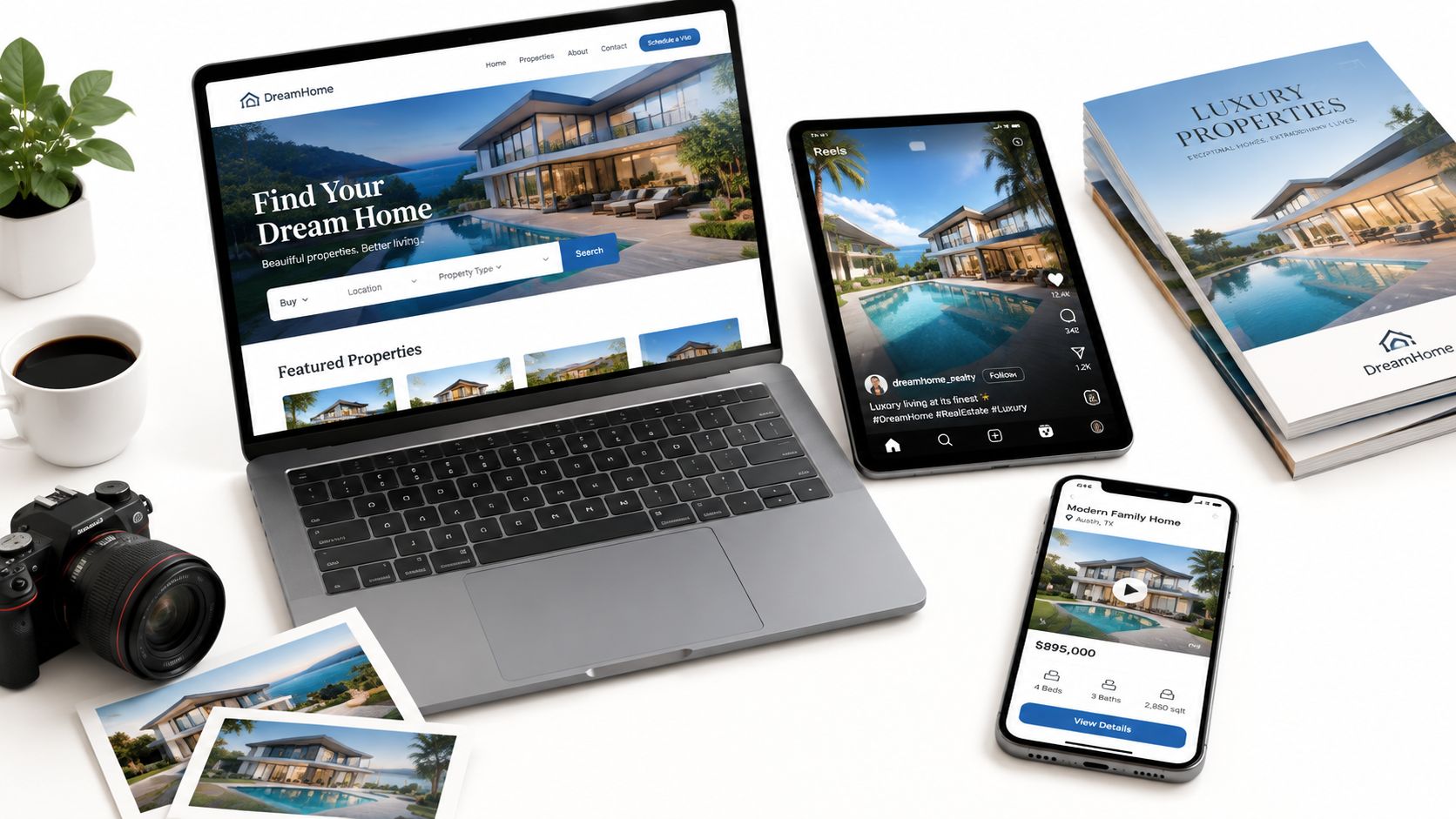
A listing agent has a finished photo set, a launch date, and almost no time left to create separate content for every channel. The images are strong, but a static gallery alone won't carry the listing through the full buyer journey. The same set can become a listing video, a social reel, a postcard, a brochure, and a landing page, provided each version has a clear job.
That approach matters because buyers often screen homes online before deciding whether to contact an agent or schedule a showing. The National Association of Realtors' 2025 buyer and seller profile reported that 52% of buyers found the home they ultimately purchased online, and buyers typically searched for approximately 10 weeks. A photo set is therefore more than a folder of deliverables. It's the raw material for the property's first sales interface.
Platforms such as VideoTour.ai can turn a photo set into ready-to-share videos in minutes, adding motion, captions, music, and branding without requiring a camera crew or manual editing. The examples below show what each asset does, how to build it from the same master materials, and one practical move you can apply this week. For broader visual production support, Liz by Design Photography is another useful reference point for building a strong source library.
That approach matters because buyers often screen homes online before deciding whether to contact an agent or schedule a showing. The National Association of Realtors' 2025 buyer and seller profile reported that 52% of buyers found the home they ultimately purchased online, and buyers typically searched for approximately 10 weeks. A photo set is therefore more than a folder of deliverables. It's the raw material for the property's first sales interface.
Platforms such as VideoTour.ai can turn a photo set into ready-to-share videos in minutes, adding motion, captions, music, and branding without requiring a camera crew or manual editing. The examples below show what each asset does, how to build it from the same master materials, and one practical move you can apply this week. For broader visual production support, Liz by Design Photography is another useful reference point for building a strong source library.
Summary
Create an AI Video Tours from PhotosTry it For Free

1. Property Video Tour
A property video tour gives buyers a sense of sequence, scale, light, and room connections before they visit. It can be narrated, music-backed, or both. The strongest version isn't a slideshow with random transitions. It follows a deliberate route through the property and gives the viewer a reason to keep watching.
Start with the image that sells the property's difference. That might be a view, a kitchen island, a landscaped garden, or a dramatic exterior. Lead with it during the first few seconds, then move through the home in an order that feels natural. A luxury listing might open with a music-scored exterior reveal, move through the main living spaces, and close with agent contact details. A vacation rental might open on the best view, then show the bedroom, pool, and outdoor dining area.
Use a consistent branded intro and outro, but keep the property itself prominent. Confirm MLS and portal rules before publishing, including restrictions on watermarks, contact information, and music licensing.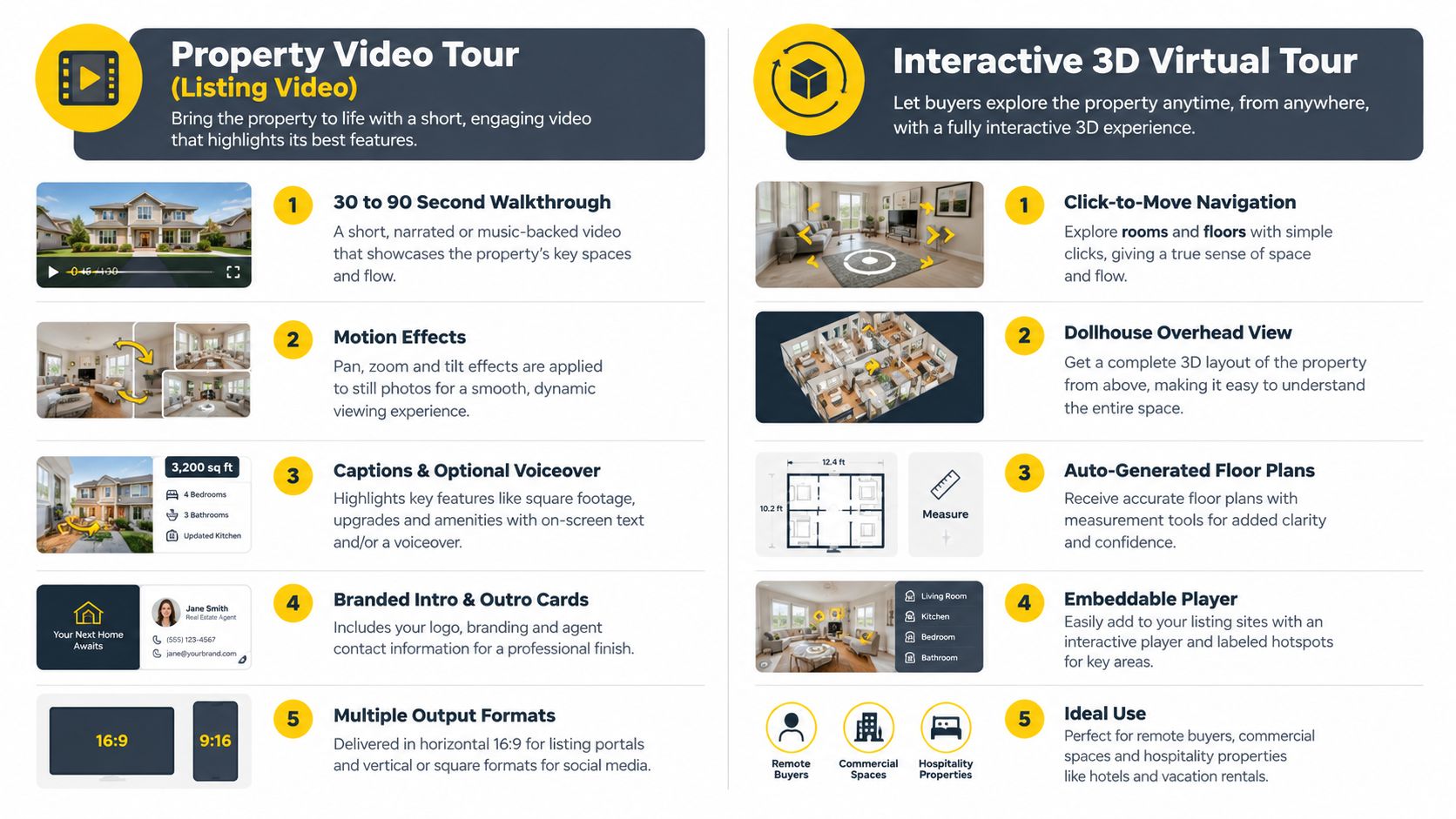
Start with the image that sells the property's difference. That might be a view, a kitchen island, a landscaped garden, or a dramatic exterior. Lead with it during the first few seconds, then move through the home in an order that feels natural. A luxury listing might open with a music-scored exterior reveal, move through the main living spaces, and close with agent contact details. A vacation rental might open on the best view, then show the bedroom, pool, and outdoor dining area.
Build two versions from one edit
Create a short master cut that can be reused on social channels, then prepare a longer listing-page version with more room-by-room detail. Keeping the shorter edit under a minute makes it easier to adapt for vertical platforms, while the longer version can answer spatial questions that still images leave open.Use a consistent branded intro and outro, but keep the property itself prominent. Confirm MLS and portal rules before publishing, including restrictions on watermarks, contact information, and music licensing.
Practical rule: Treat the video as a conversion asset. Track time on page, bounce rate, qualified inquiries, showing requests, and days to the first serious offer against comparable still-only listings where possible.The cited pilot found that pages using drone footage and 360-degree walkthroughs had 28% higher average time on page and a 22% lower bounce rate than pages using still images alone, with the strongest gains for properties where outdoor space, views, or neighborhood context shaped buyer judgment. See the pilot findings on drone and 360-degree listing engagement for the full context.
2. Interactive 3D Virtual Tour
A 3D virtual tour serves buyers who need to inspect the property on their own terms. Unlike a linear video, it lets viewers move between rooms, review the layout, and revisit areas that matter to them. That makes it particularly useful for relocation buyers, commercial prospects, and hospitality customers evaluating a space remotely.
A Matterport-hosted tour embedded on a listing page can show both a floor-level walkthrough and a dollhouse view. A coworking operator can use the same format to help prospects understand desk areas, meeting rooms, entrances, and shared amenities before arranging a visit. The experience supports careful evaluation, while the listing video creates emotional momentum.
Pair the tour with the photo-based video rather than choosing one. The video gives a guided first impression. The 3D experience answers questions about flow and scale.
For a practical production comparison, see this guide to AI 3D video tours. Link the virtual tour from the listing description, property brochure, and social posts, not only from a small icon buried below the image gallery.
A relocation buyer may never walk through the property before making an inquiry. Give that buyer an experience that supports independent inspection, then place a clear contact button beside the tour so exploration can turn into a conversation.
A Matterport-hosted tour embedded on a listing page can show both a floor-level walkthrough and a dollhouse view. A coworking operator can use the same format to help prospects understand desk areas, meeting rooms, entrances, and shared amenities before arranging a visit. The experience supports careful evaluation, while the listing video creates emotional momentum.
Capture for navigation, not just appearance
Shoot or scan after staging and decluttering. A 3D tour records the relationship between spaces, so loose furniture, crowded surfaces, or unfinished rooms become more obvious than they might in selected photographs. Add room labels and feature hotspots to help visitors find the kitchen, primary suite, parking area, or mechanical spaces.Pair the tour with the photo-based video rather than choosing one. The video gives a guided first impression. The 3D experience answers questions about flow and scale.
For a practical production comparison, see this guide to AI 3D video tours. Link the virtual tour from the listing description, property brochure, and social posts, not only from a small icon buried below the image gallery.
A relocation buyer may never walk through the property before making an inquiry. Give that buyer an experience that supports independent inspection, then place a clear contact button beside the tour so exploration can turn into a conversation.
3. Aerial Drone Photography and Video
Aerial media earns its place when the surroundings influence the property's value. A drone view can establish lot position, access roads, outdoor amenities, coastline, views, neighboring land, or the relationship between a commercial site and its district. It's especially effective for estates, land, resorts, multifamily properties, and homes where the setting is part of the product.
An estate listing might open with a high exterior reveal, then transition into interior images and a garden sequence. A resort can use aerial footage to show pools, grounds, beachfront access, and the route from the entrance to guest facilities. These are difficult to communicate with room-by-room photography alone.
When a physical flight isn't possible, AI-generated aerial motion can create movement from existing photographs. Use it as an illustrative effect rather than presenting synthetic imagery as documentary footage, and disclose synthetic elements where required. Keep the visual boundary focused on the property and relevant surroundings to reduce privacy concerns.
For photo-based alternatives, review AI real estate drone video. Operators should also understand CASA's excluded category rules when working in Australia.
An estate listing might open with a high exterior reveal, then transition into interior images and a garden sequence. A resort can use aerial footage to show pools, grounds, beachfront access, and the route from the entrance to guest facilities. These are difficult to communicate with room-by-room photography alone.
Use aerial context carefully
Plan the shot before the flight. Golden-hour light can add warmth and soften shadows, but the best timing depends on the property's orientation and the feature you need to reveal. Check airspace and local requirements before each paid flight, and verify that the operator has the necessary certification for commercial work in the relevant jurisdiction. In the United States, commercial drone operations generally involve FAA Part 107 requirements.When a physical flight isn't possible, AI-generated aerial motion can create movement from existing photographs. Use it as an illustrative effect rather than presenting synthetic imagery as documentary footage, and disclose synthetic elements where required. Keep the visual boundary focused on the property and relevant surroundings to reduce privacy concerns.
For photo-based alternatives, review AI real estate drone video. Operators should also understand CASA's excluded category rules when working in Australia.
4. Floor Plans
A floor plan answers a question photographs can't answer reliably: how do the rooms connect? A 2D plan gives buyers a quick reference for entrances, bedrooms, bathrooms, stairs, and circulation. A rendered 3D plan adds furniture and visual depth, helping viewers imagine how the space might function.
Place the plan where serious prospects will find it quickly. A listing can put a clean 3D plan after the exterior image in the gallery, while a coworking campaign can use a plan to show meeting-room locations, desk capacity, and shared areas. In a brochure, the plan helps a visitor reconstruct the showing after leaving.
Add the plan to social carousels and video overlays when the property has an unusual layout. A split-level home, narrow townhouse, converted warehouse, or expansive commercial suite often needs a visual explanation before a buyer can appreciate its possibilities.
Verify the source measurements before publication. A beautiful plan with inaccurate room labels creates confusion and can undermine trust across every other asset derived from the same listing data.
Place the plan where serious prospects will find it quickly. A listing can put a clean 3D plan after the exterior image in the gallery, while a coworking campaign can use a plan to show meeting-room locations, desk capacity, and shared areas. In a brochure, the plan helps a visitor reconstruct the showing after leaving.
Make measurements useful and defensible
Label total and per-floor square footage where verified, and identify dimensions as approximate when that reflects the measurement method. Consistency matters more than decorative detail. Use the same brand fonts and colors as the listing video, brochure, and landing page, but don't let styling obscure walls, doors, stairs, or room names.Add the plan to social carousels and video overlays when the property has an unusual layout. A split-level home, narrow townhouse, converted warehouse, or expansive commercial suite often needs a visual explanation before a buyer can appreciate its possibilities.
Verify the source measurements before publication. A beautiful plan with inaccurate room labels creates confusion and can undermine trust across every other asset derived from the same listing data.
5. Virtual Staging
Virtual staging helps viewers understand an empty, dated, or sparsely furnished room. It can show a possible living arrangement, dining configuration, bedroom use, or office setup without moving physical furniture into the property. That makes it useful for vacant homes, unfurnished rentals, and commercial spaces that need a visual concept.
The risk is expectation mismatch. A digitally furnished room can look larger, brighter, or more finished than the physical space. If the viewer arrives and sees something materially different, the asset has worked against the showing.
Virtual staging can also feed the video. Use the original photograph for documentation, then include the staged version as a short visualization sequence. The transition should explain potential use, not imply that the furniture is present.
For a plain-language explanation of the format, see what virtual staging means. A reviewer should check generated furniture, shadows, reflections, and labels before publishing. Automation speeds production, but it doesn't replace judgment about accuracy or disclosure.
The risk is expectation mismatch. A digitally furnished room can look larger, brighter, or more finished than the physical space. If the viewer arrives and sees something materially different, the asset has worked against the showing.
Show possibility without hiding reality
Label every virtually staged image clearly and follow the disclosure rules of the listing portal and local market. A before-and-after pair is often more persuasive than a staged image alone because it gives viewers an honest reference point. Keep furniture scale realistic, preserve windows and architectural details, and use one coherent design style throughout the listing.Virtual staging can also feed the video. Use the original photograph for documentation, then include the staged version as a short visualization sequence. The transition should explain potential use, not imply that the furniture is present.
For a plain-language explanation of the format, see what virtual staging means. A reviewer should check generated furniture, shadows, reflections, and labels before publishing. Automation speeds production, but it doesn't replace judgment about accuracy or disclosure.
6. Social Media Reels and Short Vertical Videos
A social reel has a different job from a listing video. It must interrupt scrolling, communicate one attractive idea quickly, and give the viewer a next step. The audience may not be actively searching for property, so the first frame needs to explain why the home deserves attention.
Use the same photo set, but change the edit. A reel might open with a text hook such as “The kitchen nobody expects in this price range,” then show three supporting details and finish with an open-house date or inquiry prompt. An Airbnb host might focus on one unusual bedroom, a balcony view, or the route from the living area to the pool.
Avoid forcing every feature into one reel. One strong idea is easier to understand than a rapid sequence of unrelated rooms. Create separate versions for the kitchen, outdoor space, renovation detail, or neighborhood setting, then connect each to the relevant landing page.
Check music rules for business accounts before using trending audio. A track that works on a personal account may not be cleared for commercial use. Save the original edit, caption file, thumbnail, and destination URL so another team member can revise the campaign without rebuilding it.
Use the same photo set, but change the edit. A reel might open with a text hook such as “The kitchen nobody expects in this price range,” then show three supporting details and finish with an open-house date or inquiry prompt. An Airbnb host might focus on one unusual bedroom, a balcony view, or the route from the living area to the pool.
Make each version native to its channel
Build a vertical cut first, then adapt the master materials for square and horizontal placements when needed. Add readable captions because many viewers watch without sound. Keep the on-screen call to action specific, such as “View the full tour,” “Book a showing,” or “Ask for the floor plan.”Avoid forcing every feature into one reel. One strong idea is easier to understand than a rapid sequence of unrelated rooms. Create separate versions for the kitchen, outdoor space, renovation detail, or neighborhood setting, then connect each to the relevant landing page.
Check music rules for business accounts before using trending audio. A track that works on a personal account may not be cleared for commercial use. Save the original edit, caption file, thumbnail, and destination URL so another team member can revise the campaign without rebuilding it.
7. Just Listed and Just Sold Postcards and Mailers
A postcard puts the property in front of people who may not be browsing listing portals at that moment. In a neighborhood farming strategy, it also reinforces who handled the listing and what kind of property that agent represents. The format works best when it combines a strong image, one clear message, and a path to digital detail.
Use the same hero photograph from the listing video, then add a QR code that opens the full tour or a dedicated property page. A just-listed mailer can lead with the exterior or strongest interior feature. A just-sold card can show the completed transaction while inviting nearby owners to request a valuation or marketing consultation, provided the wording remains accurate and compliant.
Keep the design template consistent across listings. Recognition develops through repeated exposure to the same colors, typography, logo treatment, and contact details. At the same time, update the property facts every time. An outdated price, status, or feature can make a polished mailer look careless.
A postcard shouldn't duplicate the entire listing. Its job is to earn the scan, visit, call, or conversation. Let the linked video and landing page carry the deeper story.
Use the same hero photograph from the listing video, then add a QR code that opens the full tour or a dedicated property page. A just-listed mailer can lead with the exterior or strongest interior feature. A just-sold card can show the completed transaction while inviting nearby owners to request a valuation or marketing consultation, provided the wording remains accurate and compliant.
Connect print to measurable behavior
Start with the immediate block, then decide whether to expand based on response quality. Use a unique short URL or QR destination for each mailing wave so you can distinguish postcard visits from social, email, or portal traffic. Don't send a generic property page if the purpose is to measure the mailer. Build a destination that reflects the promise on the card.Keep the design template consistent across listings. Recognition develops through repeated exposure to the same colors, typography, logo treatment, and contact details. At the same time, update the property facts every time. An outdated price, status, or feature can make a polished mailer look careless.
A postcard shouldn't duplicate the entire listing. Its job is to earn the scan, visit, call, or conversation. Let the linked video and landing page carry the deeper story.
8. Property Brochure and Feature Sheet
A brochure is the physical memory of the showing. Visitors can take it home, compare it with other properties, and revisit key details after the conversation has ended. A PDF version serves the same function in email, investor outreach, and remote leasing presentations.
The first page should do most of the selling. Lead with the property image, then present the top verified features in a hierarchy that can be scanned quickly. A commercial feature sheet may prioritize access, configuration, parking, and floor-plan information. An open-house handout may prioritize lifestyle features, key specifications, and the next action.
Print on demand or in small batches when listing details may change. Verify every fact against the current MLS record and approved disclosures before export. Include relevant disclaimers, especially where dimensions, renderings, virtual staging, or conceptual images appear.
The brochure shouldn't become a dense specification sheet. Use whitespace, captions, and concise feature descriptions so the reader can find the information that matters without working through a wall of text.
The first page should do most of the selling. Lead with the property image, then present the top verified features in a hierarchy that can be scanned quickly. A commercial feature sheet may prioritize access, configuration, parking, and floor-plan information. An open-house handout may prioritize lifestyle features, key specifications, and the next action.
Build the brochure from the master asset folder
Reuse the hero photograph, floor plan, video thumbnail, and brand elements from the listing campaign. Add QR codes for the property video and 3D tour, but test every code on a phone before printing. If the brochure is distributed at a showing, visitors should be able to continue their research without searching for the property again.Print on demand or in small batches when listing details may change. Verify every fact against the current MLS record and approved disclosures before export. Include relevant disclaimers, especially where dimensions, renderings, virtual staging, or conceptual images appear.
The brochure shouldn't become a dense specification sheet. Use whitespace, captions, and concise feature descriptions so the reader can find the information that matters without working through a wall of text.
9. Single-Property Landing Page and Microsite
A single-property landing page gives every campaign one controlled destination. It can hold the photo gallery, listing video, 3D tour, floor plan, property details, disclosures, inquiry form, and contact information without forcing visitors to assemble the story across multiple platforms.
This format is particularly effective for a luxury listing, new development, rental campaign, or vacation property. A development microsite might open with a cinematic video, then offer floor plans and a pre-registration form. A vacation rental page can combine a walkthrough, amenities, availability, and a direct booking path.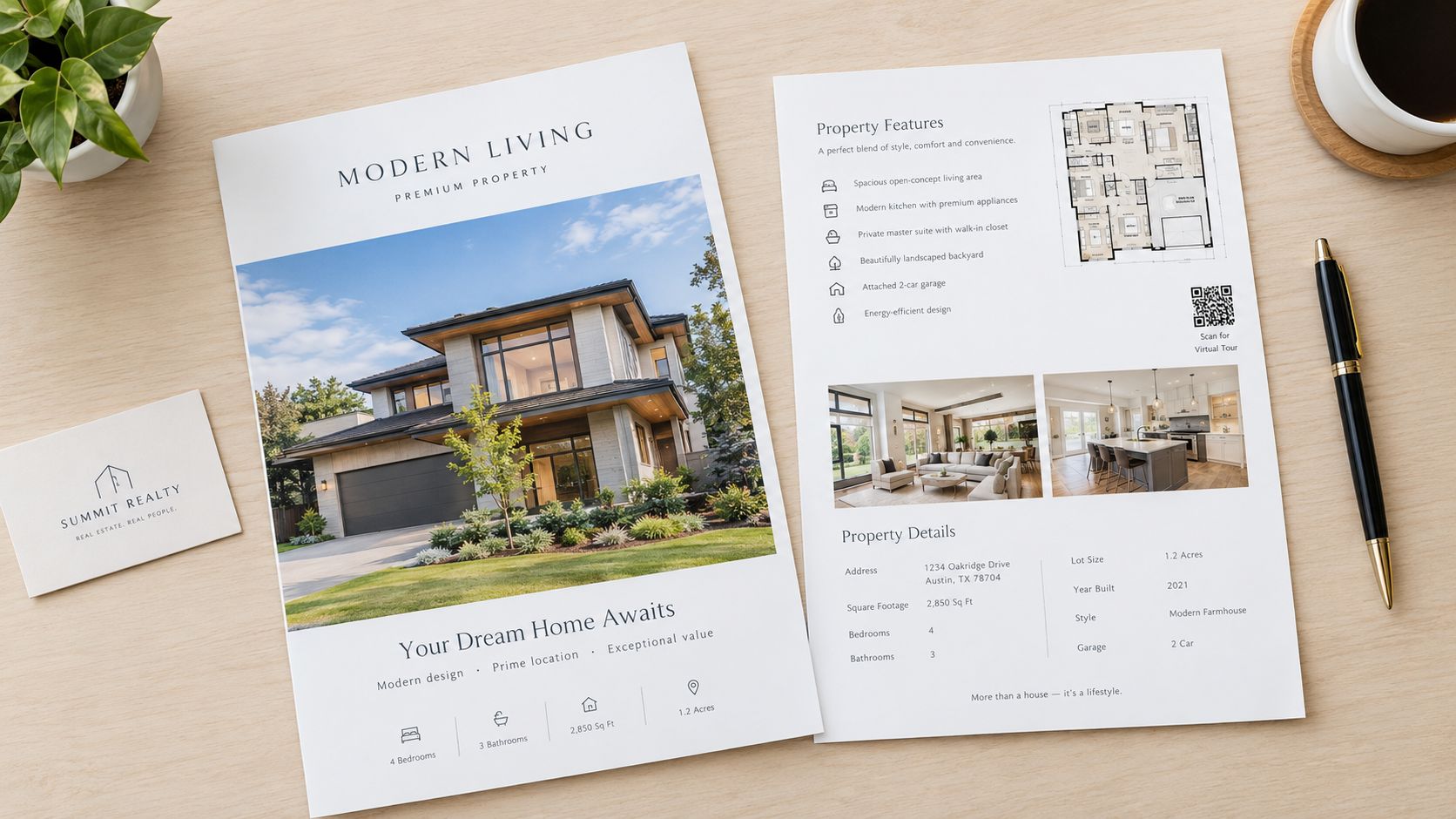
Add descriptive alt text to images and structured property information where appropriate. Search visibility depends on clear page content, but conversion depends on clarity. A visitor should understand the property, see the strongest proof, and know how to ask a question without scrolling through unrelated agent content.
A landing page can also host a downloadable brochure and neighborhood guide. Keep the page current, archive it when the listing status changes, and record which destination produced each inquiry. For a broader example of a service landing-page structure, see these monthly yard maintenance plans.
This format is particularly effective for a luxury listing, new development, rental campaign, or vacation property. A development microsite might open with a cinematic video, then offer floor plans and a pre-registration form. A vacation rental page can combine a walkthrough, amenities, availability, and a direct booking path.
Design for the next decision
Place the video above the fold with an inquiry or booking button nearby. Use a poster image and a compressed video file so mobile visitors aren't forced to wait for a heavy page. Give every campaign a unique URL, including links used in postcards, email, paid advertising, and social posts.Add descriptive alt text to images and structured property information where appropriate. Search visibility depends on clear page content, but conversion depends on clarity. A visitor should understand the property, see the strongest proof, and know how to ask a question without scrolling through unrelated agent content.
A landing page can also host a downloadable brochure and neighborhood guide. Keep the page current, archive it when the listing status changes, and record which destination produced each inquiry. For a broader example of a service landing-page structure, see these monthly yard maintenance plans.
10. Neighborhood Guide and Market Report
A property doesn't exist in isolation. A neighborhood guide gives buyers and renters the context they need to judge commute routes, amenities, local character, schools, dining, transit, and nearby recreation. It can take the form of a PDF, blog post, short video, interactive map, or a section of the property landing page.
A local agent might create a walking video that begins at the property, visits nearby landmarks, and pairs the footage with dated market information. A vacation rental host can create a digital guidebook covering restaurants, beaches, activities, and practical arrival details. Both formats help audiences understand what life around the property could look like.
Use the same visual library as the listing. Exterior photos can become map markers, a short neighborhood reel, brochure sidebars, or landing-page sections. The guide should support the property's story without making unsupported claims about residents, safety, schools, or lifestyle groups. Neutral, verifiable descriptions are safer and more useful.
Link the guide from relevant listing pages and create versions for each farm area or property cluster. Over time, the guide becomes a reusable resource that supports new listings while remaining valuable on its own.
A local agent might create a walking video that begins at the property, visits nearby landmarks, and pairs the footage with dated market information. A vacation rental host can create a digital guidebook covering restaurants, beaches, activities, and practical arrival details. Both formats help audiences understand what life around the property could look like.
Make local content specific and current
Name relevant streets, landmarks, transit stops, and destinations rather than using broad lifestyle language. Cite the source and date for every statistic, and update the report when the underlying information changes. A neighborhood guide that still lists a closed business or outdated transit detail damages the credibility it was meant to build.Use the same visual library as the listing. Exterior photos can become map markers, a short neighborhood reel, brochure sidebars, or landing-page sections. The guide should support the property's story without making unsupported claims about residents, safety, schools, or lifestyle groups. Neutral, verifiable descriptions are safer and more useful.
Link the guide from relevant listing pages and create versions for each farm area or property cluster. Over time, the guide becomes a reusable resource that supports new listings while remaining valuable on its own.
10-Item Comparison of Real Estate Marketing Materials
| Asset | Implementation Complexity 🔄 | Resource Requirements ⚡ | Expected Outcomes 📊⭐ | Ideal Use Cases 💡 | Key Advantages ⭐ |
|---|---|---|---|---|---|
| Property Video Tour (Listing Video) | Moderate, photo editing, sequencing, captions 🔄 | Low–Medium, photos, editor, music/VO ⚡ | Higher views and better sense of flow; good engagement 📊 | Residential listings, MLS, social reuse 💡 | Cinematic storytelling; repurposable across channels ⭐ |
| Interactive 3D Virtual Tour | High, 3D capture, stitching, hosting 🔄 | High, 3D camera/service, hosting, time ⚡ | Strong remote exploration; reduces unqualified showings 📊⭐ | Relocation buyers, commercial, hospitality 💡 | Interactive navigation, measurements, durable asset ⭐ |
| Aerial Drone Photography and Video | Medium–High, flight planning, legal compliance 🔄 | Medium–High, licensed pilot/equipment or AI effects ⚡ | High-impact location/context visuals; strong hero shots 📊 | Land, estates, resorts, multi-family listings 💡 | Shows lot, surroundings and access; strong differentiator ⭐ |
| Floor Plans (2D and 3D) | Low–Medium, measurements or scan processing 🔄 | Low–Medium, measurement tools or scan service ⚡ | Clear layout and dimension understanding; reduces uncertainty 📊⭐ | Serious buyers, investors, listings needing exact sizing 💡 | Conveys scale/flow; expected by portals and buyers ⭐ |
| Virtual Staging | Low, photo editing or AI staging 🔄 | Low, software/subscription or service ⚡ | Improved visualization; higher click/interest rates 📊 | Vacant homes, unfurnished rentals, dated interiors 💡 | Cost-effective alternative to physical staging; fast turnarounds ⭐ |
| Social Media Reels & Short Vertical Videos | Low–Medium, short edits, hooks, captions 🔄 | Low, vertical edits from master content, trending audio ⚡ | Broad discovery and audience growth; variable reach 📊 | Audience building, quick listings, personal branding 💡 | High shareability and discoverability; strong CTA potential ⭐⚡ |
| Just Listed / Just Sold Postcards & Mailers | Low, design and mailing setup 🔄 | Medium, printing, postage, mailing lists ⚡ | Local brand awareness; measurable with QR/URLs 📊 | Neighborhood farming, local lead generation 💡 | Tangible touchpoint; pairs well with digital assets ⭐ |
| Property Brochure & Feature Sheet | Low, design and content compilation 🔄 | Low–Medium, print or PDF production ⚡ | Consolidates facts for visitors; useful offline reference 📊 | Open houses, investor packets, leasing presentations 💡 | Detailed summary of features; portable leave-behind ⭐ |
| Single-Property Landing Page / Microsite | Medium–High, web setup, embedding media 🔄 | Medium, hosting, forms, analytics, updates ⚡ | Centralized leads and analytics; better ad conversion 📊⭐ | New developments, luxury listings, rental campaigns 💡 | Single destination for all media + lead capture; trackable ⭐ |
| Neighborhood Guide & Market Report | Medium, research, data sourcing, content creation 🔄 | Low–Medium, data services, time to produce ⚡ | Builds local authority; aids location-based decisions 📊 | Buyers evaluating neighborhood, investors, short-term rental guests 💡 | Demonstrates expertise; reusable and refreshable content ⭐ |
Build a Repeatable Asset Stack for Every Listing
The efficient workflow starts before anyone designs a postcard. Capture a complete, well-organized photo set that includes the exterior, best rooms, secondary spaces, details, views, outdoor areas, and any feature that affects the buyer's decision. Name and store the files consistently, then keep the verified property facts, floor plan, disclosures, logo, colors, and contact details in the same project folder.
Use that source library to produce the core assets first. The listing video creates a guided introduction. The 3D tour or floor plan supports independent evaluation. Aerial media adds context when the surroundings influence value. Virtual staging visualizes possible use, while the original photographs preserve accuracy.
From there, derive channel-specific versions rather than starting over:
Video and immersive media deserve measurement, not just praise. Zillow's consumer housing research found that 51% of prospective renters liked live video walkthroughs, another 51% liked 3D home tours, and 47% liked prerecorded video tours. Its 2025 agent report also found that 71% of consumers were more likely to hire an agent who provided virtual tours and/or interactive floor plans. Those findings support a layered asset strategy, but they don't mean every listing needs every format at the same production level. Match the investment to the property, audience, distance, and sales process. The Zillow housing research provides useful context for that decision.
Compliance belongs in the production workflow, not at the end. Review captions, audio alternatives, text contrast, pacing, neutral descriptions, accommodation information, and audience-targeting settings. HUD guidance emphasizes clear, consistent information, understandable language, and signals that applicants with disabilities are welcome and may request reasonable accommodations. The HUD fair-housing guidance is a practical reference for that review.
Pick one listing this month and map each asset to one buyer-journey stage. Add a unique tracking URL or QR code to every printed and social asset, then review which channel produced the most qualified inquiries before expanding the stack. VideoTour.ai can fit into the production layer by converting listing photos into branded property tours and social-ready videos, while your team retains control over the sequence, format, message, and approval process.
VideoTour.ai turns a set of real estate photographs into ready-to-share video tours with motion, captions, music, and branding, and it can produce formats for listing pages and social channels. Use it to build the core tour and derive channel-specific edits from the same photo set, then visit VideoTour.ai to create your first property video.
Use that source library to produce the core assets first. The listing video creates a guided introduction. The 3D tour or floor plan supports independent evaluation. Aerial media adds context when the surroundings influence value. Virtual staging visualizes possible use, while the original photographs preserve accuracy.
From there, derive channel-specific versions rather than starting over:
- Social reels: Recut the strongest visual idea for vertical viewing, add captions, and use a focused call to action.
- Postcards: Use one hero image and a QR code that leads to a unique campaign page.
- Brochures: Combine the photo, verified facts, floor plan, and tour links into a physical takeaway.
- Landing pages: Consolidate every asset into one mobile-friendly destination with a clear inquiry path.
- Neighborhood guides: Extend the property story to the surrounding area with dated, sourced information.
Video and immersive media deserve measurement, not just praise. Zillow's consumer housing research found that 51% of prospective renters liked live video walkthroughs, another 51% liked 3D home tours, and 47% liked prerecorded video tours. Its 2025 agent report also found that 71% of consumers were more likely to hire an agent who provided virtual tours and/or interactive floor plans. Those findings support a layered asset strategy, but they don't mean every listing needs every format at the same production level. Match the investment to the property, audience, distance, and sales process. The Zillow housing research provides useful context for that decision.
Compliance belongs in the production workflow, not at the end. Review captions, audio alternatives, text contrast, pacing, neutral descriptions, accommodation information, and audience-targeting settings. HUD guidance emphasizes clear, consistent information, understandable language, and signals that applicants with disabilities are welcome and may request reasonable accommodations. The HUD fair-housing guidance is a practical reference for that review.
Pick one listing this month and map each asset to one buyer-journey stage. Add a unique tracking URL or QR code to every printed and social asset, then review which channel produced the most qualified inquiries before expanding the stack. VideoTour.ai can fit into the production layer by converting listing photos into branded property tours and social-ready videos, while your team retains control over the sequence, format, message, and approval process.
VideoTour.ai turns a set of real estate photographs into ready-to-share video tours with motion, captions, music, and branding, and it can produce formats for listing pages and social channels. Use it to build the core tour and derive channel-specific edits from the same photo set, then visit VideoTour.ai to create your first property video.